
Radio in standby but not the processor ?
-
Hello,
I have a sensor node that do measurement every minute, but send the measure only every hour.
To save power, I would like to keep the radio in standby mode while the processor is doing measurement, and wake up the radio only when I decide to send a message to the gateway.
It seems the only function that allow to put the radio in standby is the sleep function that put the processor in sleep too.
Does someone know another way that allow to put the radio in standby without putting the processor in sleep mode ?
Best regards
Dom
-
Hello,
I have a sensor node that do measurement every minute, but send the measure only every hour.
To save power, I would like to keep the radio in standby mode while the processor is doing measurement, and wake up the radio only when I decide to send a message to the gateway.
It seems the only function that allow to put the radio in standby is the sleep function that put the processor in sleep too.
Does someone know another way that allow to put the radio in standby without putting the processor in sleep mode ?
Best regards
Dom
-
Hello,
Thank you for your answer.
My radio is a rfm69HW.
Sorry, I made a mystake, i want the radio to stay in sleep mode (not in standby mode) while the processor is doing something else.
The only solution to put the radio in sleep mode seems to call the mysensors sleep function that put the processor in sleep mode too.
In my understanding, when the node wake up after a sleep, the radio is woken up too and use power.
I would like to save this power because I don't need the radio communication when the processor do measurements and other calculations.
What do you mean by sleeping the whole node when performing measurement ?
Dom
-
Hello,
Thank you for your answer.
My radio is a rfm69HW.
Sorry, I made a mystake, i want the radio to stay in sleep mode (not in standby mode) while the processor is doing something else.
The only solution to put the radio in sleep mode seems to call the mysensors sleep function that put the processor in sleep mode too.
In my understanding, when the node wake up after a sleep, the radio is woken up too and use power.
I would like to save this power because I don't need the radio communication when the processor do measurements and other calculations.
What do you mean by sleeping the whole node when performing measurement ?
Dom
-
Ok, i understand better what you have in mind.
Your solution save a little the battery, but the radio is ON during all the measurement operation, except during the stabilization of the sensor.
Imagine you don't want to send the moisture level and the battery voltage every time you do the measures, but only an average of the 10 last measures.
In that case, you radio is woken up 9 times for nothing. I would like to save the power used by these 9 times...
-
Ok, i understand better what you have in mind.
Your solution save a little the battery, but the radio is ON during all the measurement operation, except during the stabilization of the sensor.
Imagine you don't want to send the moisture level and the battery voltage every time you do the measures, but only an average of the 10 last measures.
In that case, you radio is woken up 9 times for nothing. I would like to save the power used by these 9 times...
@dom I understand the theoretical problem, but is here a problem in practice? My nodes have been running for 3 years now, and the battery level on 2xAA is above 2.8V. Battery self-discharge is a larger factor than radio power consumption.
But I guess it depends on what you are calculating. If you are doing many millions of calculations for each measurement, turning off the radio might have a slight impact on battery life.
-
I understand your opinion, in your case, your are absolutly right.
My case is a bit different. My sensor is a load cell used to detect letters in my letter box. The weight is drifting with temperature, power voltage, etc...
If betwen two successive measures, the weight didn't change of more than a threshold, I know that the weight is the same and I can compensate.
Then the more often I can do measures, the smallest theshold I can have.
The less the node use power, the more often I can do measure, and the best precision I have.Another future use I have in mind is a solar powered node with a super capacitor used as a battery. In that case, it is very important to save the best energy possible to reduce the size of the solar panel and the capacitor.
I looked in the source code, I don't think it is possible to put the radio in sleep mode without the processor at the same time.
I see 2 means to implement that feature :
- write my own function that send the SPI frames that put the radio in sleep mode
- modify the library.
The second solution is more elegant, but it will complicate a lot the adoption of the next version of the library.
-
I understand your opinion, in your case, your are absolutly right.
My case is a bit different. My sensor is a load cell used to detect letters in my letter box. The weight is drifting with temperature, power voltage, etc...
If betwen two successive measures, the weight didn't change of more than a threshold, I know that the weight is the same and I can compensate.
Then the more often I can do measures, the smallest theshold I can have.
The less the node use power, the more often I can do measure, and the best precision I have.Another future use I have in mind is a solar powered node with a super capacitor used as a battery. In that case, it is very important to save the best energy possible to reduce the size of the solar panel and the capacitor.
I looked in the source code, I don't think it is possible to put the radio in sleep mode without the processor at the same time.
I see 2 means to implement that feature :
- write my own function that send the SPI frames that put the radio in sleep mode
- modify the library.
The second solution is more elegant, but it will complicate a lot the adoption of the next version of the library.
@dom thanks for explaining.
I am not familiar with the internals of the transport, but you might be able to use the transportPowerDown function right after waking up. (perhaps transportDisable() is even better). You'd might need to call transportReInitialise() when you want to send data again.
It would be even better if you could block the wakeup of the radio, probably by adding a condition around transportReInitialise() in MySensorsCore.cpp - maybe by adding a new define? It could be called something like MY_WAKEUP_WITHOUT_RADIO.
-
Hello,
Thank you very much for your explanation.
The solution is to call the functions :
- transportDisable() to put the radio in sleep mode
- transportReInitialise() to wake up the radio
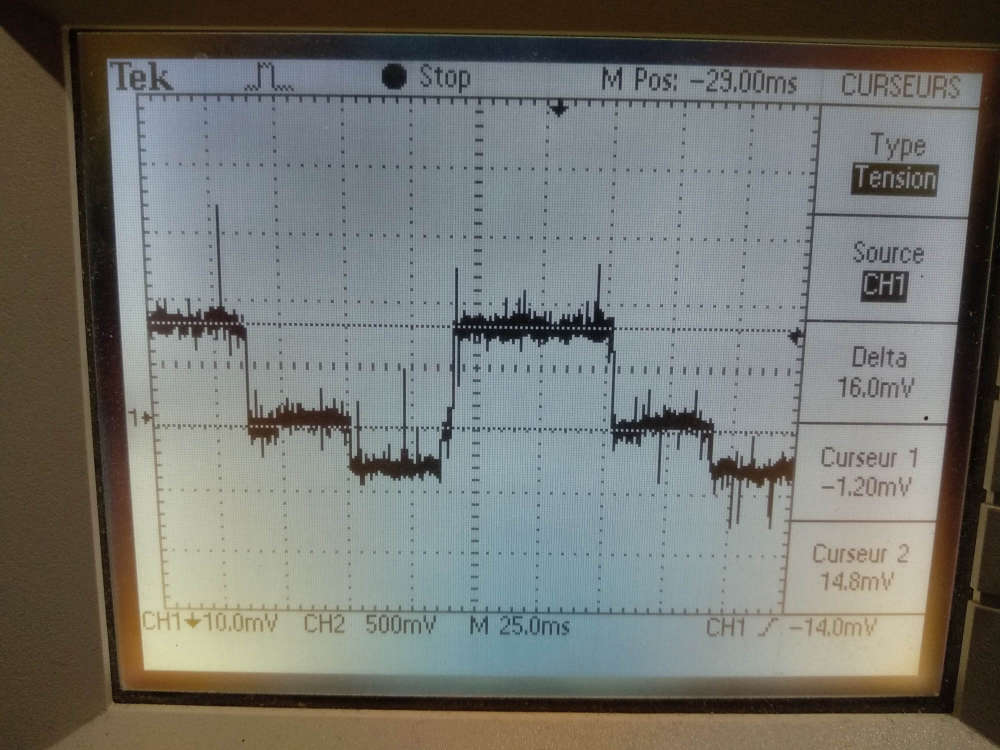
I made the following test :
void loop() {
  delay(90);
  transportDisable();
  delay(60);
  transportReInitialise();
  sleep(30);
}
and verified the power consumption with an oscilloscope. I save 16mA, that is coherent with the rfm69 datasheet.

Hello! It looks like you're interested in this conversation, but you don't have an account yet.
Getting fed up of having to scroll through the same posts each visit? When you register for an account, you'll always come back to exactly where you were before, and choose to be notified of new replies (either via email, or push notification). You'll also be able to save bookmarks and upvote posts to show your appreciation to other community members.
With your input, this post could be even better 💗
Register Login