
openHAB and NRF24 without gateway attachments
-
Hello!
Im new to all of this stuff but i already like what smart house opportunities can give to everyone. ;)
And heres my story begins: As ESP8266 is power-hungry i went for NRF24. I successfully added NRF24 to my rasp and done everything to have communication with my NRF24 node following this guide , and node code this guide.So my question:
How can i forward or post NRF24 nodes sensor status to MQTT server? As in used guide - door status.
As i already read there are ways with Ethernet Shield W5100 but is it possible to forward info without gateway?My setup:
- Raspberry pi 3 with Openhab & MQTT server & NRF24L01 & MySensors branch
- NRF24L01 node (Arduino Nano)
- couple senors connected to ESP8266 sending info to MQTT server
-
Hello!
Im new to all of this stuff but i already like what smart house opportunities can give to everyone. ;)
And heres my story begins: As ESP8266 is power-hungry i went for NRF24. I successfully added NRF24 to my rasp and done everything to have communication with my NRF24 node following this guide , and node code this guide.So my question:
How can i forward or post NRF24 nodes sensor status to MQTT server? As in used guide - door status.
As i already read there are ways with Ethernet Shield W5100 but is it possible to forward info without gateway?My setup:
- Raspberry pi 3 with Openhab & MQTT server & NRF24L01 & MySensors branch
- NRF24L01 node (Arduino Nano)
- couple senors connected to ESP8266 sending info to MQTT server
Hi @mārtiņš-prūsis, welcome to the MySensors forum. Great to have youhere :)
From what you are describing, it sounds like you already have both a raspberry pi gateway and esp8266 gateways using MQTT. The nodes send data to a gateway, which forward the messages through MQTT. Could you describe the difference between the mqtt you have and the mqtt you want?
-
Correct, i have MQTT communication between rapsberry and esp8266 nodes without problems, but recently i added NRF24 module to raspberry and created NRF24 arduino node. There is communication between raspberry and NRF24 arduino node through air (see picture). Last five rows messaging door state sg=0:"1;0" (0=open, 1=closed), so i want to have this door state forwarded to MQTT server. Maybe later on info from PIR or temperature sensors.
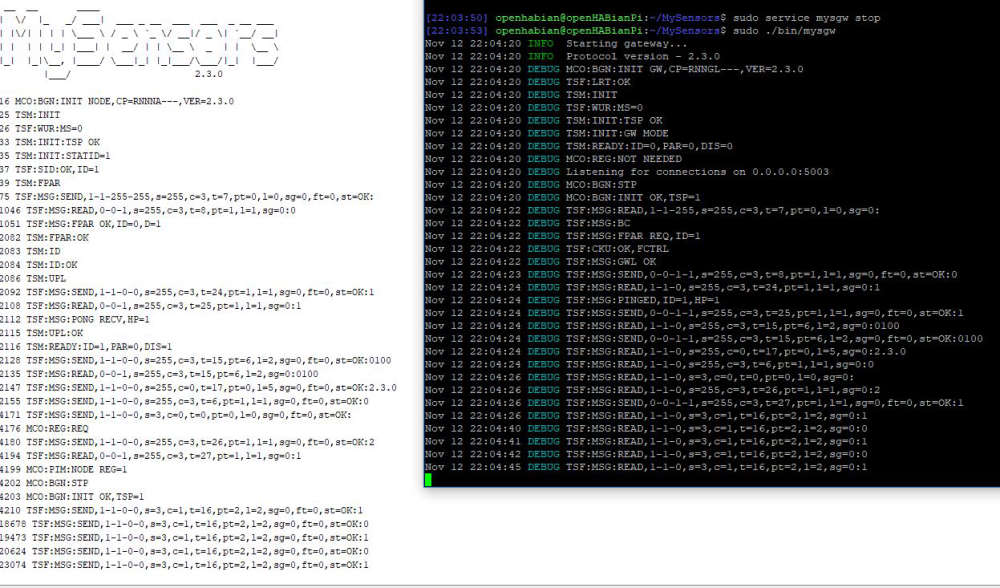
How can i forward this received state to MQTT? -
Correct, i have MQTT communication between rapsberry and esp8266 nodes without problems, but recently i added NRF24 module to raspberry and created NRF24 arduino node. There is communication between raspberry and NRF24 arduino node through air (see picture). Last five rows messaging door state sg=0:"1;0" (0=open, 1=closed), so i want to have this door state forwarded to MQTT server. Maybe later on info from PIR or temperature sensors.
How can i forward this received state to MQTT?@mārtiņš-prūsis thanks for clarifying. Just follow the instructions in the MQTT section on https://www.mysensors.org/build/raspberry
-
I done all steps only i skipped gateway type. I did MQTT gateway type and made a new gateway and vola, its working.
Thank you!

Hello! It looks like you're interested in this conversation, but you don't have an account yet.
Getting fed up of having to scroll through the same posts each visit? When you register for an account, you'll always come back to exactly where you were before, and choose to be notified of new replies (either via email, or push notification). You'll also be able to save bookmarks and upvote posts to show your appreciation to other community members.
With your input, this post could be even better 💗
Register Login