sweet, i got it. Thanks!
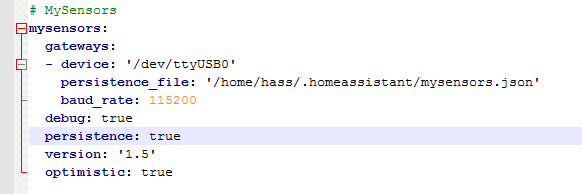
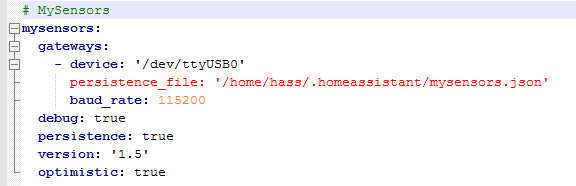
spacing in my config. yaml file. used tab instead of space which is why notepad++ had that line in red.
also had to move a few lines back under gateways: line.

 J
J
sweet, i got it. Thanks!
spacing in my config. yaml file. used tab instead of space which is why notepad++ had that line in red.
also had to move a few lines back under gateways: line.
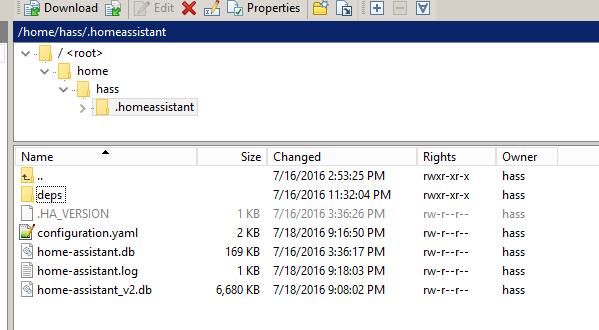
hmm. restarting HA/rebooting my pi3 doesn't generate the .json file. I'm pretty sure my config is correct now. Would you mind giving it a once over? I've already done a full re-install with updates and pretty much back to where I started.
What else could I check?
Thanks for the reply Martin.
To clarify the steps:
I need to add a persistence file in the .yaml file and ensure the path is a real path.
persistence_file: 'path/mysensors.json'. Do I need to remove those pickle files? I'm assuming they were automatically created because I did not specify a .json file in my config.
I actually tried to add persistence_file: 'path/mysensors.json' where path was = to the location of my .yaml file on my rpi3. When i restarted homeassistant, the system wouldn't come up. I tried rebooting the pi to no avail.
Do I need to create an empty mysensors.json file first?
Thanks again.
fixed 1 issue:
gw.sendSketchInfo("Motion Sensor", "1.0");
doesn't apply.
Here's the current log related to the main issue.
16-07-17 13:13:24 mysensors.mysensors: child_id 1 already exists in children, cannot add child
16-07-17 13:13:58 homeassistant.core: Home Assistant requested a restart.
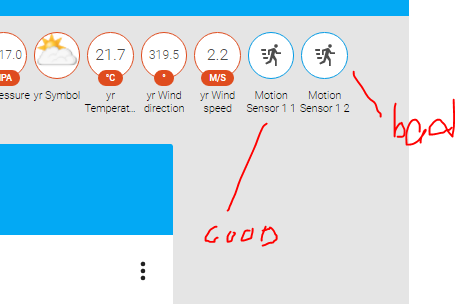
Anyone know how to remove duplicated sensors? I created a motion sensor with a CHILD_ID 1, then changed it to 2 during trouble-shooting and can't remove the original one now.
My configuration.yaml file:
mysensors:
gateways:
- device: '/dev/ttyUSB0'
baud_rate: 115200
debug: true
persistence: true
version: '1.5'
optimistic: false
I tried clearing the 'mysensors1.pickle' file thinking that's where the sensor was being stored but it didn't work. I also tried using the persistence_file: 'path/mysensors.json' in my yaml file but that just breaks my homeassistant connection - anyone have a similar experience?
My motion sensor test seems to work but still receiving an error message in the log. Not sure if this has anything to do with it.
16-07-17 12:45:07 mysensors.mysensors: Error decoding message from gateway, bad data received:
16-07-17 12:45:08 mysensors.mysensors: Error decoding message from gateway, bad data received: 0;255;3;0;9;Starting gateway (RNNGA-, 2.0.0)
--- here's my code
#include <MySensor.h>
#include <SPI.h>

// Enable and select radio type attached
#define MY_RADIO_NRF24

unsigned long SLEEP_TIME = 10000; // Sleep time between reports (in milliseconds) 120000
#define DIGITAL_INPUT_SENSOR 3   // The digital input you attached your motion sensor.  (Only 2 and 3 generates interrupt!)
#define INTERRUPT DIGITAL_INPUT_SENSOR-2 // Usually the interrupt = pin -2 (on uno/nano anyway)
#define CHILD_ID 1   // Id of the sensor child

MyMessage msg(CHILD_ID, V_TRIPPED);
// Initialize motion messagePED);
MySensor gw;

void setup()
{
  Serial.begin(115200);
  gw.begin();
  gw.sendSketchInfo("Motion Sensor", "1.0");

  pinMode(DIGITAL_INPUT_SENSOR, INPUT);      // sets the motion sensor digital pin as input
  gw.present(CHILD_ID, S_MOTION);
}

void loop()
{
  // Read digital motion value
  boolean tripped = digitalRead(DIGITAL_INPUT_SENSOR) == HIGH;

  Serial.println(tripped);
  gw.send(msg.set(tripped?"1":"0"));  // Send tripped value to gw

  // Sleep until interrupt comes in on motion sensor. Send update every two minute.
  gw.sleep(INTERRUPT,CHANGE, SLEEP_TIME);
}
Any help would be greatly appreciated.