
OTA:FWP:UPDATE SKIPPED :(
-
Hi All,
i had some spare time and thought to play with OTA, i have burned bootloader with right channel and then upload blank sketch with, i have swapped the arduino just in case.MySensors version 2.3.1
ESP8266 Gateway.
hex file size is 43KB
can any one see what i m doing wrong?Blank sketch:
// Enable debug prints to serial monitor
#define MY_DEBUG

//Set MY_SPLASH_SCREEN_DISABLED to disable MySensors splash screen. (This saves 120 bytes of flash)
#define MY_SPLASH_SCREEN_DISABLED

//Define Sketch Name
#define SKETCH_NAME "Blank Over The Air Node"
//Define Sketch Version
#define SKETCH_VERSION "0.001"

// Enable and select radio type attached
#define MY_RADIO_RF24


//Define this to use the IRQ pin of the RF24 module (optional).
#define MY_RF24_IRQ_PIN 2
#define MY_RX_MESSAGE_BUFFER_FEATURE
#define MY_RX_MESSAGE_BUFFER_SIZE 5


#define MY_RF24_PA_LEVEL RF24_PA_MIN

//Default RF channel Default is 76
#define MY_RF24_CHANNEL	91

//PiHome Zone Controller Node ID
#define MY_NODE_ID 1

//RF24_250KBPS for 250kbs, RF24_1MBPS for 1Mbps, or RF24_2MBPS for 2Mbps
#define MY_RF24_DATARATE RF24_250KBPS

//If Following LED Blink does not work then modify C:\Program Files (x86)\Arduino\libraries\MySensors_2_1_1\MyConfig.h
#define MY_DEFAULT_ERR_LED_PIN 16 //A0 previous version 8
#define MY_DEFAULT_TX_LED_PIN 14
#define MY_DEFAULT_RX_LED_PIN 15
#define MY_WITH_LEDS_BLINKING_INVERSE

#define MY_DEFAULT_LED_BLINK_PERIOD 400

#define MY_OTA_FIRMWARE_FEATURE

#include <MySensors.h>

void setup()
{

}

void presentation()
{
	//Send the sensor node sketch version information to the gateway
	sendSketchInfo(SKETCH_NAME, SKETCH_VERSION);
}

void loop()
{

}
Here is my boards.txt file just incase if i m missing something
###########################################
MYS.name=OTA nRF Ch91 8MHz RF24_PA_MIN BOD-1.8v
MYS.upload.tool=avrdude
MYS.upload.protocol=arduino
MYS.upload.maximum_size=30720
MYS.upload.speed=57600
MYS.bootloader.tool=avrdude
MYS.bootloader.low_fuses=0xFF
MYS.bootloader.high_fuses=0xDA

# all the possible values:
#MYS.extended_fuses=0x04 -> BOD at 4.3V
#MYS.extended_fuses=0x05 -> BOD at 2.7V
#MYS.extended_fuses=0x06 -> BOD at 1.8V
#MYS.extended_fuses=0x07 -> BOD disabled

MYS.bootloader.extended_fuses=0x06
MYS.bootloader.path=MYSBootloader
MYS.bootloader.file=MYSBootloader.ch91.8000000L.RF24_PA_MIN.hex
MYS.bootloader.unlock_bits=0x3F
MYS.bootloader.lock_bits=0x0F
MYS.build.mcu=atmega328p
MYS.build.f_cpu=8000000L
MYS.build.core=arduino
MYS.build.variant=standard
serial console logs for node.
⸮Q)6 TSF:WUR:MS=0
12 TSM:INIT⸮2064 !TSM:FPAR:NO REPLY
2066 TSM:FPAR
2103 TSF:MSG:SEND,1-1-255-255,s=255,c=3,t=7,pt=0,l=0,sg=0,ft=0,st=OK:
K,ID=0,D=1
4110`⸮⸮⸮255,c=3,t=24,pt=1,l=1,sg=0,ft=0,st=OK:1
TSF:MSG:READ,0-0-1,s=255,c=3,t=25,pt=1,l=1,sg=0:1
4225 TSF:MSG:PONG RECV,HP=1
4229 TSM:UPL:⸮⸮⸮⸮⸮b⸮⸮⸮0,ft=0,st=OK:FFFFFFFFB803CFD40300
4247 TSF:MSG:S4442 TSF:MSG:READ,0-0-1,s=255,c=3,t=15,pt=6,l=2,sg=0:0100
4460 TSF:MSG:SEND,1-1-0-0,s=255,c=3,t=6,pt=1,l=1,sg=0,ft=0,st=OK:0
4706 TSF:MSG:READ,0-0-1,s=2⸮<sg=0,ft=0,st=OK:Blank Over The Air Node
4726 TSF:MSG:SE⸮SEND,1-1-0-0,s=255,c=3,t=26,pt=1,l=1,sg=0,ft=0,st=OK:2
5001 TSF:MSG:READ,0-0-1,s=255,c=3,t=27,pt=1,l=1,sg=0:1
5007 MCO:PIM:NODE⸮60993 TSF:MS⸮609826 TSF:MSG:READ,0-0-255,s=255,c=3,t=20,p⸮702⸮702980 TSF:MSG:SEND,1-1-0-0,s=255,c=4⸮SG:SEND,1-1-0-0,s=255,c=3,t=15,pt=6,l=2,sg=0,ft=0,st=OK:0100
703197 TSF:MSG:SEND,1-1-0-0,s=255,c=0,t=17,pt=0,l=5,sg=0,ft=0,st=OK:2.3.1
⸮P&⸮703457 OTA:FWP:UPDATE SKIPPED
703578 TSF:MSG:READ,0-0-1,s=255,c=3,t=6,pt=0,l=1,sg=0:M
⸮END,1-1-0-0,s=255,c=3,t=11,pt=0,l=23,sg=0,ft=0,st=OK:Blank Over The Air ⸮⸮⸮i⸮710047 OTA:FWP:UPDATE SKIPPED
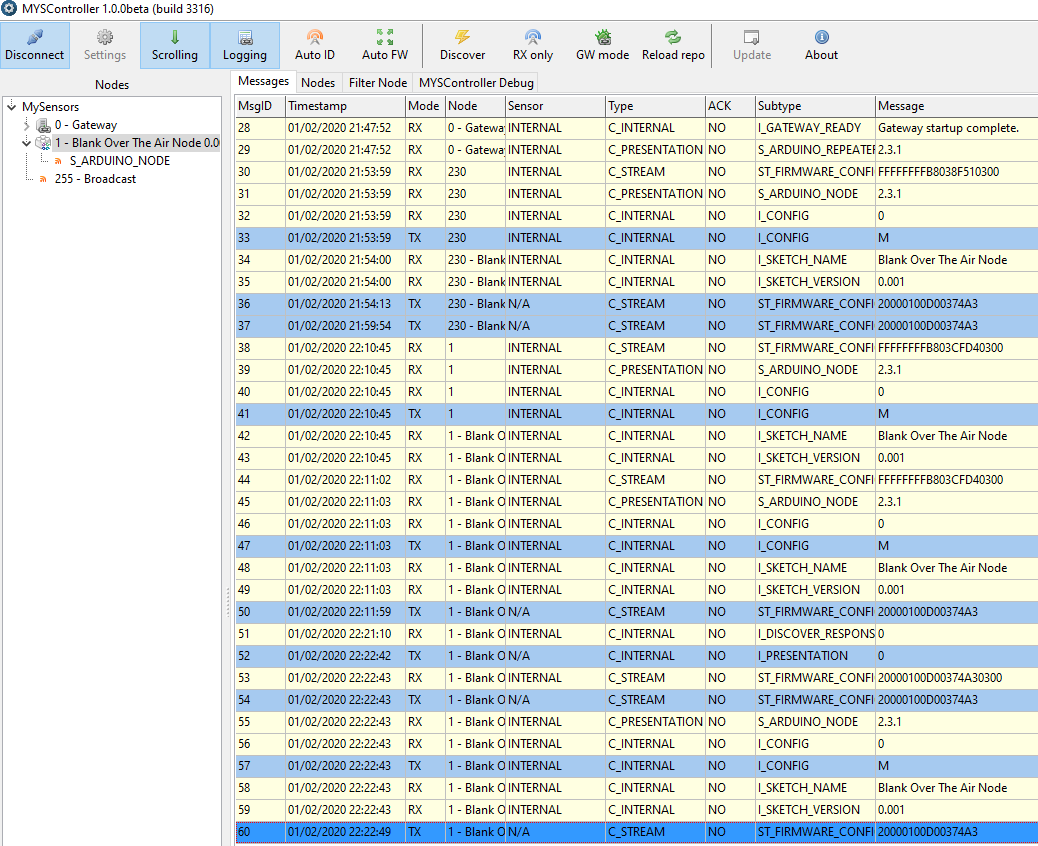
screenshot of MYSController
-
just tired with different fuse settings bootloader.low_fuses=0xE2 but no success
2088 TSM:FPAR:OK
2088 TSM:ID
2091 TSM:ID:OK
2093 TSM:UPL
2097 2193 TSF:MSG:READ,0-0-1⸮2209 TSF:MSG:SEND,1-1-0-0,s=255,c=4,t=0,pt=6,l=10,sg=0,ft.Wz-⸮0100
2410 TSF:MSG:READ,0-0-1,s=255,c=3,t=15,pt=6,l=2,sg=0:012428 TSF:MSG:SEND,1-1-0-0,s=255,c=3,t=6,pt=1,l=1,sg=0,ft=0,st=OK:0
>TSF:MSG:READ,0-0-1,s=0,c=4,t=1,pt=6,l=8,sg=0:20000100D00374A3
2674 OTA:FWP:UPDATE
26⸮2791 TSF:MSG:READ,0-0-1,s=255,c=3,t=6,pt=0,⸮⸮⸮Blank Over The Air Node
2811 TSF:MSG:SEND,1-1-0-0,s=255⸮MMi⸮3,t=26,pt=1,l=1,sg=0,ft=0,st=OK:2
3088 MCO:BGN:STP
3090 MCO:BGN:INIT OK,TSP=1
24172 TSF:MSG:READ,0-0-1,s=0,c=4,t=1,pt=6,l=8,sg=0:20000100D00374A3
24178 OTA:FWP:UPDATE

Hello! It looks like you're interested in this conversation, but you don't have an account yet.
Getting fed up of having to scroll through the same posts each visit? When you register for an account, you'll always come back to exactly where you were before, and choose to be notified of new replies (either via email, or push notification). You'll also be able to save bookmarks and upvote posts to show your appreciation to other community members.
With your input, this post could be even better 💗
Register Login