
Gate controller with Battery Checker
-
hi all
below is my code for a gate controller with attached voltage sensor for measuring the battery supply...
it has a relay and a battery checker and that is allim a little confused to how to change the setup so that the batM loop only runs once every 15 mintues without putitng the sensor to sleep,
i figure i cant put the sensor to sleep as it needs to wait to receive messages from the gateway??
anyone able to advise and let me know if my butchered code can be saved?/** The MySensors Arduino library handles the wireless radio link and protocol between your home built sensors/actuators and HA controller of choice. The sensors forms a self healing radio network with optional repeaters. Each repeater and gateway builds a routing tables in EEPROM which keeps track of the network topology allowing messages to be routed to nodes. Created by Henrik Ekblad <henrik.ekblad@mysensors.org> Copyright (C) 2013-2015 Sensnology AB Full contributor list: https://github.com/mysensors/Arduino/graphs/contributors Documentation: http://www.mysensors.org Support Forum: http://forum.mysensors.org This program is free software; you can redistribute it and/or modify it under the terms of the GNU General Public License version 2 as published by the Free Software Foundation. ******************************* REVISION HISTORY Version 1.0 - Henrik Ekblad Version 1.1 - HenryWhite DESCRIPTION Example sketch showing how to control physical relays. This example will remember relay state after power failure. Optional attachment of motion sensor to control the relays is possible. Notes: -- The Child-IDs of the attached relays range from 1 up to (1-(NUMBER_OF_RELAYS)) -- Make sure to adjust the potentiometer for triggertime on your motion sensor as leftmost as possible, because the countdown will not start until the motion sensor reports back a "0" (no movement) */ //----------------------- Library Configuration --------------------- #define MY_DEBUG // uncomment to enable debug prints to serial monitor #define MY_REPEATER_FEATURE // uncomment to enable repeater functionality for this node // Enable and uncomment attached radio type #define MY_RADIO_RF24 //#define MY_RADIO_RFM69 //#define MY_TRANSPORT_WAIT_READY_MS 1 // uncomment this to enter the loop() and setup()-function even when the node cannot be registered to gw #define NUMBER_OF_RELAYS 1 // Total number of attached relays. Must be equal to total number of elements in array below! const int RELAYS[] = {2}; // digital pins of attached relays const long ON_TIMES[] = {0}; // Specify for each element in MOTION_ACTIVATED_RELAYS, how long the specified relay should be active in seconds. #define RELAY_ON 0 // GPIO value to write to turn on attached relay #define RELAY_OFF 1 // GPIO value to write to turn off attached relay bool ack = 1; // set this to 1 if you want destination node to send ack back to this node #define CHILD_ID_RELAY 1 #define CHILD_ID_VOLTAGE 2 #include <MySensors.h> #include "Wire.h" MyMessage relay_msg; MyMessage power(CHILD_ID_VOLTAGE,V_VOLTAGE); void setup() { } void presentation() { // Send the sketch version information to the gateway and Controller sendSketchInfo("Gate button", "1.0"); present(CHILD_ID_RELAY, S_BINARY); present(CHILD_ID_VOLTAGE, S_MULTIMETER); } void loop() { batM(); } void receive(const MyMessage &message) { // Handle incoming relay commands if (message.type == V_STATUS) { // Change relay state if (RELAYS[message.sensor - 1]) { digitalWrite(RELAYS[message.sensor - 1], message.getBool() ? RELAY_ON : RELAY_OFF); // Store state in eeprom saveState(message.sensor - 1, message.getBool()); // Write some debug info Serial.print("Incoming change for sensor:"); Serial.print(message.sensor); Serial.print(", New status: "); Serial.println(message.getBool()); } } } void relay_msg_constructor(int sensor, uint8_t type) { relay_msg.setSensor(sensor); relay_msg.setType(type); } void batM() { int Pin; // 0-1023 I/P double Vin; Pin = analogRead(A0); // Probe Input Vin = Pin * (5.0*11 / 1023); // Pin to Vin (Reduction Factor 11) Serial.print(Vin); Serial.println(" VOLT DC ");\ send(power); } -
hi all
below is my code for a gate controller with attached voltage sensor for measuring the battery supply...
it has a relay and a battery checker and that is allim a little confused to how to change the setup so that the batM loop only runs once every 15 mintues without putitng the sensor to sleep,
i figure i cant put the sensor to sleep as it needs to wait to receive messages from the gateway??
anyone able to advise and let me know if my butchered code can be saved?/** The MySensors Arduino library handles the wireless radio link and protocol between your home built sensors/actuators and HA controller of choice. The sensors forms a self healing radio network with optional repeaters. Each repeater and gateway builds a routing tables in EEPROM which keeps track of the network topology allowing messages to be routed to nodes. Created by Henrik Ekblad <henrik.ekblad@mysensors.org> Copyright (C) 2013-2015 Sensnology AB Full contributor list: https://github.com/mysensors/Arduino/graphs/contributors Documentation: http://www.mysensors.org Support Forum: http://forum.mysensors.org This program is free software; you can redistribute it and/or modify it under the terms of the GNU General Public License version 2 as published by the Free Software Foundation. ******************************* REVISION HISTORY Version 1.0 - Henrik Ekblad Version 1.1 - HenryWhite DESCRIPTION Example sketch showing how to control physical relays. This example will remember relay state after power failure. Optional attachment of motion sensor to control the relays is possible. Notes: -- The Child-IDs of the attached relays range from 1 up to (1-(NUMBER_OF_RELAYS)) -- Make sure to adjust the potentiometer for triggertime on your motion sensor as leftmost as possible, because the countdown will not start until the motion sensor reports back a "0" (no movement) */ //----------------------- Library Configuration --------------------- #define MY_DEBUG // uncomment to enable debug prints to serial monitor #define MY_REPEATER_FEATURE // uncomment to enable repeater functionality for this node // Enable and uncomment attached radio type #define MY_RADIO_RF24 //#define MY_RADIO_RFM69 //#define MY_TRANSPORT_WAIT_READY_MS 1 // uncomment this to enter the loop() and setup()-function even when the node cannot be registered to gw #define NUMBER_OF_RELAYS 1 // Total number of attached relays. Must be equal to total number of elements in array below! const int RELAYS[] = {2}; // digital pins of attached relays const long ON_TIMES[] = {0}; // Specify for each element in MOTION_ACTIVATED_RELAYS, how long the specified relay should be active in seconds. #define RELAY_ON 0 // GPIO value to write to turn on attached relay #define RELAY_OFF 1 // GPIO value to write to turn off attached relay bool ack = 1; // set this to 1 if you want destination node to send ack back to this node #define CHILD_ID_RELAY 1 #define CHILD_ID_VOLTAGE 2 #include <MySensors.h> #include "Wire.h" MyMessage relay_msg; MyMessage power(CHILD_ID_VOLTAGE,V_VOLTAGE); void setup() { } void presentation() { // Send the sketch version information to the gateway and Controller sendSketchInfo("Gate button", "1.0"); present(CHILD_ID_RELAY, S_BINARY); present(CHILD_ID_VOLTAGE, S_MULTIMETER); } void loop() { batM(); } void receive(const MyMessage &message) { // Handle incoming relay commands if (message.type == V_STATUS) { // Change relay state if (RELAYS[message.sensor - 1]) { digitalWrite(RELAYS[message.sensor - 1], message.getBool() ? RELAY_ON : RELAY_OFF); // Store state in eeprom saveState(message.sensor - 1, message.getBool()); // Write some debug info Serial.print("Incoming change for sensor:"); Serial.print(message.sensor); Serial.print(", New status: "); Serial.println(message.getBool()); } } } void relay_msg_constructor(int sensor, uint8_t type) { relay_msg.setSensor(sensor); relay_msg.setType(type); } void batM() { int Pin; // 0-1023 I/P double Vin; Pin = analogRead(A0); // Probe Input Vin = Pin * (5.0*11 / 1023); // Pin to Vin (Reduction Factor 11) Serial.print(Vin); Serial.println(" VOLT DC ");\ send(power); }@markjgabb If your main loop() stays as simple as it is not ( just calling batM() ) then you could just add a wait() (https://www.mysensors.org/download/sensor_api_20#waiting) call to the loop, like:
void loop()
{
  batM();
  wait(15*60*1000ul)  // 15 minutes, times 60 seconds, times 1000 milliseconds
}
Calling wait() will keep the MySensors stack running and won't stop receiving messages.
-
-
final bug
when i try to compile the following code
i Get this error
exit status 1
call of overloaded 'set(double&)' is ambiguous googling tells me that my msg need to be defined better for the purpose but im not sure, as i can see in my void that i have declared it as double, but for some reason it doesnt understant that when i go to send my messagevoid batM() { int Pin; // 0-1023 I/P double Vin; Pin = analogRead(A0); // Probe Input Vin = Pin * (5.0*11 / 1023); // Pin to Vin (Reduction Factor 11) Serial.print(Vin); Serial.println(" VOLT DC ");\ send(power.set(Vin)); } -
final bug
when i try to compile the following code
i Get this error
exit status 1
call of overloaded 'set(double&)' is ambiguous googling tells me that my msg need to be defined better for the purpose but im not sure, as i can see in my void that i have declared it as double, but for some reason it doesnt understant that when i go to send my messagevoid batM() { int Pin; // 0-1023 I/P double Vin; Pin = analogRead(A0); // Probe Input Vin = Pin * (5.0*11 / 1023); // Pin to Vin (Reduction Factor 11) Serial.print(Vin); Serial.println(" VOLT DC ");\ send(power.set(Vin)); } -
-
@mfalkvidd cheers
ive added that instead but still get the following
call of overloaded 'set(float&)' is ambiguous
-
now compiles beautifully...
but am getting weird voltage readings... ive just connected a double set of AA batteires and am getting a reading of 11.8-11.9
im using a 100k and a 10k resistor as per this guide.... obviously i stuffed up something in my math....
this always seems to be my way :)
source for voltage reader code
https://www.codrey.com/arduino-projects/nano-digital-volt-meter/ -
@markjgabb sorry. I forgot we need to set the number of decimals. Like this:
send(power.set(Vin, 2));I think you can change it back to double if you like.
@mfalkvidd you are correct you can do double and it works
-
-
Is anyone able to confirm if the calculations in this image are correct? I would need to multiply the result by 6 to get accurate numbers
I'm just currently stuggling with acuracy on my current design and figure bringing the max reading down would help
It's a 24v battery with solar cut off of 28.4v so it will never go over 30 anyway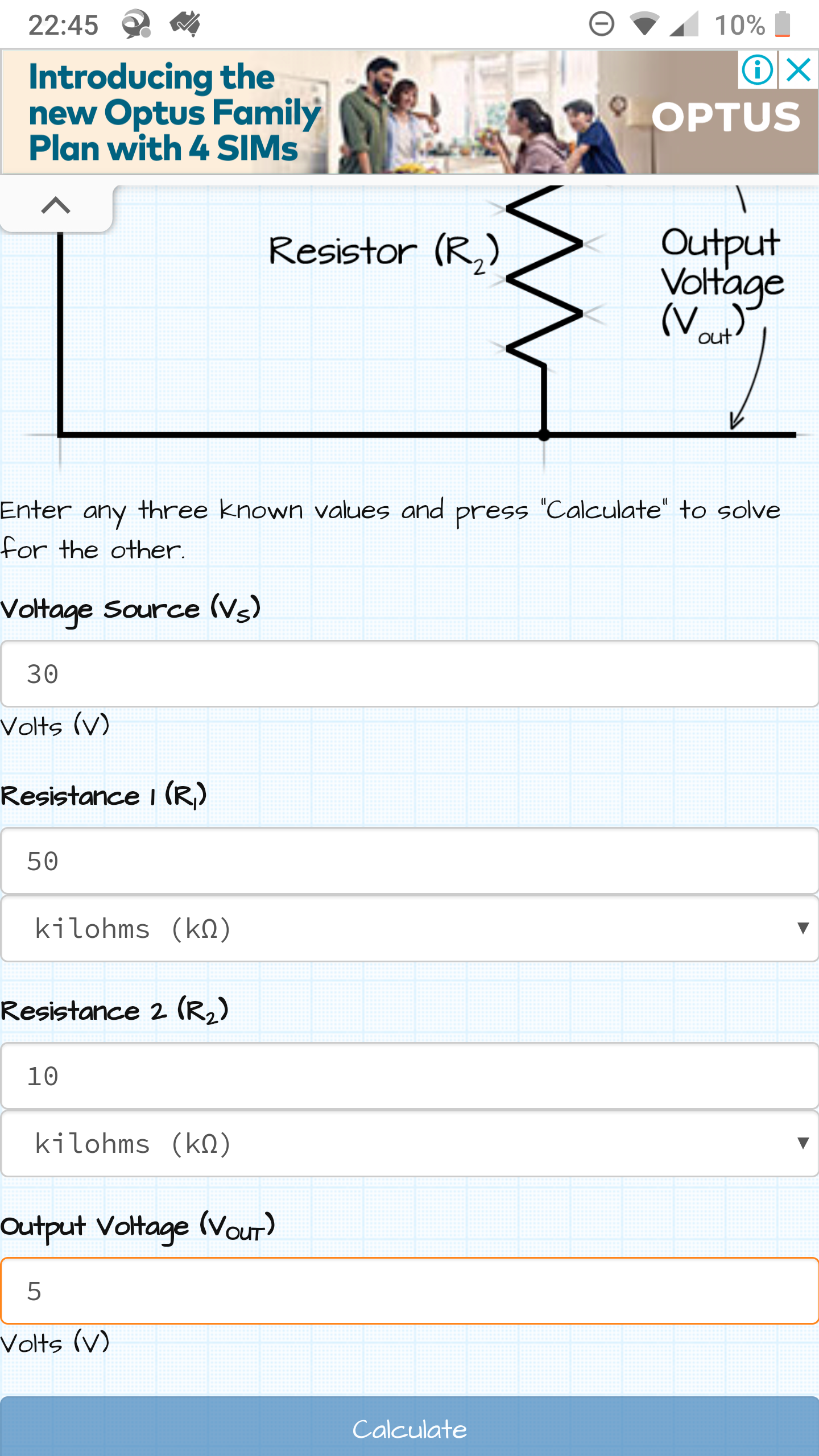
-
Is anyone able to confirm if the calculations in this image are correct? I would need to multiply the result by 6 to get accurate numbers
I'm just currently stuggling with acuracy on my current design and figure bringing the max reading down would help
It's a 24v battery with solar cut off of 28.4v so it will never go over 30 anyway@markjgabb yes it is correct.
What Arduino are you using? Most Arduinos return 1023 for max voltage, but some (Zero, Due and more) return 4095 for max voltage.
Is the Arduino 5V or 3.3V?
Are you using 100k+10k or 50k+10k resistor? (One early post says 100k, your latest post says 50k.)Edit: Zero, Due default to 1023 so they should be fine anyway. Reference: https://www.arduino.cc/reference/en/language/functions/zero-due-mkr-family/analogreadresolution/
-



Hello! It looks like you're interested in this conversation, but you don't have an account yet.
Getting fed up of having to scroll through the same posts each visit? When you register for an account, you'll always come back to exactly where you were before, and choose to be notified of new replies (either via email, or push notification). You'll also be able to save bookmarks and upvote posts to show your appreciation to other community members.
With your input, this post could be even better 💗
Register Login