
Skip to content
  • MySensors
  • OpenHardware.io
  • Categories
  • Recent
  • Tags
  • Popular
Skins
  • Light
  • Brite
  • Cerulean
  • Cosmo
  • Flatly
  • Journal
  • Litera
  • Lumen
  • Lux
  • Materia
  • Minty
  • Morph
  • Pulse
  • Sandstone
  • Simplex
  • Sketchy
  • Spacelab
  • United
  • Yeti
  • Zephyr
  • Dark
  • Cyborg
  • Darkly
  • Quartz
  • Slate
  • Solar
  • Superhero
  • Vapor

  • Default (No Skin)
  • No Skin
Collapse
Brand Logo
  1. Home
  2. Troubleshooting
  3. Gate controller with Battery Checker

Gate controller with Battery Checker

Scheduled Pinned Locked Moved Troubleshooting
13 Posts 3 Posters 125 Views 3 Watching
  • Oldest to Newest
  • Newest to Oldest
  • Most Votes
Reply
  • Reply as topic
Log in to reply
This topic has been deleted. Only users with topic management privileges can see it.
  • markjgabbM Offline
    markjgabbM Offline
    markjgabb
    wrote on last edited by
    #3

    @Yveaux said in Gate controller with Battery Checker:

    wait(15601000ul)

    champion that works much better thanks

    only one bug left now

    1 Reply Last reply
    0
    • markjgabbM Offline
      markjgabbM Offline
      markjgabb
      wrote on last edited by
      #4

      final bug

      when i try to compile the following code
      i Get this error
      exit status 1
      call of overloaded 'set(double&)' is ambiguous googling tells me that my msg need to be defined better for the purpose but im not sure, as i can see in my void that i have declared it as double, but for some reason it doesnt understant that when i go to send my message

      void batM()
      {
      int Pin; // 0-1023 I/P
      double Vin;
      Pin = analogRead(A0); // Probe Input
      Vin = Pin * (5.0*11 / 1023); // Pin to Vin (Reduction Factor 11)
      Serial.print(Vin);
      Serial.println(" VOLT DC ");\
      
      send(power.set(Vin));
      }
      
      mfalkviddM 1 Reply Last reply
      0
      • markjgabbM markjgabb

        final bug

        when i try to compile the following code
        i Get this error
        exit status 1
        call of overloaded 'set(double&)' is ambiguous googling tells me that my msg need to be defined better for the purpose but im not sure, as i can see in my void that i have declared it as double, but for some reason it doesnt understant that when i go to send my message

        void batM()
        {
        int Pin; // 0-1023 I/P
        double Vin;
        Pin = analogRead(A0); // Probe Input
        Vin = Pin * (5.0*11 / 1023); // Pin to Vin (Reduction Factor 11)
        Serial.print(Vin);
        Serial.println(" VOLT DC ");\
        
        send(power.set(Vin));
        }
        
        mfalkviddM Offline
        mfalkviddM Offline
        mfalkvidd
        Mod
        wrote on last edited by
        #5

        @markjgabb MySensors does not have support for double. Use float instead.

        1 Reply Last reply
        0
        • markjgabbM Offline
          markjgabbM Offline
          markjgabb
          wrote on last edited by
          #6

          @mfalkvidd cheers

          ive added that instead but still get the following

          call of overloaded 'set(float&)' is ambiguous

          mfalkviddM 1 Reply Last reply
          0
          • markjgabbM markjgabb

            @mfalkvidd cheers

            ive added that instead but still get the following

            call of overloaded 'set(float&)' is ambiguous

            mfalkviddM Offline
            mfalkviddM Offline
            mfalkvidd
            Mod
            wrote on last edited by mfalkvidd
            #7

            @markjgabb sorry. I forgot we need to set the number of decimals. Like this:

            
            send(power.set(Vin, 2));


            I think you can change it back to double if you like.

            markjgabbM 1 Reply Last reply
            1
            • markjgabbM Offline
              markjgabbM Offline
              markjgabb
              wrote on last edited by
              #8

              now compiles beautifully...

              but am getting weird voltage readings... ive just connected a double set of AA batteires and am getting a reading of 11.8-11.9

              im using a 100k and a 10k resistor as per this guide.... obviously i stuffed up something in my math....

              this always seems to be my way :)

              source for voltage reader code
              https://www.codrey.com/arduino-projects/nano-digital-volt-meter/

              1 Reply Last reply
              0
              • mfalkviddM mfalkvidd

                @markjgabb sorry. I forgot we need to set the number of decimals. Like this:

                
                send(power.set(Vin, 2));


                I think you can change it back to double if you like.

                markjgabbM Offline
                markjgabbM Offline
                markjgabb
                wrote on last edited by
                #9

                @mfalkvidd you are correct you can do double and it works

                1 Reply Last reply
                0
                • markjgabbM Offline
                  markjgabbM Offline
                  markjgabb
                  wrote on last edited by
                  #10

                  think i have figured it out

                  adjusted the math based on another page
                  Vin = (Pin * 5.0) / 1023;

                  removed the factor of 11 stuff and i think it wasn't necessary?

                  1 Reply Last reply
                  0
                  • markjgabbM Offline
                    markjgabbM Offline
                    markjgabb
                    wrote on last edited by
                    #11

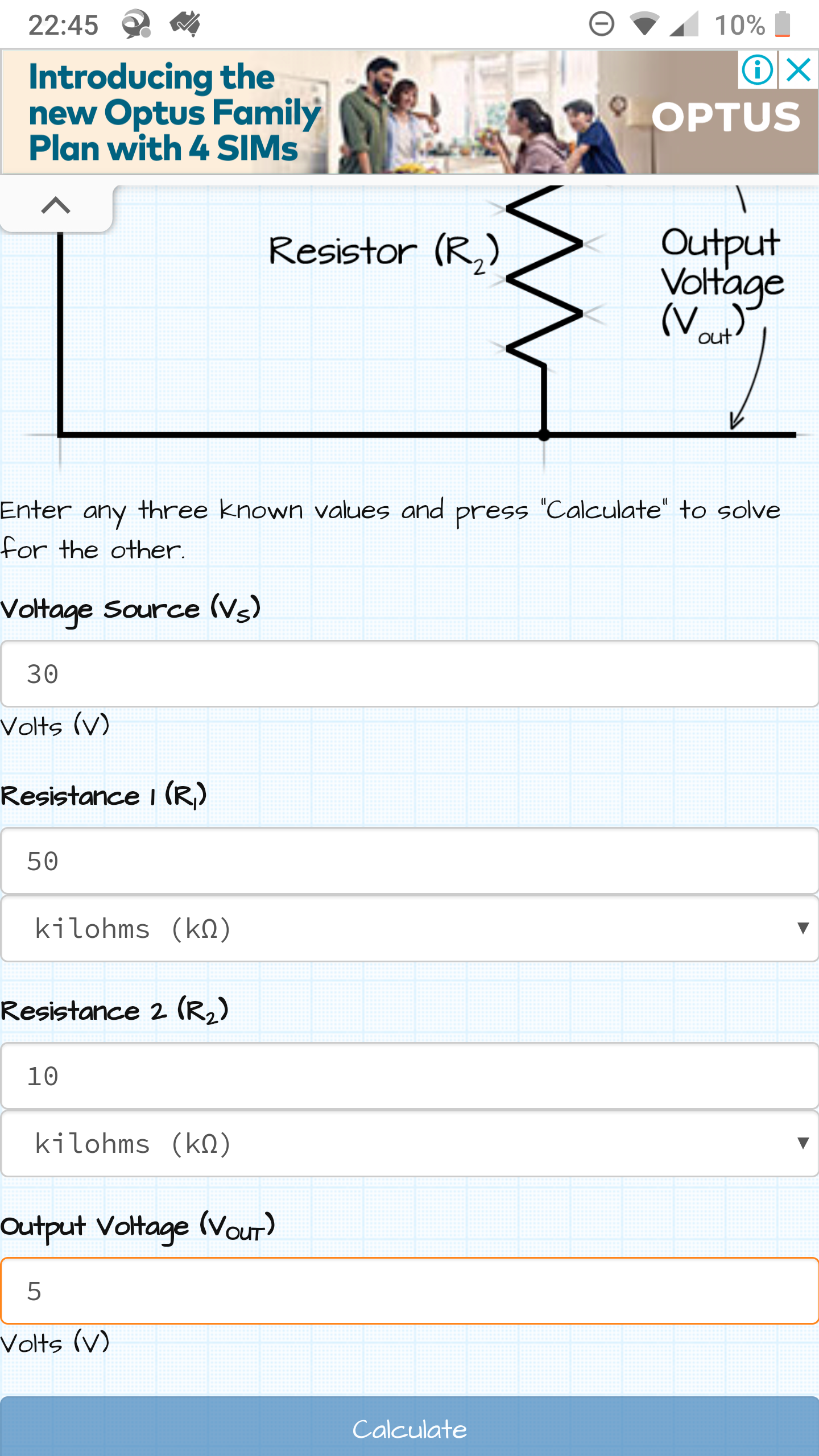
                    Is anyone able to confirm if the calculations in this image are correct? I would need to multiply the result by 6 to get accurate numbers

                    I'm just currently stuggling with acuracy on my current design and figure bringing the max reading down would help
                    It's a 24v battery with solar cut off of 28.4v so it will never go over 30 anyway
                    Screenshot_20200914-224511.png

                    mfalkviddM 1 Reply Last reply
                    0
                    • markjgabbM markjgabb

                      Is anyone able to confirm if the calculations in this image are correct? I would need to multiply the result by 6 to get accurate numbers

                      I'm just currently stuggling with acuracy on my current design and figure bringing the max reading down would help
                      It's a 24v battery with solar cut off of 28.4v so it will never go over 30 anyway

                      Screenshot_20200914-224511.png

                      mfalkviddM Offline
                      mfalkviddM Offline
                      mfalkvidd
                      Mod
                      wrote on last edited by mfalkvidd
                      #12

                      @markjgabb yes it is correct.

                      What Arduino are you using? Most Arduinos return 1023 for max voltage, but some (Zero, Due and more) return 4095 for max voltage.
                      Is the Arduino 5V or 3.3V?
                      Are you using 100k+10k or 50k+10k resistor? (One early post says 100k, your latest post says 50k.)

                      Edit: Zero, Due default to 1023 so they should be fine anyway. Reference: https://www.arduino.cc/reference/en/language/functions/zero-due-mkr-family/analogreadresolution/

                      1 Reply Last reply
                      0
                      • markjgabbM Offline
                        markjgabbM Offline
                        markjgabb
                        wrote on last edited by
                        #13

                        Yeah I'm changing up the circuit die to inaccuracy...
                        Is a arduino nano 5v powered from usb.....

                        1 Reply Last reply
                        0
                        Reply
                        • Reply as topic
                        Log in to reply
                        • Oldest to Newest
                        • Newest to Oldest
                        • Most Votes


                        13

                        Online

                        11.7k

                        Users

                        11.2k

                        Topics

                        113.1k

                        Posts


                        Copyright 2025 TBD   |   Forum Guidelines   |   Privacy Policy   |   Terms of Service
                        • Login

                        • Don't have an account? Register

                        • Login or register to search.
                        • First post
                          Last post
                        0
                        • MySensors
                        • OpenHardware.io
                        • Categories
                        • Recent
                        • Tags
                        • Popular