
Enabling interrupt on the radio for actuators
-
Hello people,
I hope you're all safe and healthy. It's been a long time since I've been active on this forum. Hence it's been a long time since I've been tinkering with electronics. Like John Lennon said: "Life is what happens while you're busy making other plans.".
First of all let me explain what I'm working on, so that it's easier to explain my question. I'm working on a battery powered - and MySensors enabled - lamp. The goal is to make it completely wireless. So that I can move it outside during those lovely summer nights.
It uses a 2n7000 mosfet to drive one of those fairy light led strings. I'm planning on using a Li-on rechargeable battery. For this I want my node to be as power friendly as possible.
So I set all the I/O pins to low and turn off ADC - because I'm not using that at all - before MySensors starts up. Currently I'm working with a Genuine Arduino so I've not been able to measure power consumption. But the fairy lights consume around 75mA when turned on fully. I measured that before I removed them from the PCB in the battery holder.
My initial idea was to put the node in sleep as soon as possible. And let it wake up when I press the manual button or operate the encoder to adjust the brightness or whenever I control it from Domoticz. But according to the API documentation the radio would go to sleep as well so it can't receive messages. And I can confirm that it does, the node doesn't wake up when I control it from Domoticz :)
Is it possible to wake up a node from the interrupt pin of the NRF24L01+ radio when a message is receiving? I would have to share the interrupt pin with the manual power switch, but that shouldn't be hard, it's just a matter of adding two diodes.
If so how can I configure this in MySensors?
Kind regards,
Theo -
Hello people,
I hope you're all safe and healthy. It's been a long time since I've been active on this forum. Hence it's been a long time since I've been tinkering with electronics. Like John Lennon said: "Life is what happens while you're busy making other plans.".
First of all let me explain what I'm working on, so that it's easier to explain my question. I'm working on a battery powered - and MySensors enabled - lamp. The goal is to make it completely wireless. So that I can move it outside during those lovely summer nights.
It uses a 2n7000 mosfet to drive one of those fairy light led strings. I'm planning on using a Li-on rechargeable battery. For this I want my node to be as power friendly as possible.
So I set all the I/O pins to low and turn off ADC - because I'm not using that at all - before MySensors starts up. Currently I'm working with a Genuine Arduino so I've not been able to measure power consumption. But the fairy lights consume around 75mA when turned on fully. I measured that before I removed them from the PCB in the battery holder.
My initial idea was to put the node in sleep as soon as possible. And let it wake up when I press the manual button or operate the encoder to adjust the brightness or whenever I control it from Domoticz. But according to the API documentation the radio would go to sleep as well so it can't receive messages. And I can confirm that it does, the node doesn't wake up when I control it from Domoticz :)
Is it possible to wake up a node from the interrupt pin of the NRF24L01+ radio when a message is receiving? I would have to share the interrupt pin with the manual power switch, but that shouldn't be hard, it's just a matter of adding two diodes.
If so how can I configure this in MySensors?
Kind regards,
Theo@TheoL technically it is possible, but the nrf24 will consume about 13mA in listen mode. Therefore, sleeping the mcu doesn’t help much and that’s why the MySensors sleep function only supports sleeping mcu+radio at the same time.
You can look into using the smartsleep feature.
-
@TheoL technically it is possible, but the nrf24 will consume about 13mA in listen mode. Therefore, sleeping the mcu doesn’t help much and that’s why the MySensors sleep function only supports sleeping mcu+radio at the same time.
You can look into using the smartsleep feature.
@mfalkvidd Thank you for the fast response. I guess I have to go back to the drawing table to come up with a different solution. It also makes sense. The arduino has to be awake to see if the message that the radio detects is targeted for the node. In my case it would wake up many times by messages send to the other nodes.
Do you happen to now if these cheap chargers can work as some kind of UPS (Uninterruptable Power SUpply).
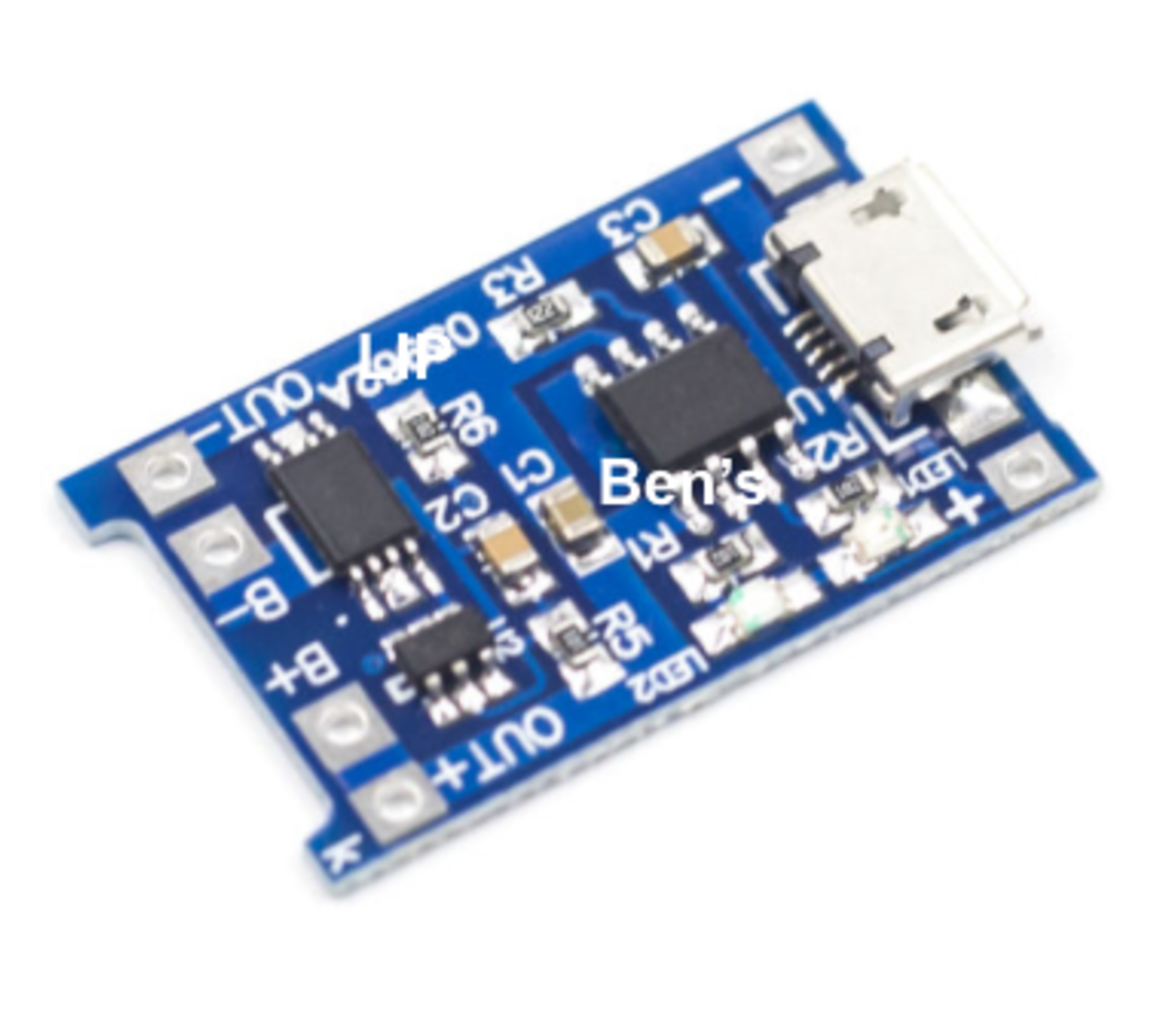
So in other words if I connect a USB cable to it all of the time and remove it when I want to take the lamp outside. Would that affect the lifetime of the LiPo battery? I have no idea how these things work to be honest. But I hope it would work like this. When a cable as attached it charges the LiPo but the arduino is always powered from the cable. When the LiPo is full it stops charging but keeps powering the arduino from the cable.
-
@mfalkvidd Thank you for the fast response. I guess I have to go back to the drawing table to come up with a different solution. It also makes sense. The arduino has to be awake to see if the message that the radio detects is targeted for the node. In my case it would wake up many times by messages send to the other nodes.
Do you happen to now if these cheap chargers can work as some kind of UPS (Uninterruptable Power SUpply).
So in other words if I connect a USB cable to it all of the time and remove it when I want to take the lamp outside. Would that affect the lifetime of the LiPo battery? I have no idea how these things work to be honest. But I hope it would work like this. When a cable as attached it charges the LiPo but the arduino is always powered from the cable. When the LiPo is full it stops charging but keeps powering the arduino from the cable.
-
Thank you again. I posted this question to my supplier. But also ordered some low power switching FETs. I'll solder one to the charging indicator. And hook it up to an Arduino to detect whether it has been charging. If it works as I hope. I can make some emergency lamps for when the electricity goes down.
I'll post the outcome on the forum, just in case some one else is interested.
-
Just for the record. Using a lipo charger doesn't work as a ups. So if the battery is below a certain trashhold, and a circuit is connected to it. It will no recharge if the circuit draws over 600 ma (I believe that is for 5v. so I guess it's more for 3.3v). Andreas Spies posted a youtube video on this last Sunday. I'm keeping my eye on his progress. I think he will design a UPS for ESP and Atmel based boards.
Also design note: I use a rotary encoder as user input. It just gives a better UX for dimable lights. But - haven't measured - the rotary encoder seems to draw quite a lot of current. I read it could be up to 60ma. I have some of those magnet based encoders laying around. But not sure if I want to use one. They are quite expensive, so I have better projects in mind for those. But they draw just a couple of micro amps. An alternative could be to switch of the encoder circuit with a fet. But I need to experiment some more with this.

Hello! It looks like you're interested in this conversation, but you don't have an account yet.
Getting fed up of having to scroll through the same posts each visit? When you register for an account, you'll always come back to exactly where you were before, and choose to be notified of new replies (either via email, or push notification). You'll also be able to save bookmarks and upvote posts to show your appreciation to other community members.
With your input, this post could be even better 💗
Register Login