
Send 2x relay states to Home Assistant to make them visible?
-
Hi Matt,
you don't send the state of your relays at all! So you need to add
MyMessage msgRelay1(CHILD_ID_RELAY1, V_STATUS);
MyMessage msgRelay2(CHILD_ID_RELAY2, V_STATUS);
objects. The presentation is OK. Then, you need a globale variable
bool firstRun=true;before the
void loop().
Inside the loop, i would put it in the begining, you need aif (firstRun) { send(msgRelay1.set(digitalRead(RELAY_1)); send(msgRelay1.set(digitalRead(RELAY_1+1)); firstRun == false; }But your code is too complicated, and setting is not handled in the receive. If you give me some minutes, I'll post you a complete example.
-
Eiten I am much obliged. Sorry for my code Ive been trying this and trying that and sort of lost track of what I done and changed.
You make it look so simple haha I just couldnt work out how to write the MyMessage and send bits thankyou so much.
Need to retire for the evening as up at 5am for work but will be back on to try it all out tomorrow, am looking forward to your next post.
Matt -
Hi Matt,
try this one:
// Configure MySensors
#define MY_DEBUG
#define MY_RADIO_RF24 // MY_RADIO_NRF24 is deprecated
#define MY_RF24_PA_LEVEL RF24_PA_HIGH
#define MY_REPEATER_FEATURE

// Configure Firmware
#define FW_NAME PSTR("Relay+Temp")          // Firmware name
#define FW_VERSION PSTR("1.0")              // Firmware version
#define MEASURE_INTERVAL (10 * 60 * 1000ul) // Measuring interval in ms

#define CHILD_ID_TEMP (1)   // Child ID temperature
#define CHILD_ID_RELAY1 (2) // Child ID relay 1
#define CHILD_ID_RELAY2 (3) // Child ID relay 2
#define CHILD_ID_BATT (4)   // Child ID battery voltage

#define ONE_WIRE_BUS_PIN (3)       // OneWire bus pin
#define RELAY1_PIN (4)             // DIO of relay 1
#define RELAY2_PIN (5)             // DIO of relay 2
#define BATT_SENSE_PIN (A0)        // Analog pin for battery voltage
#define BATT_MAX_V (14.5)          // Battery maximum voltage
#define BATT_MIN_V (11.0)          // Battery minimum voltage
#define BATT_LSB_VALUE (0.0139644) // Battery LSB voltage
#define RELAY_ON HIGH              // GPIO state for relay ON
#define RELAY_OFF LOW              // GPIO state for relay OFF

// Includes
#include <MySensors.h>
#include <DallasTemperature.h>

// Globals
OneWire oneWire(ONE_WIRE_BUS_PIN);   // OneWire bus
DallasTemperature sensors(&oneWire); // Temperature Sensors

MyMessage msgTemp(CHILD_ID_TEMP, V_TEMP);
MyMessage msgRelay1(CHILD_ID_RELAY1, V_STATUS);
MyMessage msgRelay2(CHILD_ID_RELAY2, V_STATUS);
MyMessage msgBatt(CHILD_ID_BATT, V_VOLTAGE);

uint32_t lastSend = -MEASURE_INTERVAL; // When did we last send temperature and voltage?
                                       // We set it to -MEASURE_INTERVAL in case first send goes wrong it will be retried
bool firstRun = true;                  // Are we in the first loop? Used to send inital values of all sensors
uint32_t conversationTime;             // ms the sensor needs after measure command
bool changeRelay1 = true;              // State of relay 1 changed
bool changeRelay2 = true;              // State of relay 2 changed

void before()
{
  // set relay pins as output and switch of relays
  pinMode(RELAY1_PIN, OUTPUT);
  pinMode(RELAY2_PIN, OUTPUT);
  digitalWrite(RELAY1_PIN, RELAY_OFF);
  digitalWrite(RELAY2_PIN, RELAY_OFF);
}

void setup()
{
  analogReference(INTERNAL);           // Use internal Vref
  sensors.begin();                     // start DS temperature sensors
  sensors.setWaitForConversion(false); // Do not wait for converstation to finish

  // Get the conversation time here, so you don't need the time and ram for the
  // function call every loop. Yo don't change resolution, so this stays constant
  conversationTime = sensors.millisToWaitForConversion(sensors.getResolution());
}

void presentation()
{
  sendSketchInfo(FW_NAME, FW_VERSION);
  present(CHILD_ID_TEMP, S_TEMP, PSTR("Air temperature"));
  present(CHILD_ID_RELAY1, S_BINARY, PSTR("Relay 1"));
  present(CHILD_ID_RELAY2, S_BINARY, PSTR("Relay 2"));
  present(CHILD_ID_BATT, S_MULTIMETER, PSTR("Battery voltage"));
}

void loop()
{
  // Temperature and battery voltage are sent only every MEASURE_INTERVAL ms
  // or if it is the first run of the loop, as HA else does not show them
  uint32_t now = millis();
  if (firstRun || (now - lastSend > MEASURE_INTERVAL))
  {
    // Trigger temperature measurement and wait for it to finish. Use wait()
    // and not delay so you don't miss incoming relay commands during this time
    // and keep the repeater function working
    sensors.requestTemperatures();
    wait(conversationTime);

    // Get the temperature in °C to check if it is valid
    float temperature = sensors.getTempCByIndex(0);

    // If temperature is valid, process and send it
    if (temperature != -127.0 && temperature != 85.0)
    {
      // Get imperial units if controller is not set to metric system
      if (!getControllerConfig().isMetric)
      {
        temperature = sensors.getTempFByIndex(0);
      }
      // round to one digit
      temperature = static_cast<float>(static_cast<int>(temperature) * 10.) / 10.;
      send(msgTemp.set(temperature, 1));
#ifdef MY_DEBUG
      Serial.print(PSTR("Sent temperature: "));
      Serial.print(temperature);
      Serial.println(getControllerConfig().isMetric ? PSTR("C") : PSTR("F"));
#endif
    }

    float battVolt = analogRead(BATT_SENSE_PIN) * BATT_LSB_VALUE;
    int battPct = static_cast<int>(((battVolt - BATT_MIN_V) / (BATT_MAX_V - BATT_MIN_V)) * 100.);
    battPct = constrain(battPct, 0, 100); // Avoid battery percentage outside 0-100%
    sendBatteryLevel(battPct);
    send(msgBatt.set(battVolt, 2));
#ifdef MY_DEBUG
    Serial.print(PSTR("Sent battery status: "));
    Serial.print(battVolt, 2);
    Serial.print(PSTR("V, "));
    Serial.print(battPct);
    Serial.println("%");
#endif
  }

  // Send relay state whenever they changed (or on first loop)
  if (changeRelay1 || firstRun)
  {
    bool relayState = (digitalRead(RELAY1_PIN) == RELAY_ON) ? true : false;
    send(msgRelay1.set(relayState));
    changeRelay1 = false;
#ifdef MY_DEBUG
    Serial.print(PSTR("Sent relay 1 status: "));
    Serial.println(relayState ? PSTR("ON") : PSTR("OFF"));
#endif
  }
  if (changeRelay2 || firstRun)
  {
    bool relayState = (digitalRead(RELAY2_PIN) == RELAY_ON) ? true : false;
    send(msgRelay2.set(relayState));
    changeRelay2 = false;
#ifdef MY_DEBUG
    Serial.print(PSTR("Sent relay 2 status: "));
    Serial.println(relayState ? PSTR("ON") : PSTR("OFF"));
#endif
  }
  firstRun = false; // after the first loop, set firstRun to false;
}

void receive(const MyMessage &message)
{
#ifdef MY_DEBUG
  Serial.print(PSTR("Incomming message: "));
#endif
  // V_STATUS messages are expected for relay commands
  if (message.type == V_STATUS)
  {
    // Check which relay should be switched
    switch (message.sensor)
    {
    case CHILD_ID_RELAY1:
      digitalWrite(RELAY1_PIN, message.getBool() ? RELAY_ON : RELAY_OFF);
#ifdef MY_DEBUG
      Serial.print(PSTR(" switched relay 1 "));
      Serial.println(message.getBool() ? PSTR("ON") : PSTR("OFF"));
#endif
      break;
    case CHILD_ID_RELAY2:
      digitalWrite(RELAY2_PIN, message.getBool() ? RELAY_ON : RELAY_OFF);
#ifdef MY_DEBUG
      Serial.print(PSTR(" switched relay 2 "));
      Serial.println(message.getBool() ? PSTR("ON") : PSTR("OFF"));
#endif
      break;
    default:
#ifdef MY_DEBUG
      Serial.print(PSTR(" unknown child ID "));
      Serial.println(message.sensor);
#endif
    }
  }
  else
  {
#ifdef MY_DEBUG
    Serial.print(PSTR(" unknown message type "));
    Serial.println(message.type);
#endif
  }
}
I have to admit, I did not test it, but it compiles. I'm in the train ATM and do not have hardware. But I'll test it later.
To keep it simple there are things missing like resending and things like that.Regards, Edi
-
Wow Edi you put a lot of work into that, appreciated man!
So your code seems to do some weird things see below from the serial output.
Heres a bit of it below this seems to be a repeating loop once I activated the two switches from Domoticz. These switches were registered from my own code yesterday I guess the sensor and child IDs are the same.
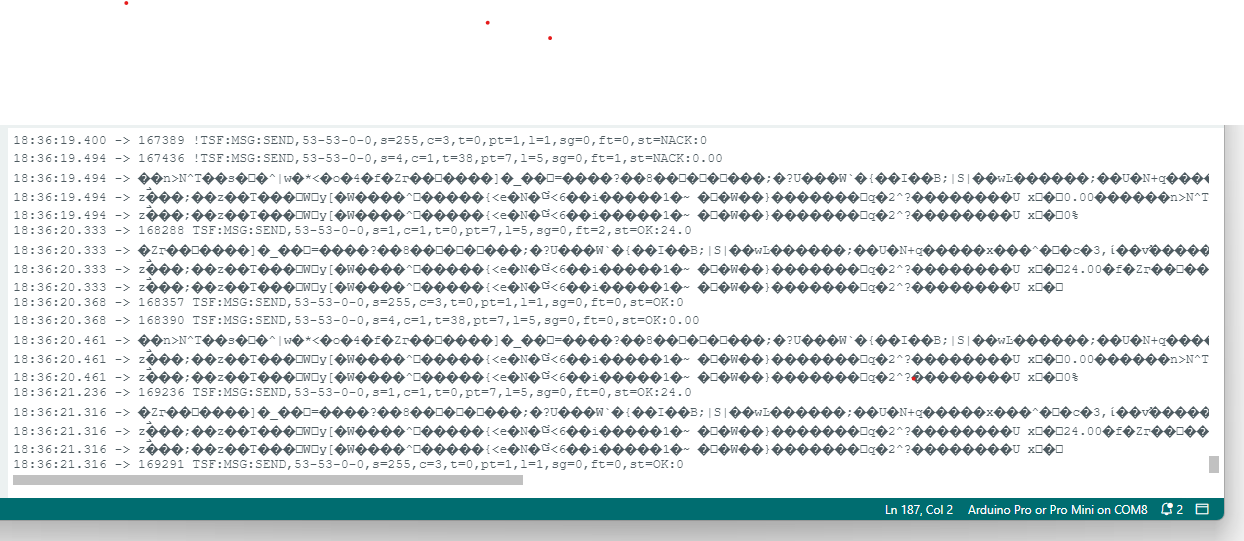
Prior to this loop there is a long run of these !MCO:PRO:RC=1 which the log parser identifies as "Recursive call detected in _process(), call level=1". These go on for many pages.
So yeah something a bit broken there Im sorry.
Nothing registered on HA =(
Have also had a go with my original code with your three suggested additions.
Is running good, domoticz has seen temp/bat/switches.
But still nothing on HA.
I have tried deleting MyS integration from HA, restarting HA, reloading MyS integration and still does not come up.
Do you think it could be because I have Domoticz listneing to the same mygw on the PI as HA? Would they compete for info or share? Beyond my level of understanding.
Perhaps I should implement a MyS serial gateway on a spare PI and connect to the HA linux box via ethernet rather than wifi and see how that goes....?Many thanks,
Matt -
-
No problem Matt, as I said, I had a looong train ride. Just got home, I'll try it myself now. May I ask you which controller you use?
And the battery type would also be interesting. Lead Acid?@eiten Hi I figured that out, radio was sort of working when device powered by serial usb programmer, enough for me to think was okay. HOWEVER was only ~1.7v so now I have SLA plugged in hardly any NACKs
Yes I have a SLA that normally charges via solar panel.
Controlled is a PI3 running mysgw development, is now conntected to linuxbox via ethernet.
So I tried your code again there is still weird stuff but I have registered both switches, one temp and one bat so perfect!
However, and this is annoying as this site is not letting me upload pics anymore but some characters are now messed up, same as in the serial ouput round arduino IDEW as before, and also device name in HA is now "{�������~��S��b������Mn�� 54" haha
Firmware also is "Firmware: ����{�������~��S��b������" within HA.
So all child sensors are there,
Bit odd eh!
Im gonna give the PC to my son so he can get his gametime in now and wife is away with the laptop but will be back a bit later tonight =)Matt
-
Hello again!
Turns out that:
- I suppose you are on an AVR. They don't seem to like
PSTR(). I changed them toF()and now there are no more hieroglyphs. - You have to send the sensor values before any other messages (in this case the
sendBatteryLevel(battPct);for HA to be happy. - I forgot to set the
lastSend = now;, so it repeatedly sent temp and batt. - I forgot to set
changeRelay1 = true;andchangeRelay2 = true;.
For me, it works now:
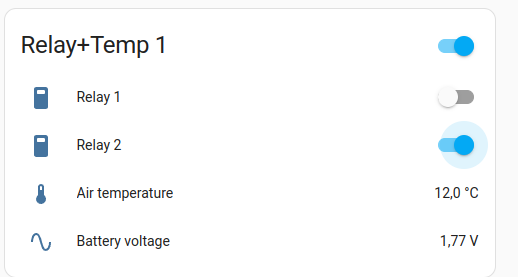
Here is the code:
// Configure MySensors
#define MY_DEBUG
#define MY_RADIO_RF24 // MY_RADIO_NRF24 is deprecated
#define MY_RF24_PA_LEVEL RF24_PA_HIGH
#define MY_REPEATER_FEATURE

// Configure Firmware
#define FW_NAME F("Relay+Temp")             // Firmware name
#define FW_VERSION F("2.0")                 // Firmware version
#define MEASURE_INTERVAL (10 * 60 * 1000ul) // Measuring interval in ms

#define CHILD_ID_TEMP (1)   // Child ID temperature
#define CHILD_ID_RELAY1 (2) // Child ID relay 1
#define CHILD_ID_RELAY2 (13) // Child ID relay 2
#define CHILD_ID_BATT (4)   // Child ID battery voltage

#define ONE_WIRE_BUS_PIN (3)       // OneWire bus pin
#define RELAY1_PIN (4)             // DIO of relay 1
#define RELAY2_PIN (5)             // DIO of relay 2
#define BATT_SENSE_PIN (A0)        // Analog pin for battery voltage
#define BATT_MAX_V (14.5)          // Battery maximum voltage
#define BATT_MIN_V (11.0)          // Battery minimum voltage
#define BATT_LSB_VALUE (0.0139644) // Battery LSB voltage
#define RELAY_ON HIGH              // GPIO state for relay ON
#define RELAY_OFF LOW              // GPIO state for relay OFF

// Includes
#include <MySensors.h>
#include <DallasTemperature.h>

// Globals
OneWire oneWire(ONE_WIRE_BUS_PIN);   // OneWire bus
DallasTemperature sensors(&oneWire); // Temperature Sensors

MyMessage msgTemp(CHILD_ID_TEMP, V_TEMP);
MyMessage msgRelay1(CHILD_ID_RELAY1, V_STATUS);
MyMessage msgRelay2(CHILD_ID_RELAY2, V_STATUS);
MyMessage msgBatt(CHILD_ID_BATT, V_VOLTAGE);

uint32_t lastSend = -MEASURE_INTERVAL; // When did we last send temperature and voltage?
                                       // We set it to -MEASURE_INTERVAL in case first send goes wrong it will be retried
bool firstRun = true;                  // Are we in the first loop? Used to send inital values of all sensors
uint32_t conversationTime;             // ms the sensor needs after measure command
bool changeRelay1 = true;              // State of relay 1 changed
bool changeRelay2 = true;              // State of relay 2 changed

void before()
{
  // set relay pins as output and switch of relays
  pinMode(RELAY1_PIN, OUTPUT);
  pinMode(RELAY2_PIN, OUTPUT);
  digitalWrite(RELAY1_PIN, RELAY_OFF);
  digitalWrite(RELAY2_PIN, RELAY_OFF);
}

void setup()
{
  analogReference(INTERNAL);           // Use internal Vref
  sensors.begin();                     // start DS temperature sensors
  sensors.setWaitForConversion(false); // Do not wait for converstation to finish

  // Get the conversation time here, so you don't need the time and ram for the
  // function call every loop. Yo don't change resolution, so this stays constant
  conversationTime = sensors.millisToWaitForConversion(sensors.getResolution());
}

void presentation()
{
  sendSketchInfo(FW_NAME, FW_VERSION);
  present(CHILD_ID_TEMP, S_TEMP, F("Air temperature"));
  present(CHILD_ID_RELAY1, S_BINARY, F("Relay 1"));
  present(CHILD_ID_RELAY2, S_BINARY, F("Relay 2"));
  present(CHILD_ID_BATT, S_MULTIMETER, F("Battery voltage"));
}

void loop()
{
  uint32_t now = millis();

  // Send relay state whenever they changed (or on first loop)
  if (changeRelay1 || firstRun)
  {
    bool relayState = (digitalRead(RELAY1_PIN) == RELAY_ON) ? true : false;
    send(msgRelay1.set(relayState));
    changeRelay1 = false;
#ifdef MY_DEBUG
    Serial.print(F("Sent relay 1 status: "));
    Serial.println(relayState ? F("ON") : F("OFF"));
#endif
  }
  if (changeRelay2 || firstRun)
  {
    bool relayState = (digitalRead(RELAY2_PIN) == RELAY_ON) ? true : false;
    send(msgRelay2.set(relayState));
    changeRelay2 = false;
#ifdef MY_DEBUG
    Serial.print(F("Sent relay 2 status: "));
    Serial.println(relayState ? F("ON") : F("OFF"));
#endif
  }

  // Temperature and battery voltage are sent only every MEASURE_INTERVAL ms
  // or if it is the first run of the loop, as HA else does not show them
  if (firstRun || (now - lastSend > MEASURE_INTERVAL))
  {
    // Trigger temperature measurement and wait for it to finish. Use wait()
    // and not delay so you don't miss incoming relay commands during this time
    // and keep the repeater function working
    sensors.requestTemperatures();
    wait(conversationTime);

    // Get the temperature in °C to check if it is valid
    float temperature = sensors.getTempCByIndex(0);

    // If temperature is valid, process and send it
    temperature = 12.55;
    if (temperature != -127.0 && temperature != 85.0)
    {
      // Get imperial units if controller is not set to metric system
      if (!getControllerConfig().isMetric)
      {
        temperature = sensors.getTempFByIndex(0);
      }
      // round to one digit
      temperature = static_cast<float>(static_cast<int>(temperature) * 10.) / 10.;
      send(msgTemp.set(temperature, 1));
#ifdef MY_DEBUG
      Serial.print(F("Sent temperature: "));
      Serial.print(temperature);
      Serial.println(getControllerConfig().isMetric ? F("C") : F("F"));
#endif
    }

    float battVolt = analogRead(BATT_SENSE_PIN) * BATT_LSB_VALUE;
    int battPct = static_cast<int>(((battVolt - BATT_MIN_V) / (BATT_MAX_V - BATT_MIN_V)) * 100.);
    battPct = constrain(battPct, 0, 100); // Avoid battery percentage outside 0-100%
    sendBatteryLevel(battPct);
    send(msgBatt.set(battVolt, 2));
#ifdef MY_DEBUG
    Serial.print(F("Sent battery status: "));
    Serial.print(battVolt, 2);
    Serial.print(F("V, "));
    Serial.print(battPct);
    Serial.println("%");
#endif
    lastSend = now;
  }
  firstRun = false; // after the first loop, set firstRun to false;
}

void receive(const MyMessage &message)
{
#ifdef MY_DEBUG
  Serial.print(F("Incomming message: "));
#endif
  // V_STATUS messages are expected for relay commands
  if (message.type == V_STATUS)
  {
    // Check which relay should be switched
    switch (message.sensor)
    {
    case CHILD_ID_RELAY1:
      digitalWrite(RELAY1_PIN, message.getBool() ? RELAY_ON : RELAY_OFF);
      changeRelay1 = true;
#ifdef MY_DEBUG
      Serial.print(F("switched relay 1 "));
      Serial.println(message.getBool() ? F("ON") : F("OFF"));
#endif
      break;
    case CHILD_ID_RELAY2:
      digitalWrite(RELAY2_PIN, message.getBool() ? RELAY_ON : RELAY_OFF);
      changeRelay2 = true;
#ifdef MY_DEBUG
      Serial.print(F("switched relay 2 "));
      Serial.println(message.getBool() ? F("ON") : F("OFF"));
#endif
      break;
    default:
#ifdef MY_DEBUG
      Serial.print(F(" unknown child ID "));
      Serial.println(message.sensor);
#endif
    }
  }
  else
  {
#ifdef MY_DEBUG
    Serial.print(F(" unknown message type "));
    Serial.println(message.type);
#endif
  }
}
And the monitor output (Link to the log parser) :
__ __ ____ | \/ |_ _/ ___| ___ _ __ ___ ___ _ __ ___ | |\/| | | | \___ \ / _ \ `_ \/ __|/ _ \| `__/ __| | | | | |_| |___| | __/ | | \__ \ _ | | \__ \ |_| |_|\__, |____/ \___|_| |_|___/\___/|_| |___/ |___/ 2.3.2 16 MCO:BGN:INIT REPEATER,CP=RNNRA---,FQ=8,REL=255,VER=2.3.2 28 MCO:BGN:BFR 30 TSM:INIT 30 TSF:WUR:MS=0 38 TSM:INIT:TSP OK 40 TSF:SID:OK,ID=1 43 TSM:FPAR 47 ?TSF:MSG:SEND,1-1-255-255,s=255,c=3,t=7,pt=0,l=0,sg=0,ft=0,st=OK: 167 TSF:MSG:READ,0-0-1,s=255,c=3,t=8,pt=1,l=1,sg=0:0 174 TSF:MSG:FPAR OK,ID=0,D=1 2056 TSM:FPAR:OK 2056 TSM:ID 2058 TSM:ID:OK 2060 TSM:UPL 2066 TSF:MSG:SEND,1-1-0-0,s=255,c=3,t=24,pt=1,l=1,sg=0,ft=0,st=OK:1 2084 TSF:MSG:READ,0-0-1,s=255,c=3,t=25,pt=1,l=1,sg=0:1 2091 TSF:MSG:PONG RECV,HP=1 2093 TSM:UPL:OK 2095 TSM:READY:ID=1,PAR=0,DIS=1 2103 TSF:MSG:SEND,1-1-0-0,s=255,c=3,t=15,pt=6,l=2,sg=0,ft=0,st=OK:0100 2117 TSF:MSG:READ,0-0-1,s=255,c=3,t=15,pt=6,l=2,sg=0:0100 2125 TSF:MSG:SEND,1-1-0-0,s=255,c=0,t=18,pt=0,l=5,sg=0,ft=0,st=OK:2.3.2 2136 TSF:MSG:SEND,1-1-0-0,s=255,c=3,t=6,pt=1,l=1,sg=0,ft=0,st=OK:0 2177 TSF:MSG:READ,0-0-1,s=255,c=3,t=6,pt=0,l=1,sg=0:M 2185 TSF:MSG:SEND,1-1-0-0,s=255,c=3,t=11,pt=0,l=10,sg=0,ft=0,st=OK:Relay+Temp 2195 TSF:MSG:SEND,1-1-0-0,s=255,c=3,t=12,pt=0,l=3,sg=0,ft=0,st=OK:1.0 2215 TSF:MSG:SEND,1-1-0-0,s=1,c=0,t=6,pt=0,l=15,sg=0,ft=0,st=OK:Air temperature 2228 TSF:MSG:SEND,1-1-0-0,s=2,c=0,t=3,pt=0,l=7,sg=0,ft=0,st=OK:Relay 1 2242 TSF:MSG:SEND,1-1-0-0,s=13,c=0,t=3,pt=0,l=7,sg=0,ft=0,st=OK:Relay 2 2254 TSF:MSG:SEND,1-1-0-0,s=4,c=0,t=30,pt=0,l=15,sg=0,ft=0,st=OK:Battery voltage 2263 MCO:REG:REQ 2269 TSF:MSG:SEND,1-1-0-0,s=255,c=3,t=26,pt=1,l=1,sg=0,ft=0,st=OK:2 2279 TSF:MSG:READ,0-0-1,s=255,c=3,t=27,pt=1,l=1,sg=0:1 2285 MCO:PIM:NODE REG=1 2287 MCO:BGN:STP 2289 MCO:BGN:INIT OK,TSP=1 2297 TSF:MSG:SEND,1-1-0-0,s=2,c=1,t=2,pt=1,l=1,sg=0,ft=0,st=OK:0 Sent relay 1 status: OFF 2308 TSF:MSG:SEND,1-1-0-0,s=13,c=1,t=2,pt=1,l=1,sg=0,ft=0,st=OK:0 Sent relay 2 status: OFF 2357 TSF:MSG:READ,0-0-1,s=255,c=3,t=6,pt=0,l=1,sg=0:M 2428 TSF:MSG:SEND,1-1-0-0,s=1,c=1,t=0,pt=7,l=5,sg=0,ft=0,st=OK:12.0 Sent temperature: 12.00C 2441 TSF:MSG:SEND,1-1-0-0,s=255,c=3,t=0,pt=1,l=1,sg=0,ft=0,st=OK:0 2451 TSF:MSG:SEND,1-1-0-0,s=4,c=1,t=38,pt=7,l=5,sg=0,ft=0,st=OK:2.67 Sent battery status: 2.67V, 0% 18446 TSF:MSG:READ,0-0-1,s=13,c=1,t=2,pt=0,l=1,sg=0:1 18452 TSF:MSG:ECHO REQ 18458 TSF:MSG:SEND,1-1-0-0,s=13,c=1,t=2,pt=0,l=1,sg=0,ft=0,st=OK:1 Incomming message: switched relay 2 ON 18468 TSF:MSG:SEND,1-1-0-0,s=13,c=1,t=2,pt=1,l=1,sg=0,ft=0,st=OK:1 Sent relay 2 status: ON - I suppose you are on an AVR. They don't seem to like
-
Ah no sorry should have said Im usuing pro-mini and FTDI breakout board to program over USB.
Sitting on sundbergs board with vreg added etc. Just running your code now...
All works, picks up on first presentation thankyou! Have you got a paypal I can buy you a beer or coffee? -
Hey Matt, no problem, that's what the community is here for. But if we meet, I'd love to have a beer with you! I'm from switzerland, so chances may not be too high.
Some other thoughts:
For SLA, you can estimate the SOC by measuring the voltage, but only if you have no load an no charging. If you want to do it really good, you also take the non-linearity into account. The SLA is full, if the open circuit voltage (no load, no charging) is at about 12.8V. 11V for empty is ok. But I would add some code that the relays don't switch if you are under 11V or so, because this can damage the battery.Do you use a charger, or is the panel directly connected to the battery? In the second case, you should add a diode so the battery does not reverse feed the panel when it's dark. And you should switch of (short circuit) the panel if the battery voltage is at 14.4V or above. This will also help for a longer battery life.
-
Very generous of you matey.
I have a solar charge controller so no worries with overcharging or draining at night.
I learned eventually to bring the battery inside through winter it lasts a lot longer now!
I've been to Switzerland Jungfrau and Bern on a contiki tour around 2004 long time ago now still have a wee knife I bought.
Have kids wife and mortgage now so sadly my travelling days are behind me, at least for another eight years or so lol -
Very generous of you matey.
I have a solar charge controller so no worries with overcharging or draining at night.
I learned eventually to bring the battery inside through winter it lasts a lot longer now!
I've been to Switzerland Jungfrau and Bern on a contiki tour around 2004 long time ago now still have a wee knife I bought.
Have kids wife and mortgage now so sadly my travelling days are behind me, at least for another eight years or so lol -
Ah that's good.
Yes, bring the battery inside over winter. For my all year outdoor thingies, I changed now to SoIon, let's se how they do in cold times.
Ah cool! Did you ride the train? If so, you rode on my work, I do electrical engineering for cog wheel trains! -
-
@eiten haha yep we went up the vernacular I think it's called still clearly remember the beautiful views and ice caves
Hello! It looks like you're interested in this conversation, but you don't have an account yet.
Getting fed up of having to scroll through the same posts each visit? When you register for an account, you'll always come back to exactly where you were before, and choose to be notified of new replies (either via email, or push notification). You'll also be able to save bookmarks and upvote posts to show your appreciation to other community members.
With your input, this post could be even better 💗
Register Login