
Wireless nRF24L01+ sniffer for MySensors
-
@Yveaux Yes, I only enabled development mode to troubleshoot. Had it running with BINARY_OUTPUT defined during normal operation. I have another sensor nearby that is sending data and it's talking to the gateway/controller properly so I know it's transmitting/receiving. I've tried a few different radio modules as well to rule out any issues with those, but I did test them using a normal MySensors sketch first to make sure they are operating properly. I'll add some LED's to troubleshoot. Below is my sketch for reference. Thanks for your help!
Cheers
AlEDIT: Code Removed
@Sparkman Apart from the DEFAULT_RF_DATARATE your sketch seems to be identical to mine on GitHub...
It also doesn't seem to work on a Pro Mini, as you say. Only hardware difference between a Pro Mini and Uno is clock speed (or am I missing something?)@marceltrapman Did you ever get the sniffer running on a Mega?
-
@Sparkman Apart from the DEFAULT_RF_DATARATE your sketch seems to be identical to mine on GitHub...
It also doesn't seem to work on a Pro Mini, as you say. Only hardware difference between a Pro Mini and Uno is clock speed (or am I missing something?)@marceltrapman Did you ever get the sniffer running on a Mega?
@Yveaux said:
Apart from the DEFAULT_RF_DATARATE your sketch seems to be identical to mine on GitHub...
That's a good thing right?
@Yveaux said:
It also doesn't seem to work on a Pro Mini, as you say. Only hardware difference between a Pro Mini and Uno is clock speed (or am I missing something?)
That's my understanding as well.
I hooked up LEDs to pins A0-A4. The LED on A0 is on when the sketch is running and the LED on A2 flashes briefly when my other sensor sends a packet. The LEDs on A1, A3 and A4 have not shown any activity. Is that what is expected?
Thanks
Al -
@Sparkman Apart from the DEFAULT_RF_DATARATE your sketch seems to be identical to mine on GitHub...
It also doesn't seem to work on a Pro Mini, as you say. Only hardware difference between a Pro Mini and Uno is clock speed (or am I missing something?)@marceltrapman Did you ever get the sniffer running on a Mega?
-
@Yveaux Well strangely enough, after hooking up the LEDs, it now works. I've tried it on both the Pro Mini and on the Mega and am now capturing data. Does the sketch not work if the LEDs are not connected? Should I have commented out the #define LED_SUPPORTED line if the LEDs are not connected?
Thanks for the help and the quick replies. Much appreciated.
Cheers
Al -
@Yveaux said:
Apart from the DEFAULT_RF_DATARATE your sketch seems to be identical to mine on GitHub...
That's a good thing right?
@Yveaux said:
It also doesn't seem to work on a Pro Mini, as you say. Only hardware difference between a Pro Mini and Uno is clock speed (or am I missing something?)
That's my understanding as well.
I hooked up LEDs to pins A0-A4. The LED on A0 is on when the sketch is running and the LED on A2 flashes briefly when my other sensor sends a packet. The LEDs on A1, A3 and A4 have not shown any activity. Is that what is expected?
Thanks
Al@Sparkman said:
That's a good thing right?
Of course! Mine works ;-)
I hooked up LEDs to pins A0-A4. The LED on A0 is on when the sketch is running and the LED on A2 flashes briefly when my other sensor sends a packet. The LEDs on A1, A3 and A4 have not shown any activity. Is that what is expected?
A1 blinks on reception of data by the nRF24 (toggled in the interrupt handler per packet). It will probably blink too fast for the eye to see (a scope would help though).
Same for A3 (which quickly blinks when a new config is received).
A4 will indicate the sniffer cannot keep up with the incoming packet stream. This should not happen as packets will be dropped. -
@Yveaux Never tried. It works with the Uno and I say 'never change a winning team' :)
-
@Yveaux Well strangely enough, after hooking up the LEDs, it now works. I've tried it on both the Pro Mini and on the Mega and am now capturing data. Does the sketch not work if the LEDs are not connected? Should I have commented out the #define LED_SUPPORTED line if the LEDs are not connected?
Thanks for the help and the quick replies. Much appreciated.
Cheers
Al@Sparkman said:
@Yveaux Well strangely enough, after hooking up the LEDs, it now works. I've tried it on both the Pro Mini and on the Mega and am now capturing data. Does the sketch not work if the LEDs are not connected? Should I have commented out the #define LED_SUPPORTED line if the LEDs are not connected?
Very glad to hear that it's working now!
The LED_SUPPORTED being defined or not should only make a difference in code size, nothing else. The LED option was added after the sniffer was completely functional as some low-level indication of its status. It should work independent of LEDs being connected or not.
Thanks for the help and the quick replies. Much appreciated.
You're welcome! At least now I know the Mega's are also supported ;-)
-
@Sparkman said:
@Yveaux Well strangely enough, after hooking up the LEDs, it now works. I've tried it on both the Pro Mini and on the Mega and am now capturing data. Does the sketch not work if the LEDs are not connected? Should I have commented out the #define LED_SUPPORTED line if the LEDs are not connected?
Very glad to hear that it's working now!
The LED_SUPPORTED being defined or not should only make a difference in code size, nothing else. The LED option was added after the sniffer was completely functional as some low-level indication of its status. It should work independent of LEDs being connected or not.
Thanks for the help and the quick replies. Much appreciated.
You're welcome! At least now I know the Mega's are also supported ;-)
@Yveaux said:
Very glad to hear that it's working now!
The LED_SUPPORTED being defined or not should only make a difference in code size, nothing else. The LED option was added after the sniffer was completely functional as some low-level indication of its status. It should work independent of LEDs being connected or not.
That's what I had thought as well, so not sure why it started working.
@Yveaux said:
You're welcome! At least now I know the Mega's are also supported ;-)
And the Pro Mini too!
Cheers
Al -
In case anyone else is interested, I updated the sketch to work with a 20x4 LCD screen so that you can see how many packets have been captured. I used this LCD screen connected to the I2C interface. Make sure you get the correct LCD libraries for it as the default LCD libraries don't work with it. There's a link for them on the eBay page.
EDIT: There seems to be an issue capturing packets if it's also connected to the nrf24sniff program. It works fine standalone and also when BINARY_OUTPUT is undefined and talking to the Serial Monitor. I'l need to do more troubleshooting as to why.
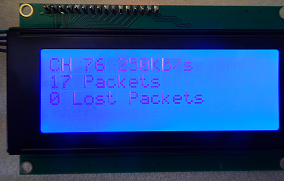
Cheers
Al/* NRF24_Sniff - An Arduino sketch to promiscuous capture all wireless traffic generated by Nordic Semi. NRF24L01+ modules. Created by Ivo Pullens, Emmission, 2014 -- www.emmission.nl Updated by Sparkman, 2015 - added LCD support This program is free software: you can redistribute it and/or modify it under the terms of the GNU General Public License as published by the Free Software Foundation, either version 3 of the License, or (at your option) any later version. This program is distributed in the hope that it will be useful, but WITHOUT ANY WARRANTY; without even the implied warranty of MERCHANTABILITY or FITNESS FOR A PARTICULAR PURPOSE. See the GNU General Public License for more details. You should have received a copy of the GNU General Public License along with this program. If not, see <http://www.gnu.org/licenses/>. */ #include <Arduino.h> #include <SPI.h> #include <CircularBuffer.h> #include <RF24.h> #include <RF24_config.h> #include <Wire.h> #include <LiquidCrystal_I2C.h> #define LED_SUPPORTED #define LCD_SUPPORTED // Hardware configuration #define RF_CE_PIN (9) #define RF_CS_PIN (10) #define RF_IRQ_PIN (2) #define RF_IRQ (RF_IRQ_PIN-2) // Usually the interrupt = pin -2 (on uno/nano anyway) #ifdef LED_SUPPORTED #define LED_PIN_LISTEN (A0) #define LED_PIN_RX (A1) #define LED_PIN_TX (A2) #define LED_PIN_CONFIG (A3) #define LED_PIN_BUFF_FULL (A4) #endif #ifdef LCD_SUPPORTED LiquidCrystal_I2C lcd(0x27,20,4); // set the LCD address to 0x27 for a 20 chars and 4 line display #endif static uint32_t PacketCount = 0; static uint8_t lostPacketCount = 0; #define RF_MAX_ADDR_WIDTH (5) // Maximum address width, in bytes. MySensors use 5 bytes for addressing, where lowest byte is for node addressing. #define MAX_RF_PAYLOAD_SIZE (32) #define SER_BAUDRATE (115200) #define PACKET_BUFFER_SIZE (30) // Maximum number of packets that can be buffered between reception by NRF and transmission over serial port. #define PIPE (0) // Pipe number to use for listening // Startup defaults until user reconfigures it #define DEFAULT_RF_CHANNEL (76) // 76 = Default channel for MySensors. #define DEFAULT_RF_DATARATE (RF24_250KBPS) // Datarate #define DEFAULT_RF_ADDR_WIDTH (RF_MAX_ADDR_WIDTH) // We use all but the lowest address byte for promiscuous listening. First byte of data received will then be the node address. #define DEFAULT_RF_ADDR_PROMISC_WIDTH (DEFAULT_RF_ADDR_WIDTH-1) #define DEFAULT_RADIO_ID ((uint64_t)0xA8A8E1FC00LL) // 0xA8A8E1FC00LL = MySensors v2 (1.4) default #define DEFAULT_RF_CRC_LENGTH (2) // Length (in bytes) of NRF24 CRC #define DEFAULT_RF_PAYLOAD_SIZE (MAX_RF_PAYLOAD_SIZE) // Define NRF24 payload size to maximum, so we'll slurp as many bytes as possible from the packet. // If BINARY_OUTPUT is defined, this sketch will output in hex format to the PC. // If undefined it will output text output for development. #define BINARY_OUTPUT #include "NRF24_sniff_types.h" #ifndef BINARY_OUTPUT int my_putc( char c, FILE *t ) { Serial.write( c ); } #endif // Set up nRF24L01 radio on SPI bus plus CE/CS pins static RF24 radio(RF_CE_PIN, RF_CS_PIN); static NRF24_packet_t bufferData[PACKET_BUFFER_SIZE]; static CircularBuffer<NRF24_packet_t> packetBuffer(bufferData, sizeof(bufferData)/sizeof(bufferData[0])); static Serial_header_t serialHdr; static volatile Serial_config_t conf = { DEFAULT_RF_CHANNEL, DEFAULT_RF_DATARATE, DEFAULT_RF_ADDR_WIDTH, DEFAULT_RF_ADDR_PROMISC_WIDTH, DEFAULT_RADIO_ID, DEFAULT_RF_CRC_LENGTH, DEFAULT_RF_PAYLOAD_SIZE }; #define GET_PAYLOAD_LEN(p) ((p->packet[conf.addressLen-conf.addressPromiscLen] & 0xFC) >> 2) // First 6 bits of nRF header contain length. inline static void dumpData(uint8_t* p, int len) { #ifndef BINARY_OUTPUT while (len--) { printf("%02x", *p++); } Serial.print(' '); #else Serial.write(p, len); #endif } static void handleNrfIrq() { // Loop until RX buffer(s) contain no more packets. while (radio.available()) { #ifdef LED_SUPPORTED digitalWrite(LED_PIN_RX, HIGH); #endif if (!packetBuffer.full()) { #ifdef LED_SUPPORTED digitalWrite(LED_PIN_BUFF_FULL, LOW); #endif NRF24_packet_t* p = packetBuffer.getFront(); p->timestamp = micros(); // Micros does not increase in interrupt, but it can be used. p->packetsLost = lostPacketCount; uint8_t packetLen = radio.getPayloadSize(); if (packetLen > MAX_RF_PAYLOAD_SIZE) packetLen = MAX_RF_PAYLOAD_SIZE; radio.read( p->packet, packetLen ); // Determine length of actual payload (in bytes) received from NRF24 packet control field (bits 7..2 of byte with offset 1) // Enhanced shockburst format is assumed! if (GET_PAYLOAD_LEN(p) <= MAX_RF_PAYLOAD_SIZE) { // Seems like a valid packet. Enqueue it. packetBuffer.pushFront(p); PacketCount++; } else { // Packet with invalid size received. Could increase some counter... } lostPacketCount = 0; } else { // Buffer full. Increase lost packet counter. #ifdef LED_SUPPORTED digitalWrite(LED_PIN_BUFF_FULL, HIGH); #endif bool tx_ok, tx_fail, rx_ready; if (lostPacketCount < 255) lostPacketCount++; // Call 'whatHappened' to reset interrupt status. radio.whatHappened(tx_ok, tx_fail, rx_ready); // Flush buffer to drop the packet. radio.flush_rx(); } #ifdef LED_SUPPORTED digitalWrite(LED_PIN_RX, LOW); #endif } } static void activateConf( void ) { #ifdef LED_SUPPORTED digitalWrite(LED_PIN_CONFIG, HIGH); #endif // Match MySensors' channel & datarate radio.setChannel(conf.channel); radio.setDataRate((rf24_datarate_e)conf.rate); // Disable CRC & set fixed payload size to allow all packets captured to be returned by Nrf24. radio.disableCRC(); radio.setPayloadSize(conf.maxPayloadSize); // Configure listening pipe with the 'promiscuous' address and start listening radio.setAddressWidth(conf.addressPromiscLen); radio.openReadingPipe( PIPE, conf.address >> (8*(conf.addressLen - conf.addressPromiscLen)) ); radio.startListening(); // Attach interrupt handler to NRF IRQ output. Overwrites any earlier handler. attachInterrupt(RF_IRQ, handleNrfIrq, FALLING); // NRF24 Irq pin is active low. // Initialize serial header's address member to promiscuous address. uint64_t addr = conf.address; // TODO: probably add some shifting! for (int8_t i = sizeof(serialHdr.address)-1; i >= 0; --i) { serialHdr.address[i] = addr; addr >>= 8; } // Send config back. Write record length & message type uint8_t lenAndType = SET_MSG_TYPE(sizeof(conf), MSG_TYPE_CONFIG); dumpData(&lenAndType, sizeof(lenAndType)); // Write config dumpData((uint8_t*)&conf, sizeof(conf) ); #ifndef BINARY_OUTPUT Serial.print("Channel: "); Serial.println(conf.channel); Serial.print("Datarate: "); switch (conf.rate) { case 0: Serial.println("1Mb/s"); break; case 1: Serial.println("2Mb/s"); break; case 2: Serial.println("250Kb/s"); break; } Serial.print("Address: 0x"); uint64_t adr = conf.address; for (int8_t i = conf.addressLen-1; i >= 0; --i) { if ( i >= conf.addressLen - conf.addressPromiscLen ) { Serial.print((uint8_t)(adr >> (8*i)), HEX); } else { Serial.print("**"); } } Serial.println(""); Serial.print("Max payload: "); Serial.println(conf.maxPayloadSize); Serial.print("CRC length: "); Serial.println(conf.crcLength); Serial.println(""); radio.printDetails(); Serial.println(""); Serial.println("Listening..."); #endif #ifdef LED_SUPPORTED digitalWrite(LED_PIN_CONFIG, LOW); #endif #ifdef LCD_SUPPORTED lcd.setCursor(0, 0); lcd.print("CH "); lcd.print(conf.channel); switch (conf.rate) { case 0: lcd.print(" @ 1Mb/s"); break; case 1: lcd.print(" @ 2Mb/s"); break; case 2: lcd.print(" @ 250kb/s"); break; } #endif } void setup(void) { #ifdef LED_SUPPORTED pinMode(LED_PIN_LISTEN, OUTPUT); pinMode(LED_PIN_RX, OUTPUT); pinMode(LED_PIN_TX, OUTPUT); pinMode(LED_PIN_CONFIG, OUTPUT); pinMode(LED_PIN_BUFF_FULL, OUTPUT); digitalWrite(LED_PIN_LISTEN, LOW); digitalWrite(LED_PIN_RX, LOW); digitalWrite(LED_PIN_TX, LOW); digitalWrite(LED_PIN_CONFIG, LOW); digitalWrite(LED_PIN_BUFF_FULL, LOW); #endif #ifdef LCD_SUPPORTED lcd.init(); // initialize the lcd lcd.backlight(); lcd.clear(); lcd.home(); #endif Serial.begin(SER_BAUDRATE); #ifndef BINARY_OUTPUT fdevopen( &my_putc, 0); Serial.println("-- RF24 Sniff --"); #endif radio.begin(); // Disable shockburst radio.setAutoAck(false); radio.setRetries(0,0); // Configure nRF IRQ input pinMode(RF_IRQ_PIN, INPUT); #ifdef LED_SUPPORTED digitalWrite(LED_PIN_LISTEN, HIGH); #endif #ifdef LCD_SUPPORTED lcd.setCursor(0, 1); lcd.print(PacketCount); lcd.print(" Packets"); lcd.setCursor(0, 2); lcd.print(lostPacketCount); lcd.print(" Lost Packets"); #endif activateConf(); } void loop(void) { while (!packetBuffer.empty()) { #ifdef LED_SUPPORTED digitalWrite(LED_PIN_TX, HIGH); #endif // One or more records present NRF24_packet_t* p = packetBuffer.getBack(); int serialHdrLen = sizeof(serialHdr) - (conf.addressLen - conf.addressPromiscLen); serialHdr.timestamp = p->timestamp; serialHdr.packetsLost = p->packetsLost; // Calculate data length in bits, then round up to get full number of bytes. uint8_t dataLen = ( (serialHdrLen<<3) /* Serial packet header */ + ((conf.addressLen - conf.addressPromiscLen)<<3) /* NRF24 LSB address byte(s) */ + 9 /* NRF24 control field */ + (GET_PAYLOAD_LEN(p) << 3) /* NRF24 payload length */ + (conf.crcLength << 3) /* NRF24 crc length */ + 7 /* Round up to full nr. of bytes */ ) >> 3; /* Convert from bits to bytes */ // Write record length & message type uint8_t lenAndType = SET_MSG_TYPE(dataLen, MSG_TYPE_PACKET); dumpData(&dataLen, sizeof(lenAndType)); // Write serial header dumpData((uint8_t*)&serialHdr, serialHdrLen ); // Write packet data dumpData(p->packet, dataLen - serialHdrLen); #ifndef BINARY_OUTPUT if (p->packetsLost > 0) { Serial.print(" Lost: "); Serial.print(p->packetsLost); } Serial.println(""); #endif // Remove record as we're done with it. packetBuffer.popBack(); #ifdef LED_SUPPORTED digitalWrite(LED_PIN_TX, LOW); #endif } #ifdef LCD_SUPPORTED lcd.setCursor(0, 1); lcd.print(PacketCount); lcd.print(" Packets"); lcd.setCursor(0, 2); lcd.print(lostPacketCount); lcd.print(" Lost Packets"); #endif // Test if new config comes in uint8_t lenAndType; if (Serial.available() >= sizeof(lenAndType) + sizeof(conf)) { lenAndType = Serial.read(); if ((GET_MSG_TYPE(lenAndType) == MSG_TYPE_CONFIG) && (GET_MSG_LEN(lenAndType) == sizeof(conf))) { // Disable nRF interrupt while reading & activating new configuration. noInterrupts(); // Retrieve the new configuration uint8_t* c = (uint8_t*)(&conf); for (uint8_t i = 0; i < sizeof(conf); ++i) { *c++ = Serial.read(); } // Clear any packets in the buffer and flush rx buffer. packetBuffer.clear(); radio.flush_rx(); // Activate new config & re-enable nRF interrupt. activateConf(); interrupts(); } else { #ifndef BINARY_OUTPUT Serial.println("Illegal configuration received!"); #endif #ifdef LCD_SUPPORTED lcd.setCursor(0, 3); lcd.print("Illegal Config"); #endif } } } -
It would be a noce idea to create a portable 'sniffer' which you could easily position around the house (compared to a laptop + sniffer).
If it could do charts like Wireshark, e.g.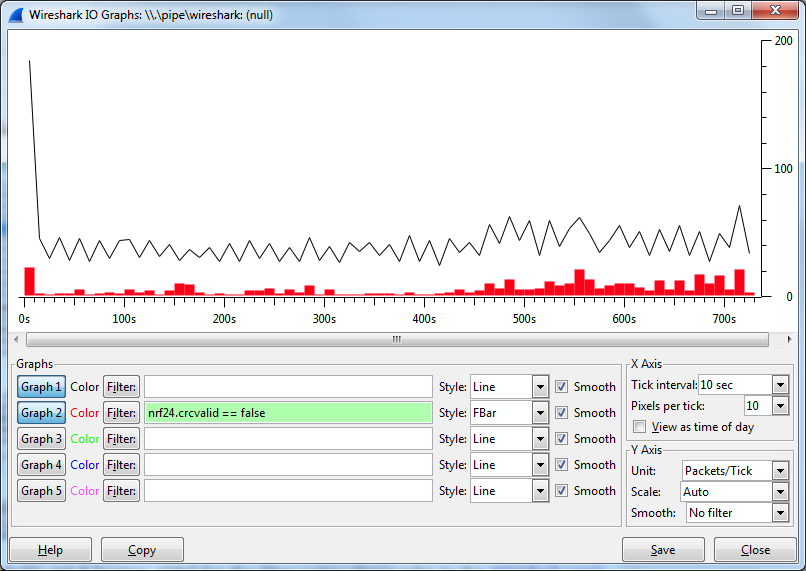
it would be very easy to determine signal quality and the like!
Requires dissection on the sinffer, though. -
It would be a noce idea to create a portable 'sniffer' which you could easily position around the house (compared to a laptop + sniffer).
If it could do charts like Wireshark, e.g.it would be very easy to determine signal quality and the like!
Requires dissection on the sinffer, though. -
So, remember that pcb I showed earlier.
This is what it looks like with a 3D printed green glow in the dark case around it :)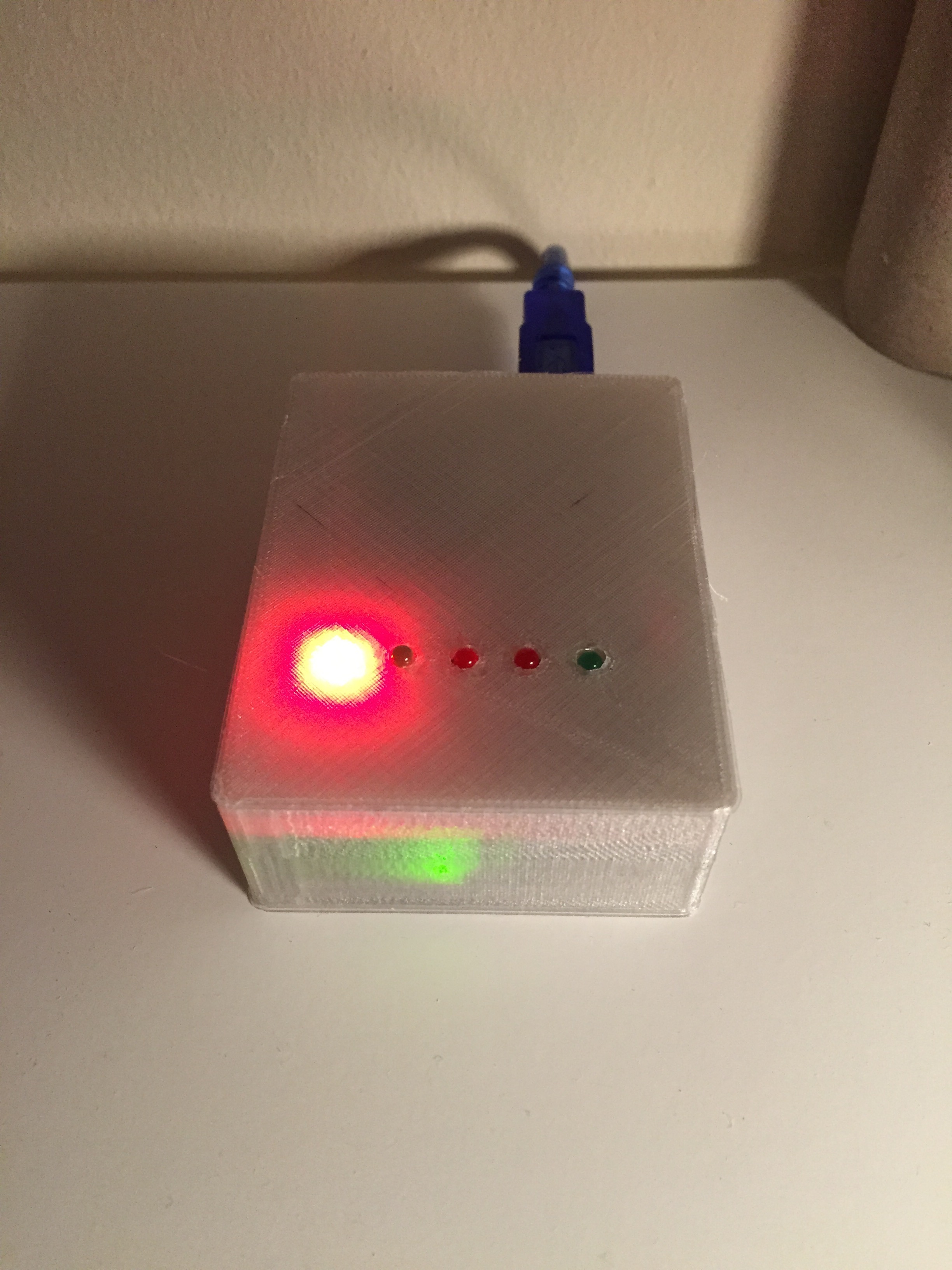
-
A portable version of the nRF24L01+ sniffer could be extremely useful. Anyone know if it would be possible to combining a nRF24L01+ and an ESP8266 into an Arduino giving it the capability to transmit the nRF24L01+ data over WIFI to a computer running wireshark? I dont have the time to research the possibility right now, but will keep this in mind for the future.
-
So, remember that pcb I showed earlier.
This is what it looks like with a 3D printed green glow in the dark case around it :) -
Hello,
Great job !!! I am French so excuse my broken English. Does someone could guide me? At launch Wireshark, I have a message systematically "tvb_lenght The procedure entry point is not found in the dynamic link library C: \ Program Files (x86) \ Wireshark \ plugins \ 1.12.4 \ mysensors1.dll" then same for mysensors2, nrf24.dll, radiohead.dll. I'm sure I added DLL in Wireshark, and tried the 64b version and the 32b, under Windows 8.1. If someone has an idea, THANK YOU :) -
Hello,
Great job !!! I am French so excuse my broken English. Does someone could guide me? At launch Wireshark, I have a message systematically "tvb_lenght The procedure entry point is not found in the dynamic link library C: \ Program Files (x86) \ Wireshark \ plugins \ 1.12.4 \ mysensors1.dll" then same for mysensors2, nrf24.dll, radiohead.dll. I'm sure I added DLL in Wireshark, and tried the 64b version and the 32b, under Windows 8.1. If someone has an idea, THANK YOU :) -
Hi, Nice job what yoh've done here.
Awkardly, I am not able to compile the sketch. I have download the last version available form github, but when I try to compile it, the IDE hungs about 60% and nothingelse happens. The compiler log looks like this:Utilizando biblioteca SPI en carpeta: C:\Program Files\Arduino\hardware\arduino\avr\libraries\SPI
Utilizando biblioteca CircularBuffer_Sniff en carpeta: C:\Users\arnalbago\Documents\Arduino\libraries\CircularBuffer_Sniff (legacy)
Utilizando biblioteca RF24-master en carpeta: C:\Users\arnalbago\Documents\Arduino\libraries\RF24-master (legacy)
Utilizando biblioteca RF24_Sniff en carpeta: C:\Users\arnalbago\Documents\Arduino\libraries\RF24_Sniff (legacy)C:\Program Files\Arduino\hardware\tools\avr/bin/avr-g++ -c -g -Os -fno-exceptions -ffunction-sections -fdata-sections -fno-threadsafe-statics -MMD -mmcu=atmega328p -DF_CPU=16000000L -DARDUINO=10604 -DARDUINO_AVR_NANO -DARDUINO_ARCH_AVR -IC:\Program Files\Arduino\hardware\arduino\avr\cores\arduino -IC:\Program Files\Arduino\hardware\arduino\avr\variants\eightanaloginputs -IC:\Program Files\Arduino\hardware\arduino\avr\libraries\SPI -IC:\Users\arnalbago\Documents\Arduino\libraries\CircularBuffer_Sniff -IC:\Users\arnalbago\Documents\Arduino\libraries\RF24-master -IC:\Users\arnalbago\Documents\Arduino\libraries\RF24_Sniff C:\Users\ARNALB~1\AppData\Local\Temp\build2068833823121923998.tmp\NRF24_sniff.cpp -o C:\Users\ARNALB~1\AppData\Local\Temp\build2068833823121923998.tmp\NRF24_sniff.cpp.o
C:\Program Files\Arduino\hardware\tools\avr/bin/avr-g++ -c -g -Os -fno-exceptions -ffunction-sections -fdata-sections -fno-threadsafe-statics -MMD -mmcu=atmega328p -DF_CPU=16000000L -DARDUINO=10604 -DARDUINO_AVR_NANO -DARDUINO_ARCH_AVR -IC:\Program Files\Arduino\hardware\arduino\avr\cores\arduino -IC:\Program Files\Arduino\hardware\arduino\avr\variants\eightanaloginputs -IC:\Program Files\Arduino\hardware\arduino\avr\libraries\SPI -IC:\Users\arnalbago\Documents\Arduino\libraries\CircularBuffer_Sniff -IC:\Users\arnalbago\Documents\Arduino\libraries\RF24-master -IC:\Users\arnalbago\Documents\Arduino\libraries\RF24_Sniff C:\Users\ARNALB~1\AppData\Local\Temp\build2068833823121923998.tmp\RF24.cpp -o C:\Users\ARNALB~1\AppData\Local\Temp\build2068833823121923998.tmp\RF24.cpp.o
Utilizando archivo previamente compilado: C:\Users\ARNALB~1\AppData\Local\Temp\build2068833823121923998.tmp\SPI\SPI.cpp.o
Utilizando archivo previamente compilado: C:\Users\ARNALB~1\AppData\Local\Temp\build2068833823121923998.tmp\RF24-master\RF24.cpp.o
Utilizando archivo previamente compilado: C:\Users\ARNALB~1\AppData\Local\Temp\build2068833823121923998.tmp\RF24_Sniff\RF24.cpp.o
Utilizando archivo previamente compilado: C:\Users\ARNALB~1\AppData\Local\Temp\build2068833823121923998.tmp\hooks.c.o
Utilizando archivo previamente compilado: C:\Users\ARNALB~1\AppData\Local\Temp\build2068833823121923998.tmp\WInterrupts.c.o
Utilizando archivo previamente compilado: C:\Users\ARNALB~1\AppData\Local\Temp\build2068833823121923998.tmp\wiring.c.o
Utilizando archivo previamente compilado: C:\Users\ARNALB~1\AppData\Local\Temp\build2068833823121923998.tmp\wiring_analog.c.o
Utilizando archivo previamente compilado: C:\Users\ARNALB~1\AppData\Local\Temp\build2068833823121923998.tmp\wiring_digital.c.o
Utilizando archivo previamente compilado: C:\Users\ARNALB~1\AppData\Local\Temp\build2068833823121923998.tmp\wiring_pulse.c.o
Utilizando archivo previamente compilado: C:\Users\ARNALB~1\AppData\Local\Temp\build2068833823121923998.tmp\wiring_shift.c.o
Utilizando archivo previamente compilado: C:\Users\ARNALB~1\AppData\Local\Temp\build2068833823121923998.tmp\abi.cpp.o
Utilizando archivo previamente compilado: C:\Users\ARNALB~1\AppData\Local\Temp\build2068833823121923998.tmp\CDC.cpp.o
Utilizando archivo previamente compilado: C:\Users\ARNALB~1\AppData\Local\Temp\build2068833823121923998.tmp\HardwareSerial.cpp.o
Utilizando archivo previamente compilado: C:\Users\ARNALB~1\AppData\Local\Temp\build2068833823121923998.tmp\HardwareSerial0.cpp.o
Utilizando archivo previamente compilado: C:\Users\ARNALB~1\AppData\Local\Temp\build2068833823121923998.tmp\HardwareSerial1.cpp.o
Utilizando archivo previamente compilado: C:\Users\ARNALB~1\AppData\Local\Temp\build2068833823121923998.tmp\HardwareSerial2.cpp.o
Utilizando archivo previamente compilado: C:\Users\ARNALB~1\AppData\Local\Temp\build2068833823121923998.tmp\HardwareSerial3.cpp.o
Utilizando archivo previamente compilado: C:\Users\ARNALB~1\AppData\Local\Temp\build2068833823121923998.tmp\HID.cpp.o
Utilizando archivo previamente compilado: C:\Users\ARNALB~1\AppData\Local\Temp\build2068833823121923998.tmp\IPAddress.cpp.o
Utilizando archivo previamente compilado: C:\Users\ARNALB~1\AppData\Local\Temp\build2068833823121923998.tmp\main.cpp.o
Utilizando archivo previamente compilado: C:\Users\ARNALB~1\AppData\Local\Temp\build2068833823121923998.tmp\new.cpp.o
Utilizando archivo previamente compilado: C:\Users\ARNALB~1\AppData\Local\Temp\build2068833823121923998.tmp\Print.cpp.o
Utilizando archivo previamente compilado: C:\Users\ARNALB~1\AppData\Local\Temp\build2068833823121923998.tmp\Stream.cpp.o
Utilizando archivo previamente compilado: C:\Users\ARNALB~1\AppData\Local\Temp\build2068833823121923998.tmp\Tone.cpp.o
Utilizando archivo previamente compilado: C:\Users\ARNALB~1\AppData\Local\Temp\build2068833823121923998.tmp\USBCore.cpp.o
Utilizando archivo previamente compilado: C:\Users\ARNALB~1\AppData\Local\Temp\build2068833823121923998.tmp\WMath.cpp.o
Utilizando archivo previamente compilado: C:\Users\ARNALB~1\AppData\Local\Temp\build2068833823121923998.tmp\WString.cpp.o
Utilizando archivo previamente compilado: C:\Users\ARNALB~1\AppData\Local\Temp\build2068833823121923998.tmp\core.a
C:\Program Files\Arduino\hardware\tools\avr/bin/avr-gcc -Os -Wl,--gc-sections -mmcu=atmega328p -o C:\Users\ARNALB~1\AppData\Local\Temp\build2068833823121923998.tmp/NRF24_sniff.cpp.elf C:\Users\ARNALB~1\AppData\Local\Temp\build2068833823121923998.tmp\NRF24_sniff.cpp.o C:\Users\ARNALB~1\AppData\Local\Temp\build2068833823121923998.tmp\RF24.cpp.o C:\Users\ARNALB~1\AppData\Local\Temp\build2068833823121923998.tmp\SPI\SPI.cpp.o C:\Users\ARNALB~1\AppData\Local\Temp\build2068833823121923998.tmp\RF24-master\RF24.cpp.o C:\Users\ARNALB~1\AppData\Local\Temp\build2068833823121923998.tmp\RF24_Sniff\RF24.cpp.o C:\Users\ARNALB~1\AppData\Local\Temp\build2068833823121923998.tmp/core.a -LC:\Users\ARNALB~1\AppData\Local\Temp\build2068833823121923998.tmp -lmDoes anyone know what could be happening with this?
I would appreciate any help you can provide.Thanks, regards.
-
Hi, Nice job what yoh've done here.
Awkardly, I am not able to compile the sketch. I have download the last version available form github, but when I try to compile it, the IDE hungs about 60% and nothingelse happens. The compiler log looks like this:Utilizando biblioteca SPI en carpeta: C:\Program Files\Arduino\hardware\arduino\avr\libraries\SPI
Utilizando biblioteca CircularBuffer_Sniff en carpeta: C:\Users\arnalbago\Documents\Arduino\libraries\CircularBuffer_Sniff (legacy)
Utilizando biblioteca RF24-master en carpeta: C:\Users\arnalbago\Documents\Arduino\libraries\RF24-master (legacy)
Utilizando biblioteca RF24_Sniff en carpeta: C:\Users\arnalbago\Documents\Arduino\libraries\RF24_Sniff (legacy)C:\Program Files\Arduino\hardware\tools\avr/bin/avr-g++ -c -g -Os -fno-exceptions -ffunction-sections -fdata-sections -fno-threadsafe-statics -MMD -mmcu=atmega328p -DF_CPU=16000000L -DARDUINO=10604 -DARDUINO_AVR_NANO -DARDUINO_ARCH_AVR -IC:\Program Files\Arduino\hardware\arduino\avr\cores\arduino -IC:\Program Files\Arduino\hardware\arduino\avr\variants\eightanaloginputs -IC:\Program Files\Arduino\hardware\arduino\avr\libraries\SPI -IC:\Users\arnalbago\Documents\Arduino\libraries\CircularBuffer_Sniff -IC:\Users\arnalbago\Documents\Arduino\libraries\RF24-master -IC:\Users\arnalbago\Documents\Arduino\libraries\RF24_Sniff C:\Users\ARNALB~1\AppData\Local\Temp\build2068833823121923998.tmp\NRF24_sniff.cpp -o C:\Users\ARNALB~1\AppData\Local\Temp\build2068833823121923998.tmp\NRF24_sniff.cpp.o
C:\Program Files\Arduino\hardware\tools\avr/bin/avr-g++ -c -g -Os -fno-exceptions -ffunction-sections -fdata-sections -fno-threadsafe-statics -MMD -mmcu=atmega328p -DF_CPU=16000000L -DARDUINO=10604 -DARDUINO_AVR_NANO -DARDUINO_ARCH_AVR -IC:\Program Files\Arduino\hardware\arduino\avr\cores\arduino -IC:\Program Files\Arduino\hardware\arduino\avr\variants\eightanaloginputs -IC:\Program Files\Arduino\hardware\arduino\avr\libraries\SPI -IC:\Users\arnalbago\Documents\Arduino\libraries\CircularBuffer_Sniff -IC:\Users\arnalbago\Documents\Arduino\libraries\RF24-master -IC:\Users\arnalbago\Documents\Arduino\libraries\RF24_Sniff C:\Users\ARNALB~1\AppData\Local\Temp\build2068833823121923998.tmp\RF24.cpp -o C:\Users\ARNALB~1\AppData\Local\Temp\build2068833823121923998.tmp\RF24.cpp.o
Utilizando archivo previamente compilado: C:\Users\ARNALB~1\AppData\Local\Temp\build2068833823121923998.tmp\SPI\SPI.cpp.o
Utilizando archivo previamente compilado: C:\Users\ARNALB~1\AppData\Local\Temp\build2068833823121923998.tmp\RF24-master\RF24.cpp.o
Utilizando archivo previamente compilado: C:\Users\ARNALB~1\AppData\Local\Temp\build2068833823121923998.tmp\RF24_Sniff\RF24.cpp.o
Utilizando archivo previamente compilado: C:\Users\ARNALB~1\AppData\Local\Temp\build2068833823121923998.tmp\hooks.c.o
Utilizando archivo previamente compilado: C:\Users\ARNALB~1\AppData\Local\Temp\build2068833823121923998.tmp\WInterrupts.c.o
Utilizando archivo previamente compilado: C:\Users\ARNALB~1\AppData\Local\Temp\build2068833823121923998.tmp\wiring.c.o
Utilizando archivo previamente compilado: C:\Users\ARNALB~1\AppData\Local\Temp\build2068833823121923998.tmp\wiring_analog.c.o
Utilizando archivo previamente compilado: C:\Users\ARNALB~1\AppData\Local\Temp\build2068833823121923998.tmp\wiring_digital.c.o
Utilizando archivo previamente compilado: C:\Users\ARNALB~1\AppData\Local\Temp\build2068833823121923998.tmp\wiring_pulse.c.o
Utilizando archivo previamente compilado: C:\Users\ARNALB~1\AppData\Local\Temp\build2068833823121923998.tmp\wiring_shift.c.o
Utilizando archivo previamente compilado: C:\Users\ARNALB~1\AppData\Local\Temp\build2068833823121923998.tmp\abi.cpp.o
Utilizando archivo previamente compilado: C:\Users\ARNALB~1\AppData\Local\Temp\build2068833823121923998.tmp\CDC.cpp.o
Utilizando archivo previamente compilado: C:\Users\ARNALB~1\AppData\Local\Temp\build2068833823121923998.tmp\HardwareSerial.cpp.o
Utilizando archivo previamente compilado: C:\Users\ARNALB~1\AppData\Local\Temp\build2068833823121923998.tmp\HardwareSerial0.cpp.o
Utilizando archivo previamente compilado: C:\Users\ARNALB~1\AppData\Local\Temp\build2068833823121923998.tmp\HardwareSerial1.cpp.o
Utilizando archivo previamente compilado: C:\Users\ARNALB~1\AppData\Local\Temp\build2068833823121923998.tmp\HardwareSerial2.cpp.o
Utilizando archivo previamente compilado: C:\Users\ARNALB~1\AppData\Local\Temp\build2068833823121923998.tmp\HardwareSerial3.cpp.o
Utilizando archivo previamente compilado: C:\Users\ARNALB~1\AppData\Local\Temp\build2068833823121923998.tmp\HID.cpp.o
Utilizando archivo previamente compilado: C:\Users\ARNALB~1\AppData\Local\Temp\build2068833823121923998.tmp\IPAddress.cpp.o
Utilizando archivo previamente compilado: C:\Users\ARNALB~1\AppData\Local\Temp\build2068833823121923998.tmp\main.cpp.o
Utilizando archivo previamente compilado: C:\Users\ARNALB~1\AppData\Local\Temp\build2068833823121923998.tmp\new.cpp.o
Utilizando archivo previamente compilado: C:\Users\ARNALB~1\AppData\Local\Temp\build2068833823121923998.tmp\Print.cpp.o
Utilizando archivo previamente compilado: C:\Users\ARNALB~1\AppData\Local\Temp\build2068833823121923998.tmp\Stream.cpp.o
Utilizando archivo previamente compilado: C:\Users\ARNALB~1\AppData\Local\Temp\build2068833823121923998.tmp\Tone.cpp.o
Utilizando archivo previamente compilado: C:\Users\ARNALB~1\AppData\Local\Temp\build2068833823121923998.tmp\USBCore.cpp.o
Utilizando archivo previamente compilado: C:\Users\ARNALB~1\AppData\Local\Temp\build2068833823121923998.tmp\WMath.cpp.o
Utilizando archivo previamente compilado: C:\Users\ARNALB~1\AppData\Local\Temp\build2068833823121923998.tmp\WString.cpp.o
Utilizando archivo previamente compilado: C:\Users\ARNALB~1\AppData\Local\Temp\build2068833823121923998.tmp\core.a
C:\Program Files\Arduino\hardware\tools\avr/bin/avr-gcc -Os -Wl,--gc-sections -mmcu=atmega328p -o C:\Users\ARNALB~1\AppData\Local\Temp\build2068833823121923998.tmp/NRF24_sniff.cpp.elf C:\Users\ARNALB~1\AppData\Local\Temp\build2068833823121923998.tmp\NRF24_sniff.cpp.o C:\Users\ARNALB~1\AppData\Local\Temp\build2068833823121923998.tmp\RF24.cpp.o C:\Users\ARNALB~1\AppData\Local\Temp\build2068833823121923998.tmp\SPI\SPI.cpp.o C:\Users\ARNALB~1\AppData\Local\Temp\build2068833823121923998.tmp\RF24-master\RF24.cpp.o C:\Users\ARNALB~1\AppData\Local\Temp\build2068833823121923998.tmp\RF24_Sniff\RF24.cpp.o C:\Users\ARNALB~1\AppData\Local\Temp\build2068833823121923998.tmp/core.a -LC:\Users\ARNALB~1\AppData\Local\Temp\build2068833823121923998.tmp -lmDoes anyone know what could be happening with this?
I would appreciate any help you can provide.Thanks, regards.
@gonzalonal I reproduced compiling the latest version on Github with Arduino IDE 1.6.5.
It compiles without problems on my IDE, on Windows.
Some things you can try:- Reinstall the Arduino IDE and/or make sure you're using 1.6.5
- Extract the NRF24 Sniffer source code to its own sketchbook location. Don't put any other stuff in there (e.g. no MySensors libraries). Point the Arduino IDE to this location (File -> Preferences -> Sketchbook location, save and restart the IDE)
Good luck!
-
@gonzalonal I reproduced compiling the latest version on Github with Arduino IDE 1.6.5.
It compiles without problems on my IDE, on Windows.
Some things you can try:- Reinstall the Arduino IDE and/or make sure you're using 1.6.5
- Extract the NRF24 Sniffer source code to its own sketchbook location. Don't put any other stuff in there (e.g. no MySensors libraries). Point the Arduino IDE to this location (File -> Preferences -> Sketchbook location, save and restart the IDE)
Good luck!
@Yveaux
Thanks Yveaux. Pointing the sketch path in the right direction made the trick.
Once again, thanks.Regards.
-
Is there anyone who has the Wireshark dissectors for the latest 1.5 api?
Mine is complaining about "The Procedure entry point tvb_length could not be located in the DLL library libwireshark.dll"

Hello! It looks like you're interested in this conversation, but you don't have an account yet.
Getting fed up of having to scroll through the same posts each visit? When you register for an account, you'll always come back to exactly where you were before, and choose to be notified of new replies (either via email, or push notification). You'll also be able to save bookmarks and upvote posts to show your appreciation to other community members.
With your input, this post could be even better 💗
Register Login