Skip to content
  • MySensors
  • OpenHardware.io
  • Categories
  • Recent
  • Tags
  • Popular
Skins
  • Light
  • Brite
  • Cerulean
  • Cosmo
  • Flatly
  • Journal
  • Litera
  • Lumen
  • Lux
  • Materia
  • Minty
  • Morph
  • Pulse
  • Sandstone
  • Simplex
  • Sketchy
  • Spacelab
  • United
  • Yeti
  • Zephyr
  • Dark
  • Cyborg
  • Darkly
  • Quartz
  • Slate
  • Solar
  • Superhero
  • Vapor

  • Default (No Skin)
  • No Skin
Collapse
Brand Logo
  1. Home
  2. Troubleshooting
  3. What is wrong with this node?

What is wrong with this node?

Scheduled Pinned Locked Moved Troubleshooting
10 Posts 7 Posters 3.9k Views 2 Watching
  • Oldest to Newest
  • Newest to Oldest
  • Most Votes
Reply
  • Reply as topic
Log in to reply
This topic has been deleted. Only users with topic management privileges can see it.
  • 5546dug5 Offline
    5546dug5 Offline
    5546dug
    wrote on last edited by
    #1

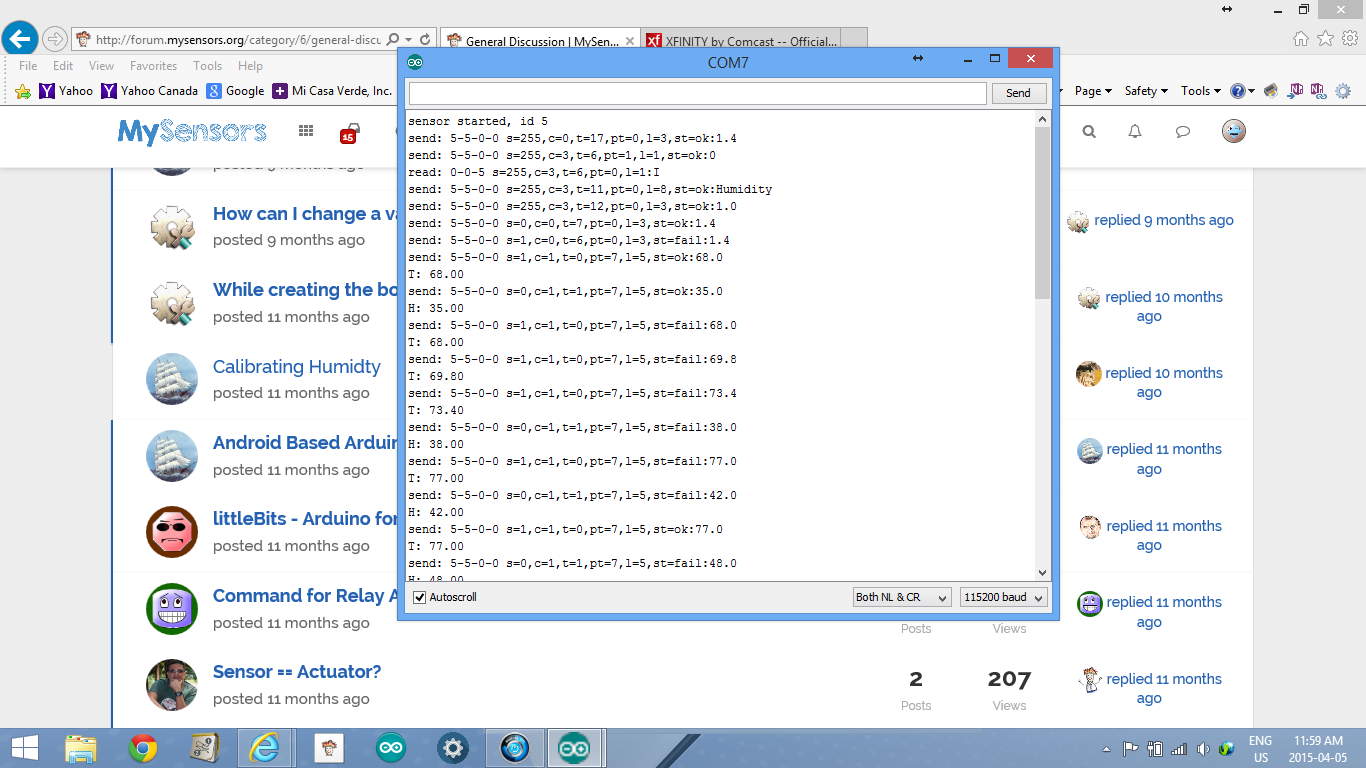
    Screenshot (42).png

    What am I missing with this node, it is plugged into laptop and running ide serial readout.

    I have all running on ver 1.4
    with6.1 ide
    mini pro 5v
    dt11
    using usb2serial interface
    temp report 30 sec
    hum report on change
    I understand most of what is presented however, the part after the length of payload is "st=fail:68.0
    temp=68.0"
    It must be telling me something but I can't find out what and the serial g/wand vera3 does not see an update or change in temp/hum.

    Is there a thread on this or can you offer info?
    thanks

    1 Reply Last reply
    0
    • K Offline
      K Offline
      kalle
      wrote on last edited by
      #2

      It looks like your node will stream the temperature to your gateway, but it fails. Did you use a capacitor on the NRF24 chip?

      1 Reply Last reply
      0
      • G Offline
        G Offline
        GuyP
        wrote on last edited by
        #3

        Which gateway have you used? serial or ethernet? can you show the serial diag data from that as well? maybe they are out of range of each other

        1 Reply Last reply
        0
        • A Offline
          A Offline
          andriej
          wrote on last edited by
          #4

          I had some similiar issues.

          Now I use Ethernet Gateway, changed channel in Config and re-clearead EEPROM on every node...
          Problem seem to be missing, but sometimes node's just loose connection (even if it's only one wall away...)

          :-)

          1 Reply Last reply
          0
          • M Offline
            M Offline
            mikeones
            wrote on last edited by
            #5

            If you have the hardware, hook up a sniffer and see what is happening with wireshark at the network layer. I had similar issues and found with the help of the sniffer, my node was having resend/timeout issues even being a couple of feet away. Playing with the channel and data rate, I was able to get a better signal and those st fail messages have stopped. This node is normally in the garage so the interference I had on the default channel was causing issues. Use the sniffer to see what is happening at the network layer.

            1 Reply Last reply
            0
            • 5546dug5 Offline
              5546dug5 Offline
              5546dug
              wrote on last edited by
              #6

              No @andriej , I have no sniffer but any ideawhat the st =fail is in regards to?
              @GuyP , I use serial g/w at the moment, what is serial diag data and there is cap on radio 4.7 microfarads.
              Funny all the other nodes seem to be ok, I did at one time have this running through a repeater node to g/w, but it always reverted back to g/w as mother node.

              1 Reply Last reply
              0
              • 5546dug5 Offline
                5546dug5 Offline
                5546dug
                wrote on last edited by
                #7

                Also,I may have not stated that this node doesn't update even with a reset or two.

                1 Reply Last reply
                0
                • CorvlC Offline
                  CorvlC Offline
                  Corvl
                  wrote on last edited by Corvl
                  #8

                  Looks like I got the same ..... I have a nano with a temp sensor on it and reed switch , and 8 out of 10 times it sends it status change. but sometimes it doesn't.

                  send: 2-2-0-0 s=0,c=1,t=0,pt=7,l=5,st=fail:25.0
                  send: 2-2-0-0 s=0,c=1,t=0,pt=7,l=5,st=fail:25.1
                  send: 2-2-0-0 s=17,c=1,t=16,pt=2,l=2,st=fail:1
                  send: 2-2-0-0 s=0,c=1,t=0,pt=7,l=5,st=fail:25.2
                  send: 2-2-0-0 s=17,c=1,t=16,pt=2,l=2,st=fail:0
                  send: 2-2-0-0 s=0,c=1,t=0,pt=7,l=5,st=fail:25.3
                  send: 2-2-0-0 s=17,c=1,t=16,pt=2,l=2,st=fail:1
                  send: 2-2-255-255 s=255,c=3,t=7,pt=0,l=0,st=fail:
                  

                  I ended up removing a part in the sketch that it not only sends with the status change but every 30 seconds. Not ideal , but good enough.

                  Hopefully you find out the issue.

                  Cor

                  1 Reply Last reply
                  0
                  • 5546dug5 Offline
                    5546dug5 Offline
                    5546dug
                    wrote on last edited by
                    #9

                    What does st=fail mean and what or where is this located?
                    The node ,the g/w, eprom.

                    It looks as though node 5 sends to 0 (g/w) but the message is not there, is it stuck and do I look in node 5 or g/w?

                    1 Reply Last reply
                    0
                    • H Offline
                      H Offline
                      hek
                      Admin
                      wrote on last edited by
                      #10

                      st=fail indicates that sending node never received any acknowledgment back from the recipient.

                      It could be a few reasons for this. Here is a selection.

                      1. Recipient does not have enough power to transmit the ack back (try adding a larger/different cap on the receiving radio).
                      2. Distance is too long.
                      3. A bad spiky power supply is used.
                      4. One or both your radios is fake/clone NRF24L01+. Seen discussions that this kind of behaviour could arise.
                      1 Reply Last reply
                      0

                      Hello! It looks like you're interested in this conversation, but you don't have an account yet.

                      Getting fed up of having to scroll through the same posts each visit? When you register for an account, you'll always come back to exactly where you were before, and choose to be notified of new replies (either via email, or push notification). You'll also be able to save bookmarks and upvote posts to show your appreciation to other community members.

                      With your input, this post could be even better 💗

                      Register Login
                      Reply
                      • Reply as topic
                      Log in to reply
                      • Oldest to Newest
                      • Newest to Oldest
                      • Most Votes


                      11

                      Online

                      12.0k

                      Users

                      11.2k

                      Topics

                      113.4k

                      Posts


                      Copyright 2025 TBD   |   Forum Guidelines   |   Privacy Policy   |   Terms of Service
                      • Login

                      • Don't have an account? Register

                      • Login or register to search.
                      • First post
                        Last post
                      0
                      • MySensors
                      • OpenHardware.io
                      • Categories
                      • Recent
                      • Tags
                      • Popular