Skip to content
  • MySensors
  • OpenHardware.io
  • Categories
  • Recent
  • Tags
  • Popular
Skins
  • Light
  • Brite
  • Cerulean
  • Cosmo
  • Flatly
  • Journal
  • Litera
  • Lumen
  • Lux
  • Materia
  • Minty
  • Morph
  • Pulse
  • Sandstone
  • Simplex
  • Sketchy
  • Spacelab
  • United
  • Yeti
  • Zephyr
  • Dark
  • Cyborg
  • Darkly
  • Quartz
  • Slate
  • Solar
  • Superhero
  • Vapor

  • Default (No Skin)
  • No Skin
Collapse
Brand Logo
  1. Home
  2. General Discussion
  3. Question concerning low voltage arduino Pro mini

Question concerning low voltage arduino Pro mini

Scheduled Pinned Locked Moved General Discussion
16 Posts 5 Posters 7.9k Views 2 Watching
  • Oldest to Newest
  • Newest to Oldest
  • Most Votes
Reply
  • Reply as topic
Log in to reply
This topic has been deleted. Only users with topic management privileges can see it.
  • dakkyD dakky

    Hello

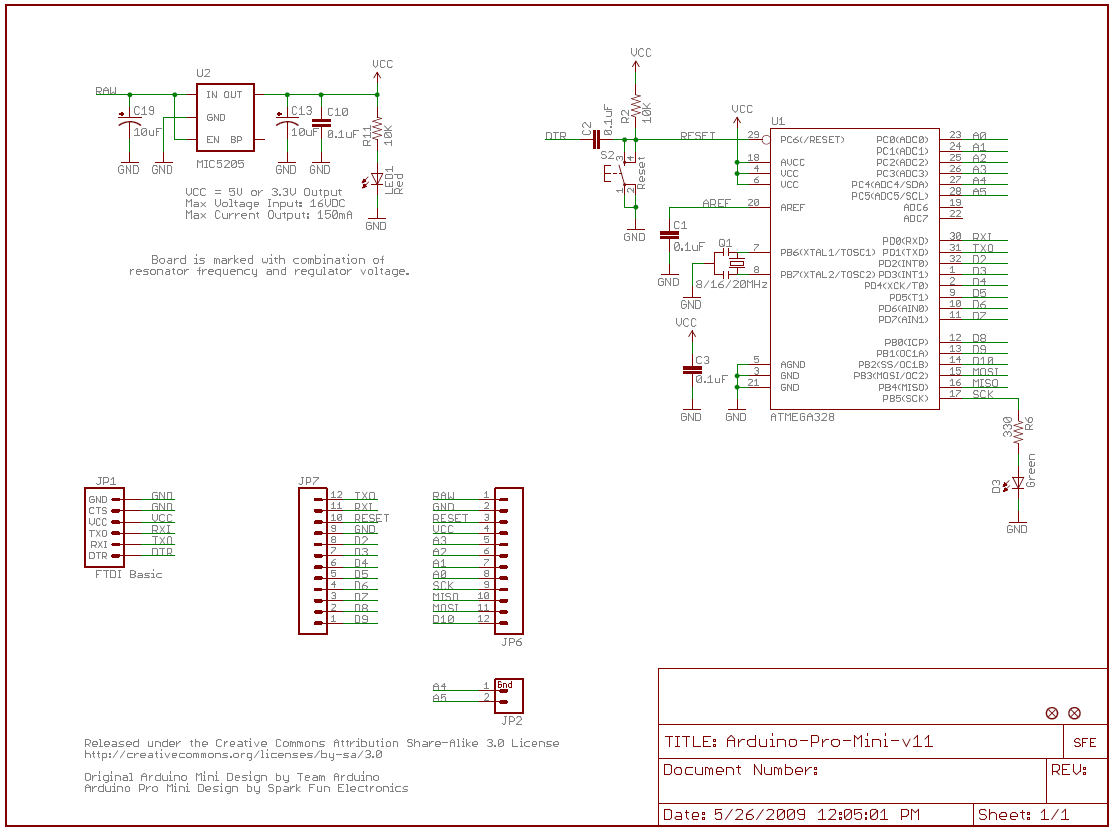
    i don't understand, how to connect my ftdi programmer to the low power tweaked arduino pro mini

    http://www.mysensors.org/battery/ProMiniMod.png

    how is the ardiuno powered, while the sketches get uploaded? Or is this only for 5V ftdi programmers? Mine can be jumpered to 3.3V

    Thx

    AnticimexA Offline
    AnticimexA Offline
    Anticimex
    Contest Winner
    wrote on last edited by
    #2

    @dakky You cut out the regulator that provides 3.3V from the RAW pin (which can be a larger voltage). When you have cut the regulator, you are expected to provide a "clean" 3.3V voltage on VCC pin(s) (which the programmer does when programming).

    Do you feel secure today? No? Start requiring some signatures and feel better tomorrow ;)

    1 Reply Last reply
    0
    • dakkyD Offline
      dakkyD Offline
      dakky
      wrote on last edited by dakky
      #3

      Hurm i thought, vcc ALWAYS has to be a clean voltage, in case of the 3.3V Arduino 3.3V confused
      or is it only important not to connect the vcc pin, when using a 5v programmer?

      Controller: Raspberry Pi 2 :: Openhab2 :: with @TimO MySensors Binding
      Gateway: Arduino MEGA 2560 R3 :: W5100 :: Ethernet GW

      Software: MySensors 2.0development

      AnticimexA 1 Reply Last reply
      0
      • dakkyD dakky

        Hurm i thought, vcc ALWAYS has to be a clean voltage, in case of the 3.3V Arduino 3.3V confused
        or is it only important not to connect the vcc pin, when using a 5v programmer?

        AnticimexA Offline
        AnticimexA Offline
        Anticimex
        Contest Winner
        wrote on last edited by
        #4

        @dakky What do you mean? VCC ALWAYS has to be a clean voltage. Also from programmer. You have to use a 3.3V capable programmer (or rather, FTDI interface) when interfacing with a 3.3V Arduino.
        If you use a 5V FTDI interface, you will fry the Arduino unless you cut the VCC pin on the programmer header (in which case you have to provide 3.3V on the other VCC pin).

        Do you feel secure today? No? Start requiring some signatures and feel better tomorrow ;)

        1 Reply Last reply
        0
        • dakkyD Offline
          dakkyD Offline
          dakky
          wrote on last edited by
          #5

          mission accomplished: everbody is confused ^^

          ok in my eyes removing the regultator results in one thing: using the RAW pin with more than 3.3V will kill the arduino. but the pin we are talking about is the vcc pin on the ftdi interface (is interface the correct word btw?)
          i'm aware, that on (every?) vcc pin on the board the max voltage is 3.3V. but should i not power the vcc from the programmer? When looking on the image above, it says: dont connect the vcc pin. i don't see the reason, because

          1. i need some kind of power
          2. of course i should put a max of 3.3V on this pin (as always when connecting the vcc pin)

          so i don't see any reson why not to use this pin.

          That's my problem ;)

          Controller: Raspberry Pi 2 :: Openhab2 :: with @TimO MySensors Binding
          Gateway: Arduino MEGA 2560 R3 :: W5100 :: Ethernet GW

          Software: MySensors 2.0development

          AnticimexA 1 Reply Last reply
          0
          • dakkyD dakky

            mission accomplished: everbody is confused ^^

            ok in my eyes removing the regultator results in one thing: using the RAW pin with more than 3.3V will kill the arduino. but the pin we are talking about is the vcc pin on the ftdi interface (is interface the correct word btw?)
            i'm aware, that on (every?) vcc pin on the board the max voltage is 3.3V. but should i not power the vcc from the programmer? When looking on the image above, it says: dont connect the vcc pin. i don't see the reason, because

            1. i need some kind of power
            2. of course i should put a max of 3.3V on this pin (as always when connecting the vcc pin)

            so i don't see any reson why not to use this pin.

            That's my problem ;)

            AnticimexA Offline
            AnticimexA Offline
            Anticimex
            Contest Winner
            wrote on last edited by
            #6

            @dakky If you remove the regulator, RAW pin is useless. The regulator is responsible of regulating the RAW voltage into 3.3V. Remove it, and you will not be able to regulate the RAW voltage (and it will not have a path to VCC either) as you can see here.

            When you program the Arduino it has to receive power. I do not know your setup, but you have two options:

            1. Supply power from a 3.3V FTDI programming interface
            2. Supply power from another source (and make sure a 5V FTDI programming interface does not connect to a VCC pin).

            I do not know who made the picture but I would assume that it is for those with an 3.3V Arduino and a 5V FTDI board.

            Do you feel secure today? No? Start requiring some signatures and feel better tomorrow ;)

            1 Reply Last reply
            1
            • dakkyD Offline
              dakkyD Offline
              dakky
              wrote on last edited by
              #7

              ah now i understand ... and feel a little bit stupid :P

              maybe trying to think too much about simple things .. thanks for your patience

              Controller: Raspberry Pi 2 :: Openhab2 :: with @TimO MySensors Binding
              Gateway: Arduino MEGA 2560 R3 :: W5100 :: Ethernet GW

              Software: MySensors 2.0development

              AnticimexA 1 Reply Last reply
              0
              • dakkyD dakky

                ah now i understand ... and feel a little bit stupid :P

                maybe trying to think too much about simple things .. thanks for your patience

                AnticimexA Offline
                AnticimexA Offline
                Anticimex
                Contest Winner
                wrote on last edited by
                #8

                @dakky No worries. Better to think too much than too little :)

                Do you feel secure today? No? Start requiring some signatures and feel better tomorrow ;)

                1 Reply Last reply
                0
                • FotoFieberF Offline
                  FotoFieberF Offline
                  FotoFieber
                  Hardware Contributor
                  wrote on last edited by
                  #9

                  The 328P is working with
                  8 MHz in the range of +2.7 - +5.5 V

                  I do program all my arduinos with 5V.

                  Detach the NRF24L01+ and other 3.3V sensors or they may die while you attach 5V.

                  Use at your own risk. :)

                  AnticimexA 1 Reply Last reply
                  0
                  • FotoFieberF FotoFieber

                    The 328P is working with
                    8 MHz in the range of +2.7 - +5.5 V

                    I do program all my arduinos with 5V.

                    Detach the NRF24L01+ and other 3.3V sensors or they may die while you attach 5V.

                    Use at your own risk. :)

                    AnticimexA Offline
                    AnticimexA Offline
                    Anticimex
                    Contest Winner
                    wrote on last edited by
                    #10

                    @FotoFieber @dakky yeah, but the cheap Chinese clones on eBay does not because people have reported them dying so make sure you use "genuine" HW in that case. I have not experienced it myself because my ftdi board is 3.3V only and it's only my gw (Arduino nano) that run on 5V and that one has "native" USB so no ftdi board is needed.

                    Do you feel secure today? No? Start requiring some signatures and feel better tomorrow ;)

                    1 Reply Last reply
                    0
                    • tbowmoT Offline
                      tbowmoT Offline
                      tbowmo
                      Admin
                      wrote on last edited by
                      #11

                      I think one of the problems, of dying 3V3 arduinos, is people that doesn't disconnect the 3V3 regulator on board. If you then supply the board with 5V on VCC pins, you might destroy the regulator, which then could short circuit.

                      But if the regulator is removed from the circuit, as in this example, I don't see any thing wrong in supplying the arduino with 5V on the VCC pins, but you should take care of any connected peripherals, that aren't 5V compatible.

                      1 Reply Last reply
                      0
                      • AnticimexA Offline
                        AnticimexA Offline
                        Anticimex
                        Contest Winner
                        wrote on last edited by
                        #12

                        I see. Perhaps the site should be updated to clarify this. It has a section for FTDI voltage selection. Ping @hek

                        Do you feel secure today? No? Start requiring some signatures and feel better tomorrow ;)

                        1 Reply Last reply
                        0
                        • hekH Offline
                          hekH Offline
                          hek
                          Admin
                          wrote on last edited by
                          #13

                          @Anticimex

                          So what should I update?

                          When doing FTDI upload for 3v3 Pro Minis, shouldn't the FTDI be set to 3v3?
                          I would rather not make this page to complex as it is part of the "getting started" guide.

                          AnticimexA 1 Reply Last reply
                          0
                          • hekH hek

                            @Anticimex

                            So what should I update?

                            When doing FTDI upload for 3v3 Pro Minis, shouldn't the FTDI be set to 3v3?
                            I would rather not make this page to complex as it is part of the "getting started" guide.

                            AnticimexA Offline
                            AnticimexA Offline
                            Anticimex
                            Contest Winner
                            wrote on last edited by
                            #14

                            @hek Perhaps it is fine as it is. I just thought that since this thread was created in the first plase, there is room for confusion. Especially since the picture linked in the authors first post is from the site.

                            Do you feel secure today? No? Start requiring some signatures and feel better tomorrow ;)

                            1 Reply Last reply
                            0
                            • dakkyD Offline
                              dakkyD Offline
                              dakky
                              wrote on last edited by
                              #15

                              In this case a simple note on the battery site, that we have to be careful to supply a stable 3v3 source after removing the regulator would help.
                              For you, as u are much more experienced, this is a nobrainer, but for beginners like me, this remark would help.

                              Controller: Raspberry Pi 2 :: Openhab2 :: with @TimO MySensors Binding
                              Gateway: Arduino MEGA 2560 R3 :: W5100 :: Ethernet GW

                              Software: MySensors 2.0development

                              1 Reply Last reply
                              0
                              • hekH Offline
                                hekH Offline
                                hek
                                Admin
                                wrote on last edited by
                                #16

                                Ok, added a note over there. Will pop up next time I deploy.

                                1 Reply Last reply
                                1
                                Reply
                                • Reply as topic
                                Log in to reply
                                • Oldest to Newest
                                • Newest to Oldest
                                • Most Votes


                                31

                                Online

                                11.7k

                                Users

                                11.2k

                                Topics

                                113.1k

                                Posts


                                Copyright 2025 TBD   |   Forum Guidelines   |   Privacy Policy   |   Terms of Service
                                • Login

                                • Don't have an account? Register

                                • Login or register to search.
                                • First post
                                  Last post
                                0
                                • MySensors
                                • OpenHardware.io
                                • Categories
                                • Recent
                                • Tags
                                • Popular