
Problems getting sensorID
-
Hi Yveaux, and thanks for your answer. Because i dream about wireless sensors since years, i don't want to give up to early, even if there are problems and much work to do. I already knows about the '\n' terminator and really took care to send LF (0x0A) in each of my tested programs, but thanks to name it as possible failure cause.
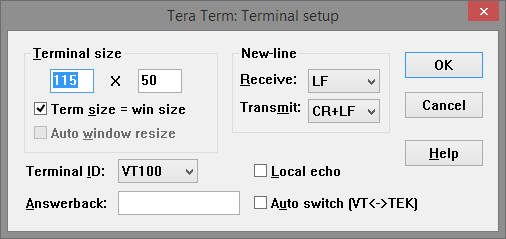
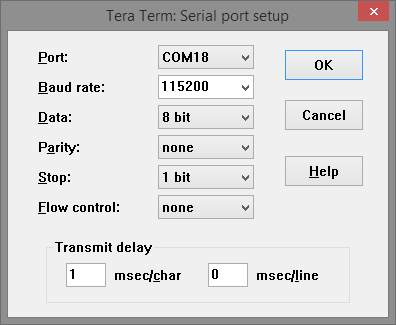
By the way, i've tested your suggested terminal program 'Tera Term', configured it like in your previous post, but also without success.This is the config which is working in my case:
I'm not sure why my environment needs a 'Transmission delay > 0', but I've an idea, so please tell me your opinion to this. I use the Arduino Pro mini 3.3V Version with just 8Mhz as Gateway and Node, could this be the root cause of my problem?
Slower operating speed = different timing (on time critical operations) -
Hi Yveaux, and thanks for your answer. Because i dream about wireless sensors since years, i don't want to give up to early, even if there are problems and much work to do. I already knows about the '\n' terminator and really took care to send LF (0x0A) in each of my tested programs, but thanks to name it as possible failure cause.
By the way, i've tested your suggested terminal program 'Tera Term', configured it like in your previous post, but also without success.This is the config which is working in my case:
I'm not sure why my environment needs a 'Transmission delay > 0', but I've an idea, so please tell me your opinion to this. I use the Arduino Pro mini 3.3V Version with just 8Mhz as Gateway and Node, could this be the root cause of my problem?
Slower operating speed = different timing (on time critical operations)@klim If it only works with this configuration, then it must indeed be transmit delay related :)
I google'd a bit and see some more Arduino serial communication issues which seem to be solved by adding a serial delay (e.g. http://electronics.stackexchange.com/questions/28739/arduino-delay-of-1ms-necessary-between-serial-read-and-serial-write)
There also seems to be variation over different Arduino versions.I use 1.5.7. Which version of the IDE do you use?
-
-
@klim If it only works with this configuration, then it must indeed be transmit delay related :)
I google'd a bit and see some more Arduino serial communication issues which seem to be solved by adding a serial delay (e.g. http://electronics.stackexchange.com/questions/28739/arduino-delay-of-1ms-necessary-between-serial-read-and-serial-write)
There also seems to be variation over different Arduino versions.I use 1.5.7. Which version of the IDE do you use?
@Yveaux said:
@klim If it only works with this configuration, then it must indeed be transmit delay related :)
I google'd a bit and see some more Arduino serial communication issues which seem to be solved by adding a serial delay (e.g. http://electronics.stackexchange.com/questions/28739/arduino-delay-of-1ms-necessary-between-serial-read-and-serial-write)
There also seems to be variation over different Arduino versions.I use 1.5.7. Which version of the IDE do you use?
Hmm, this could explain an issue I am having as well.
Lately I started using 1.5.7 (and 1.5.8 since yesterday). I am not really sure but I fear that I have an issue with two sensors that I can't get to communicate properly. Will try 1.0.6 this week to see what happens... -
-
@klim @Yveaux Well, it could be a coincidence because I also moved to the latest git version but, apart from the fact that there is an issue with setting the id of the sensor, it sure looks like I have (better) communication between the repeater and the sensor now that I uploaded the sketch using 1.0.5. With 1.5.x there was virtually no communication between these two...
-
-
Hi guys, first a big thanks for your great work. I spend lot of hours (~15h) to get your examples running, but without success. So i ask kindly for your help please.
I build up a gateway and a sensor node. All code is untouched example code from git or mysensors.com.
The problem i've, that the node does not get a sensorID from the gateway.
The sensor sends a request to the gateway, the gateway receives the request and that's it.gateway log:
*0;0;3;0;14;Gateway startup complete.
0;0;3;0;9;read: 255-255-0 s=255,c=3,t=3,pt=0,l=0:
255;255;3;0;3;
0;0;3;0;9;read: 255-255-0 s=255,c=3,t=3,pt=0,l=0:
255;255;3;0;3;
0;0;3;0;9;read: 255-255-0 s=255,c=3,t=3,pt=0,l=0:
255;255;3;0;3;
0;0;3;0;9;read: 255-255-0 s=255,c=3,t=3,pt=0,l=0:
255;255;3;0;3;
0;0;3;0;9;read: 255-255-0 s=255,c=3,t=3,pt=0,l=0:
255;255;3;0;3;
0;0;3;0;9;read: 255-255-0 s=255,c=3,t=3,pt=0,l=0:
255;255;3;0;3;
*sensor log
eq node id
send: 255-255-0-0 s=255,c=3,t=3,pt=0,l=0,st=ok:
sensor started, id 255
req node id
send: 255-255-0-0 s=255,c=3,t=3,pt=0,l=0,st=ok:
req node id
send: 255-255-0-0 s=255,c=3,t=3,pt=0,l=0,st=ok:
req node id
send: 255-255-0-0 s=255,c=3,t=3,pt=0,l=0,st=ok:
req node id
send: 255-255-0-0 s=255,c=3,t=3,pt=0,l=0,st=ok:
req node id
send: 255-255-0-0 s=255,c=3,t=3,pt=0,l=0,st=ok:
req node id
send: 255-255-0-0 s=255,c=3,t=3,pt=0,l=0,st=ok:As the eeprom of both was filled up with 0xFF (255), the sensor starts with id 255. As all MySensor code examples are configured to work with AUTO ID, the sensor should get an ID and hold that in the eeprom, but this does not happen in my environment. Am i right until here?
After reading some parts of source code, i've tried manually to write the sensorID to the sensor eeprom and sensor starts with sending out his presentation and sensor data. Gateway was receiving sensor data too.
Maybe the communication is only working in one way: sensor-->gateway, but not in the other way: gateway-->sensor. But why??A listing what i've already tried:
-
hardware:
-
gateway:
- type:
- serial
- ethernet
- arduino:
- pro mini 5V (m328)
- pro mini 3.3V (m328)
- uno (m328)
- mega 2560
- type:
-
node:
- arduino:
- pro mini 5V (m328)
- pro mini 3.3V (m328)
- uno (m328)
- arduino:
-
nrf24l01:
- capacitors:
- foil 100nF
- and electrolytic capacitor (1µ - 470µ)
- power supply
- arduino powered and external power supply
- 3.3v stable, yes
- connection
- verified 100 times, it must be correct
- breadboard and flying wires
- tried 10 different nrf24l01 modules
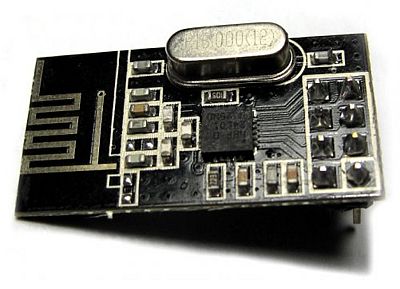
- modules looks like this:
-
software:
-
ide
- 1.0.5-r2 (windows)
- 1.0.5 (linux)
- 1.5.7 beta (windows)
-
mySensors
- 1.4 stable
- 1.4 dev
- 1.3 stable
- eeprom clear, yes - many times
I've read a lot of forum posts, but without any answer that fixed my problem.
I have no idea anymore what i can try as next.
So please, i need you help.@klim . well so how did you solve this problem ? Urgently need help with this , I am time bound with my project
-
-
@hek so how do I get the controller to hand out the I'd please?
-
-
@hek how do I go about this ?
@odark007 It would help if you specify what your problem is, include log and sketch. Repeating yourself will not get you anywhere....
-
@app-z.net where does this code need to be entered?






Hello! It looks like you're interested in this conversation, but you don't have an account yet.
Getting fed up of having to scroll through the same posts each visit? When you register for an account, you'll always come back to exactly where you were before, and choose to be notified of new replies (either via email, or push notification). You'll also be able to save bookmarks and upvote posts to show your appreciation to other community members.
With your input, this post could be even better 💗
Register Login