Skip to content
  • MySensors
  • OpenHardware.io
  • Categories
  • Recent
  • Tags
  • Popular
Skins
  • Light
  • Brite
  • Cerulean
  • Cosmo
  • Flatly
  • Journal
  • Litera
  • Lumen
  • Lux
  • Materia
  • Minty
  • Morph
  • Pulse
  • Sandstone
  • Simplex
  • Sketchy
  • Spacelab
  • United
  • Yeti
  • Zephyr
  • Dark
  • Cyborg
  • Darkly
  • Quartz
  • Slate
  • Solar
  • Superhero
  • Vapor

  • Default (No Skin)
  • No Skin
Collapse
Brand Logo
  1. Home
  2. Bug Reports
  3. Pressure example BMP085

Pressure example BMP085

Scheduled Pinned Locked Moved Bug Reports
16 Posts 7 Posters 8.3k Views 2 Watching
  • Oldest to Newest
  • Newest to Oldest
  • Most Votes
Reply
  • Reply as topic
Log in to reply
This topic has been deleted. Only users with topic management privileges can see it.
  • sundberg84S Offline
    sundberg84S Offline
    sundberg84
    Hardware Contributor
    wrote on last edited by sundberg84
    #5

    @Heinz Yesterday we had a thunder forecast... but the sensor reported cloudy so i will also try this :)
    Thank you! I will try and report back - well done!

    Controller: Proxmox VM - Home Assistant
    MySensors GW: Arduino Uno - W5100 Ethernet, Gw Shield Nrf24l01+ 2,4Ghz
    MySensors GW: Arduino Uno - Gw Shield RFM69, 433mhz
    RFLink GW - Arduino Mega + RFLink Shield, 433mhz

    1 Reply Last reply
    0
    • HeinzH Offline
      HeinzH Offline
      Heinz
      Hero Member
      wrote on last edited by
      #6

      Well, after the changes the forecast obviously works well. I will try to submit the changed code the next days.

      1 Reply Last reply
      0
      • epierreE Offline
        epierreE Offline
        epierre
        Hero Member
        wrote on last edited by
        #7

        For all the v2 library is out, although the v1 is the one commonly provided today
        https://learn.adafruit.com/bmp085/using-the-bmp085-api-v2

        The BMP085 has been discontinued by BOSCH and replaced with the BMP180 which is smaller and less expensive but is identical in terms of wiring and software!

        to have a correct pressure you need to correct this:

         float pressure_raw = bmp.readPressure();
        +  float pressure = pressure_raw/pow((1.0 - ( myAltitude/44330.0 )), 5.255);
        

        now I have values that I can validate with other barometers. You just need to know your altitude from sea level.

        z-wave - Vera -> Domoticz
        rfx - Domoticz <- MyDomoAtHome <- Imperihome
        mysensors -> mysensors-gw -> Domoticz

        1 Reply Last reply
        0
        • HeinzH Offline
          HeinzH Offline
          Heinz
          Hero Member
          wrote on last edited by
          #8

          The library used in the pressure example of the mysensors project already supports this:

          	float pressure = bmp.readSealevelPressure(ALTITUDE) / 100.0;
          

          Btw I fixed some issues in the sample see also
          https://github.com/mysensors/Arduino/tree/master/libraries/MySensors/examples/PressureSensor

          1 Reply Last reply
          0
          • A Offline
            A Offline
            Andreas Maurer
            wrote on last edited by
            #9

            Hi all,

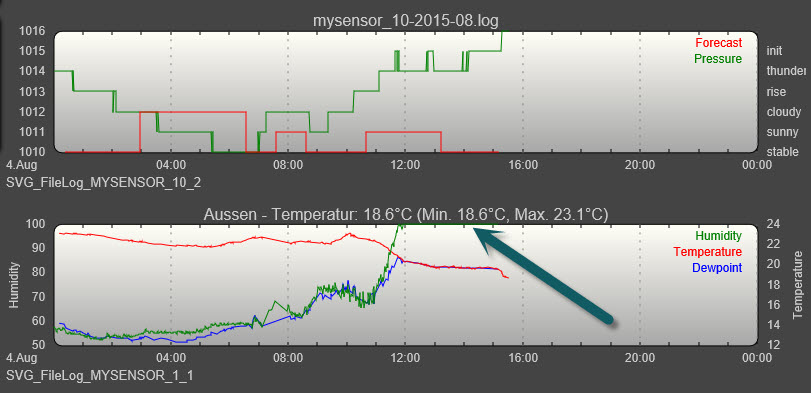
            the forcast is working as expected for a while now. It follows the pressure values from the device.

            First diagram shows pressure and forcast. Looks like the calculation is ok.
            But the weather doesnt know anything about the forecast :) 100% Humidity because it rains Dogs and Cats :)
            04-08-2015 15-44-10.jpg

            This is no question. Just a little reminder about crystalballs :)

            Andreas

            1 Reply Last reply
            1
            • HeinzH Offline
              HeinzH Offline
              Heinz
              Hero Member
              wrote on last edited by Heinz
              #10

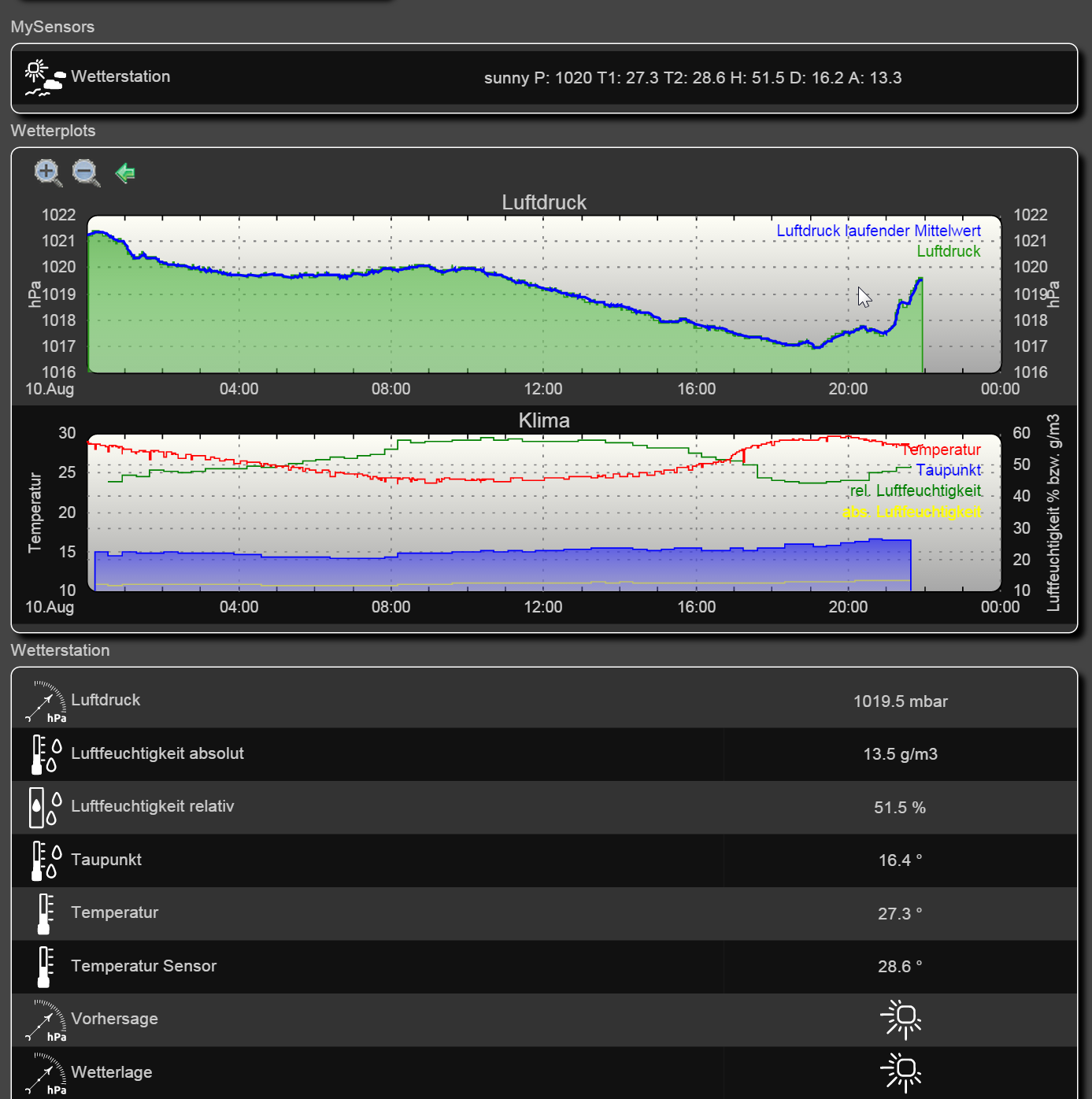
              Mine is also working well...here is my FHEM screentshot of today. Right now it is clearing up again after a short thunder storm...
              2015-08-10 21_59_23-Home, Sweet Home.png

              I also added a weather situation indicator which works like a common barometer: it shows sunny when the pressure is above 1013hPa and rainy if the pressure is below this world wide average.

              The field "Vorhersage" shows the forecast "sunny" as the pressure raised last last hours significantly.

              1 Reply Last reply
              0
              • 5546dug5 Offline
                5546dug5 Offline
                5546dug
                wrote on last edited by
                #11

                @Heinz
                I too am having reading issues with the new 180 pressure sensor.

                a couple of questions,
                Is altitude stated in meters I think?

                The code revisions;
                Are they to added to sketch in place of the existing parts, while the algorithm is to be totally replaced with the revised code you have supplied?

                Thanks

                1 Reply Last reply
                0
                • HeinzH Offline
                  HeinzH Offline
                  Heinz
                  Hero Member
                  wrote on last edited by
                  #12

                  @5546dug
                  Yes, the altitude is in meters.
                  A complete sketch containing the changes and some bug fixes is part of the mysensors library 1.5. So you don't have to merge the code from above, simply download it from github.

                  1 Reply Last reply
                  0
                  • 5546dug5 Offline
                    5546dug5 Offline
                    5546dug
                    wrote on last edited by
                    #13

                    @Heinz thanks I am still on 1.4.1 and will look it up

                    1 Reply Last reply
                    0
                    • 5546dug5 Offline
                      5546dug5 Offline
                      5546dug
                      wrote on last edited by
                      #14

                      @Heinz
                      Well once again I am stumped, I can't find this library I need, do I need to upgrade my system to 1.5 to find this file., or am I just not seeing what I need to see?:blush:

                      1 Reply Last reply
                      0
                      • korttomaK Offline
                        korttomaK Offline
                        korttoma
                        Hero Member
                        wrote on last edited by
                        #15

                        @5546dug -> https://github.com/mysensors

                        • Tomas
                        1 Reply Last reply
                        0
                        • HeinzH Offline
                          HeinzH Offline
                          Heinz
                          Hero Member
                          wrote on last edited by
                          #16

                          You don't need to upgrade to 1.5, you can simply download the sketch from here
                          https://github.com/mysensors/Arduino/tree/development/libraries/MySensors/examples/PressureSensor

                          1 Reply Last reply
                          0
                          Reply
                          • Reply as topic
                          Log in to reply
                          • Oldest to Newest
                          • Newest to Oldest
                          • Most Votes


                          26

                          Online

                          11.7k

                          Users

                          11.2k

                          Topics

                          113.1k

                          Posts


                          Copyright 2025 TBD   |   Forum Guidelines   |   Privacy Policy   |   Terms of Service
                          • Login

                          • Don't have an account? Register

                          • Login or register to search.
                          • First post
                            Last post
                          0
                          • MySensors
                          • OpenHardware.io
                          • Categories
                          • Recent
                          • Tags
                          • Popular