Skip to content
  • MySensors
  • OpenHardware.io
  • Categories
  • Recent
  • Tags
  • Popular
Skins
  • Light
  • Brite
  • Cerulean
  • Cosmo
  • Flatly
  • Journal
  • Litera
  • Lumen
  • Lux
  • Materia
  • Minty
  • Morph
  • Pulse
  • Sandstone
  • Simplex
  • Sketchy
  • Spacelab
  • United
  • Yeti
  • Zephyr
  • Dark
  • Cyborg
  • Darkly
  • Quartz
  • Slate
  • Solar
  • Superhero
  • Vapor

  • Default (No Skin)
  • No Skin
Collapse
Brand Logo
  1. Home
  2. Controllers
  3. Domoticz
  4. Raspbery PI + nrf24 (gpio) not work Domoticz Temp+humanidy PLS HELP

Raspbery PI + nrf24 (gpio) not work Domoticz Temp+humanidy PLS HELP

Scheduled Pinned Locked Moved Domoticz
24 Posts 8 Posters 13.8k Views 5 Watching
  • Oldest to Newest
  • Newest to Oldest
  • Most Votes
Reply
  • Reply as topic
Log in to reply
This topic has been deleted. Only users with topic management privileges can see it.
  • R Offline
    R Offline
    revoltec112
    wrote on last edited by revoltec112
    #5

    hello I know but I have tried through the gate USB and also was not working , help me as you can, how you want your file ttyMySensorsGateway , I like it open in the nano this file is empty or perhaps me someone some idea how this is supposed to look , please , I really already sit on it week and nothing

    1 Reply Last reply
    0
    • TheoLT Offline
      TheoLT Offline
      TheoL
      Contest Winner
      wrote on last edited by TheoL
      #6

      I'm not sure, but I think I read somewhere on the Domoticz forum, that it's only possible to use the GPIO's, on the pi you're running Domoticz on, as digital output. I'm not even sure if you can use them as input.

      But if you can hook a temperature sensor to it. I'm really interested in how you'd accomplished it.

      R 1 Reply Last reply
      0
      • TheoLT TheoL

        I'm not sure, but I think I read somewhere on the Domoticz forum, that it's only possible to use the GPIO's, on the pi you're running Domoticz on, as digital output. I'm not even sure if you can use them as input.

        But if you can hook a temperature sensor to it. I'm really interested in how you'd accomplished it.

        R Offline
        R Offline
        revoltec112
        wrote on last edited by
        #7

        @revoltec112 said:

        http: // forum.mysensors.org/topic/1151/tutorial-raspberry-pi-nrf24l01-direct-connection

        here is the link to connect and for testing can be seen on the RPI data transmitted from the remote sensor but the question is how to do it domoticz read ???

        1 Reply Last reply
        0
        • R Offline
          R Offline
          revoltec112
          wrote on last edited by revoltec112
          #8

          whether in the / dev file must be named ttyMySensorsGeteway ? if so how it developed and what it should contain

          1 Reply Last reply
          0
          • mfalkviddM Offline
            mfalkviddM Offline
            mfalkvidd
            Mod
            wrote on last edited by
            #9

            I am not sure I understand your question, but I have a NRF24L01+ connected to my Raspberry Pi and I am able to read the sensors in Domoticz.

            I had to do

            sudo ln -s /dev/ttyMySensorsGateway /dev/ttyUSB20
            

            because /dev/ttyMySensorsGateway did not show up in the serial port list on the Domoticz Hardware page. Then I added Mysensors to Domoticz like this:
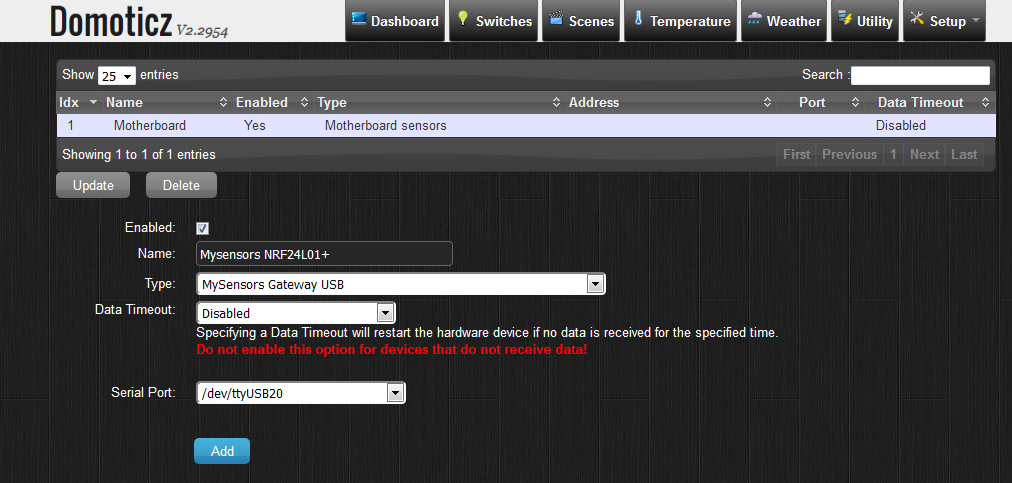
            domoticz_add_hardware.png

            I hope this helps

            1 Reply Last reply
            0
            • R Offline
              R Offline
              revoltec112
              wrote on last edited by
              #10

              Please can you help me step by step how you did it

              1 Reply Last reply
              0
              • R Offline
                R Offline
                revoltec112
                wrote on last edited by
                #11

                I made this command does nothing fortunately still does not work : ( ( (

                1 Reply Last reply
                0
                • mfalkviddM Offline
                  mfalkviddM Offline
                  mfalkvidd
                  Mod
                  wrote on last edited by mfalkvidd
                  #12

                  Install the gateway:

                  git clone https://github.com/mysensors/Raspberry.git
                  cd Raspberry/librf24-bcm
                  make all && sudo make install
                  cd ..
                  make all && sudo make install
                  sudo make enable-gwserial
                  sudo /etc/init.d/PiGatewaySerial start
                  

                  Verify that the gateway started properly:

                  cat /dev/ttyMySensorsGateway
                  0;0;3;0;14;Gateway startup complete.


                  Domoticz is unable to read from /dev/ttyMySensorsGateway so create a link to a name that Domoticz understands:

                  sudo ln -s /dev/ttyMySensorsGateway /dev/ttyUSB20
                  

                  To automatically create the link on startup, add

                  ln -s /dev/ttyMySensorsGateway /dev/ttyUSB20
                  

                  just before

                  exit0
                  

                  in /etc/rc.local

                  I then added the gateway as per the image in my last post.

                  EDIT: Changed instructions to use librf24-bcm instead of tmrh20. tmrh20 tricked my Gateway into forwarding everything to a strange (non-existing) parent node.

                  W T 2 Replies Last reply
                  1
                  • mfalkviddM mfalkvidd

                    Install the gateway:

                    git clone https://github.com/mysensors/Raspberry.git
                    cd Raspberry/librf24-bcm
                    make all && sudo make install
                    cd ..
                    make all && sudo make install
                    sudo make enable-gwserial
                    sudo /etc/init.d/PiGatewaySerial start
                    

                    Verify that the gateway started properly:

                    cat /dev/ttyMySensorsGateway
                    0;0;3;0;14;Gateway startup complete.


                    Domoticz is unable to read from /dev/ttyMySensorsGateway so create a link to a name that Domoticz understands:

                    sudo ln -s /dev/ttyMySensorsGateway /dev/ttyUSB20
                    

                    To automatically create the link on startup, add

                    ln -s /dev/ttyMySensorsGateway /dev/ttyUSB20
                    

                    just before

                    exit0
                    

                    in /etc/rc.local

                    I then added the gateway as per the image in my last post.

                    EDIT: Changed instructions to use librf24-bcm instead of tmrh20. tmrh20 tricked my Gateway into forwarding everything to a strange (non-existing) parent node.

                    W Offline
                    W Offline
                    wergeld
                    wrote on last edited by
                    #13

                    @mfalkvidd I am attempting to follow your lead here on compiling the Raspberry mysensors gateway. However, this is failing on my rpi2 with tons of repeating errors like:
                    bcm2835.c: In function "bcm2835_init" :
                    error invalid suffix "x" on integer constant

                    I have enabled SPI from rasp-config. This is using the domoticz image of raspbian wheezy. Any thoughts on how to get around this?

                    1 Reply Last reply
                    0
                    • mfalkviddM Offline
                      mfalkviddM Offline
                      mfalkvidd
                      Mod
                      wrote on last edited by
                      #14

                      @wergeld I remember seeing those errors as well. I think that's why I switched to tmrh20 but then I switched back and didn't get any errors when I tried again. Not sure what happened between, I hacked away now and then during several weeks.

                      W 1 Reply Last reply
                      0
                      • mfalkviddM mfalkvidd

                        @wergeld I remember seeing those errors as well. I think that's why I switched to tmrh20 but then I switched back and didn't get any errors when I tried again. Not sure what happened between, I hacked away now and then during several weeks.

                        W Offline
                        W Offline
                        wergeld
                        wrote on last edited by
                        #15

                        @mfalkvidd Okay, that is what i was going to go for as well:
                        Try tmrh20 and then see what happens.

                        I think there is some issue with the code in general as the rpi2 does not have the bcm2835 chip, right? I think it is bcm2836 (mind not working this early in the morning).

                        1 Reply Last reply
                        0
                        • mfalkviddM Offline
                          mfalkviddM Offline
                          mfalkvidd
                          Mod
                          wrote on last edited by
                          #16

                          Looks like it. Output from hwinfo:

                          raspberrypi-firmware: /devices/platform/soc/soc:firmware
                              bcm2835-mbox: /devices/platform/soc/3f00b880.mailbox
                              bcm2835_AUD0: /devices/platform/bcm2835_AUD0.0
                              bcm2835_AUD0: module = snd_bcm2835
                              bcm2835_AUD1: /devices/platform/bcm2835_AUD1.1
                              bcm2835_AUD1: module = snd_bcm2835
                              bcm2835_AUD2: /devices/platform/bcm2835_AUD2.2
                              bcm2835_AUD2: module = snd_bcm2835
                              bcm2835_AUD3: /devices/platform/bcm2835_AUD3.3
                              bcm2835_AUD3: module = snd_bcm2835
                              bcm2835_AUD4: /devices/platform/bcm2835_AUD4.4
                              bcm2835_AUD4: module = snd_bcm2835
                              bcm2835_AUD5: /devices/platform/bcm2835_AUD5.5
                              bcm2835_AUD5: module = snd_bcm2835
                              bcm2835_AUD6: /devices/platform/bcm2835_AUD6.6
                              bcm2835_AUD6: module = snd_bcm2835
                              bcm2835_AUD7: /devices/platform/bcm2835_AUD7.7
                              bcm2835_AUD7: module = snd_bcm2835
                                alarmtimer: /devices/platform/alarmtimer
                                   dwc_otg: /devices/platform/soc/3f980000.usb
                               spi-bcm2835: module = spi_bcm2835
                               spi-bcm2835: /devices/platform/soc/3f204000.spi
                                bcm2708_fb: /devices/platform/soc/soc:fb
                          bcm2708-dmaengine: /devices/platform/soc/3f007000.dma
                           uio_pdrv_genirq: module = uio_pdrv_genirq
                                serial8250: /devices/platform/serial8250
                           pinctrl-bcm2835: /devices/platform/soc/3f200000.gpio
                               mmc-bcm2835: /devices/platform/soc/3f300000.mmc
                                   arm-pmu: /devices/platform/soc/soc:arm-pmu
                           bcm2835_thermal: /devices/platform/soc/soc:thermal
                             bcm2835_vchiq: /devices/platform/soc/3f00b840.vchiq
                               bcm2708_i2c: /devices/platform/soc/3f804000.i2c
                               bcm2708_i2c: module = i2c_bcm2708
                          
                          
                          1 Reply Last reply
                          0
                          • mfalkviddM Offline
                            mfalkviddM Offline
                            mfalkvidd
                            Mod
                            wrote on last edited by
                            #17

                            This thread might be useful for troubleshooting

                            W 1 Reply Last reply
                            0
                            • mfalkviddM mfalkvidd

                              This thread might be useful for troubleshooting

                              W Offline
                              W Offline
                              wergeld
                              wrote on last edited by
                              #18

                              @mfalkvidd Yes, I used that to do the build initially. I cannot even get past the "make" command (tried sudo make as well). One person there had same error but they "solved it" and did not mention how they did it. I am going to give it another go tonight with a fresh image of raspbian.

                              1 Reply Last reply
                              0
                              • W Offline
                                W Offline
                                wergeld
                                wrote on last edited by
                                #19

                                Finally got mysensors built on my RPi2. And have built domoiticz and it is up and running! I have added my USB gateway but now not sure what to do? It does not appear to pick up my sensor node. Where do I change the Gateway's channel and radio parameters?

                                1 Reply Last reply
                                0
                                • W Offline
                                  W Offline
                                  wergeld
                                  wrote on last edited by
                                  #20

                                  Actually forgot that MyConfig file when I built the RPi gateway. That is all set but now when I debug using ./PiGatewaySerial i see good output for the radio parameters but then it spits out continuous reams of:

                                  read: 0-0-0 s=0,c=0,t=0,pt=0,l=0:
                                  version mismatch
                                  read: 0-0-0 s=0,c=0,t=0,pt=0,l=0:
                                  version mismatch
                                  read: 0-0-0 s=0,c=0,t=0,pt=0,l=0:
                                  version mismatch

                                  Not sure what this is about as I do not have any nodes on this channel (76). All my active nodes are on channel 90 and are talking just fine to my RPi running easyIOT server.

                                  What is this version mismatch about?

                                  1 Reply Last reply
                                  0
                                  • GertSandersG Offline
                                    GertSandersG Offline
                                    GertSanders
                                    Hardware Contributor
                                    wrote on last edited by
                                    #21

                                    Probably your nodes which were compiled with version 1.5 of the library, and the fact that the version of the library upon which the PiGatewaySerial is compiled is still version 1.4

                                    On your Raspberry, in the Raspberry directory you should find a "Version.h" file.

                                    Try changing the content to this:
                                    /***

                                    • This file defines the Sensor library version number
                                    • Normally, contributors should not modify this directly
                                    • as it is manaaged by the MySensors Bot.
                                      */
                                      #ifndef Version_h
                                      #define Version_h

                                    #define LIBRARY_VERSION "1.5"

                                    #endif

                                    The do another sudo make etc...

                                    I hope this helps you.

                                    1 Reply Last reply
                                    0
                                    • W Offline
                                      W Offline
                                      wergeld
                                      wrote on last edited by
                                      #22

                                      GertSanders,
                                      All of my nodes are using 1.4 library. Oddly at around 2:30 am my one sensor I moved to same channel as my domoticz gateway got picked up. Pretty interesting! I had changed it to the domiticz channel at 11pm. Progress is good. Now going to see about why the temp is being reported as ~140 F when that sensor reported ~70 F (correct) when attached to my other controller.

                                      1 Reply Last reply
                                      0
                                      • mfalkviddM mfalkvidd

                                        Install the gateway:

                                        git clone https://github.com/mysensors/Raspberry.git
                                        cd Raspberry/librf24-bcm
                                        make all && sudo make install
                                        cd ..
                                        make all && sudo make install
                                        sudo make enable-gwserial
                                        sudo /etc/init.d/PiGatewaySerial start
                                        

                                        Verify that the gateway started properly:

                                        cat /dev/ttyMySensorsGateway
                                        0;0;3;0;14;Gateway startup complete.


                                        Domoticz is unable to read from /dev/ttyMySensorsGateway so create a link to a name that Domoticz understands:

                                        sudo ln -s /dev/ttyMySensorsGateway /dev/ttyUSB20
                                        

                                        To automatically create the link on startup, add

                                        ln -s /dev/ttyMySensorsGateway /dev/ttyUSB20
                                        

                                        just before

                                        exit0
                                        

                                        in /etc/rc.local

                                        I then added the gateway as per the image in my last post.

                                        EDIT: Changed instructions to use librf24-bcm instead of tmrh20. tmrh20 tricked my Gateway into forwarding everything to a strange (non-existing) parent node.

                                        T Offline
                                        T Offline
                                        tommyken
                                        wrote on last edited by
                                        #23

                                        @mfalkvidd said:

                                        Install the gateway:

                                        git clone https://github.com/mysensors/Raspberry.git
                                        cd Raspberry/librf24-bcm
                                        make all && sudo make install
                                        cd ..
                                        make all && sudo make install
                                        sudo make enable-gwserial
                                        sudo /etc/init.d/PiGatewaySerial start
                                        

                                        Verify that the gateway started properly:

                                        cat /dev/ttyMySensorsGateway
                                        0;0;3;0;14;Gateway startup complete.


                                        Domoticz is unable to read from /dev/ttyMySensorsGateway so create a link to a name that Domoticz understands:

                                        sudo ln -s /dev/ttyMySensorsGateway /dev/ttyUSB20
                                        

                                        To automatically create the link on startup, add

                                        ln -s /dev/ttyMySensorsGateway /dev/ttyUSB20
                                        

                                        just before

                                        exit0
                                        

                                        in /etc/rc.local

                                        I then added the gateway as per the image in my last post.

                                        EDIT: Changed instructions to use librf24-bcm instead of tmrh20. tmrh20 tricked my Gateway into forwarding everything to a strange (non-existing) parent node.

                                        I tried this for SPI through raspberry

                                        Can someone provide me the correct way to install those ?

                                        First attempt was like mentioned above. But i don't have the folder librf24-bcm

                                        then i placed nrf2401 zip file into the folder from http://tmrh20.github.io/

                                        Now i got this error

                                        pi@testdom ~/Raspberry $ make all
                                        g++ -c -o MyGateway.o MyGateway.cpp -Wall -Ofast -mfpu=vfp -lpthread -g -D__Raspberry_Pi -mfloat-abi=hard -mtune=arm1176jzf-s -D_TTY_NAME="/dev/ttyMySensorsGateway" -D_TTY_GROUPNAME="tty" -march=armv6zk -D__PI_BPLUS -I. -I/usr/local/include/RF24
                                        In file included from RF24.h:18:0,
                                        from MySensor.h:37,
                                        from MyGateway.h:16,
                                        from MyGateway.cpp:13:
                                        RF24_config.h:38:32: fatal error: utility/includes.h: No such file or directory
                                        #include "utility/includes.h"
                                        ^
                                        compilation terminated.
                                        Makefile:57: recipe for target 'MyGateway.o' failed
                                        make: *** [MyGateway.o] Error 1

                                        I have lateste update and upgrade and i'm using Jessie. Hopely can someone help me.

                                        Thanks in advance.

                                        mfalkviddM 1 Reply Last reply
                                        0
                                        • T tommyken

                                          @mfalkvidd said:

                                          Install the gateway:

                                          git clone https://github.com/mysensors/Raspberry.git
                                          cd Raspberry/librf24-bcm
                                          make all && sudo make install
                                          cd ..
                                          make all && sudo make install
                                          sudo make enable-gwserial
                                          sudo /etc/init.d/PiGatewaySerial start
                                          

                                          Verify that the gateway started properly:

                                          cat /dev/ttyMySensorsGateway
                                          0;0;3;0;14;Gateway startup complete.


                                          Domoticz is unable to read from /dev/ttyMySensorsGateway so create a link to a name that Domoticz understands:

                                          sudo ln -s /dev/ttyMySensorsGateway /dev/ttyUSB20
                                          

                                          To automatically create the link on startup, add

                                          ln -s /dev/ttyMySensorsGateway /dev/ttyUSB20
                                          

                                          just before

                                          exit0
                                          

                                          in /etc/rc.local

                                          I then added the gateway as per the image in my last post.

                                          EDIT: Changed instructions to use librf24-bcm instead of tmrh20. tmrh20 tricked my Gateway into forwarding everything to a strange (non-existing) parent node.

                                          I tried this for SPI through raspberry

                                          Can someone provide me the correct way to install those ?

                                          First attempt was like mentioned above. But i don't have the folder librf24-bcm

                                          then i placed nrf2401 zip file into the folder from http://tmrh20.github.io/

                                          Now i got this error

                                          pi@testdom ~/Raspberry $ make all
                                          g++ -c -o MyGateway.o MyGateway.cpp -Wall -Ofast -mfpu=vfp -lpthread -g -D__Raspberry_Pi -mfloat-abi=hard -mtune=arm1176jzf-s -D_TTY_NAME="/dev/ttyMySensorsGateway" -D_TTY_GROUPNAME="tty" -march=armv6zk -D__PI_BPLUS -I. -I/usr/local/include/RF24
                                          In file included from RF24.h:18:0,
                                          from MySensor.h:37,
                                          from MyGateway.h:16,
                                          from MyGateway.cpp:13:
                                          RF24_config.h:38:32: fatal error: utility/includes.h: No such file or directory
                                          #include "utility/includes.h"
                                          ^
                                          compilation terminated.
                                          Makefile:57: recipe for target 'MyGateway.o' failed
                                          make: *** [MyGateway.o] Error 1

                                          I have lateste update and upgrade and i'm using Jessie. Hopely can someone help me.

                                          Thanks in advance.

                                          mfalkviddM Offline
                                          mfalkviddM Offline
                                          mfalkvidd
                                          Mod
                                          wrote on last edited by
                                          #24

                                          @tommyken see the updated instructions at http://forum.mysensors.org/topic/2437/step-by-step-procedure-to-connect-the-nrf24l01-to-the-gpio-pins-and-use-the-raspberry-as-a-serial-gateway They show how to get the rf24 files.

                                          1 Reply Last reply
                                          0
                                          Reply
                                          • Reply as topic
                                          Log in to reply
                                          • Oldest to Newest
                                          • Newest to Oldest
                                          • Most Votes


                                          22

                                          Online

                                          11.7k

                                          Users

                                          11.2k

                                          Topics

                                          113.1k

                                          Posts


                                          Copyright 2025 TBD   |   Forum Guidelines   |   Privacy Policy   |   Terms of Service
                                          • Login

                                          • Don't have an account? Register

                                          • Login or register to search.
                                          • First post
                                            Last post
                                          0
                                          • MySensors
                                          • OpenHardware.io
                                          • Categories
                                          • Recent
                                          • Tags
                                          • Popular