
motion and relay
-
-
Hey maybe you can modify this sketch:
http://forum.mysensors.org/topic/902/relay-motion-multisensor
-
I have modified the code, I have no error message but:
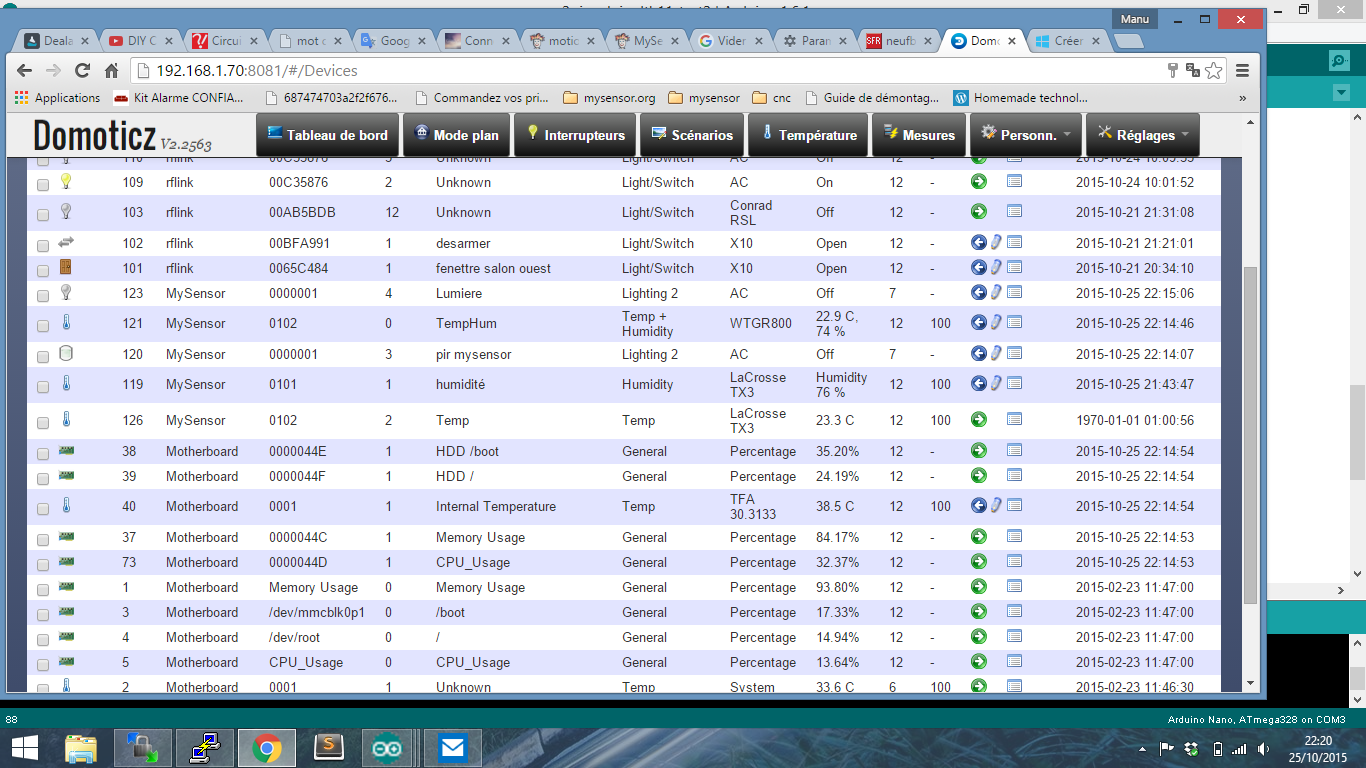
the relay remains on position but n not appear in domoticz
in the logs they have the same name
dth11 the works#include <MySensor.h> #include <Wire.h> #include <DHT.h> #include <SimpleTimer.h> #define CHILD_ID_HUM 1 #define CHILD_ID_TEMP 2 #define CHILD_ID_MOTION 3 #define CHILD_ID_RELAY 4 #define RELAY 3 // Arduino Digital I/O pin number for first relay (second on pin+1 etc) #define HUMIDITY_SENSOR_DIGITAL_PIN 4 #define MOTION_SENSOR_DIGITAL_PIN 5 #define MOTION_SENSOR_DIGITAL_PIN2 6 #define INTERRUPT MOTION_SENSOR_DIGITAL_PIN-2 // Usually the interrupt = pin -2 (on uno/nano anyway) #define RELAY_ON 0 // GPIO value to write to turn on attached relay #define RELAY_OFF 1 // GPIO value to write to turn off attached relay unsigned long SLEEP_TIME = 600000; // Sleep time between reads (in milliseconds) - 10mins MySensor gw; DHT dht; SimpleTimer timer; float lastTemp; float lastHum; boolean lastTripped; boolean lastTripped2; boolean metric = true; MyMessage msgHum(CHILD_ID_HUM, V_HUM); MyMessage msgTemp(CHILD_ID_TEMP, V_TEMP); MyMessage msg(CHILD_ID_MOTION, V_TRIPPED); void setup() { // Initialize library and add callback for incoming messages gw.begin(incomingMessage, AUTO, true); dht.setup(HUMIDITY_SENSOR_DIGITAL_PIN); // Send the Sketch Version Information to the Gateway gw.sendSketchInfo("HumTempRelayMotion", "1.0"); // REGISTER all sensors to gw (they will be created as child devices) gw.present(CHILD_ID_HUM, S_HUM); gw.present(CHILD_ID_TEMP, S_TEMP); gw.present(CHILD_ID_MOTION, S_MOTION); gw.present(CHILD_ID_RELAY, V_LIGHT); pinMode(RELAY, OUTPUT); digitalWrite(RELAY, gw.loadState(RELAY)?RELAY_OFF:RELAY_ON); //Serial.begin(9600); timer.setInterval(30000, getMeasure); metric = gw.getConfig().isMetric; } void loop() { // Alway process incoming messages whenever possible gw.process(); timer.run(); boolean tripped = digitalRead(MOTION_SENSOR_DIGITAL_PIN) == HIGH; if (tripped != lastTripped) { lastTripped = tripped; Serial.print("M: "); Serial.println(tripped); gw.send(msg.set(tripped?"1":"0")); // Send tripped value to gw } boolean tripped2 = digitalRead(MOTION_SENSOR_DIGITAL_PIN2) == HIGH; // if (tripped2 != lastTripped2) { lastTripped2 = tripped2; Serial.print("M2: "); Serial.println(tripped2); gw.send(msg.set(tripped2?"1":"0")); // Send tripped value to gw // } } void incomingMessage(const MyMessage &message) { // We only expect one type of message from controller. But we better check anyway. if (message.type==V_LIGHT) { // Change relay state digitalWrite(message.sensor-CHILD_ID_RELAY+RELAY, message.getBool()?RELAY_ON:RELAY_OFF); // Store state in eeprom gw.saveState(message.sensor, message.getBool()); // Write some debug info Serial.print("Incoming change for sensor:"); Serial.print(message.sensor); Serial.print(", New status: "); Serial.println(message.getBool()); } } void getMeasure() { delay(dht.getMinimumSamplingPeriod()); float temperature = dht.getTemperature(); if (isnan(temperature)) { Serial.println("Failed reading temperature from DHT"); } else if (temperature != lastTemp) { lastTemp = temperature; if (!metric) { temperature = dht.toFahrenheit(temperature); } gw.send(msgTemp.set(temperature, 1)); Serial.print("T: "); Serial.println(temperature); } float humidity = dht.getHumidity(); if (isnan(humidity)) { Serial.println("Failed reading humidity from DHT"); } else if (humidity != lastHum) { lastHum = humidity; gw.send(msgHum.set(humidity, 1)); Serial.print("H: "); Serial.println(humidity); } } Insert Code Here -
I have modified the code, I have no error message but:
the relay remains on position but n not appear in domoticz
in the logs they have the same name
dth11 the works#include <MySensor.h> #include <Wire.h> #include <DHT.h> #include <SimpleTimer.h> #define CHILD_ID_HUM 1 #define CHILD_ID_TEMP 2 #define CHILD_ID_MOTION 3 #define CHILD_ID_RELAY 4 #define RELAY 3 // Arduino Digital I/O pin number for first relay (second on pin+1 etc) #define HUMIDITY_SENSOR_DIGITAL_PIN 4 #define MOTION_SENSOR_DIGITAL_PIN 5 #define MOTION_SENSOR_DIGITAL_PIN2 6 #define INTERRUPT MOTION_SENSOR_DIGITAL_PIN-2 // Usually the interrupt = pin -2 (on uno/nano anyway) #define RELAY_ON 0 // GPIO value to write to turn on attached relay #define RELAY_OFF 1 // GPIO value to write to turn off attached relay unsigned long SLEEP_TIME = 600000; // Sleep time between reads (in milliseconds) - 10mins MySensor gw; DHT dht; SimpleTimer timer; float lastTemp; float lastHum; boolean lastTripped; boolean lastTripped2; boolean metric = true; MyMessage msgHum(CHILD_ID_HUM, V_HUM); MyMessage msgTemp(CHILD_ID_TEMP, V_TEMP); MyMessage msg(CHILD_ID_MOTION, V_TRIPPED); void setup() { // Initialize library and add callback for incoming messages gw.begin(incomingMessage, AUTO, true); dht.setup(HUMIDITY_SENSOR_DIGITAL_PIN); // Send the Sketch Version Information to the Gateway gw.sendSketchInfo("HumTempRelayMotion", "1.0"); // REGISTER all sensors to gw (they will be created as child devices) gw.present(CHILD_ID_HUM, S_HUM); gw.present(CHILD_ID_TEMP, S_TEMP); gw.present(CHILD_ID_MOTION, S_MOTION); gw.present(CHILD_ID_RELAY, V_LIGHT); pinMode(RELAY, OUTPUT); digitalWrite(RELAY, gw.loadState(RELAY)?RELAY_OFF:RELAY_ON); //Serial.begin(9600); timer.setInterval(30000, getMeasure); metric = gw.getConfig().isMetric; } void loop() { // Alway process incoming messages whenever possible gw.process(); timer.run(); boolean tripped = digitalRead(MOTION_SENSOR_DIGITAL_PIN) == HIGH; if (tripped != lastTripped) { lastTripped = tripped; Serial.print("M: "); Serial.println(tripped); gw.send(msg.set(tripped?"1":"0")); // Send tripped value to gw } boolean tripped2 = digitalRead(MOTION_SENSOR_DIGITAL_PIN2) == HIGH; // if (tripped2 != lastTripped2) { lastTripped2 = tripped2; Serial.print("M2: "); Serial.println(tripped2); gw.send(msg.set(tripped2?"1":"0")); // Send tripped value to gw // } } void incomingMessage(const MyMessage &message) { // We only expect one type of message from controller. But we better check anyway. if (message.type==V_LIGHT) { // Change relay state digitalWrite(message.sensor-CHILD_ID_RELAY+RELAY, message.getBool()?RELAY_ON:RELAY_OFF); // Store state in eeprom gw.saveState(message.sensor, message.getBool()); // Write some debug info Serial.print("Incoming change for sensor:"); Serial.print(message.sensor); Serial.print(", New status: "); Serial.println(message.getBool()); } } void getMeasure() { delay(dht.getMinimumSamplingPeriod()); float temperature = dht.getTemperature(); if (isnan(temperature)) { Serial.println("Failed reading temperature from DHT"); } else if (temperature != lastTemp) { lastTemp = temperature; if (!metric) { temperature = dht.toFahrenheit(temperature); } gw.send(msgTemp.set(temperature, 1)); Serial.print("T: "); Serial.println(temperature); } float humidity = dht.getHumidity(); if (isnan(humidity)) { Serial.println("Failed reading humidity from DHT"); } else if (humidity != lastHum) { lastHum = humidity; gw.send(msgHum.set(humidity, 1)); Serial.print("H: "); Serial.println(humidity); } } Insert Code Here -
-
the relay is present in domoticz but not the more it is driven on position when I connect the Arduino
the motion sensor works well but they have the same name in domoticz so that I have one that appears -
-
I think this might cause your problem. It's in the incommingMessage method
 if (message.type==V_LIGHT) {
     // Change relay state
     digitalWrite(message.sensor-CHILD_ID_RELAY+RELAY, message.getBool()?RELAY_ON:RELAY_OFF);
     // Store state in eeprom
I think you copied it from the multiple relays example.
try changing that code to
 if (message.type==V_LIGHT) {
     // Change relay state
     digitalWrite( RELAY, message.getBool()?RELAY_ON:RELAY_OFF);
     // Store state in eeprom
In your code, you are not writing the value to the pin you've assigned to the relay.
-
-
-
-
AC works thank you for your help
#include <SPI.h>
#include <MySensor.h>
#include <Wire.h>
#include <DHT.h>
#include <SimpleTimer.h>

#define CHILD_ID_HUM 1
#define CHILD_ID_TEMP 2
#define CHILD_ID_MOTION 3
#define CHILD_ID_RELAY 4

#define HUMIDITY_SENSOR_DIGITAL_PIN 4
#define MOTION_SENSOR_DIGITAL_PIN 3
#define INTERRUPT MOTION_SENSOR_DIGITAL_PIN-2 // Usually the interrupt = pin -2 (on uno/nano anyway)
#define RELAY  7  // Arduino Digital I/O pin number for first relay (second on pin+1 etc)
#define RELAY_ON 0  // GPIO value to write to turn on attached relay
#define RELAY_OFF 1 // GPIO value to write to turn off attached relay

unsigned long SLEEP_TIME = 600000; // Sleep time between reads (in milliseconds) - 10mins

MySensor gw;
DHT dht;
SimpleTimer timer;

float lastTemp;
float lastHum;
boolean lastTripped;
boolean metric = true;

MyMessage msgHum(CHILD_ID_HUM, V_HUM);
MyMessage msgTemp(CHILD_ID_TEMP, V_TEMP);
MyMessage msg(CHILD_ID_MOTION, V_TRIPPED);

void setup()
{
  // Initialize library and add callback for incoming messages
  gw.begin(incomingMessage, AUTO, true);

  dht.setup(HUMIDITY_SENSOR_DIGITAL_PIN);

  // Send the Sketch Version Information to the Gateway
  gw.sendSketchInfo("HumTempRelayMotion", "1.0");

  // REGISTER all sensors to gw (they will be created as child devices)
  gw.present(CHILD_ID_HUM, S_HUM);
  gw.present(CHILD_ID_TEMP, S_TEMP);
  gw.present(CHILD_ID_MOTION, S_MOTION);
  gw.present(CHILD_ID_RELAY, S_LIGHT);
  pinMode(RELAY, OUTPUT);
  digitalWrite(RELAY, gw.loadState(RELAY)?RELAY_OFF:RELAY_ON);

  //Serial.begin(9600);
  timer.setInterval(30000, getMeasure);
  metric = gw.getConfig().isMetric;

}

void loop()
{
  // Alway process incoming messages whenever possible
  gw.process();
  timer.run();

  boolean tripped = digitalRead(MOTION_SENSOR_DIGITAL_PIN) == HIGH;
  if (tripped != lastTripped) {
    lastTripped = tripped;
    Serial.print("M: ");
    Serial.println(tripped);
    gw.send(msg.set(tripped?"1":"0"));  // Send tripped value to gw
  }

}

void incomingMessage(const MyMessage &message) {
  // We only expect one type of message from controller. But we better check anyway.
  if (message.type==V_LIGHT) {
     // Change relay state
     digitalWrite(message.sensor-CHILD_ID_RELAY+RELAY, message.getBool()?RELAY_ON:RELAY_OFF);
     // Store state in eeprom
     gw.saveState(message.sensor, message.getBool());
     // Write some debug info
     Serial.print("Incoming change for sensor:");
     Serial.print(message.sensor);
     Serial.print(", New status: ");
     Serial.println(message.getBool());
   }
}

void getMeasure() {
  delay(dht.getMinimumSamplingPeriod());

  float temperature = dht.getTemperature();
  if (isnan(temperature)) {
      Serial.println("Failed reading temperature from DHT");
  } else if (temperature != lastTemp) {
    lastTemp = temperature;
    if (!metric) {
      temperature = dht.toFahrenheit(temperature);
    }
    gw.send(msgTemp.set(temperature, 1));
    Serial.print("T: ");
    Serial.println(temperature);
  }

  float humidity = dht.getHumidity();
  if (isnan(humidity)) {
      Serial.println("Failed reading humidity from DHT");
  } else if (humidity != lastHum) {
      lastHum = humidity;
      gw.send(msgHum.set(humidity, 1));
      Serial.print("H: ");
      Serial.println(humidity);
  }
}
Insert Code Here

Hello! It looks like you're interested in this conversation, but you don't have an account yet.
Getting fed up of having to scroll through the same posts each visit? When you register for an account, you'll always come back to exactly where you were before, and choose to be notified of new replies (either via email, or push notification). You'll also be able to save bookmarks and upvote posts to show your appreciation to other community members.
With your input, this post could be even better 💗
Register Login