
LCD Clock and Text sensor node with new V_TEXT
-
Here is it.
// Enable debug prints to serial monitor //#define MY_DEBUG //#define MY_NODE_ID 200 #define MY_SENSOR_ID 1 // Enable and select radio type attached #define MY_RADIO_NRF24 //#define MY_RADIO_RFM69 // Enable repeater functionality for this node #define MY_REPEATER_FEATURE // LCD includes #include <Wire.h> #include <LiquidCrystal_I2C.h> // MYS includes #include <SPI.h> #include <MySensors.h> #define LCD_ON 1 // GPIO value to write to turn on attached relay #define LCD_OFF 0 // GPIO value to write to turn off attached relay LiquidCrystal_I2C lcd(0x3f, 20, 4); //0x3f is the LCD address. String LINE_BLANK = " "; void before() { } void setup() { // Set off LCD module lcd.begin (); lcd.backlight(); lcd.setCursor(0, 0); // lcd.print("Ready!"); // We expect the controller to remove this from display. } void presentation() { // Send the sketch version information to the gateway and Controller sendSketchInfo("LCD Display", "1.0"); present(MY_SENSOR_ID, S_INFO); } void loop() { // extra processing if required. } void receive(const MyMessage &message) { // We only expect one type of message from controller. But we better check anyway. if (message.type == V_STATUS) { // Use V_STATUS to turn on/off the LCD display // if supported by LCD. } // temp string, probably don't need this. if (message.type == V_VAR1) { writeScreen(0, message.data); } if (message.type == V_VAR2) { writeScreen(1, message.data); } if (message.type == V_VAR3) { writeScreen(2, message.data); } if (message.type == V_VAR4) { writeScreen(3, message.data); } } void writeScreen(int line, String text) { // Trim whitespace from incoming text. text.trim(); // Remove anything over 20 char in text. if(text.length() > 19) { text.remove(20); } // Clear the line lcd.setCursor(0, line); lcd.print(LINE_BLANK); // Set Line lcd.setCursor(0, line); lcd.print(text); } -
Hi AWI,
Yes my display is working, i can see the date and "Line 1 - First....."I think what i send is not correct....0_o
This is from the serial monitorread: 0-20-49 s=9,c=1,t=16,pt=0,l=4,sg=0:testShould it be something like this
read: 0-20-49 s=9,c=1,t=16,pt=0,l=4,sg=0:Line1=testthis is the sketch.
/*
 PROJECT: MySensors / LCD display for text from controller
 PROGRAMMER: AWI
 DATE: september 8, 2015/ last update: september 8, 2015
 FILE: AWI_LCD_49.ino
 LICENSE: Public domain

 Hardware: tbd ..MYS Ceech - ATmega328p board w/ NRF24l01
    and MySensors 1.5 ()

Special:
    MySensors - Development (as of sept 2015)

SUMMARY:
    display time & 2 lines of text from Controller Text sensors
*/

#include <MyMessage.h>
#include <MySensor.h>                       // Mysensor network
#include <SPI.h>
#include <LiquidCrystal_I2C.h>
#include <Time.h>                           //http://playground.arduino.cc/Code/Time
#include <Wire.h>

// uncomment if you are using the DEVELOPMENT version with V_TEXT & V_INFO defined (better to use development MyMessage.h)
const byte V_TEXT = 47 ;                  // values taken from development edition MyMessage.h
const byte S_INFO = 36 ;

const byte nodeId = 49 ;                    // MySensors fixed node id
const byte LCD1_CHILD = 8 ;                 // LCD line 1
const byte LCD2_CHILD = 9 ;                 // LCD line 2

char lastLCD1[21] = "Line1 - first   ";     // define & init before first receive
char lastLCD2[21] = "Line2 - second  ";

boolean timeReceived = false ;
// timers for loop delays
unsigned long lastUpdate=0, lastRequest=0, lastDisplay=0;
int display_no = 0 ;                        // current display

// *** Definition and initialisation
// define the MySensor network
MyTransportNRF24 transport(9,10);           // Sensoduino (8,7) Ceech board, 3.3v (7,8)  (pin default 9,10)
MySensor gw(transport);

// Initialize messages for sensor network
MyMessage textMsg(0, V_TEXT);
//                    addr, en,rw,rs,d4,d5,d6,d7,bl,blpol
LiquidCrystal_I2C lcd(0x27, 2, 1, 0, 4, 5, 6, 7, 3, POSITIVE);  // Set the LCD I2C address

// OPTIONAL: Custom characters for display - Units)
byte heart[8] = { B00000, B01010, B11111, B11111, B01110, B00100, B00000, B00000};

void setup(void){
    //Serial in Sensor network = 115200
    gw.begin(incomingMessage, nodeId);                  // this node is 49 fixed
    //Send the sensor node sketch version information to the gateway
    gw.sendSketchInfo("AWI_LCD text 49", "1.1");
    gw.present(LCD1_CHILD, S_INFO, "LCD_line1");        // new S_type 20150905 (not know by domoticz)
    gw.present(LCD2_CHILD, S_INFO, "LCD_line2");
    gw.send(textMsg.setSensor(LCD1_CHILD).set("-"));    // initialize the V_TEXT at controller for sensor to none (trick for Domoticz)
    gw.send(textMsg.setSensor(LCD2_CHILD).set("-"));

    // Initializations
    gw.requestTime(receiveTime);                        // get the time from controller (handled by receiveTime)

    // ** LCD display **
    Wire.begin();                                       // I2C
    lcd.begin(16, 2);                                   // LCD 2 lines * 16 char.
    lcd.setBacklight(HIGH);
    lcd.setCursor(0, 0);
    lcd.createChar(1, heart);

    // lcd.write(byte(0)); // write units
}

void loop(void){
    // timer for loop delays
    unsigned long now = millis();
    gw.process() ;
    // If no time has been received yet, request it every 10 second from controller
    // When time has been received, request update every hour
    if ((!timeReceived && (now-lastRequest > 10*1000)) ||
        (now-lastRequest > 3600000UL)){                 // request update every hour to keep in sync
       // Request time from controller.
       Serial.println("requesting time");
       timeReceived = false;
       gw.requestTime(receiveTime);
       lastRequest = now;
        }
    // Change display and update sensors every 5 seconds (default = 5000)
    if (now-lastDisplay > 5000){
        lastDisplay = now;
        gw.request(LCD1_CHILD, V_TEXT, 0);                  // request new values from controller
        gw.request(LCD2_CHILD, V_TEXT, 0);                ;// request new values from controller
        // change display
        display_no++;
            if (display_no >= 2){ // wrap for number of different displays for second line
            display_no = 0;
            }
        }
    // Update display every second
    if (now-lastUpdate > 1000) {
        LCD_local_display();
        lastUpdate = now;
        }
    }

// This is called when a new time value was received
void receiveTime(unsigned long controllerTime) {
    Serial.print("Time value received: ");
    Serial.println(controllerTime);
    setTime(controllerTime);                            // time from controller
    timeReceived = true;
    }

// This is called when a message is received
void incomingMessage(const MyMessage &message) {
    if (message.type==V_TEXT) {                         // Text messages only
     // Write some debug info
     Serial.print("Message: "); Serial.print(message.sensor); Serial.print(", Message: "); Serial.println(message.getString());
    if (message.sensor == LCD1_CHILD ) {
        snprintf(lastLCD1, sizeof(lastLCD1), "%16s", message.getString());  // load text into LCD string
        }
    else if (message.sensor == LCD2_CHILD){
        snprintf(lastLCD2, sizeof(lastLCD2), "%16s", message.getString());
        }
    }
}

void LCD_local_display(void){
// take car of LCD display information
    char buf[17]; // temp buffer for max 16 char display
    // start with location & time on first line
    snprintf(buf, sizeof buf, "%02d:%02d:%02d %02d-%02d", hour(), minute(), second(), day(), month());
    lcd.setCursor(0, 0);
    lcd.print(buf);
    lcd.setCursor(0, 1);
    if (display_no == 0){
      lcd.print(lastLCD1);                          // second line is text value from controller
    } else {                                        // display == 2
      lcd.print(lastLCD2);
    }
}
Thxs
-
Hi AWI,
Yes my display is working, i can see the date and "Line 1 - First....."I think what i send is not correct....0_o
This is from the serial monitorread: 0-20-49 s=9,c=1,t=16,pt=0,l=4,sg=0:testShould it be something like this
read: 0-20-49 s=9,c=1,t=16,pt=0,l=4,sg=0:Line1=testthis is the sketch.
/*
 PROJECT: MySensors / LCD display for text from controller
 PROGRAMMER: AWI
 DATE: september 8, 2015/ last update: september 8, 2015
 FILE: AWI_LCD_49.ino
 LICENSE: Public domain

 Hardware: tbd ..MYS Ceech - ATmega328p board w/ NRF24l01
    and MySensors 1.5 ()

Special:
    MySensors - Development (as of sept 2015)

SUMMARY:
    display time & 2 lines of text from Controller Text sensors
*/

#include <MyMessage.h>
#include <MySensor.h>                       // Mysensor network
#include <SPI.h>
#include <LiquidCrystal_I2C.h>
#include <Time.h>                           //http://playground.arduino.cc/Code/Time
#include <Wire.h>

// uncomment if you are using the DEVELOPMENT version with V_TEXT & V_INFO defined (better to use development MyMessage.h)
const byte V_TEXT = 47 ;                  // values taken from development edition MyMessage.h
const byte S_INFO = 36 ;

const byte nodeId = 49 ;                    // MySensors fixed node id
const byte LCD1_CHILD = 8 ;                 // LCD line 1
const byte LCD2_CHILD = 9 ;                 // LCD line 2

char lastLCD1[21] = "Line1 - first   ";     // define & init before first receive
char lastLCD2[21] = "Line2 - second  ";

boolean timeReceived = false ;
// timers for loop delays
unsigned long lastUpdate=0, lastRequest=0, lastDisplay=0;
int display_no = 0 ;                        // current display

// *** Definition and initialisation
// define the MySensor network
MyTransportNRF24 transport(9,10);           // Sensoduino (8,7) Ceech board, 3.3v (7,8)  (pin default 9,10)
MySensor gw(transport);

// Initialize messages for sensor network
MyMessage textMsg(0, V_TEXT);
//                    addr, en,rw,rs,d4,d5,d6,d7,bl,blpol
LiquidCrystal_I2C lcd(0x27, 2, 1, 0, 4, 5, 6, 7, 3, POSITIVE);  // Set the LCD I2C address

// OPTIONAL: Custom characters for display - Units)
byte heart[8] = { B00000, B01010, B11111, B11111, B01110, B00100, B00000, B00000};

void setup(void){
    //Serial in Sensor network = 115200
    gw.begin(incomingMessage, nodeId);                  // this node is 49 fixed
    //Send the sensor node sketch version information to the gateway
    gw.sendSketchInfo("AWI_LCD text 49", "1.1");
    gw.present(LCD1_CHILD, S_INFO, "LCD_line1");        // new S_type 20150905 (not know by domoticz)
    gw.present(LCD2_CHILD, S_INFO, "LCD_line2");
    gw.send(textMsg.setSensor(LCD1_CHILD).set("-"));    // initialize the V_TEXT at controller for sensor to none (trick for Domoticz)
    gw.send(textMsg.setSensor(LCD2_CHILD).set("-"));

    // Initializations
    gw.requestTime(receiveTime);                        // get the time from controller (handled by receiveTime)

    // ** LCD display **
    Wire.begin();                                       // I2C
    lcd.begin(16, 2);                                   // LCD 2 lines * 16 char.
    lcd.setBacklight(HIGH);
    lcd.setCursor(0, 0);
    lcd.createChar(1, heart);

    // lcd.write(byte(0)); // write units
}

void loop(void){
    // timer for loop delays
    unsigned long now = millis();
    gw.process() ;
    // If no time has been received yet, request it every 10 second from controller
    // When time has been received, request update every hour
    if ((!timeReceived && (now-lastRequest > 10*1000)) ||
        (now-lastRequest > 3600000UL)){                 // request update every hour to keep in sync
       // Request time from controller.
       Serial.println("requesting time");
       timeReceived = false;
       gw.requestTime(receiveTime);
       lastRequest = now;
        }
    // Change display and update sensors every 5 seconds (default = 5000)
    if (now-lastDisplay > 5000){
        lastDisplay = now;
        gw.request(LCD1_CHILD, V_TEXT, 0);                  // request new values from controller
        gw.request(LCD2_CHILD, V_TEXT, 0);                ;// request new values from controller
        // change display
        display_no++;
            if (display_no >= 2){ // wrap for number of different displays for second line
            display_no = 0;
            }
        }
    // Update display every second
    if (now-lastUpdate > 1000) {
        LCD_local_display();
        lastUpdate = now;
        }
    }

// This is called when a new time value was received
void receiveTime(unsigned long controllerTime) {
    Serial.print("Time value received: ");
    Serial.println(controllerTime);
    setTime(controllerTime);                            // time from controller
    timeReceived = true;
    }

// This is called when a message is received
void incomingMessage(const MyMessage &message) {
    if (message.type==V_TEXT) {                         // Text messages only
     // Write some debug info
     Serial.print("Message: "); Serial.print(message.sensor); Serial.print(", Message: "); Serial.println(message.getString());
    if (message.sensor == LCD1_CHILD ) {
        snprintf(lastLCD1, sizeof(lastLCD1), "%16s", message.getString());  // load text into LCD string
        }
    else if (message.sensor == LCD2_CHILD){
        snprintf(lastLCD2, sizeof(lastLCD2), "%16s", message.getString());
        }
    }
}

void LCD_local_display(void){
// take car of LCD display information
    char buf[17]; // temp buffer for max 16 char display
    // start with location & time on first line
    snprintf(buf, sizeof buf, "%02d:%02d:%02d %02d-%02d", hour(), minute(), second(), day(), month());
    lcd.setCursor(0, 0);
    lcd.print(buf);
    lcd.setCursor(0, 1);
    if (display_no == 0){
      lcd.print(lastLCD1);                          // second line is text value from controller
    } else {                                        // display == 2
      lcd.print(lastLCD2);
    }
}
Thxs
@Marc-Olivier-Chaubet You should be receiving the TEXT value coming from the controller. Is node showing other information on serial?
// This is called when a message is received
void incomingMessage(const MyMessage &message) {
     // Write some debug info
     Serial.print("Message: "); Serial.print(message.sensor); Serial.print(", Message: "); Serial.println(message.getString());
    if (message.type==V_TEXT) {                         // Text messages only
     // Write some debug info
     Serial.print("Text Message: "); Serial.print(message.sensor); Serial.print(", Message: "); Serial.println(message.getString());
    if (message.sensor == LCD1_CHILD ) {
        snprintf(lastLCD1, sizeof(lastLCD1), "%16s", message.getString());  // load text into LCD string
        }
    else if (message.sensor == LCD2_CHILD){
        snprintf(lastLCD2, sizeof(lastLCD2), "%16s", message.getString());
        }
    }
}
In incomingmessage routing add a print statement to show which messages are coming in (see above).
-
Hi,
I've change this line with "!=" and it work. but i dont undestand why....?void incomingMessage(const MyMessage &message) { if (message.type!=V_TEXT) { // Text messages only -
Hi,
I've change this line with "!=" and it work. but i dont undestand why....?void incomingMessage(const MyMessage &message) { if (message.type!=V_TEXT) { // Text messages only@Marc-Olivier-Chaubet A closer look at what happens on you seria outputl:
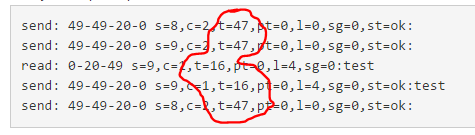
- on the first 2 lines there are 2 requests for values from your controller. The "t=47' indicates that the type is V_TEXT.
- on the the third line you receive a value with payload "test". however the 't=16' indicates that this is a V_TRIPPED value. (see Serial Protocol).
So there is something completely wrong. What is your controller and does it show the right types of sensors?
-
Here is it.
// Enable debug prints to serial monitor //#define MY_DEBUG //#define MY_NODE_ID 200 #define MY_SENSOR_ID 1 // Enable and select radio type attached #define MY_RADIO_NRF24 //#define MY_RADIO_RFM69 // Enable repeater functionality for this node #define MY_REPEATER_FEATURE // LCD includes #include <Wire.h> #include <LiquidCrystal_I2C.h> // MYS includes #include <SPI.h> #include <MySensors.h> #define LCD_ON 1 // GPIO value to write to turn on attached relay #define LCD_OFF 0 // GPIO value to write to turn off attached relay LiquidCrystal_I2C lcd(0x3f, 20, 4); //0x3f is the LCD address. String LINE_BLANK = " "; void before() { } void setup() { // Set off LCD module lcd.begin (); lcd.backlight(); lcd.setCursor(0, 0); // lcd.print("Ready!"); // We expect the controller to remove this from display. } void presentation() { // Send the sketch version information to the gateway and Controller sendSketchInfo("LCD Display", "1.0"); present(MY_SENSOR_ID, S_INFO); } void loop() { // extra processing if required. } void receive(const MyMessage &message) { // We only expect one type of message from controller. But we better check anyway. if (message.type == V_STATUS) { // Use V_STATUS to turn on/off the LCD display // if supported by LCD. } // temp string, probably don't need this. if (message.type == V_VAR1) { writeScreen(0, message.data); } if (message.type == V_VAR2) { writeScreen(1, message.data); } if (message.type == V_VAR3) { writeScreen(2, message.data); } if (message.type == V_VAR4) { writeScreen(3, message.data); } } void writeScreen(int line, String text) { // Trim whitespace from incoming text. text.trim(); // Remove anything over 20 char in text. if(text.length() > 19) { text.remove(20); } // Clear the line lcd.setCursor(0, line); lcd.print(LINE_BLANK); // Set Line lcd.setCursor(0, line); lcd.print(text); } -
This is my test code. Not optimized, just testing. I have just started to play with arduino (got my first ever this month) so I can't say I know what I am doing. ;) Made som changes in the code below, not tested yet. It compiles, guess that's good. ;)
I have commented out stuff related to line1 because that is always showing the time and date, in code, from GW/controller. Enable if you want to control all 4 lines from Domoticz.
Update display by using the domoticz api:
json.htm?type=command¶m=udevice&idx=XXXX&nvalue=0&svalue=Banana
Replace XXXX with the IDX for each of the 3 lines. You'll see it when adding the 3 text devices in Domoticz. Then use the Event-system in Domoticz to add Lua-script to update the display as example in this thread.//Credits: https://forum.mysensors.org/topic/1957/lcd-clock-and-text-sensor-node-with-new-v_text //Soft signing. //#define MY_SIGNING_SOFT //#define MY_SIGNING_REQUEST_SIGNATURES //#define MY_SIGNING_SOFT_RANDOMSEED_PIN 7 #define MY_RADIO_NRF24 #define MY_REPEATER_FEATURE #define MY_DEBUG #include <TimeLib.h> #include <Wire.h> #include <LiquidCrystal_I2C.h> #include <SPI.h> #include <MySensors.h> //char lastLCD1[21] = "Line1"; //Line 1 always showing current time char lastLCD2[21] = "Line2"; char lastLCD3[21] = "Line3"; char lastLCD4[21] = "Line4"; //20 whitespace characters used to clear your LCD line before printing to it. //Change to fit your LCD. Don't forget to change number of chars in the writeScreen function if needed. String LINE_BLANK = " "; boolean timeReceived = false ; unsigned long lastUpdate = 0, lastRequest = 0, lastDisplay = 0; //const byte LCD1_CHILD = 1; // Child ID for LCD line 1 const byte LCD2_CHILD = 2; // Child ID for LCD line 2 const byte LCD3_CHILD = 3; // Child ID for LCD line 3 const byte LCD4_CHILD = 4; // Child ID for LCD line 4 MyMessage textMsg(0, V_TEXT); // Initialize display. Google the correct settings for your display. // The follwoing setting should work for the recommended display in the MySensors "shop". LiquidCrystal_I2C lcd(0x27, 2, 1, 0, 4, 5, 6, 7, 3, POSITIVE); void before() { Wire.begin(); // I2C. lcd.begin(20, 4); // LCD with 20 chars, 4 lines. lcd.setBacklight(HIGH); // Make sure backlight is on. writeScreen(0, "Waiting for GW..."); // Print initial text before contact with GW. } void setup(void) { Serial.begin(115200); // Start serial. requestTime(); // Request time from controller. } void presentation() { sendSketchInfo("Domoticz LCD", "1.0"); // Send the sketch version information to the gateway and Controller //present(LCD1_CHILD, S_INFO, "LCD_line1"); //wait(500); present(LCD2_CHILD, S_INFO, "LCD_line2"); wait(500); present(LCD3_CHILD, S_INFO, "LCD_line3"); wait(500); present(LCD4_CHILD, S_INFO, "LCD_line4"); wait(500); //send(textMsg.setSensor(LCD1_CHILD).set("-")); // initialize the V_TEXT at controller for sensor to none (trick for Domoticz) send(textMsg.setSensor(LCD2_CHILD).set("-")); send(textMsg.setSensor(LCD3_CHILD).set("-")); send(textMsg.setSensor(LCD4_CHILD).set("-")); } void loop() { // timer for loop delays unsigned long now = millis(); // If no time has been received yet, request it every 10 second from controller // When time has been received, request update every hour if ((!timeReceived && (now - lastRequest > 10 * 1000)) || (now - lastRequest > 3600000UL)) { // request update from GW every hour to keep in sync // Request time from controller. Serial.println("Requesting time..."); timeReceived = false; requestTime(); lastRequest = now; } // Update sensors every 5 seconds if (now - lastDisplay > 5000) { lastDisplay = now; //request(LCD1_CHILD, V_TEXT, 0); // request new values from controller request(LCD2_CHILD, V_TEXT, 0); // request new values from controller request(LCD3_CHILD, V_TEXT, 0); // request new values from controller request(LCD4_CHILD, V_TEXT, 0); // request new values from controller } // Update LCD time every second if (now - lastUpdate > 1000) { LCD_time(); lastUpdate = now; } } // This is called when a message is received void receive(const MyMessage &message) { if (message.type == V_TEXT) { // Text messages only Serial.print("Message: "); Serial.print(message.sensor); Serial.print(", Message: "); Serial.println(message.getString()); // Write some debug info //if (message.sensor == LCD1_CHILD) { // writeScreen(0, message.data); //} // Don't forget to change "if" to "else if" when controlling all 4 lines: if (message.sensor == LCD2_CHILD) { writeScreen(1, message.data); } else if (message.sensor == LCD3_CHILD) { writeScreen(2, message.data); } else if (message.sensor == LCD4_CHILD) { writeScreen(3, message.data); } } } void receiveTime(unsigned long ts) { setTime(ts); timeReceived = true; } void LCD_time(void) { lcd.setCursor(0, 0); if (timeReceived) { lcd.print(year()); lcd.print("-"); printDigits(month()); lcd.print("-"); printDigits(day()); lcd.print(" "); printDigits(hour()); lcd.print(":"); printDigits(minute()); } else { writeScreen(0, "Waiting for time..."); } } void printDigits(int digits) { //add leading 0 if digit = 0-9 if (digits < 10) lcd.print('0'); lcd.print(digits); } void writeScreen(int line, String text) { // Remove anything over 20 char in text. if (text.length() > 19) { text.remove(20); } // Clear the line lcd.setCursor(0, line); lcd.print(LINE_BLANK); // Set Line lcd.setCursor(0, line); lcd.print(text); } -
thank you very much for sharing your code.
sorry this might be simple but i'm not sure how do you send text to the display? How do you update V_VAR1 in domoticz?thanks
-
thanks guy for the help,
what i'm trying to do, is send text to the display (16x2) using both lines (dont really need the time on top), and attach a 4 button keypad on it. then have these buttons sends commands (on.off) to Domoticz which will trigger Event and send that data/text back to the display.
if i manage to figure it out i'll post my code. -
Is there a limitation in text length? I plan to use a bigger display and want to maybe send strings with 30+ chars. Is it impossible (maybe then split this into two strings) or is it internally seperated in 2 messages (as nrf-payload is 32 byte - 7 byte MySensors-header)?
-
Is there a limitation in text length? I plan to use a bigger display and want to maybe send strings with 30+ chars. Is it impossible (maybe then split this into two strings) or is it internally seperated in 2 messages (as nrf-payload is 32 byte - 7 byte MySensors-header)?
-
@Anduril The text length is limited to the maximum payload size. So I guess you need to do some tweaking ;)
Re: LCD Clock and Text sensor node with new V_TEXT
Hello ,
I have done the same exercise also with the LCD 4*20 and use the same program. It is great.
It works but only I have the first line with the date.
The lines 2,3,4 are empty.
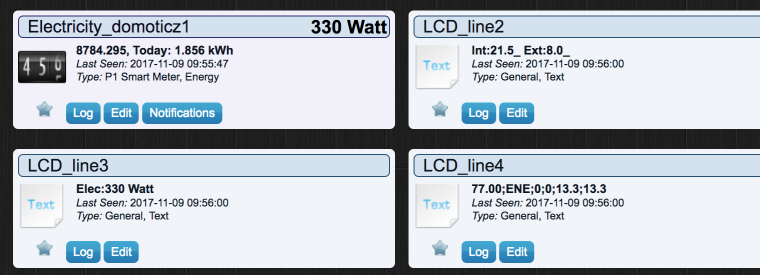
In Domoticz my V_TEXT are created and filled in.
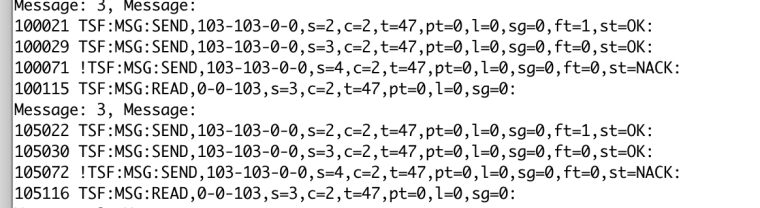
It seems that I can not read correctly the information LCD_line2, LCD_line3,LCD_line4

we can see that on the line READ , the text is V_TEXT but nothing is received.
Why ?
Thanks





Hello! It looks like you're interested in this conversation, but you don't have an account yet.
Getting fed up of having to scroll through the same posts each visit? When you register for an account, you'll always come back to exactly where you were before, and choose to be notified of new replies (either via email, or push notification). You'll also be able to save bookmarks and upvote posts to show your appreciation to other community members.
With your input, this post could be even better 💗
Register Login