
Boiler control from MAX! Cube to Drayton Boiler via Raspberry Pi/Vera/Mysensors.
-
I have to say using Vera and the boiler switch attached to that is a great solution, if I could just get past one problem. I wonder if anyone else is experiencing this, but I find the time taken for the valves to respond to the temperature changes is a little slow. Lets say I set the required temperature to 19c most rooms jump to 20/21 before the valves close enough to actually prevent further heating to the room.
My thoughts at the moment are to see if I can somehow directly communicate with the valves or maybe set offsets for each temp on the valves so they read a couple of degrees high.
Anyone have any thoughts?
-
What I do is only supply heat if valve is open more than 80% or more than 2 valves open 60% so heat shuts off at about 21.9 if you are looking for 22, then the residual heat in the radiator takes temp to about 22.2 before the room starts to slowly cool over the next hour or so down to 21.7 when the valve opens up enough to bring the heat back on.
-
twisted, unfortunately you can't directly communicate with the valves. AFAIK the way the work is that they initiate communication with the cube every 2(?) minutes and not the other way around. The cube just listens for the data and then sends data back to the valve. This is to conserve battery so the valve doesn't need to be active all the time. I'm sure stephenmhall will correct me if I'm wrong :)
-
As far as Cube to valves and valves to cube comms, I think it must be bi-directional as if you change anything on the cube app it happens pretty much instantly. How the cube and valves communicate could be magic for all I know :) they are on the 868Mhz band but what the protocol is I don't know.
I recently read about a company in Germany called busware.de that makes a Raspberry interface card that has firmware that speaks MAX protocol, I have sent them an email looking to confirm this but not heard anything back yet. If I could cut the Cube out of my system I would be very happy as it is the least reliable part, it seems to factory reset itself every couple of months.
-
Ah, well, I think the cube tells you it happens instantly but queues the requests up and waits to be contacted by a valve. I think that's what the memory slot parameters are for when you get the cube data. It fills them up with outgoing data ready for when the device makes contact. I'm not 100% sure about this but when researching it a while ago (I was going to go down the 868Mhz radio route before I found your project) I'm sure I read that's how it worked. I'll see if I can find the article.
-
I'm having a small issue, and I can't see why. I had to reload and now every time I try to load it I get the following before it terminates. This is from fresh install.
Traceback (most recent call last):
File "main.py", line 204, in <module>
Main()
File "main.py", line 96, in init
self.doLoop()
File "main.py", line 111, in doLoop
buttonCheckHeat("main")
File "/home/pi/PiHeating/heatinggpio.py", line 173, in buttonCheckHeat
MaxInterface().checkHeat(0)
File "/home/pi/PiHeating/max.py", line 56, in checkHeat
self.switchHeat()
File "/home/pi/PiHeating/max.py", line 486, in switchHeat
roomTemps = CreateUIPage().createRooms()
File "/home/pi/PiHeating/webui.py", line 224, in createRooms
actualTemp, roomOpen, roomMode)
UnboundLocalError: local variable 'roomOpen' referenced before assignment -
That error suggests you don't have a settings file?
-
@stephenmhall - I'm getting a lot of issues that seem to plague the MAX system (not your excellent software of course :) ) where the cube forgets the valves randomly or updating timings don't get sent to the valves. I also hate that the realtime temp isn't reported.
With this said, I was wondering if you (or anyone else) had seen the BlueTooth version of the valves that they sell. And if so, has anyone taken a peek at the messages to see if the temp is reported? I'd rather control the whole thing via BT than go via the dodgy cube! :)
-
Looks eq-3 at least have plans for eq-3 MAX! compatible boiler/hot water controller, the manual is already there, just cannot see the product anywhere.
-
For anyone looking in having a setup like above, theres a way without extra buying the cube or the ccu2 when using homematic thermostats. Please have a look at https://www.homegear.eu , which eliminates the need of those boxes as it runs on a raspberry pi which most of us already have. You will have to add a CUL or better build yourself a NanoCUL (arduino nano + CC1101 ). Homegear does all the pairing and communication (also scripts) and best of all its converting and outputs all the communication via MQTT, so you can use Node Red.
-
Damn, just weeks after I changed to a Honeywell system. Talk about bad timing.
-
FYI, I bought a CC1101 connected it up to an RPI, setup openhab, homegear, the homeatic binding, and within minutes I had all of the devices listed and complete control over them all. Well I can say that is where it has ended, I am struggling to either find pre-written logic or writing my own to control everything. The issue isn't so much writing it as such, but choosing which system should host it. This dilemma exists, as I have everything else in my vera, I am getting into node-red, and now also have openhab/homegear in the loop, I don't want to fracture my set up too much from a control interface point. I like the idea of keeping the WAF where it is, so I will probably still need to have some sort of control via the vera and therefore one of the apps that the other half is still happy with.
-
I've got a CC1101 on its way from China. I'm hoping it'll be here soon. My plan was to rewrite the excellent Python code from this page to talk to them directly rather than through the cube. Currently, I don't have an off the shelf home system. I'm kind of writing it all myself as I go (maybe a mistake, I know). I'll let you know how I get on when mine arrives.
-
I've got a CC1101 on its way from China. I'm hoping it'll be here soon. My plan was to rewrite the excellent Python code from this page to talk to them directly rather than through the cube. Currently, I don't have an off the shelf home system. I'm kind of writing it all myself as I go (maybe a mistake, I know). I'll let you know how I get on when mine arrives.
@Stuart-Middleton Although I mentioned my difficulties, I would suggest that you at least have a look at homegear and openhab (or the openhabian bundle to make it easier) as it does give great access to the devices and opens up very easy use of MQTT.
-
Thanks. I'll take a look at that first.
-
Thanks. I'll take a look at that first.
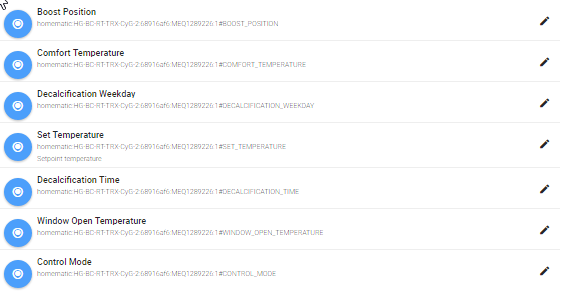
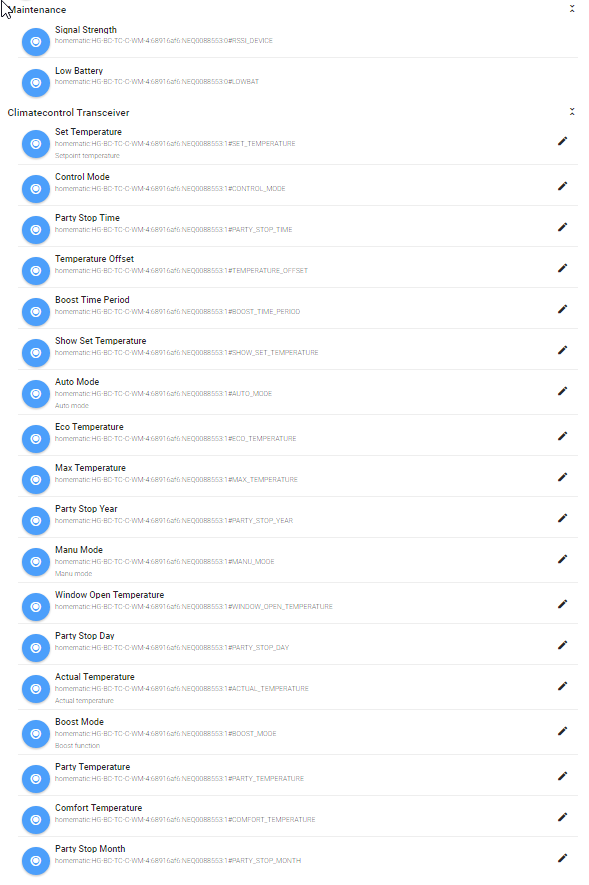
@Stuart-Middleton attached is an example of the items that get loaded when connected to openhab2 via homegear and the homematic binding.

-
That pretty much covers all the settings. When my radio arrives I'll hopefully be able to get it working quickly and I may come to you for help with setting it up with openhab so I can at least see a working system before I start playing with the code. Thanks
-
For a beginner, what shall I read (links) to understand what it means to do this. I have MAX cube and 3 actuators and I need a boiler control device. I called eq-3 and they reply they are not selling boiler controller device BC-TS-Sw2-WM (The MAX! boiler controller has been withdrawn from the market due to poor customer uptake. We do not believe there to be any devices available in the sales channel.) Thanks a lot !
-
Looks eq-3 at least have plans for eq-3 MAX! compatible boiler/hot water controller, the manual is already there, just cannot see the product anywhere.
@Maciej-Jablonski
They are not selling any more this. (Their answer: The MAX! boiler controller has been withdrawn from the market due to poor customer uptake. We do not believe there to be any devices available in the sales channel.) -
It depends on how much of a beginner you are. If you're OK with very basic electronics, happy to install some software on a Raspberry Pi and can connect a mains voltage wire to your boiler without killing yourself, then it's pretty simple.
At a minimum, you'll need a Raspberry Pi PC, a mains relay board controllable from the Pi (very cheap on eBay) and some cable.

Hello! It looks like you're interested in this conversation, but you don't have an account yet.
Getting fed up of having to scroll through the same posts each visit? When you register for an account, you'll always come back to exactly where you were before, and choose to be notified of new replies (either via email, or push notification). You'll also be able to save bookmarks and upvote posts to show your appreciation to other community members.
With your input, this post could be even better 💗
Register Login