Skip to content
  • MySensors
  • OpenHardware.io
  • Categories
  • Recent
  • Tags
  • Popular
Skins
  • Light
  • Brite
  • Cerulean
  • Cosmo
  • Flatly
  • Journal
  • Litera
  • Lumen
  • Lux
  • Materia
  • Minty
  • Morph
  • Pulse
  • Sandstone
  • Simplex
  • Sketchy
  • Spacelab
  • United
  • Yeti
  • Zephyr
  • Dark
  • Cyborg
  • Darkly
  • Quartz
  • Slate
  • Solar
  • Superhero
  • Vapor

  • Default (No Skin)
  • No Skin
Collapse
Brand Logo
  1. Home
  2. Troubleshooting
  3. [Beginner] WS2811 lights just doesn't light up normally

[Beginner] WS2811 lights just doesn't light up normally

Scheduled Pinned Locked Moved Troubleshooting
14 Posts 3 Posters 3.4k Views 3 Watching
  • Oldest to Newest
  • Newest to Oldest
  • Most Votes
Reply
  • Reply as topic
Log in to reply
This topic has been deleted. Only users with topic management privileges can see it.
  • Mantvydas RiM Offline
    Mantvydas RiM Offline
    Mantvydas Ri
    wrote on last edited by
    #3

    Reversed wiring (connected 5v and ground at the end of strip) and connected BOTH sides data wire (the one from beginning and one at the end). Don't know why, but it started working now. Any ideas now? :laughing:

    mfalkviddM 1 Reply Last reply
    0
    • Mantvydas RiM Mantvydas Ri

      Reversed wiring (connected 5v and ground at the end of strip) and connected BOTH sides data wire (the one from beginning and one at the end). Don't know why, but it started working now. Any ideas now? :laughing:

      mfalkviddM Offline
      mfalkviddM Offline
      mfalkvidd
      Mod
      wrote on last edited by
      #4

      @Mantvydas-Ri Interesting :) Could you post photos of both ends of the strip?

      1 Reply Last reply
      0
      • Mantvydas RiM Offline
        Mantvydas RiM Offline
        Mantvydas Ri
        wrote on last edited by
        #5

        The ends looked like this http://www.ipix.lt/image/6kFGp but I cut them off because of huge interference (The lights worked after disconnecting 5v pin :smiley: - probably data pin was colliding with 5v or something ). Now there are just plain wires.

        I feel so dumb because I don't even know how and why this happens.
        For example sometimes lights just works by simply connecting those pins as they should be, sometimes the lights just blinking randomly, sometimes nothing happens, but this often can get fixed if I attach both ends of data pin to arduino (and sometimes not). :confused:

        Feeling like I have bought defected strip or just don't have enough brains to connect it :laughing:

        mfalkviddM 1 Reply Last reply
        0
        • Mantvydas RiM Mantvydas Ri

          The ends looked like this http://www.ipix.lt/image/6kFGp but I cut them off because of huge interference (The lights worked after disconnecting 5v pin :smiley: - probably data pin was colliding with 5v or something ). Now there are just plain wires.

          I feel so dumb because I don't even know how and why this happens.
          For example sometimes lights just works by simply connecting those pins as they should be, sometimes the lights just blinking randomly, sometimes nothing happens, but this often can get fixed if I attach both ends of data pin to arduino (and sometimes not). :confused:

          Feeling like I have bought defected strip or just don't have enough brains to connect it :laughing:

          mfalkviddM Offline
          mfalkviddM Offline
          mfalkvidd
          Mod
          wrote on last edited by mfalkvidd
          #6

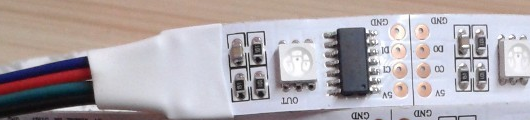
          @Mantvydas-Ri sorry I meant the strip itself, to see the markings for the connectors. Like this:
          0_1483108219158_leds.png
          (not that this image is from a different type of strip though)

          1 Reply Last reply
          0
          • Mantvydas RiM Offline
            Mantvydas RiM Offline
            Mantvydas Ri
            wrote on last edited by
            #7

            Every pixel looks like this http://www.ipix.lt/image/6kzdh and the other side like this http://www.ipix.lt/image/6kBSl. Don't know if you can see here, but there is written "+" , "DI" (data input probably), and "GND", so I guess contacts are marked correctly.

            mfalkviddM 1 Reply Last reply
            0
            • Mantvydas RiM Mantvydas Ri

              Every pixel looks like this http://www.ipix.lt/image/6kzdh and the other side like this http://www.ipix.lt/image/6kBSl. Don't know if you can see here, but there is written "+" , "DI" (data input probably), and "GND", so I guess contacts are marked correctly.

              mfalkviddM Offline
              mfalkviddM Offline
              mfalkvidd
              Mod
              wrote on last edited by
              #8

              @Mantvydas-Ri can't see the markings but I don't see anything strange so they are probably fine.

              How are you powering the strips? Is gnd on the power source connected to gnd on the Mega?

              YveauxY 1 Reply Last reply
              0
              • mfalkviddM mfalkvidd

                @Mantvydas-Ri can't see the markings but I don't see anything strange so they are probably fine.

                How are you powering the strips? Is gnd on the power source connected to gnd on the Mega?

                YveauxY Offline
                YveauxY Offline
                Yveaux
                Mod
                wrote on last edited by
                #9

                @mfalkvidd said:

                How are you powering the strips?

                Good question :+1:

                @Mantvydas-Ri How many LEDs are you trying to control?
                Each LED consumes 0.3W (60mA) according to the link in the 1st post, so a strand of 50 consumes 3A at maximum brightness.

                That's far too much for the 5V supply of the Arduino Mega, so try powering the LEDs from a separate, beefy (min. 4 Amps) power supply, or test with a much shorter strand (e.g. start with 1 LED only).

                http://yveaux.blogspot.nl

                1 Reply Last reply
                1
                • Mantvydas RiM Offline
                  Mantvydas RiM Offline
                  Mantvydas Ri
                  wrote on last edited by
                  #10

                  Tried external power supply, same problem as on Arduino mega. I have also decreased brightness of the bulbs to ensure this is not an issue.
                  Also, as I said, connecting both ends of data pin most likely solves the problem, but it is a little impractical.

                  1 Reply Last reply
                  0
                  • Mantvydas RiM Offline
                    Mantvydas RiM Offline
                    Mantvydas Ri
                    wrote on last edited by
                    #11

                    But I will try it again anyway- maybe this time i'll be lucky

                    1 Reply Last reply
                    0
                    • Mantvydas RiM Offline
                      Mantvydas RiM Offline
                      Mantvydas Ri
                      wrote on last edited by
                      #12

                      Alright, tested it with 10A 5V power supply. But now lights doesn't work at all. Even from battery it works, but not from the external power supply.
                      And yes, I have checked that power supply is working with multimeter.
                      Weird..

                      1 Reply Last reply
                      0
                      • Mantvydas RiM Offline
                        Mantvydas RiM Offline
                        Mantvydas Ri
                        wrote on last edited by Mantvydas Ri
                        #13

                        Btw is it normal that after removing GND wire lights are still glowing? :laughing:

                        YveauxY 1 Reply Last reply
                        0
                        • Mantvydas RiM Mantvydas Ri

                          Btw is it normal that after removing GND wire lights are still glowing? :laughing:

                          YveauxY Offline
                          YveauxY Offline
                          Yveaux
                          Mod
                          wrote on last edited by
                          #14

                          @Mantvydas-Ri Might be. Data line serves as gnd. But don't operate them like that, things might break!

                          http://yveaux.blogspot.nl

                          1 Reply Last reply
                          1
                          Reply
                          • Reply as topic
                          Log in to reply
                          • Oldest to Newest
                          • Newest to Oldest
                          • Most Votes


                          20

                          Online

                          11.7k

                          Users

                          11.2k

                          Topics

                          113.1k

                          Posts


                          Copyright 2025 TBD   |   Forum Guidelines   |   Privacy Policy   |   Terms of Service
                          • Login

                          • Don't have an account? Register

                          • Login or register to search.
                          • First post
                            Last post
                          0
                          • MySensors
                          • OpenHardware.io
                          • Categories
                          • Recent
                          • Tags
                          • Popular