
temp sensor keep on loging status switch
-
I have a working sensor that checks the temp om 2 places. If needed it wil switch on/of a Fan. That is all working perfect only this sensor logs continue the status of the switch. i am using Domoticz.
the log looks like this:2017-01-05 19:24:18.747 EventSystem: Event triggered: ventilator aan/uit_2
2017-01-05 19:24:18.741 (MySensors GW1) Temp (Temp serre)
2017-01-05 19:24:18.960 (MySensors GW1) Lighting 2 (Temp Fan switch)
2017-01-05 19:24:48.736 EventSystem: Event triggered: ventilator aan/uit_2
2017-01-05 19:24:48.730 (MySensors GW1) Temp (Temp serre)
2017-01-05 19:24:49.068 (MySensors GW1) Lighting 2 (Temp Fan switch)
2017-01-05 19:26:49.032 EventSystem: Event triggered: ventilator aan/uit_2
2017-01-05 19:26:49.027 (MySensors GW1) Temp (Temp binnen)
2017-01-05 19:26:49.182 (MySensors GW1) Lighting 2 (Temp Fan switch)
2017-01-05 19:27:49.049 EventSystem: Event triggered: ventilator aan/uit_2
2017-01-05 19:27:49.044 (MySensors GW1) Temp (Temp serre)
2017-01-05 19:27:49.291 (MySensors GW1) Lighting 2 (Temp Fan switch)
2017-01-05 19:28:48.988 EventSystem: Event triggered: ventilator aan/uit_2
2017-01-05 19:28:48.985 (MySensors GW1) Temp (Temp binnen)
2017-01-05 19:28:49.401 (MySensors GW1) Lighting 2 (Temp Fan switch)
2017-01-05 19:29:18.972 EventSystem: Event triggered: ventilator aan/uit_2 italicised textThis is my code
#include <MySensor.h>
#include <SPI.h>
#include <Bounce2.h>
#include <DallasTemperature.h>
#include <OneWire.h>

// Partie Température
#define COMPARE_TEMP 1 // Send temperature only if changed? 1 = Yes 0 = No

#define ONE_WIRE_BUS 3 // Pin where dallase sensor is connected
#define MAX_ATTACHED_DS18B20 16
unsigned long SLEEP_TIME = 30000; // Sleep time between reads (in milliseconds)
OneWire oneWire(ONE_WIRE_BUS); // Setup a oneWire instance to communicate with any OneWire devices (not just Maxim/Dallas temperature ICs)
DallasTemperature sensors(&oneWire); // Pass the oneWire reference to Dallas Temperature.
float lastTemperature[MAX_ATTACHED_DS18B20];
int numSensors=0;
boolean receivedConfig = false;
boolean metric = true;
// Initialize temperature message
MyMessage msg(0,V_TEMP);

// Partie Relay
#define RELAY_PIN  A1  // Arduino Digital I/O pinnumber for relay
#define BUTTON_PIN  A3   // Arduino Digital I/O pin number for button
#define CHILD_ID 17   // Id of the sensor child
#define RELAY_ON 1
#define RELAY_OFF 0

Bounce debouncer = Bounce();
int oldValue=0;
bool state;

unsigned long previousMillis = 0;

MySensor gw;
MyMessage msg2(CHILD_ID,V_LIGHT);

void setup()
{
  // Startup up the OneWire library
  sensors.begin();
  // requestTemperatures() will not block current thread
  sensors.setWaitForConversion(false);

  gw.begin(incomingMessage, AUTO, true);

  // Send the sketch version information to the gateway and Controller
  gw.sendSketchInfo("Relay & Button", "1.0");
  gw.sendSketchInfo("Temperature Sensor", "1.1");

    // Fetch the number of attached temperature sensors
  numSensors = sensors.getDeviceCount();
  Serial.print(numSensors);
  Serial.println(" temperature sensors detected");

 // Setup the button
  pinMode(BUTTON_PIN,INPUT);
  // Activate internal pull-up
  digitalWrite(BUTTON_PIN,HIGH);

  // After setting up the button, setup debouncer
  debouncer.attach(BUTTON_PIN);
  debouncer.interval(5);

  // Present all sensors to controller
  for (int i=0; i<numSensors && i<MAX_ATTACHED_DS18B20; i++) {
     gw.present(i, S_TEMP);
      }
  // Register all sensors to gw (they will be created as child devices)
  gw.present(CHILD_ID, S_LIGHT);

  // Make sure relays are off when starting up
  digitalWrite(RELAY_PIN, RELAY_OFF);
  // Then set relay pins in output mode
  pinMode(RELAY_PIN, OUTPUT);

  // Set relay to last known state (using eeprom storage)
  state = gw.loadState(CHILD_ID);
  digitalWrite(RELAY_PIN, state?RELAY_ON:RELAY_OFF);
}


/*
*  Example on how to asynchronously check for new messages from gw
*/
void loop()
{
  gw.process();

  // Relay button
  debouncer.update();
  // Get the update value
  int value = debouncer.read();
  if (value != oldValue && value==0) {
      gw.send(msg2.set(state?false:true), true); // Send new state and request ack back
  }
  oldValue = value;

  // Fetch temperatures from Dallas sensors
  sensors.requestTemperatures();

  // query conversion time and sleep until conversion completed
  //int16_t conversionTime = sensors.millisToWaitForConversion(sensors.getResolution());
  unsigned long currentMillis = millis();
  // sleep() call can be replaced by wait() call if node need to process incoming messages (or if node is repeater)
  // gw.wait(conversionTime);

// Read temperatures and send them to controller
  if (currentMillis - previousMillis >= SLEEP_TIME) {
    // save the last time you read temperature
    previousMillis = currentMillis;
    for (int i=0; i<numSensors && i<MAX_ATTACHED_DS18B20; i++) {

      // Fetch and round temperature to one decimal
      float temperature = static_cast<float>(static_cast<int>((gw.getConfig().isMetric?sensors.getTempCByIndex(i):sensors.getTempFByIndex(i)) * 10.)) / 10.;

      // Only send data if temperature has changed and no error
      #if COMPARE_TEMP == 1
      if (lastTemperature[i] != temperature && temperature != -127.00 && temperature != 85.00) {
      #else
      if (temperature != -127.00 && temperature != 85.00) {
      #endif

        // Send in the new temperature
        gw.send(msg.setSensor(i).set(temperature,1));
        // Save new temperatures for next compare
        lastTemperature[i]=temperature;
        }
     }
  }
}

void incomingMessage(const MyMessage &message) {
  // We only expect one type of message from controller. But we better check anyway.
  if (message.isAck()) {
     Serial.println("This is an ack from gateway");
  }

  if (message.type == V_LIGHT) {
     // Change relay state
     state = message.getBool();
     digitalWrite(RELAY_PIN, state?RELAY_ON:RELAY_OFF);
     // Store state in eeprom
     gw.saveState(CHILD_ID, state);

     // Write some debug info
     Serial.print("Incoming change for sensor:");
     Serial.print(message.sensor);
     Serial.print(", New status: ");
     Serial.println(message.getBool());
   }
}
Does anyone know why it produce that large amount of logs?
-
-
-
-
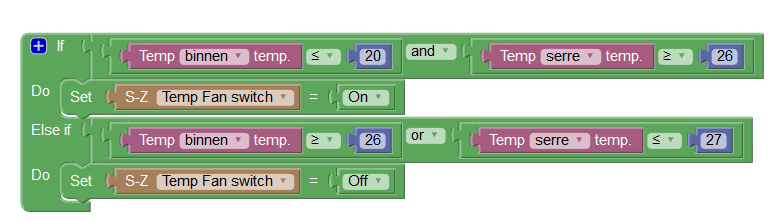
this sensor only messure the temp on 2 different locations and as seen in the Event, if the temp inside (TEMP binnen temp) <- 20 and the temp in the glasshouse is >-26 the fan switch on and the second part of the Event only switch of the Fan if the temp inside is to high (>-26) or the temp in the glasshouse is <-27. that is all I want with this project. I only want the mesurement every 15 min for example
-
-
-
-
-

Hello! It looks like you're interested in this conversation, but you don't have an account yet.
Getting fed up of having to scroll through the same posts each visit? When you register for an account, you'll always come back to exactly where you were before, and choose to be notified of new replies (either via email, or push notification). You'll also be able to save bookmarks and upvote posts to show your appreciation to other community members.
With your input, this post could be even better 💗
Register Login