
LED Strip Dimmer with 2 power supply's killed my arduino
-
I'm trying to do the same as an example on mysensors.org
https://www.mysensors.org/build/dimmer
But have expanded it to 2 power supply's and 2 led strips as it draws more power than one power supply can handle.
It's been working with 1 power supply and 1 LED strip connected for some months now, but then I wanted to connect the other LED strip and the other power supply and my Arduino burned :(. Can anyone spot an error in my setup? I have attached an image of the Breadboard setup (without the radio and so) does that look right?
I might add that at first I when adding the 2nd power supply and 2nd LED strip, there was no light in the second, so I disconnected the power and connected it to my USB on my laptop to debug the output and connected the 2 power supplies again and then it happened. Is it bad to have both USB power and external VCC 12v power? Think it happened when I turned up the power on the gain to make the LEDs light up.
Anyway here is the setup:
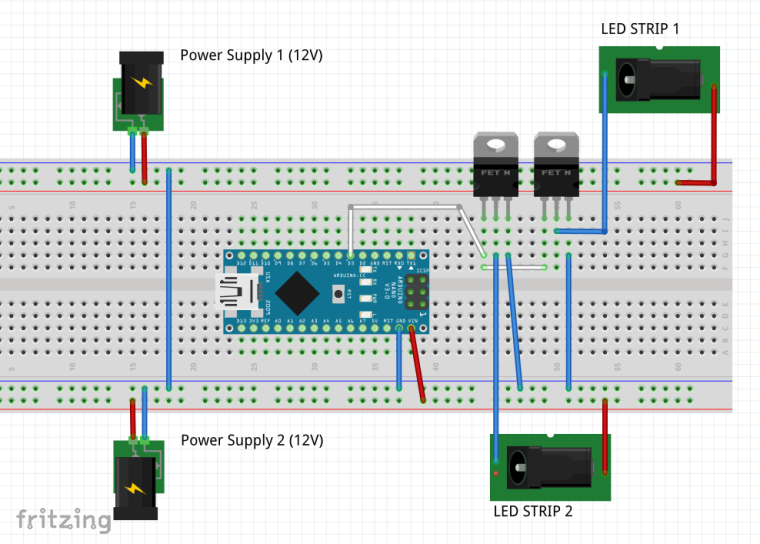
Any good ideas?
PS: The MOSFETs are IRL Z44N
-
I'm trying to do the same as an example on mysensors.org
https://www.mysensors.org/build/dimmer
But have expanded it to 2 power supply's and 2 led strips as it draws more power than one power supply can handle.
It's been working with 1 power supply and 1 LED strip connected for some months now, but then I wanted to connect the other LED strip and the other power supply and my Arduino burned :(. Can anyone spot an error in my setup? I have attached an image of the Breadboard setup (without the radio and so) does that look right?
I might add that at first I when adding the 2nd power supply and 2nd LED strip, there was no light in the second, so I disconnected the power and connected it to my USB on my laptop to debug the output and connected the 2 power supplies again and then it happened. Is it bad to have both USB power and external VCC 12v power? Think it happened when I turned up the power on the gain to make the LEDs light up.
Anyway here is the setup:
Any good ideas?
PS: The MOSFETs are IRL Z44N
-
@kajhoej is this a genuine Arduino? Most chinese clones can't handle 12V. A lot of people on the forum have burned their clones this way, you are not alone :)
@mfalkvidd Thanks for your quick answer. No, it's a cheap Chinese one 😀. It been running fine for months with only the one 12v power supply that drives the arduino and 1 led strip. Only when I was trying to add the other power supply and the 2nd led strip it burned. Had my laptop connected to usb at the same time for debug.
Before trying again I would like to know if the hw setup looks OK so that I don't burn another because of it. I could replace it with an original Nano but I don't dare until I'm sure that my setup does not cause the problem 😀
-
@mfalkvidd Thanks for your quick answer. No, it's a cheap Chinese one 😀. It been running fine for months with only the one 12v power supply that drives the arduino and 1 led strip. Only when I was trying to add the other power supply and the 2nd led strip it burned. Had my laptop connected to usb at the same time for debug.
Before trying again I would like to know if the hw setup looks OK so that I don't burn another because of it. I could replace it with an original Nano but I don't dare until I'm sure that my setup does not cause the problem 😀
-
@kajhoej the setup looks fine to me, except that 12V burns most clones - sooner or later.
@mfalkvidd Ok thanks for your answer. Glad to hear the setup looks ok (almost :) ) and I'll remove the 12V from the VCC and do some testing with 5v power through USB to start with.
Thanks :)

Hello! It looks like you're interested in this conversation, but you don't have an account yet.
Getting fed up of having to scroll through the same posts each visit? When you register for an account, you'll always come back to exactly where you were before, and choose to be notified of new replies (either via email, or push notification). You'll also be able to save bookmarks and upvote posts to show your appreciation to other community members.
With your input, this post could be even better 💗
Register Login