Skip to content
  • MySensors
  • OpenHardware.io
  • Categories
  • Recent
  • Tags
  • Popular
Skins
  • Light
  • Brite
  • Cerulean
  • Cosmo
  • Flatly
  • Journal
  • Litera
  • Lumen
  • Lux
  • Materia
  • Minty
  • Morph
  • Pulse
  • Sandstone
  • Simplex
  • Sketchy
  • Spacelab
  • United
  • Yeti
  • Zephyr
  • Dark
  • Cyborg
  • Darkly
  • Quartz
  • Slate
  • Solar
  • Superhero
  • Vapor

  • Default (No Skin)
  • No Skin
Collapse
Brand Logo
  1. Home
  2. Hardware
  3. FTDI <=> Arduino Pro Mini

FTDI <=> Arduino Pro Mini

Scheduled Pinned Locked Moved Hardware
19 Posts 7 Posters 15.0k Views 3 Watching
  • Oldest to Newest
  • Newest to Oldest
  • Most Votes
Reply
  • Reply as topic
Log in to reply
This topic has been deleted. Only users with topic management privileges can see it.
  • H Offline
    H Offline
    hek
    Admin
    wrote on last edited by
    #9

    Ok,

    Well... if anyone experience this from one of the recommended sellers let me know.

    1 Reply Last reply
    0
    • greglG Offline
      greglG Offline
      gregl
      Hero Member
      wrote on last edited by
      #10

      No luck - i am able to upload the Optiboot bootloader to them no problem,
      but i cannot program ( upload a sketch) with any of my ftdi programmers.

      I found this thread, same issue but with 3.3v - i had a quick attempt but i dont think its much different to what i was doing uploading (successfully) the optiboot bootloader.

      Spent enough time on this junk....ill just stick to using Nano's...

      Good luck!

      1 Reply Last reply
      0
      • B Offline
        B Offline
        bjornhallberg
        Hero Member
        wrote on last edited by bjornhallberg
        #11

        Thanks for the warning. All the Pro Minis I've bought from Ebay / Ali have been the standard clone version thankfully and they have all worked out of the box, at least the way I've wired them. I did start out with the useless Silicon Labs CP2102 programmer because I didn't do my homework (the one where you have to solder a super-small wire from the chip or hold down the reset button manually). Not saying this would work here, there seems to indeed be something wonky with the Funduinos:
        Sparkfun: Arduino Pro Mini 3.3v and FTDI 3.3v upload errors

        For reference (the exact same APM board most of us have as well):
        https://www.youtube.com/watch?v=Vawhrr4COjI
        (or: don't do what I did - avoid non-ftdi programmers)

        1 Reply Last reply
        0
        • J Offline
          J Offline
          jocke4u
          wrote on last edited by
          #12

          @bjornhallberg
          Thanks for the info/video, I will do another try before they go the same route as for @gregl ....trash bin :-1:

          @hek I also have bought these from another Aliexpress supplier

          1 Reply Last reply
          0
          • J Offline
            J Offline
            jocke4u
            wrote on last edited by
            #13

            I did the FTDI loop back test and so far I see the programmer doesn't work so ordered the one referenced on MySensors

            1 Reply Last reply
            0
            • B Offline
              B Offline
              bjornhallberg
              Hero Member
              wrote on last edited by
              #14

              Seems you have the same programmer as I have though. But I guess you could have gotten a faulty one.
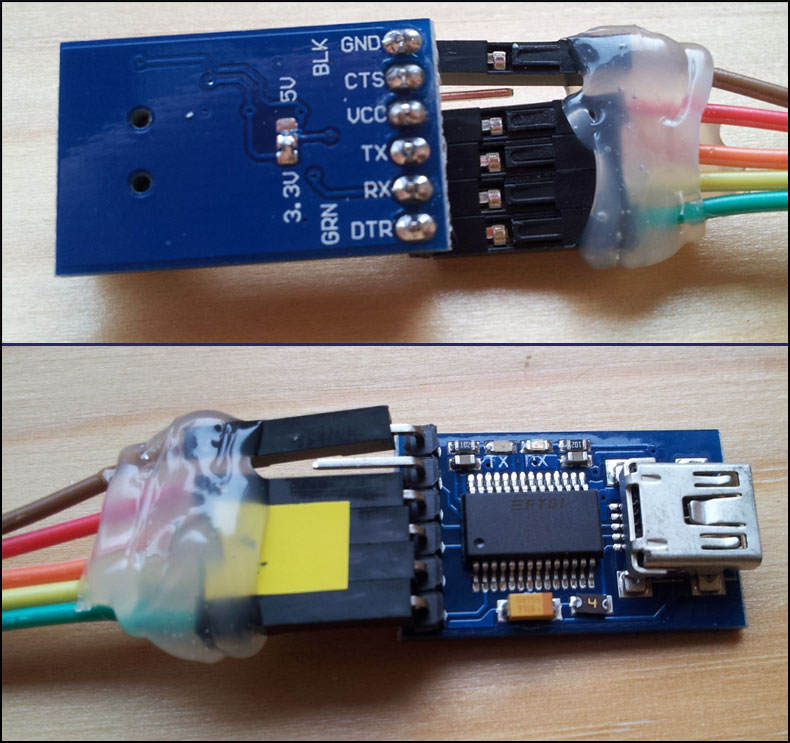
              IMG_20140925_095933.jpg
              In retrospect I should have gotten one with a 3.3V/5V jumper instead of solder pads. Not that I need 5V.

              1 Reply Last reply
              0
              • J Offline
                J Offline
                jocke4u
                wrote on last edited by
                #15

                FYI
                I today received the new FTDI programmer referenced on this site (http://www.ebay.com/itm/320907184616) and now it works to program Pro Mini's :)

                1 Reply Last reply
                0
                • D Offline
                  D Offline
                  daulagari
                  Hero Member
                  wrote on last edited by
                  #16

                  @jocke4u Looking at the first picture of this thread it looks to me like you did not make a selection between 3.3 V and 5 V on your FTDI adapter.

                  You need to connect either the 3.3 V pad with the middle pad or the 5V pad with the middle pad.

                  H 1 Reply Last reply
                  0
                  • D daulagari

                    @jocke4u Looking at the first picture of this thread it looks to me like you did not make a selection between 3.3 V and 5 V on your FTDI adapter.

                    You need to connect either the 3.3 V pad with the middle pad or the 5V pad with the middle pad.

                    H Offline
                    H Offline
                    hek
                    Admin
                    wrote on last edited by
                    #17

                    @daulagari

                    Yep you're probably right. Nice spotted!

                    1 Reply Last reply
                    0
                    • greglG Offline
                      greglG Offline
                      gregl
                      Hero Member
                      wrote on last edited by
                      #18

                      i think on mine the solder pads are bridged... but i will check.

                      J 1 Reply Last reply
                      0
                      • greglG gregl

                        i think on mine the solder pads are bridged... but i will check.

                        J Offline
                        J Offline
                        jocke4u
                        wrote on last edited by jocke4u
                        #19

                        @gregl said:

                        i think on mine the solder pads are bridged... but i will check.

                        I am pretty sure it's the same (5V as default) for me but will double check.

                        1 Reply Last reply
                        0

                        Hello! It looks like you're interested in this conversation, but you don't have an account yet.

                        Getting fed up of having to scroll through the same posts each visit? When you register for an account, you'll always come back to exactly where you were before, and choose to be notified of new replies (either via email, or push notification). You'll also be able to save bookmarks and upvote posts to show your appreciation to other community members.

                        With your input, this post could be even better 💗

                        Register Login
                        Reply
                        • Reply as topic
                        Log in to reply
                        • Oldest to Newest
                        • Newest to Oldest
                        • Most Votes


                        6

                        Online

                        11.9k

                        Users

                        11.2k

                        Topics

                        113.4k

                        Posts


                        Copyright 2025 TBD   |   Forum Guidelines   |   Privacy Policy   |   Terms of Service
                        • Login

                        • Don't have an account? Register

                        • Login or register to search.
                        • First post
                          Last post
                        0
                        • MySensors
                        • OpenHardware.io
                        • Categories
                        • Recent
                        • Tags
                        • Popular