
Requesting value from Domoticz
-
@gohan Yes, I understand, but when I create a dummy text sensor I can't define its child ID. Can I find it somewhere?
-
-
You have to create a sensor in the sensor node sketch, assign a child ID to it and present it like the others sensors during setup, then it should show on the controller. I can't be more specific because I haven't worked on text sensors yet
@gohan Dummy sensors are created in Domoticz, they don't use the MySensors library, so one doesn't upload any sketches to Arduino :)
What I want to achieve specifically is to send outside temperature received from WeatherUnderground to one of my MySensors nodes.
-
-
I know, but if you don't create a sensor able to receive the value, you can't send anything to it through the mysensors network
-
-
Just for my curiosity, why are you using the temperature from weather underground? Is it just displayed on a screen?
@gohan I'm doing a project for my master's thesis.
There's a mathematical thermal model of a building running on MySensors node. I wanted to supply it with an information about actual outside temperature to have accurate results.
-
-
A real mysensors project would require an external node with temperature and humidity sensor 😁
@gohan This model is just a small part of my project. But I get your concept.
There's already a DHT11 node running inside my house, measuring quantities that you've mentioned.
-
@gohan hey, now I get it!
got it working the way I wanted, thank you so much :D
-
@tomek_olo
Sorry what is the way for send from domoticz child -node to other node through lua script for example Tanks@mar.conte I don't understand your question. Can you clarify, please?
-
@mar.conte I don't understand your question. Can you clarify, please?
-
@tomek_olo
Sorry what is the way for send from domoticz child -node to other node through lua script for example TanksOK, I'll try to describe everything I've done to get it working:
- I'm presenting MySensors node to Domoticz as S_INFO: "present(CHILD_ID, S_INFO);"
- Next step is to add this node in your Domoticz. It should be visible at first in "Devices" as a "Text" device. After you add it it will be present in the "Utility" tab.
- Now you have to edit a text value of this device in Domoticz. (I think that's what interests you but in reverse) I'm using a "Device" script that updates this text value with outside temperature every time the weather is updated:
commandArray = {}
local tempOut = devicechanged["Outside_Temperature"]
local tempOutIdx = 25if ( devicechanged["Outside"]) then
commandArray['UpdateDevice'] = otherdevices_idx['TextNode']..'|1|'..tempOut
end- Now when I want to download this new value to my node I use "request( CHILD_ID, V_TEXT );" and inside "receive()" function:
if (message.type == V_TEXT) {
if (message.sensor == CHILD_ID) {
outTemp = message.getFloat();
}
}That's all, it's complicated. If you have any questions feel free to ask. I'll do my best to help.
-
-
-
Hi,
I've been trying to modify the sketch of Solar Powered Plant moisture sensor so that I can remotely control the sleep time from Domoticz.. But so far I failed.. ;-(
Sorry for the long post below, but I try to provide all details, as I don't understand what I did wrong..I tried to understand several contributions including the ones above from dbemowsk (thank you also for your chat messages!) and tomek_olo, as well as the Water Pulse meter sensor , but I still don't succeed having the sensor receiving data from Domoticz.
Here's what I tried to do.
In Sensor, I reused the code from solar powered moisture sensor from other post (and that code is working on another sensor) then I modified it to:- present an additional child to Domoticz (CHILD_ID_SLEEP 2 with S_INFO) in setup
- send a value (here 11) of V_VAR1 in setup as per the advise from dbemowsk so that domotic recognize that data field
- then in Loop(), I have (apart the code for moisture sensor) a loop for requesting V_VAR1 (copied that from the water pulse meter sensor code)
- outside Loop() (at bottom of script), I created the receive(const MyMessage &message) procedure (in code below, I tried to print to serial several debugging messages...)
Here's below the whole code:
#include <SPI.h>
#define MY_RADIO_NRF24
#define MY_DEBUG
#include <MySensors.h>

#define round(x) ((x)>=0?(long)((x)+0.5):(long)((x)-0.5))
#define N_ELEMENTS(array) (sizeof(array)/sizeof((array)[0]))

#define CHILD_ID_MOISTURE 0
#define CHILD_ID_BATTERY 1
#define CHILD_ID_SLEEP_S 2
// #define SLEEP_TIME_S 100 // Sleep time between reads (in seconds)
#define THRESHOLD 1.1 // Only make a new reading with reverse polarity if the change is larger than 10%.
#define STABILIZATION_TIME 1000 // Let the sensor stabilize before reading default BOD settings.
const int SENSOR_ANALOG_PINS[] = {A4, A5}; // Sensor is connected to these two pins. Avoid A3 if using ATSHA204. A6 and A7 cannot be used because they don't have pullups.

// MySensor gw;
MyMessage msg(CHILD_ID_MOISTURE, V_HUM);
MyMessage voltage_msg(CHILD_ID_BATTERY, V_VOLTAGE);
MyMessage sleep_msg(CHILD_ID_SLEEP_S, V_VAR1);
unsigned long SLEEP_TIME_S = 10;
unsigned long SLEEP_TIME = 10000;
long oldvoltage = 0;
byte direction = 0;
int oldMoistureLevel = -1;
float batteryPcnt;
float batteryVolt;
int LED = 5;
bool pcReceived = false;

void setup()
{
  pinMode(LED, OUTPUT);
  digitalWrite(LED, HIGH);
  delay(200);
  digitalWrite(LED, LOW);
  delay(200);
  digitalWrite(LED, HIGH);
  delay(200);
  digitalWrite(LED, LOW);
  SLEEP_TIME=SLEEP_TIME_S*1000;


sendSketchInfo("Plant moisture solar proto", "1.0");
// request(CHILD_ID_SLEEP_S, V_VAR1);
present(CHILD_ID_MOISTURE, S_HUM);
  delay(250);
present(CHILD_ID_BATTERY, S_MULTIMETER);
  for (int i = 0; i < N_ELEMENTS(SENSOR_ANALOG_PINS); i++) {
    pinMode(SENSOR_ANALOG_PINS[i], OUTPUT);
    digitalWrite(SENSOR_ANALOG_PINS[i], LOW);
  }
present(CHILD_ID_SLEEP_S, S_INFO);
send(sleep_msg.set(11));
}

void loop()
{
  pcReceived = false;
  int moistureLevel = readMoisture();

  // Send rolling average of 2 samples to get rid of the "ripple" produced by different resistance in the internal pull-up resistors
  // See http://forum.mysensors.org/topic/2147/office-plant-monitoring/55 for more information
  if (oldMoistureLevel == -1) { // First reading, save current value as old
    oldMoistureLevel = moistureLevel;
  }
  if (moistureLevel > (oldMoistureLevel * THRESHOLD) || moistureLevel < (oldMoistureLevel / THRESHOLD)) {
    // The change was large, so it was probably not caused by the difference in internal pull-ups.
    // Measure again, this time with reversed polarity.
    moistureLevel = readMoisture();
  }
send(msg.set((moistureLevel + oldMoistureLevel) / 2.0 / 10.23, 1));
  oldMoistureLevel = moistureLevel;

  int sensorValue = analogRead(A0);
  Serial.println(sensorValue);
  float voltage=sensorValue*(3.3/1023);
  Serial.println(voltage);
  batteryPcnt = (sensorValue - 248) * 0.72;
  batteryVolt = voltage;
sendBatteryLevel(batteryPcnt);
  resend((voltage_msg.set(batteryVolt, 3)), 10);

if (!pcReceived) {
      //Last sleept time not yet received from controller, request it again
      request(CHILD_ID_SLEEP_S, V_VAR1);
      Serial.print("Requested time sleep from gw VAR1");
      return;
    }


  digitalWrite(LED, HIGH);
  delay(200);
  digitalWrite(LED, LOW);
SLEEP_TIME=SLEEP_TIME_S*1000;
sleep(SLEEP_TIME);
}

void resend(MyMessage &msg, int repeats)
{
  int repeat = 1;
  int repeatdelay = 0;
  boolean sendOK = false;

  while ((sendOK == false) and (repeat < repeats)) {
    if (send(msg)) {
      sendOK = true;
    } else {
      sendOK = false;
      Serial.print("Error ");
      Serial.println(repeat);
      repeatdelay += 500;
    } repeat++; delay(repeatdelay);
  }
}


int readMoisture() {
  pinMode(SENSOR_ANALOG_PINS[direction], INPUT_PULLUP); // Power on the sensor
  analogRead(SENSOR_ANALOG_PINS[direction]);// Read once to let the ADC capacitor start charging
  sleep(STABILIZATION_TIME);
  int moistureLevel = (1023 - analogRead(SENSOR_ANALOG_PINS[direction]));

  // Turn off the sensor to conserve battery and minimize corrosion
  pinMode(SENSOR_ANALOG_PINS[direction], OUTPUT);
  digitalWrite(SENSOR_ANALOG_PINS[direction], LOW);

  direction = (direction + 1) % 2; // Make direction alternate between 0 and 1 to reverse polarity which reduces corrosion
  return moistureLevel;
}

void receive(const MyMessage &message)
{
  if (message.type==V_TEXT) {
    // unsigned long infosleep=message.getULong();
    String infosleepstr=message.getString();
    unsigned long infosleep=infosleepstr.toInt();
    Serial.print("Received time sleep as string from gw:");
    Serial.println(infosleepstr);
    Serial.print("fin de msg");
    SLEEP_TIME_S = infosleep;
    pcReceived = true;
  }
  if (message.type==V_VAR1) {
    unsigned long infosleep=message.getULong();
    //unsigned long infosleep=message.getString();

    Serial.print("Received time sleep as VAR1 ULOng from gw:");
    Serial.println(infosleep);
    Serial.print("fin de msg");
    SLEEP_TIME_S = infosleep;
    pcReceived = true;
  }
}
In Domoticz, in hardware I can see this:
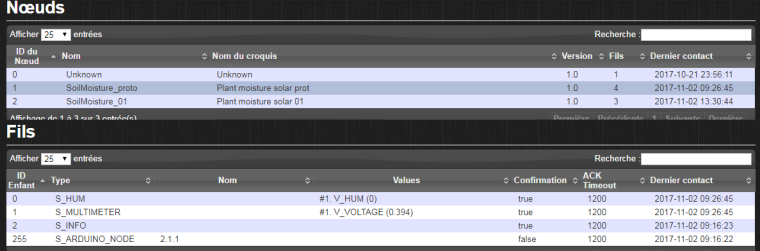
The sensor is the "proto" one (ID 1) where I can see the various children (Humidity=0 is normal as I did not attach the soil sensor and voltage is weird as it's not connected either).
In devices view, I have:

where I can see the text sensor of S_INFO which is set to "5" thanks to a user variable (see LUA script below).
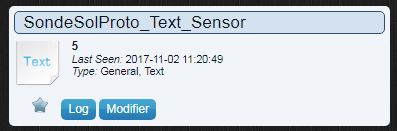
I created a user variable "SondeSleep" with a LUA script (type "variables") to update the text sensor whenever the suer variable changes:commandArray = {} if ( uservariablechanged['SondeSleep']) then print ("nouvelle valeur Level1 de SondeSleep:" .. uservariables['SondeSleep']); ttidx=otherdevices_idx['SondeSolProto_Text_Sensor']; commandArray['UpdateDevice']=ttidx..'|1|' .. uservariables['SondeSleep'] end return commandArrayThis script seems working since it replicates properly the vriable value to the text_sensor. I'm just confused by the command
commandArray['UpdateDevice']=ttidx..'|1|' .. uservariables['SondeSleep']where I couldn't understand the meaning of the value between the || (here |1|).
The Domoticz website refers to LUA and JSON page, but I coudn't find the explanation. In 1 script of this post, I saw a 0, in another a 1.. I tried with both and also wit 2 (just in case it refers to Child ID ..) but no better result.
Could someone clarifies the meaning ?When I run the sensor, I can only see (in serial monitor) the message "Requested time sleep from gw VAR1" from the "request" loop. and in Domoticz log, I can see that the sensor updates the humidity and voltage values, but that's all.
I'm also surprised I do'nt see any value in S_INFO child, but maybe it's normal.
I had tried to use V_TEXT instead of V_VAR1 everhwhere, but same result. There's definitely something I misunderstood somewehere.Anyone could help me ?
ricorico94 -
-
well, one of my issues is that I don't understand how the V_VAR1 is managed by Domoticz. The website states that V_VARx exist for any kind of sensor, but in such case I don't understand how to define its value in Domoticz as V_VAR1 appears nowhere. So I used an integer user variable, then transtype to text and in my receive(à procedure, I was trying to transtype again to integer (or unsigned long)..
It's also why I had tried to replace all my V_VAR1 by V_TEXT, to be more homogenous. -
well, one of my issues is that I don't understand how the V_VAR1 is managed by Domoticz. The website states that V_VARx exist for any kind of sensor, but in such case I don't understand how to define its value in Domoticz as V_VAR1 appears nowhere. So I used an integer user variable, then transtype to text and in my receive(à procedure, I was trying to transtype again to integer (or unsigned long)..
It's also why I had tried to replace all my V_VAR1 by V_TEXT, to be more homogenous.@ricorico94 If you are asking about V_VarX, I won't be much help. Back when I used Domoticz, V_VarX was not supported yet. I would be curious to see what the answer is though.
-
HI again,
I noticed that I never see any "read" line in the serial monitor (except at the very beginning when I restart the sensor". Is it normal ?
Here are snapshots of a couple messages (among the thousands appearing on Serial monitor)
Seen right after restart of sensor:0 MCO:BGN:INIT NODE,CP=RNNNA--,VER=2.1.1 4 TSM:INIT 4 TSF:WUR:MS=0 12 TSM:INIT:TSP OK 14 TSF:SID:OK,ID=1 16 TSM:FPAR 51 TSF:MSG:SEND,1-1-255-255,s=255,c=3,t=7,pt=0,l=0,sg=0,ft=0,st=OK: 585 TSF:MSG:READ,0-0-1,s=255,c=3,t=8,pt=1,l=1,sg=0:0 591 TSF:MSG:FPAR OK,ID=0,D=1 2060 TSM:FPAR:OK 2060 TSM:ID 2062 TSM:ID:OK 2064 TSM:UPL 2068 TSF:MSG:SEND,1-1-0-0,s=255,c=3,t=24,pt=1,l=1,sg=0,ft=0,st=OK:1 2074 TSF:MSG:READ,0-0-1,s=255,c=3,t=25,pt=1,l=1,sg=0:1 2080 TSF:MSG:PONG RECV,HP=1 2084 TSM:UPL:OK 2086 TSM:READY:ID=1,PAR=0,DIS=1 2091 TSF:MSG:SEND,1-1-0-0,s=255,c=3,t=15,pt=6,l=2,sg=0,ft=0,st=OK:0100 2099 TSF:MSG:READ,0-0-1,s=255,c=3,t=15,pt=6,l=2,sg=0:0100 2107 TSF:MSG:SEND,1-1-0-0,s=255,c=0,t=17,pt=0,l=5,sg=0,ft=0,st=OK:2.1.1 2121 TSF:MSG:SEND,1-1-0-0,s=255,c=3,t=6,pt=1,l=1,sg=0,ft=0,st=OK:0 2570 TSF:MSG:READ,0-0-1,s=255,c=3,t=6,pt=0,l=1,sg=0:M 2576 MCO:REG:REQ 2580 TSF:MSG:SEND,1-1-0-0,s=255,c=3,t=26,pt=1,l=1,sg=0,ft=0,st=OK:2 2588 TSF:MSG:READ,0-0-1,s=255,c=3,t=27,pt=1,l=1,sg=0:1 2594 MCO:PIM:NODE REG=1 2596 MCO:BGN:STP 3201 TSF:MSG:SEND,1-1-0-0,s=255,c=3,t=11,pt=0,l=25,sg=0,ft=0,st=OK:Plant moisture solar prot 3213 TSF:MSG:SEND,1-1-0-0,s=255,c=3,t=12,pt=0,l=3,sg=0,ft=0,st=OK:1.0 3223 TSF:MSG:SEND,1-1-0-0,s=0,c=0,t=7,pt=0,l=0,sg=0,ft=0,st=OK: 3481 TSF:MSG:SEND,1-1-0-0,s=1,c=0,t=30,pt=0,l=0,sg=0,ft=0,st=OK: 3491 TSF:MSG:SEND,1-1-0-0,s=2,c=0,t=36,pt=0,l=0,sg=0,ft=0,st=OK: 3502 TSF:MSG:SEND,1-1-0-0,s=2,c=1,t=24,pt=2,l=2,sg=0,ft=0,st=OK:11 3508 MCO:BGN:INIT OK,TSP=1 3512 MCO:SLP:MS=1000,SMS=0,I1=255,M1=255,I2=255,M2=255 3518 MCO:SLP:TPD 3520 MCO:SLP:WUP=-1 3524 TSF:MSG:SEND,1-1-0-0,s=0,c=1,t=1,pt=7,l=5,sg=0,ft=0,st=OK:0.0 242 0.78 3534 TSF:MSG:SEND,1-1-0-0,s=255,c=3,t=0,pt=1,l=1,sg=0,ft=0,st=OK:252 3545 TSF:MSG:SEND,1-1-0-0,s=1,c=1,t=38,pt=7,l=5,sg=0,ft=0,st=OK:0.781 3555 TSF:MSG:SEND,1-1-0-0,s=2,c=2,t=24,pt=0,l=0,sg=0,ft=0,st=OK: Requested time sleep from gw VAR13565 TSF:MSG:SEND,1-1-0-0,s=2,c=2,t=47,pt=0,l=0,sg=0,ft=0,st=OK: Requested time sleep from gw TEXT3573 MCO:SLP:MS=1000,SMS=0,I1=255,M1=255,I2=255,M2=255and then messages which keeps repeating (no read message):
10414 TSF:MSG:SEND,1-1-0-0,s=2,c=2,t=24,pt=0,l=0,sg=0,ft=0,st=OK:
Requested time sleep from gw VAR110424 TSF:MSG:SEND,1-1-0-0,s=2,c=2,t=47,pt=0,l=0,sg=0,ft=0,st=OK:
Requested time sleep from gw TEXT10432 MCO:SLP:MS=1000,SMS=0,I1=255,M1=255,I2=255,M2=255
10438 MCO:SLP:TPD
10440 MCO:SLP:WUP=-1
10448 TSF:MSG:SEND,1-1-0-0,s=0,c=1,t=1,pt=7,l=5,sg=0,ft=0,st=OK:0.0
189
0.61
10461 TSF:MSG:SEND,1-1-0-0,s=255,c=3,t=0,pt=1,l=1,sg=0,ft=0,st=OK:214
10471 TSF:MSG:SEND,1-1-0-0,s=1,c=1,t=38,pt=7,l=5,sg=0,ft=0,st=OK:0.610
10479 TSF:MSG:SEND,1-1-0-0,s=2,c=2,t=24,pt=0,l=0,sg=0,ft=0,st=OK:
Requested time sleep from gw VAR110489 TSF:MSG:SEND,1-1-0-0,s=2,c=2,t=47,pt=0,l=0,sg=0,ft=0,st=OK:
Requested time sleep from gw TEXT10498 MCO:SLP:MS=1000,SMS=0,I1=255,M1=255,I2=255,M2=255
Any idea of what might happen ? (or not happen..)
NB: in snapshots above, I'm requesting both V_VAR1 and V_TEXT vaues with these commands looping:if (!pcReceived) { //Last sleept time not yet received from controller, request it again request(CHILD_ID_SLEEP_S, V_VAR1); Serial.print("Requested time sleep from gw VAR1"); request(CHILD_ID_SLEEP_S, V_TEXT); Serial.print("Requested time sleep from gw TEXT"); return; }``` ricorico94



Hello! It looks like you're interested in this conversation, but you don't have an account yet.
Getting fed up of having to scroll through the same posts each visit? When you register for an account, you'll always come back to exactly where you were before, and choose to be notified of new replies (either via email, or push notification). You'll also be able to save bookmarks and upvote posts to show your appreciation to other community members.
With your input, this post could be even better 💗
Register Login