
openHAB 2.0 binding
-
I am trying to make use of the customSensor using org.openhab.binding.mysensors-2.1.0-SNAPSHOT.jar I see the node 12 var4 message arrive but it is not being assigned to my item; am I doing something wrong? I have tried both string and number item types.
10:37:37.879 [DEBUG] [rsAbstractConnection$MySensorsReader] - 12;0;1;0;27;1023
10:37:37.880 [DEBUG] [rs.internal.gateway.MySensorsGateway] - Node 12 found in gateway
10:37:37.881 [DEBUG] [rs.internal.gateway.MySensorsGateway] - Child 0 found in node 12
10:37:37.882 [DEBUG] [ensors.handler.MySensorsThingHandler] - Updating channel: var4(27) value to: 1023
10:37:37.896 [DEBUG] [ensors.handler.MySensorsThingHandler] - Setting last update for node/child 12/0 to 2017-06-03T10:37:37.000-0400
10:37:37.901 [DEBUG] [rsAbstractConnection$MySensorsReader] - 12;255;3;0;22;63464
10:37:37.912 [INFO ] [marthome.event.ItemStateChangedEvent] - Sensor12LastUpdate changed from 2017-06-03T10:37:26.000-0400 to 2017-06-03T10:37:37.000-0400
10:37:37.925 [INFO ] [marthome.event.ItemStateChangedEvent] - mySMsg01 changed from 1;4;1;0;1;64.2 to 12;0;1;0;27;1023
10:37:37.935 [INFO ] [marthome.event.ItemStateChangedEvent] - mySMsg01 changed from 12;0;1;0;27;1023 to 12;255;3;0;22;63464
10:37:41.974 [DEBUG] [rsAbstractConnection$MySensorsReader] - 2;0;1;0;17;544
10:37:41.975 [DEBUG] [rs.internal.gateway.MySensorsGateway] - Node 2 found in gateway
10:37:41.976 [DEBUG] [rs.internal.gateway.MySensorsGateway] - Child 0 found in node 2
10:37:41.976 [DEBUG] [ensors.handler.MySensorsThingHandler] - Updating channel: watt(17) value to: 544
10:37:41.984 [DEBUG] [ensors.handler.MySensorsThingHandler] - Setting last update for node/child 2/0 to 2017-06-03T10:37:41.000-0400
10:37:41.995 [INFO ] [marthome.event.ItemStateChangedEvent] - watt01 changed from 547 to 544
10:37:42.005 [DEBUG] [rsAbstractConnection$MySensorsReader] - 2;0;1;0;24;1138982
10:37:42.006 [INFO ] [marthome.event.ItemStateChangedEvent] - Sensor02LastUpdate changed from 2017-06-03T10:37:27.000-0400 to 2017-06-03
Things
Bridge mysensors:bridge-eth:ethGatewayPi [ ipAddress="127.0.0.1", tcpPort=5003, sendDelay=200 ]
{
   /** define things connected to that bridge here */
   humidity         hum01       [ nodeId="1", childId="0" ]
   temperature      temp01      [ nodeId="1", childId="1" ]
   humidity         hum02       [ nodeId="1", childId="2" ]
   temperature      temp02      [ nodeId="1", childId="3" ]
   humidity         hum03       [ nodeId="1", childId="4" ]
   temperature      temp03      [ nodeId="1", childId="5" ]
   power            power01     [ nodeId="2", childId="0" ]
   rgbLight         rgb02       [ nodeId="6", childId="0", requestAck=true ]
   light            relay01     [ nodeId="7", childId="0", requestAck=true ]
   motion           motion01    [ nodeId="8", childId="0", requestAck=true ]
   motion           motion02    [ nodeId="9", childId="0", requestAck=true ]
   light            relay02     [ nodeId="9", childId="1", requestAck=true ]
   cover            cover03     [ nodeId="10", childId="0", requestAck=true, smartSleep=true ]
   cover            cover02     [ nodeId="11", childId="0", requestAck=true, smartSleep=true ]
   customSensor     blind01     [ nodeId="12", childId="0", requestAck=true, smartSleep=true ]
   mySensorsMessage mySMsg01    [ nodeId="999", childId="999" ]
}
items:
String blind1BatReading	    "Blind#1 Battery A/D Reading"  	<battery>			{ channel="mysensors:customSensor:ethGatewayPi:blind01:var4" }
DateTime Sensor12LastUpdate "Last seen Nd12 [%1$ta %1$tT]"       <clock>    	{ channel="mysensors:customSensor:ethGatewayPi:blind01:lastupdate" }
edit 6/7: I stand corrected, the variables are being updated. I was fooled by the log. For some reason the log does not show the change the way it did it binding 2.0.0. I placed debug messages in my rules and they're updating.
-
@RVMRVM could you give this one a try?
https://github.com/tobof/openhab2-addons/issues/76
It is not yet integrated into the main branch. If you could test it and give me some feedback I would be very grateful. :)
@TimO is it possible to configure using paper ui?
cheers
Matt -
@the-trung This thread is OpenHAB and MySensors binding related. Better ask here: https://community.openhab.org
In your case I suppose you need to switch chmod with chown. :)
-
@TimO is it possible to configure using paper ui?
cheers
Matt@matt-shepherd yes!
-
I am trying to make use of the customSensor using org.openhab.binding.mysensors-2.1.0-SNAPSHOT.jar I see the node 12 var4 message arrive but it is not being assigned to my item; am I doing something wrong? I have tried both string and number item types.
10:37:37.879 [DEBUG] [rsAbstractConnection$MySensorsReader] - 12;0;1;0;27;1023
10:37:37.880 [DEBUG] [rs.internal.gateway.MySensorsGateway] - Node 12 found in gateway
10:37:37.881 [DEBUG] [rs.internal.gateway.MySensorsGateway] - Child 0 found in node 12
10:37:37.882 [DEBUG] [ensors.handler.MySensorsThingHandler] - Updating channel: var4(27) value to: 1023
10:37:37.896 [DEBUG] [ensors.handler.MySensorsThingHandler] - Setting last update for node/child 12/0 to 2017-06-03T10:37:37.000-0400
10:37:37.901 [DEBUG] [rsAbstractConnection$MySensorsReader] - 12;255;3;0;22;63464
10:37:37.912 [INFO ] [marthome.event.ItemStateChangedEvent] - Sensor12LastUpdate changed from 2017-06-03T10:37:26.000-0400 to 2017-06-03T10:37:37.000-0400
10:37:37.925 [INFO ] [marthome.event.ItemStateChangedEvent] - mySMsg01 changed from 1;4;1;0;1;64.2 to 12;0;1;0;27;1023
10:37:37.935 [INFO ] [marthome.event.ItemStateChangedEvent] - mySMsg01 changed from 12;0;1;0;27;1023 to 12;255;3;0;22;63464
10:37:41.974 [DEBUG] [rsAbstractConnection$MySensorsReader] - 2;0;1;0;17;544
10:37:41.975 [DEBUG] [rs.internal.gateway.MySensorsGateway] - Node 2 found in gateway
10:37:41.976 [DEBUG] [rs.internal.gateway.MySensorsGateway] - Child 0 found in node 2
10:37:41.976 [DEBUG] [ensors.handler.MySensorsThingHandler] - Updating channel: watt(17) value to: 544
10:37:41.984 [DEBUG] [ensors.handler.MySensorsThingHandler] - Setting last update for node/child 2/0 to 2017-06-03T10:37:41.000-0400
10:37:41.995 [INFO ] [marthome.event.ItemStateChangedEvent] - watt01 changed from 547 to 544
10:37:42.005 [DEBUG] [rsAbstractConnection$MySensorsReader] - 2;0;1;0;24;1138982
10:37:42.006 [INFO ] [marthome.event.ItemStateChangedEvent] - Sensor02LastUpdate changed from 2017-06-03T10:37:27.000-0400 to 2017-06-03
Things
Bridge mysensors:bridge-eth:ethGatewayPi [ ipAddress="127.0.0.1", tcpPort=5003, sendDelay=200 ]
{
   /** define things connected to that bridge here */
   humidity         hum01       [ nodeId="1", childId="0" ]
   temperature      temp01      [ nodeId="1", childId="1" ]
   humidity         hum02       [ nodeId="1", childId="2" ]
   temperature      temp02      [ nodeId="1", childId="3" ]
   humidity         hum03       [ nodeId="1", childId="4" ]
   temperature      temp03      [ nodeId="1", childId="5" ]
   power            power01     [ nodeId="2", childId="0" ]
   rgbLight         rgb02       [ nodeId="6", childId="0", requestAck=true ]
   light            relay01     [ nodeId="7", childId="0", requestAck=true ]
   motion           motion01    [ nodeId="8", childId="0", requestAck=true ]
   motion           motion02    [ nodeId="9", childId="0", requestAck=true ]
   light            relay02     [ nodeId="9", childId="1", requestAck=true ]
   cover            cover03     [ nodeId="10", childId="0", requestAck=true, smartSleep=true ]
   cover            cover02     [ nodeId="11", childId="0", requestAck=true, smartSleep=true ]
   customSensor     blind01     [ nodeId="12", childId="0", requestAck=true, smartSleep=true ]
   mySensorsMessage mySMsg01    [ nodeId="999", childId="999" ]
}
items:
String blind1BatReading	    "Blind#1 Battery A/D Reading"  	<battery>			{ channel="mysensors:customSensor:ethGatewayPi:blind01:var4" }
DateTime Sensor12LastUpdate "Last seen Nd12 [%1$ta %1$tT]"       <clock>    	{ channel="mysensors:customSensor:ethGatewayPi:blind01:lastupdate" }
edit 6/7: I stand corrected, the variables are being updated. I was fooled by the log. For some reason the log does not show the change the way it did it binding 2.0.0. I placed debug messages in my rules and they're updating.
-
@TimO
I follow your guid and it's ok, then i checks karaf and see there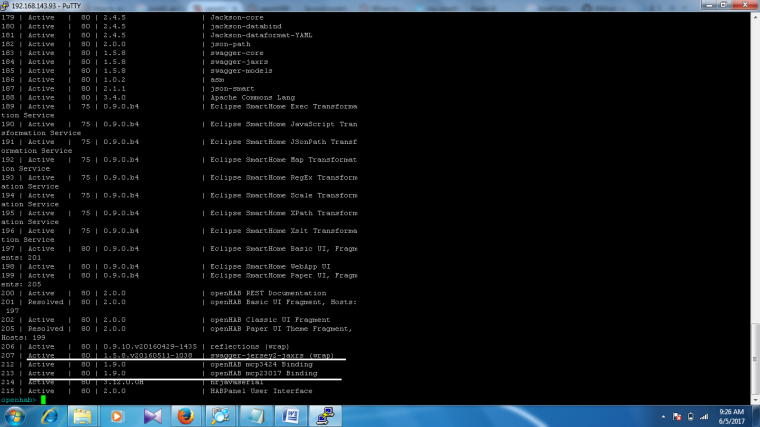
is this mean i installed my binding?
and i have question
did you fix error : Unable to install bundle openhab-transport-serial
thanks you so much@the-trung yes, the binding seems to be installed. Serial transport is needed for MySensors. I'm not able to answer questions about mcp binding.
-
@RVMRVM could you give this one a try?
https://github.com/tobof/openhab2-addons/issues/76
It is not yet integrated into the main branch. If you could test it and give me some feedback I would be very grateful. :)
@TimO Hey Tim, before i start test , i have installed OH2.1 build #925 on 2 new W8 pc's.
download the org.openhab.binding.mysensors-2.1.0-SNAPSHOT.jar file and put it in the addons folder.
result:
2017-06-10 15:01:27.812 [INFO ] [.dashboard.internal.DashboardService] - Started dashboard at /start
2017-06-10 15:01:27.922 [INFO ] [basic.internal.servlet.WebAppServlet] - Started Basic UI at /basicui/app
2017-06-10 15:01:28.031 [INFO ] [arthome.ui.paper.internal.PaperUIApp] - Started Paper UI at /paperui
2017-06-10 15:01:28.250 [INFO ] [panel.internal.HABPanelDashboardTile] - Started HABPanel at /habpanel
2017-06-10 15:01:28.281 [ERROR] [org.openhab.binding.mysensors ] - FrameworkEvent ERROR - org.openhab.binding.mysensors
org.osgi.framework.BundleException: Could not resolve module: org.openhab.binding.mysensors [182]
Unresolved requirement: Import-Package: gnu.ioat org.eclipse.osgi.container.Module.start(Module.java:434)[org.eclipse.osgi-3.10.101.v20150820-1432.jar:] at org.eclipse.osgi.container.ModuleContainer$ContainerStartLevel.incStartLevel(ModuleContainer.java:1582)[org.eclipse.osgi-3.10.101.v20150820-1432.jar:] at org.eclipse.osgi.container.ModuleContainer$ContainerStartLevel.incStartLevel(ModuleContainer.java:1562)[org.eclipse.osgi-3.10.101.v20150820-1432.jar:] at org.eclipse.osgi.container.ModuleContainer$ContainerStartLevel.doContainerStartLevel(ModuleContainer.java:1533)[org.eclipse.osgi-3.10.101.v20150820-1432.jar:] at org.eclipse.osgi.container.ModuleContainer$ContainerStartLevel.dispatchEvent(ModuleContainer.java:1476)[org.eclipse.osgi-3.10.101.v20150820-1432.jar:] at org.eclipse.osgi.container.ModuleContainer$ContainerStartLevel.dispatchEvent(ModuleContainer.java:1)[org.eclipse.osgi-3.10.101.v20150820-1432.jar:] at org.eclipse.osgi.framework.eventmgr.EventManager.dispatchEvent(EventManager.java:230)[org.eclipse.osgi-3.10.101.v20150820-1432.jar:] at org.eclipse.osgi.framework.eventmgr.EventManager$EventThread.run(EventManager.java:340)[org.eclipse.osgi-3.10.101.v20150820-1432.jar:]i cannot start the mysensors binding ...
i have installed it on 3 diff pc's, same result , can you help mee with this, i'am stucked ..
thanks in advance
kind regards -
@TimO Hey Tim, before i start test , i have installed OH2.1 build #925 on 2 new W8 pc's.
download the org.openhab.binding.mysensors-2.1.0-SNAPSHOT.jar file and put it in the addons folder.
result:
2017-06-10 15:01:27.812 [INFO ] [.dashboard.internal.DashboardService] - Started dashboard at /start
2017-06-10 15:01:27.922 [INFO ] [basic.internal.servlet.WebAppServlet] - Started Basic UI at /basicui/app
2017-06-10 15:01:28.031 [INFO ] [arthome.ui.paper.internal.PaperUIApp] - Started Paper UI at /paperui
2017-06-10 15:01:28.250 [INFO ] [panel.internal.HABPanelDashboardTile] - Started HABPanel at /habpanel
2017-06-10 15:01:28.281 [ERROR] [org.openhab.binding.mysensors ] - FrameworkEvent ERROR - org.openhab.binding.mysensors
org.osgi.framework.BundleException: Could not resolve module: org.openhab.binding.mysensors [182]
Unresolved requirement: Import-Package: gnu.ioat org.eclipse.osgi.container.Module.start(Module.java:434)[org.eclipse.osgi-3.10.101.v20150820-1432.jar:] at org.eclipse.osgi.container.ModuleContainer$ContainerStartLevel.incStartLevel(ModuleContainer.java:1582)[org.eclipse.osgi-3.10.101.v20150820-1432.jar:] at org.eclipse.osgi.container.ModuleContainer$ContainerStartLevel.incStartLevel(ModuleContainer.java:1562)[org.eclipse.osgi-3.10.101.v20150820-1432.jar:] at org.eclipse.osgi.container.ModuleContainer$ContainerStartLevel.doContainerStartLevel(ModuleContainer.java:1533)[org.eclipse.osgi-3.10.101.v20150820-1432.jar:] at org.eclipse.osgi.container.ModuleContainer$ContainerStartLevel.dispatchEvent(ModuleContainer.java:1476)[org.eclipse.osgi-3.10.101.v20150820-1432.jar:] at org.eclipse.osgi.container.ModuleContainer$ContainerStartLevel.dispatchEvent(ModuleContainer.java:1)[org.eclipse.osgi-3.10.101.v20150820-1432.jar:] at org.eclipse.osgi.framework.eventmgr.EventManager.dispatchEvent(EventManager.java:230)[org.eclipse.osgi-3.10.101.v20150820-1432.jar:] at org.eclipse.osgi.framework.eventmgr.EventManager$EventThread.run(EventManager.java:340)[org.eclipse.osgi-3.10.101.v20150820-1432.jar:]i cannot start the mysensors binding ...
i have installed it on 3 diff pc's, same result , can you help mee with this, i'am stucked ..
thanks in advance
kind regardsDid you run feature:install openhab-transport-serial, on OH console?
-
-
@the-trung yes, the binding seems to be installed. Serial transport is needed for MySensors. I'm not able to answer questions about mcp binding.
@TimO Hello, i tried the RGB & RGBW , it looks ok but there are no commands that been send to the node and this for every item, a'im new in the openHab world, so that will be the problem.
the result is the same for RGB & RGBW
my .things file:Bridge mysensors:bridge-eth:gateway [ ipAddress="192.168.2.190", tcpPort=5003, sendDelay=200 ] {
/** define things connected to that bridge here */
light:RGBW_23_Status [ nodeId="23", childId="0", requestAck=false]
rgbwLight:RGBW_23_Color [ nodeId="23", childId="1", requestAck=false ]
dimmer:RGBW_23_Dimmer [ nodeId="23", childId="2", requestAck=false ]
}my .items file:
Group GF_Living "Living Room" <video> (gGF)
/* Indoor Temperatures */
//Number Temperature_GF_Living "Temperature [%.1f °C]" <temperature> (Temperature, GF_Living)Switch RGBW_23_Status "Living" (GF_Living, Lights) { channel="mysensors:bridge-eth:gateway:RGBW_23_Status"}
Dimmer RGBW_23_Dimmer "Living" <slider> (GF_Living, Lights) ["Lighting"] { channel="mysensors:bridge-eth:gateway:RGBW_23_Dimmer"}
Color RGBW_23_Color "RGBW Light" <colorwheel> {channel = "mysensors:bridge-eth:gateway:RGBW_23_Color"}and my .sitemap file
sitemap rvms label="test rvms"
{
Frame label="RGBW Living" {
Switch item=RGBW_23_Status label="Button Switch" mappings=[ON="on",OFF="off"]
Slider item=RGBW_23_Dimmer switchSupport
Colorpicker item=RGBW_23_Color
}
}as result we have:
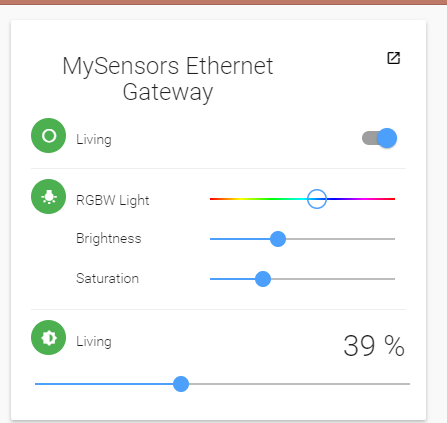
and in the paperUI:
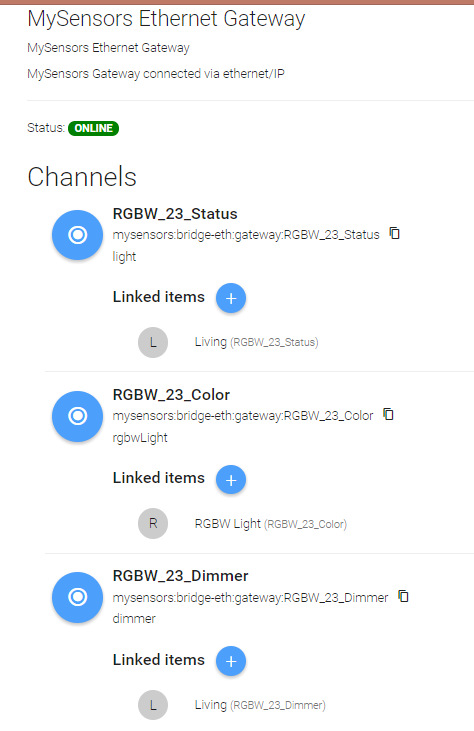
this is what the log-file shows:
2017-06-11 09:50:48.187 [INFO ] [.dashboard.internal.DashboardService] - Started dashboard at /start
2017-06-11 09:50:51.161 [INFO ] [el.core.internal.ModelRepositoryImpl] - Loading model 'rvms.items'
2017-06-11 09:50:52.088 [INFO ] [el.core.internal.ModelRepositoryImpl] - Loading model 'rvms.sitemap'
2017-06-11 09:50:52.187 [INFO ] [el.core.internal.ModelRepositoryImpl] - Loading model 'rvms.things'
2017-06-11 09:50:52.978 [INFO ] [basic.internal.servlet.WebAppServlet] - Started Basic UI at /basicui/app
2017-06-11 09:50:53.006 [INFO ] [arthome.ui.paper.internal.PaperUIApp] - Started Paper UI at /paperui
2017-06-11 09:50:53.073 [INFO ] [panel.internal.HABPanelDashboardTile] - Started HABPanel at /habpanel
2017-06-11 09:50:53.404 [INFO ] [assic.internal.servlet.WebAppServlet] - Started Classic UI at /classicui/app
2017-06-11 09:50:53.555 [WARN ] [.discovery.MySensorsDiscoveryService] - Cannot automatic discover thing node: 0, child: 255 please insert it manually
2017-06-11 09:50:53.558 [INFO ] [al.protocol.ip.MySensorsIpConnection] - Successfully connected to MySensors Bridge.
2017-06-11 09:55:56.976 [INFO ] [el.core.internal.ModelRepositoryImpl] - Refreshing model 'rvms.things'
2017-06-11 09:55:56.988 [WARN ] [rsAbstractConnection$MySensorsWriter] - Interrupted MySensorsWriter
2017-06-11 09:55:56.989 [WARN ] [rsAbstractConnection$MySensorsReader] - Interrupted MySensorsReader
2017-06-11 09:55:58.010 [WARN ] [.discovery.MySensorsDiscoveryService] - Cannot automatic discover thing node: 0, child: 255 please insert it manually
2017-06-11 09:55:58.020 [INFO ] [al.protocol.ip.MySensorsIpConnection] - Successfully connected to MySensors Bridge.
2017-06-11 10:08:57.483 [INFO ] [el.core.internal.ModelRepositoryImpl] - Refreshing model 'rvms.sitemap'so what is wrong here ?
thanks in advance
Roger -
Hi @TimO,
I also tried the RGB Light and it seems to be working! (I am using Maghac's RGB LED strip sketch)
Auto discovery worked instantly. I did have to work with the .items file to get the color picker instead of a text input. I also get these two errors every time I send a command:16:57:36.770 [INFO ] [smarthome.event.ItemCommandEvent ] - Item 'rgbLight01' received command 124,89,100 16:57:36.809 [INFO ] [marthome.event.ItemStateChangedEvent] - rgbLight01 changed from 359,91,100 to 124,89,100 16:57:37.117 [WARN ] [rs.internal.gateway.MySensorsGateway] - Variable 2 not present 16:57:37.222 [WARN ] [rs.internal.gateway.MySensorsGateway] - Variable 3 not presentAs I'm relatively new to MySensors, I was wondering if it is normal that the RGB Light Sensor channel is used for this. Or is this just temporary until an actual RGB channel is made?
-
I've been trying to figure this out for a while. For me openhab discovers 4 things Red, Green, Blue and Status. These are all dimmers and I can't get them all to work together as 1 colour wheel? They all work really well independently but that's as far as I got. I've also tried the .items file but with no luck.
-
Hello!
I just started to play with OpenHab2 and new binding? thank you for great work.
But, i discover some strange behavior:
Openhab2, ethernet gateway, 3 mysensor nodes, all nodes sucessfully detected and configured in PaperUI, but some data looks like not updated. Looking to log i note some suspicious lines like:00:28:47.077 [DEBUG] [rsAbstractConnection$MySensorsReader] - 3;1;1;0;0;24.6 00:28:47.078 [DEBUG] [rs.internal.gateway.MySensorsGateway] - Node 3 found in gateway 00:28:47.078 [DEBUG] [rs.internal.gateway.MySensorsGateway] - Child 1 found in node 3 00:28:47.078 [WARN ] [rs.internal.gateway.MySensorsGateway] - Variable 0 not presentSorry, i don't know how to dump OpenHab configuration, but item configured.
Any suggestions? -
I've been trying to figure this out for a while. For me openhab discovers 4 things Red, Green, Blue and Status. These are all dimmers and I can't get them all to work together as 1 colour wheel? They all work really well independently but that's as far as I got. I've also tried the .items file but with no luck.
@matt-shepherd What works for me :
items - just used 1 channel, V_VAR1, but you could keep them separateString neoPixelRgb "RGB LED string" (grpLighting) { channel="mysensors:rgbLight:ethGateway:rgb01:var1" } Color neoPixelColor "RGB LED string" <colorwheel> (grpLighting)rule
rule "Set RGB value NeoPixelStrip"
when
    Item neoPixelColor changed
then
    val hsbValue = neoPixelColor.state as HSBType

    val brightness = hsbValue.brightness.intValue
    val redValue = ((((hsbValue.red.intValue * 255) / 100) * brightness) / 100)
    val grnValue = ((((hsbValue.green.intValue * 255) / 100) * brightness) / 100)
    val bluValue = ((((hsbValue.blue.intValue * 255) / 100) * brightness) / 100)

    val rgbHexString = String::format("%02X%02X%02X", redValue, grnValue, bluValue)
    sendCommand(neoPixelRgb, rgbHexString)
end
parsed in node
if (message.type == V_VAR1) { // Write some debug info Serial.print(", New status, V_RGB: "); Serial.println(message.getString()); // starting to process the hex code String hexstring = message.getString(); //here goes the hex color code coming from through MySensors (like FF9A00) long number = (long) strtol( &hexstring[0], NULL, 16); RGB_values[0] = number >> 16; RGB_values[1] = number >> 8 & 0xFF; RGB_values[2] = number & 0xFF; colorWipe(strip.Color(RGB_values[0], RGB_values[1], RGB_values[2]), 50); } -
@the-trung yes, the binding seems to be installed. Serial transport is needed for MySensors. I'm not able to answer questions about mcp binding.
-
Hi @TimO,
I also tried the RGB Light and it seems to be working! (I am using Maghac's RGB LED strip sketch)
Auto discovery worked instantly. I did have to work with the .items file to get the color picker instead of a text input. I also get these two errors every time I send a command:16:57:36.770 [INFO ] [smarthome.event.ItemCommandEvent ] - Item 'rgbLight01' received command 124,89,100 16:57:36.809 [INFO ] [marthome.event.ItemStateChangedEvent] - rgbLight01 changed from 359,91,100 to 124,89,100 16:57:37.117 [WARN ] [rs.internal.gateway.MySensorsGateway] - Variable 2 not present 16:57:37.222 [WARN ] [rs.internal.gateway.MySensorsGateway] - Variable 3 not presentAs I'm relatively new to MySensors, I was wondering if it is normal that the RGB Light Sensor channel is used for this. Or is this just temporary until an actual RGB channel is made?
@FusedHe3 Thank you for testing and your input!
The sketch you are using is representing itself as a RGB sensor and the log you've posted looks good.
About the fiddling with the .items file and the color picker: Thank you! That should'nt be needed anymore, I've changed it here: RGB-Test-Binding
-
@TimO Hey all, looks everything seems to work now, but now i have defined the bindings by the paper UI, and work with the rule definition as show by 'doctor64' ....
thanks for the help
Roger@RVMRVM The definitions carlyler posted looks fine and I've tried to implement this logic into the binding so you won't need the rule anymore. Feel free to test my binding or stay with the rule. Hopefully both would lead to the same result. :)
-
Hello!
I just started to play with OpenHab2 and new binding? thank you for great work.
But, i discover some strange behavior:
Openhab2, ethernet gateway, 3 mysensor nodes, all nodes sucessfully detected and configured in PaperUI, but some data looks like not updated. Looking to log i note some suspicious lines like:00:28:47.077 [DEBUG] [rsAbstractConnection$MySensorsReader] - 3;1;1;0;0;24.6 00:28:47.078 [DEBUG] [rs.internal.gateway.MySensorsGateway] - Node 3 found in gateway 00:28:47.078 [DEBUG] [rs.internal.gateway.MySensorsGateway] - Child 1 found in node 3 00:28:47.078 [WARN ] [rs.internal.gateway.MySensorsGateway] - Variable 0 not presentSorry, i don't know how to dump OpenHab configuration, but item configured.
Any suggestions? -
@FusedHe3 Thank you for testing and your input!
The sketch you are using is representing itself as a RGB sensor and the log you've posted looks good.
About the fiddling with the .items file and the color picker: Thank you! That should'nt be needed anymore, I've changed it here: RGB-Test-Binding
-
@RVMRVM The definitions carlyler posted looks fine and I've tried to implement this logic into the binding so you won't need the rule anymore. Feel free to test my binding or stay with the rule. Hopefully both would lead to the same result. :)
@TimO Perfect, is OK for RGB & RGBW... but now the datastring you send is a decimal string, not a HEX-string as they used normal, it is not a big problem to change this feature in the node script, if you want to have a decimal string.
How do you handle the white color, becaus this is not included in the datastring info. maybe by a switch and a other variable .
something like this:
Roger




Hello! It looks like you're interested in this conversation, but you don't have an account yet.
Getting fed up of having to scroll through the same posts each visit? When you register for an account, you'll always come back to exactly where you were before, and choose to be notified of new replies (either via email, or push notification). You'll also be able to save bookmarks and upvote posts to show your appreciation to other community members.
With your input, this post could be even better 💗
Register Login