Skip to content
  • MySensors
  • OpenHardware.io
  • Categories
  • Recent
  • Tags
  • Popular
Skins
  • Light
  • Brite
  • Cerulean
  • Cosmo
  • Flatly
  • Journal
  • Litera
  • Lumen
  • Lux
  • Materia
  • Minty
  • Morph
  • Pulse
  • Sandstone
  • Simplex
  • Sketchy
  • Spacelab
  • United
  • Yeti
  • Zephyr
  • Dark
  • Cyborg
  • Darkly
  • Quartz
  • Slate
  • Solar
  • Superhero
  • Vapor

  • Default (No Skin)
  • No Skin
Collapse
Brand Logo
  1. Home
  2. Hardware
  3. How to connect QUIP300 to Domoticz

How to connect QUIP300 to Domoticz

Scheduled Pinned Locked Moved Hardware
31 Posts 3 Posters 6.8k Views 3 Watching
  • Oldest to Newest
  • Newest to Oldest
  • Most Votes
Reply
  • Reply as topic
Log in to reply
This topic has been deleted. Only users with topic management privileges can see it.
  • gohanG Offline
    gohanG Offline
    gohan
    Mod
    wrote on last edited by
    #5

    I can't see your sketch. What problem are you having exactly?

    1 Reply Last reply
    0
    • M Offline
      M Offline
      mckenzi
      wrote on last edited by
      #6

      Hello Gohan ,

      Here is my sketch. Arduino is conected via uSB cable to my QNAP.
      And there is few relays conected to Arduino. I would like to avoid wireless conection.

      Now i would like to add PIRs to this sketch.


      // Enable debug prints to serial monitor
      #define MY_DEBUG 
      
      
      // Enable and select radio type attached
      //#define MY_RADIO_NRF24
      //#define MY_RADIO_RFM69
      
      // Set LOW transmit power level as default, if you have an amplified NRF-module and
      // power your radio separately with a good regulator you can turn up PA level. 
      //#define MY_RF24_PA_LEVEL RF24_PA_LOW
      
      // Enable serial gateway
      #define MY_GATEWAY_SERIAL
      
      // Define a lower baud rate for Arduino's running on 8 MHz (Arduino Pro Mini 3.3V & SenseBender)
      #if F_CPU == 8000000L
      #define MY_BAUD_RATE 38400
      #endif
      
      // Flash leds on rx/tx/err
      // #define MY_LEDS_BLINKING_FEATURE
      // Set blinking period
      // #define MY_DEFAULT_LED_BLINK_PERIOD 300
      
      // Inverses the behavior of leds
      // #define MY_WITH_LEDS_BLINKING_INVERSE
      
      // Enable inclusion mode
      #define MY_INCLUSION_MODE_FEATURE
      // Enable Inclusion mode button on gateway
      #define MY_INCLUSION_BUTTON_FEATURE
      
      // Inverses behavior of inclusion button (if using external pullup)
      //#define MY_INCLUSION_BUTTON_EXTERNAL_PULLUP
      
      // Set inclusion mode duration (in seconds)
      #define MY_INCLUSION_MODE_DURATION 60 
      // Digital pin used for inclusion mode button
      #define MY_INCLUSION_MODE_BUTTON_PIN  3 
      
      // Uncomment to override default HW configurations
      //#define MY_DEFAULT_ERR_LED_PIN 4  // Error led pin
      //#define MY_DEFAULT_RX_LED_PIN  6  // Receive led pin
      //#define MY_DEFAULT_TX_LED_PIN  5  // the PCB, on board LED
      
      #include <SPI.h>
      #include <MySensors.h>  
      #include <Bounce2.h>
      
      // Enable repeater functionality for this node
      #define MY_REPEATER_FEATURE
      
      
      #define RELAY_1  4  // Arduino Digital I/O pin number for first relay (second on pin+1 etc)
      #define NUMBER_OF_RELAYS 1 // Total number of attached relays
      #define RELAY_ON 1  // GPIO value to write to turn on attached relay
      #define RELAY_OFF 0 // GPIO value to write to turn off attached relay
      
      #define BUTTON_PIN A1
      
      
      void before() { 
        for (int sensor=1, pin=RELAY_1; sensor<=NUMBER_OF_RELAYS;sensor++, pin++) {
          // Then set relay pins in output mode
          pinMode(pin, OUTPUT);   
          // Set relay to last known state (using eeprom storage) 
          digitalWrite(pin, loadState(sensor)?RELAY_ON:RELAY_OFF);
        }
      }
      Bounce debouncer = Bounce();
      
      void setup() { 
        // Setup locally attached sensors
        delay(10000);
         // Setup the button.
        pinMode(BUTTON_PIN, INPUT_PULLUP);
        // After setting up the button, setup debouncer.
        debouncer.attach(BUTTON_PIN);
        debouncer.interval(5);
        //presentation();
      }
      void presentation()  
      {   
        // Send the sketch version information to the gateway and Controller
        sendSketchInfo("Relay", "1.0");
      
        for (int sensor=1, pin=RELAY_1; sensor<=NUMBER_OF_RELAYS;sensor++, pin++) {
          // Register all sensors to gw (they will be created as child devices)
          present(sensor, S_LIGHT);
        }
      }
      
      MyMessage msg(1, V_LIGHT);
      
      void loop() { 
        // Send locally attached sensor data here 
        if (debouncer.update()) {
          // Get the update value.
          int value = debouncer.read();
          // Send in the new value.
          if(value == LOW){
               saveState(1, !loadState(1));
               digitalWrite(RELAY_1, loadState(1)?RELAY_ON:RELAY_OFF);
               send(msg.set(loadState(1)));
          }
        }
      }
      
      
      void receive(const MyMessage &message) {
        // We only expect one type of message from controller. But we better check anyway.
        if (message.type==V_LIGHT) {
           // Change relay state
           digitalWrite(message.sensor-1+RELAY_1, message.getBool()?RELAY_ON:RELAY_OFF);
           // Store state in eeprom
           saveState(message.sensor, message.getBool());
           // Write some debug info
           Serial.print("Incoming change for sensor:");
           Serial.print(message.sensor);
           Serial.print(", New status: ");
           Serial.println(message.getBool());
         } 
      }


      How to make it ? I'm newbie - sorry.

      Regards.

      1 Reply Last reply
      0
      • gohanG Offline
        gohanG Offline
        gohan
        Mod
        wrote on last edited by
        #7

        Just copy the code from motion sensor sketch, assign a child ID to the pir sensor, present it and in code just check pin status with digitalread() and send value changed from last send

        1 Reply Last reply
        0
        • M Offline
          M Offline
          mckenzi
          wrote on last edited by
          #8

          Hey gohan, thanks - basic sketch will do the job.
          I faced another problem. Now i've conected one of the PIR via WemosD1 mini with ESP Easy.0_1497208049084_DSC_0864.JPG
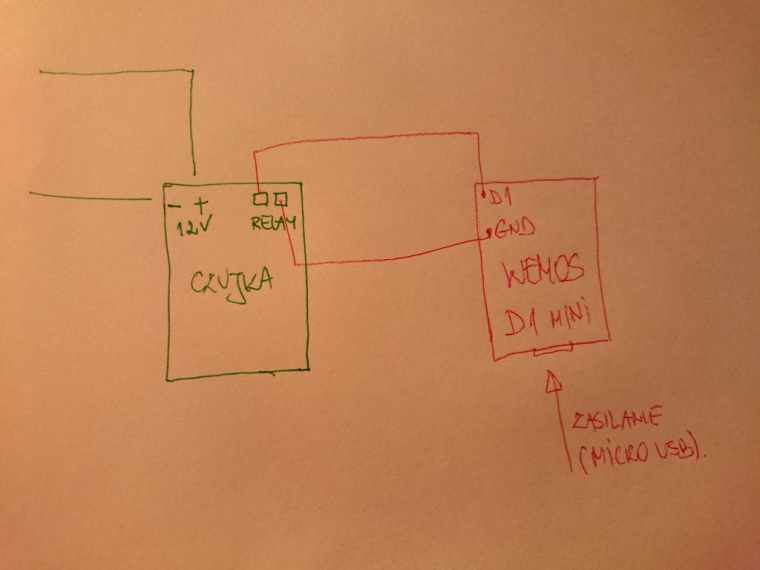
          And works very well.
          But i would like to connect 3 more sensors.
          Power supply for PIR and Wemos is different and there is only one GND pin .
          Any idea how to make it?

          1 Reply Last reply
          0
          • gohanG Offline
            gohanG Offline
            gohan
            Mod
            wrote on last edited by
            #9

            3 more sensor to the same wemos?

            1 Reply Last reply
            0
            • M Offline
              M Offline
              mckenzi
              wrote on last edited by mckenzi
              #10

              Yes. Possible?

              1 Reply Last reply
              0
              • gohanG Offline
                gohanG Offline
                gohan
                Mod
                wrote on last edited by
                #11

                With mysensors it is possible, with esp easy I don't know.

                1 Reply Last reply
                0
                • M Offline
                  M Offline
                  mckenzi
                  wrote on last edited by
                  #12

                  I can swich to MySensors- no problem.

                  1 Reply Last reply
                  0
                  • M Offline
                    M Offline
                    mckenzi
                    wrote on last edited by
                    #13

                    Hi Gohan, please see my set up i more details.
                    Each of PIR is conected to old/not used alarm control panel.
                    Now it is used as power supply. I've just ordered Arduino Nano + nRF24L01 to conect all motion sensors. I would like to use one of free port to power my node (thru voltage step down : 12V->5V)
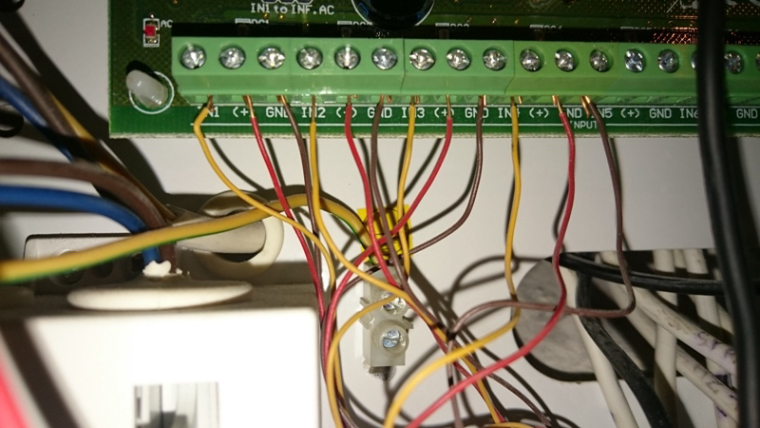
                    0_1497296131460_sensors.JPG
                    How should i conect sensors to node?

                    1 Reply Last reply
                    0
                    • gohanG Offline
                      gohanG Offline
                      gohan
                      Mod
                      wrote on last edited by gohan
                      #14

                      Do you want to put the nano in that panel?

                      1 Reply Last reply
                      0
                      • M Offline
                        M Offline
                        mckenzi
                        wrote on last edited by
                        #15

                        Hi, panel will be use as a power supply only.

                        1 Reply Last reply
                        0
                        • gohanG Offline
                          gohanG Offline
                          gohan
                          Mod
                          wrote on last edited by
                          #16

                          Ok, but if you put the nano in that location you will have the yellow cables coming back from the PIR sensors and you would have to use those to connect to digital pins of the arduino, the problem is that you need to check what is the voltage that most likely will be over 5V and you would need to find a way to lower it.

                          1 Reply Last reply
                          0
                          • M Offline
                            M Offline
                            mckenzi
                            wrote on last edited by
                            #17

                            Yellow cable is connected to PIR's relay. And this cable i'm going to conect to digital input of arduino.
                            Second cable from PIR's relay will be connnected to arduino's GND pin. ( not shown on this photo).
                            There is no voltage on PIR's relay ( works as simple switch).
                            Is my understanding correct ?

                            1 Reply Last reply
                            0
                            • gohanG Offline
                              gohanG Offline
                              gohan
                              Mod
                              wrote on last edited by
                              #18

                              If it is just a relay ok, I thought you were using the output of the pir sensor, but always check before connecting to the Arduino

                              1 Reply Last reply
                              0
                              • M Offline
                                M Offline
                                mckenzi
                                wrote on last edited by
                                #19

                                So how to connect 4 PIRs to one node to be able to see in Domoticz which was acivated ?

                                1 Reply Last reply
                                0
                                • gohanG Offline
                                  gohanG Offline
                                  gohan
                                  Mod
                                  wrote on last edited by
                                  #20

                                  Connect each one on a different digital pin and create a different child id for each pir sensor and present all of them, it is just replicating 4 times the code of the motion sensor sketch.

                                  1 Reply Last reply
                                  0
                                  • M Offline
                                    M Offline
                                    mckenzi
                                    wrote on last edited by
                                    #21

                                    Last question: one pin of each PIR's relay must be connected to common Arduino GND pin, right ?

                                    1 Reply Last reply
                                    0
                                    • gohanG Offline
                                      gohanG Offline
                                      gohan
                                      Mod
                                      wrote on last edited by
                                      #22

                                      it depends, you could also wire it to the 5V and detect when the digital pin goes high you have movement.

                                      1 Reply Last reply
                                      0
                                      • M Offline
                                        M Offline
                                        mckenzi
                                        wrote on last edited by
                                        #23

                                        THank you Gohan. Now everything is more clearer. :-) Will try today to wire everything.

                                        1 Reply Last reply
                                        0
                                        • M Offline
                                          M Offline
                                          mckenzi
                                          wrote on last edited by
                                          #24

                                          Hi GOHAN,

                                          Finally i've build my serial gateway ( Arduino UNO + nRF24) + node (Arduino Nano + nRF24) but i failed with PIR conection to my NODE. How should i connect PIR's relay to Nano ? ( digital input + GND ) ?
                                          Now i know that relay is normally closed ( 0, 1 state, no power on it)
                                          I was trying to connect this way and it was working for few second ( i saw in the serial monitor , 1 , 0) but after some time NODE was sending weird data to GW.
                                          How connect it corectlly and how to mod the sketch for more sensors? (4 pcs). ```
                                          This is the way ?

                                          #define DIGITAL_INPUT_SENSOR 3   // The digital input you attached your motion sensor.  (Only 2 and 3 generates interrupt!)
                                          #define CHILD_ID 1   // Id of the sensor child
                                          #define DIGITAL_INPUT_SENSOR 4   // The digital input you attached your motion sensor.  (Only 2 and 3 generates interrupt!)
                                          #define CHILD_ID 2   // Id of the sensor child```
                                          1 Reply Last reply
                                          0
                                          Reply
                                          • Reply as topic
                                          Log in to reply
                                          • Oldest to Newest
                                          • Newest to Oldest
                                          • Most Votes


                                          15

                                          Online

                                          11.7k

                                          Users

                                          11.2k

                                          Topics

                                          113.1k

                                          Posts


                                          Copyright 2025 TBD   |   Forum Guidelines   |   Privacy Policy   |   Terms of Service
                                          • Login

                                          • Don't have an account? Register

                                          • Login or register to search.
                                          • First post
                                            Last post
                                          0
                                          • MySensors
                                          • OpenHardware.io
                                          • Categories
                                          • Recent
                                          • Tags
                                          • Popular