
Motion sensors
-
Hi all
Could you please help me?
I want to hook more than one motion detector to arduino.
In the program I see both sensors and contatron
The first motion sensor works and the second one does not change states
Contatron works
What's wrong with the scripts? -
Hi all
Could you please help me?
I want to hook more than one motion detector to arduino.
In the program I see both sensors and contatron
The first motion sensor works and the second one does not change states
Contatron works
What's wrong with the scripts?@Jacek-Slawinski welcome to the MySensors community!
The code in your sketch first sleeps waiting for sensor1, then sleeps waiting for sensor2. So when "the other" sensor is triggered, the Arduino does not wake.
Remove the first sleep and change the last sleep to something like
wakeupReason = sleep(digitalPinToInterrupt(CzujnikRuchu1), CHANGE, digitalPinToInterrupt(CzujnikRuchu2), CHANGE, SLEEP_TIME);Then check the value of wakeupReason and act accordingly.
See https://www.mysensors.org/download/sensor_api_20#sleeping for full description on how to sleep with two interrupt pins and how to use the return value of sleep().
Also note that only some pins can be used for interrupt.
-
Thank you very much
It works
I add thissleep(digitalPinToInterrupt(CzujnikRuchu1), CHANGE, digitalPinToInterrupt(CzujnikRuchu2), CHANGE, SLEEP_TIME);`````` Insert Code HereHowever, in the devices from time to time themselves add new ones not used.
I don't know why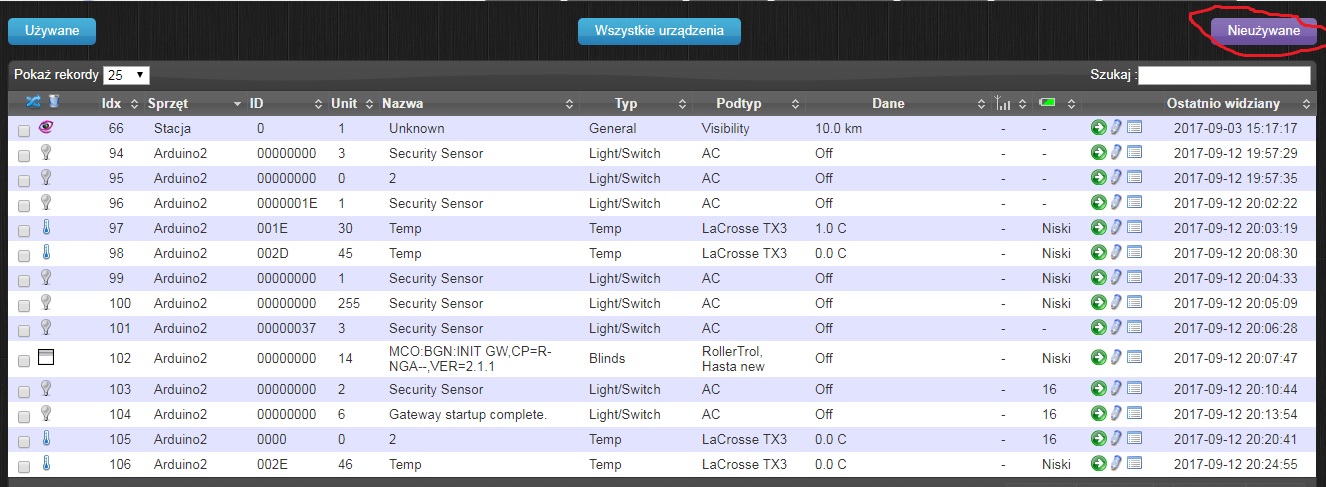
-
Hi
I have coneccted the arduino mega to RPI 3 via usb
I can not handle the script on more than one motion sensor#define MY_DEBUG // Enable serial gateway #define MY_GATEWAY_SERIAL // Define a lower baud rate for Arduino's running on 8 MHz (Arduino Pro Mini 3.3V & SenseBender) #if F_CPU == 8000000L #define MY_BAUD_RATE 38400 #endif // Enable inclusion mode #define MY_INCLUSION_MODE_FEATURE // Enable Inclusion mode button on gateway #define MY_INCLUSION_BUTTON_FEATURE // Set inclusion mode duration (in seconds) #define MY_INCLUSION_MODE_DURATION 60 // Digital pin used for inclusion mode button #define MY_INCLUSION_MODE_BUTTON_PIN 3 #include <SPI.h> #include <MySensors.h> #include <Bounce2.h> unsigned long SLEEP_TIME = 120000; // Sleep time between reports (in milliseconds) #define DIGITAL_INPUT_SENSOR 6 // The digital input you attached your motion sensor. (Only 2 and 3 generates interrupt!) #define CHILD_ID 1 // Id of the sensor child #define DIGITAL_INPUT_SENSOR_2 7 // The digital input you attached your motion sensor. (Only 2 and 3 generates interrupt!) #define CHILD_ID_2 2 // Id of the sensor child // Initialize motion message MyMessage msg(CHILD_ID, V_TRIPPED); MyMessage msg2(CHILD_ID_2, V_TRIPPED); void setup() { pinMode(DIGITAL_INPUT_SENSOR, INPUT); // sets the motion sensor digital pin as input pinMode(DIGITAL_INPUT_SENSOR_2, INPUT); } void presentation() { // Send the sketch version information to the gateway and Controller sendSketchInfo("Motion Sensor", "1.0"); // Register all sensors to gw (they will be created as child devices) present(CHILD_ID, S_MOTION); present(CHILD_ID_2, S_MOTION); } void loop() { { // Read digital motion value bool tripped = digitalRead(DIGITAL_INPUT_SENSOR) == HIGH; Serial.println(tripped); send(msg.set(tripped?"1":"0")); // Send tripped value to gw // Sleep until interrupt comes in on motion sensor. Send update every two minute. } {// Read digital motion value bool tripped = digitalRead(DIGITAL_INPUT_SENSOR_2) == HIGH; Serial.println(tripped); send(msg2.set(tripped?"1":"0")); // Send tripped value to gw sleep(digitalPinToInterrupt(DIGITAL_INPUT_SENSOR), CHANGE,digitalPinToInterrupt(DIGITAL_INPUT_SENSOR_2), CHANGE, SLEEP_TIME); } }This script generates a lot of different sensors in the domoticz and should only two.
I don't now why? :(When it erases:
sleep(digitalPinToInterrupt(CzujnikRuchu1), CHANGE, digitalPinToInterrupt(CzujnikRuchu2), CHANGE, SLEEP_TIME); ``````It's the same
Could you help me with this?

Hello! It looks like you're interested in this conversation, but you don't have an account yet.
Getting fed up of having to scroll through the same posts each visit? When you register for an account, you'll always come back to exactly where you were before, and choose to be notified of new replies (either via email, or push notification). You'll also be able to save bookmarks and upvote posts to show your appreciation to other community members.
With your input, this post could be even better 💗
Register Login