
Device to remotely turn a thermostat
-
My house is getting all automated by now , thanks to vera and Z-wave. And now Arduino comes into play !! :-)
My heating system is also automated , by means of Fibaro relais which turns things (the system itself or pumps) on and off. And radiators have danfoss Z-wave thermostats attached to it.
But my floorheating ..... that was a different story. It had a special thermostat with a temperature sensor going a device which measures the water in the floorheating system.
Allready demolished a danfoss Z-wave thermostate , trying to make the tempretaure sensor external , but no joy.
Huray for Arduino.
Building the gateway was easy enough, building a servo-actuator with an arduino UNO was also very easy.
On vera there was an issue with the slider , with the slider the servo only moves 90 degrees. someone helped me changing some code on the sketch:
fixed it by replacing the line:
myservo.write(SERVO_MAX + (SERVO_MIN-SERVO_MAX)/100 * val); // sets the servo position 0-180
by the following 2 lines of code:
    val = map(val, 0, 100, 0, 180); // scale 0%-100% between 0 and 180)
    myservo.write(val);       // sets the servo position 0-180
Now the servo was moving the full 180 degrees by means of the slider.
Than came the mechanical part, I had to make quite a bracket to hold the servo. Initially I had a standard 3 kg/cm servo , but it wasn't enough to completely close the valve. I ended up using a big scale servo with 14 kg/cm on 7V. Offcourse the servo is powered by a seperate 7V, max 5A power supply
Initially the plan was to attach the servo directly to the thermostat , at that time I didn't know the themostat not only turns , but also moves in-and outwards .....
Plan 2 was to use a timing belt system with 2 sprockets , also this didn't work , because the servo pulled the thermostat towards it
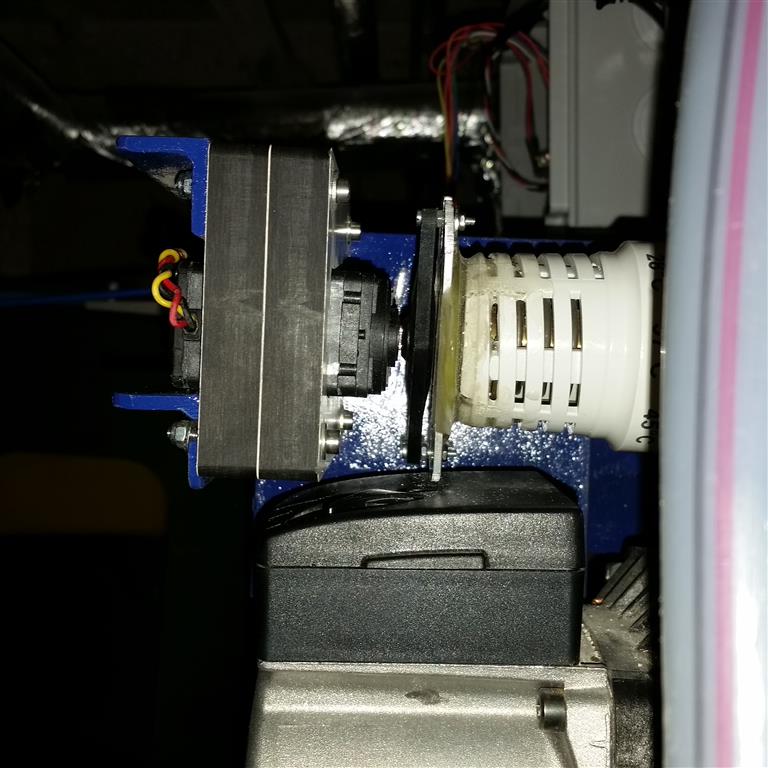
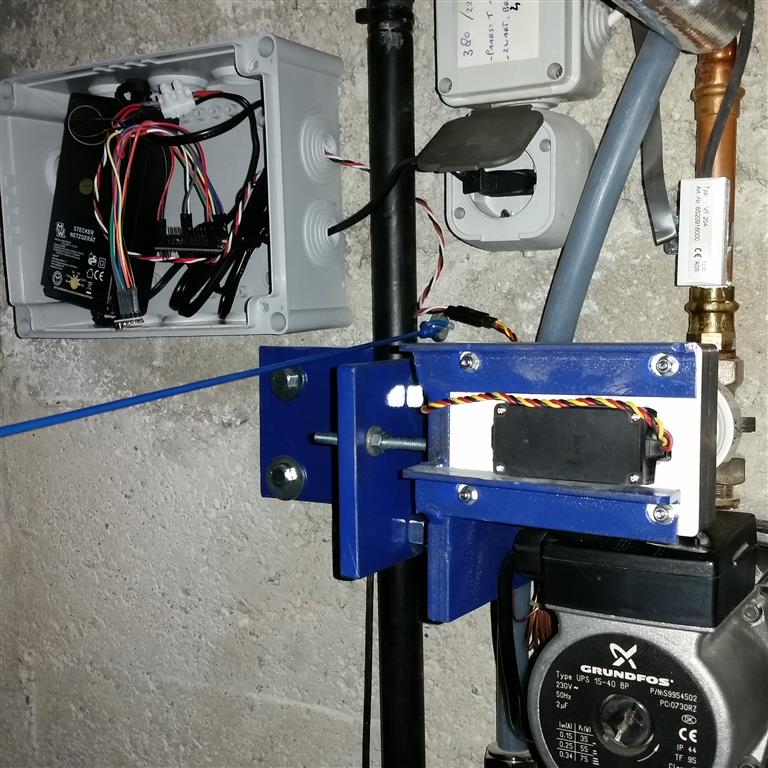
Plan 3 finally worked , I routed out of trespa a bracket where the servo could go freely in and out , but not turn itself.
This trespa ( white) attached to the metal bracket. Now the servo can do it's normal thing , turn the lever , but also move in and outwardHere 2 pictures:
A succesfull project I must say :-)
-
-
My house is getting all automated by now , thanks to vera and Z-wave. And now Arduino comes into play !! :-)
My heating system is also automated , by means of Fibaro relais which turns things (the system itself or pumps) on and off. And radiators have danfoss Z-wave thermostats attached to it.
But my floorheating ..... that was a different story. It had a special thermostat with a temperature sensor going a device which measures the water in the floorheating system.
Allready demolished a danfoss Z-wave thermostate , trying to make the tempretaure sensor external , but no joy.
Huray for Arduino.
Building the gateway was easy enough, building a servo-actuator with an arduino UNO was also very easy.
On vera there was an issue with the slider , with the slider the servo only moves 90 degrees. someone helped me changing some code on the sketch:
fixed it by replacing the line:
myservo.write(SERVO_MAX + (SERVO_MIN-SERVO_MAX)/100 * val); // sets the servo position 0-180
by the following 2 lines of code:
    val = map(val, 0, 100, 0, 180); // scale 0%-100% between 0 and 180)
    myservo.write(val);       // sets the servo position 0-180
Now the servo was moving the full 180 degrees by means of the slider.
Than came the mechanical part, I had to make quite a bracket to hold the servo. Initially I had a standard 3 kg/cm servo , but it wasn't enough to completely close the valve. I ended up using a big scale servo with 14 kg/cm on 7V. Offcourse the servo is powered by a seperate 7V, max 5A power supply
Initially the plan was to attach the servo directly to the thermostat , at that time I didn't know the themostat not only turns , but also moves in-and outwards .....
Plan 2 was to use a timing belt system with 2 sprockets , also this didn't work , because the servo pulled the thermostat towards it
Plan 3 finally worked , I routed out of trespa a bracket where the servo could go freely in and out , but not turn itself.
This trespa ( white) attached to the metal bracket. Now the servo can do it's normal thing , turn the lever , but also move in and outwardHere 2 pictures:
A succesfull project I must say :-)
-
My house is getting all automated by now , thanks to vera and Z-wave. And now Arduino comes into play !! :-)
My heating system is also automated , by means of Fibaro relais which turns things (the system itself or pumps) on and off. And radiators have danfoss Z-wave thermostats attached to it.
But my floorheating ..... that was a different story. It had a special thermostat with a temperature sensor going a device which measures the water in the floorheating system.
Allready demolished a danfoss Z-wave thermostate , trying to make the tempretaure sensor external , but no joy.
Huray for Arduino.
Building the gateway was easy enough, building a servo-actuator with an arduino UNO was also very easy.
On vera there was an issue with the slider , with the slider the servo only moves 90 degrees. someone helped me changing some code on the sketch:
fixed it by replacing the line:
myservo.write(SERVO_MAX + (SERVO_MIN-SERVO_MAX)/100 * val); // sets the servo position 0-180
by the following 2 lines of code:
    val = map(val, 0, 100, 0, 180); // scale 0%-100% between 0 and 180)
    myservo.write(val);       // sets the servo position 0-180
Now the servo was moving the full 180 degrees by means of the slider.
Than came the mechanical part, I had to make quite a bracket to hold the servo. Initially I had a standard 3 kg/cm servo , but it wasn't enough to completely close the valve. I ended up using a big scale servo with 14 kg/cm on 7V. Offcourse the servo is powered by a seperate 7V, max 5A power supply
Initially the plan was to attach the servo directly to the thermostat , at that time I didn't know the themostat not only turns , but also moves in-and outwards .....
Plan 2 was to use a timing belt system with 2 sprockets , also this didn't work , because the servo pulled the thermostat towards it
Plan 3 finally worked , I routed out of trespa a bracket where the servo could go freely in and out , but not turn itself.
This trespa ( white) attached to the metal bracket. Now the servo can do it's normal thing , turn the lever , but also move in and outwardHere 2 pictures:
A succesfull project I must say :-)
-
-
-




Hello! It looks like you're interested in this conversation, but you don't have an account yet.
Getting fed up of having to scroll through the same posts each visit? When you register for an account, you'll always come back to exactly where you were before, and choose to be notified of new replies (either via email, or push notification). You'll also be able to save bookmarks and upvote posts to show your appreciation to other community members.
With your input, this post could be even better 💗
Register Login