
mysensors.json file structure
-
When creating new nodes, the mysensos.json file is updated, but sometimes i need to edit the json file,
the structure is clear but the file is one line with all the nodes, sensors in one line.
I find it personally difficult to edit this file.
Isn't it possible to structure the file with newlines idents etc ?
You can do it manually, but i assume when a new node is added the structure is gone again. -
@Richard-van-der-Plas said in mysensors.json file structure:
Isn't it possible to structure the file with newlines idents etc ?
You can do it manually, but i assume when a new node is added the structure is gone again.Agreed. Needed to edit couple times and messed up once or twice. I usually copy the file contents to online .json file checker that formats file to more understandable and then I can figure out where to make changes.
-
@Richard-van-der-Plas said in mysensors.json file structure:
Isn't it possible to structure the file with newlines idents etc ?
You can do it manually, but i assume when a new node is added the structure is gone again.Agreed. Needed to edit couple times and messed up once or twice. I usually copy the file contents to online .json file checker that formats file to more understandable and then I can figure out where to make changes.
@archiijs yes, problem is im working on a chromebook, thus the commands to select and copy a file in nano doesn't work, so i have to shift cursor to the end of the line :)
-
Well, my 10" laptop also makes hard to work with lengthy text. I guess that in normal size monitor this is not as much a problem. :grimacing:
Let's see what @martinhjelmare has to say. -

thats all i see, only the 1st node -
Sorry the question, but this mysensos.json files where it is located ?? I did not understand it !!
-
Hi @sindrome73 by instructions here https://home-assistant.io/components/mysensors/ you chose path to .json file (and it is automatically created after that) by adding path to it to your configuration.yaml
-
Hi @sindrome73 by instructions here https://home-assistant.io/components/mysensors/ you chose path to .json file (and it is automatically created after that) by adding path to it to your configuration.yaml
@sindrome73 It's not used unless you use Home Assistant as a controller for mysensors.
@Richard-van-der-Plas It's a JSON file, so you can use any editor that understands json to edit it. No need to use nano or vi.
I personally use notepad++ to remote edit files on my server, it has a nice json plugin to pretty print json files. You could also use an online editor, e.g https://jsonformatter.org/ or something.
-
@maghac problem is my limited editor / shell on chrome os makes it a tediuos job on selecting the line :(
can you paste the formatted data back to the file? (with enters etc?). i thought the first round mysensors edits the file its a flat file again ?. -
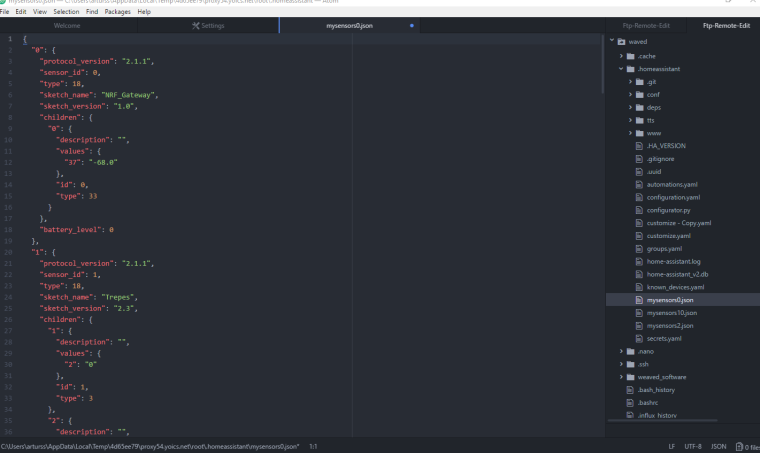
I use atom editor where there's a plugin that can automatically format the json prettily. But we can add formatting to the dump, I don't see anything hindering that.
I'll happily except a PR that adds indentation to the json dump. Otherwise I can do it when I find some time.
-
Hi all.
@maghac Can you please share what plugin do You use? I already use np++ but have not thought of that, thanks.@martinhjelmare Can atom editor can connect to my home assistant files through
sshwithout using samba shares as np++ can with plugins? If so, I should check that.Otherwise, no worries about rushing this implementation and thanks for your work.
-
Hi all.
@maghac Can you please share what plugin do You use? I already use np++ but have not thought of that, thanks.@martinhjelmare Can atom editor can connect to my home assistant files through
sshwithout using samba shares as np++ can with plugins? If so, I should check that.Otherwise, no worries about rushing this implementation and thanks for your work.
I don't think atom can connect via ssh.
-
-
I think this plugin does what you want:
https://atom.io/packages/remote-ftp -
-
@sindrome73 It's not used unless you use Home Assistant as a controller for mysensors.
@Richard-van-der-Plas It's a JSON file, so you can use any editor that understands json to edit it. No need to use nano or vi.
I personally use notepad++ to remote edit files on my server, it has a nice json plugin to pretty print json files. You could also use an online editor, e.g https://jsonformatter.org/ or something.
@maghac I loved https://jsonformatter.org and also uses https://codebeautify.org/jsonviewer
-
Hi all.
@maghac Can you please share what plugin do You use? I already use np++ but have not thought of that, thanks.@martinhjelmare Can atom editor can connect to my home assistant files through
sshwithout using samba shares as np++ can with plugins? If so, I should check that.Otherwise, no worries about rushing this implementation and thanks for your work.
-
I use atom editor where there's a plugin that can automatically format the json prettily. But we can add formatting to the dump, I don't see anything hindering that.
I'll happily except a PR that adds indentation to the json dump. Otherwise I can do it when I find some time.
I made a pull request over on github, if @martinhjelmare accepts it we should be good to go.



Hello! It looks like you're interested in this conversation, but you don't have an account yet.
Getting fed up of having to scroll through the same posts each visit? When you register for an account, you'll always come back to exactly where you were before, and choose to be notified of new replies (either via email, or push notification). You'll also be able to save bookmarks and upvote posts to show your appreciation to other community members.
With your input, this post could be even better 💗
Register Login