Skip to content
  • MySensors
  • OpenHardware.io
  • Categories
  • Recent
  • Tags
  • Popular
Skins
  • Light
  • Brite
  • Cerulean
  • Cosmo
  • Flatly
  • Journal
  • Litera
  • Lumen
  • Lux
  • Materia
  • Minty
  • Morph
  • Pulse
  • Sandstone
  • Simplex
  • Sketchy
  • Spacelab
  • United
  • Yeti
  • Zephyr
  • Dark
  • Cyborg
  • Darkly
  • Quartz
  • Slate
  • Solar
  • Superhero
  • Vapor

  • Default (No Skin)
  • No Skin
Collapse
Brand Logo
  1. Home
  2. General Discussion
  3. Windows PopCom tool shows which USB serial ports are available

Windows PopCom tool shows which USB serial ports are available

Scheduled Pinned Locked Moved General Discussion
10 Posts 4 Posters 1.6k Views 4 Watching
  • Oldest to Newest
  • Newest to Oldest
  • Most Votes
Reply
  • Reply as topic
Log in to reply
This topic has been deleted. Only users with topic management privileges can see it.
  • YveauxY Offline
    YveauxY Offline
    Yveaux
    Mod
    wrote on last edited by
    #1

    I bumped into this handy Windows tool which shows a notification when USB Serial ports are connected or disconnected:

    https://github.com/avishorp/PopCom

    "PopCom is a COM port plug-in/plug-out notifier. Whenever a USB device that emulates a COM port is connected to the computer, a pop-up will be displayed, describing the device that has been plugged in and the COM number assigned to it. This pop-up helps determinig the COM number assigned to each device, a number that is required for communicating with it."

    0_1534241461629_2bd3169b-943b-4611-b04f-6718576760b0-image.png

    As we are plugging serial devices all the time it can be of use to you too!

    Enjoy!

    http://yveaux.blogspot.nl

    1 Reply Last reply
    7
    • gohanG Offline
      gohanG Offline
      gohan
      Mod
      wrote on last edited by
      #2

      It can help, but fortunately most programs do refresh the com ports list automatically

      YveauxY 1 Reply Last reply
      0
      • gohanG gohan

        It can help, but fortunately most programs do refresh the com ports list automatically

        YveauxY Offline
        YveauxY Offline
        Yveaux
        Mod
        wrote on last edited by Yveaux
        #3

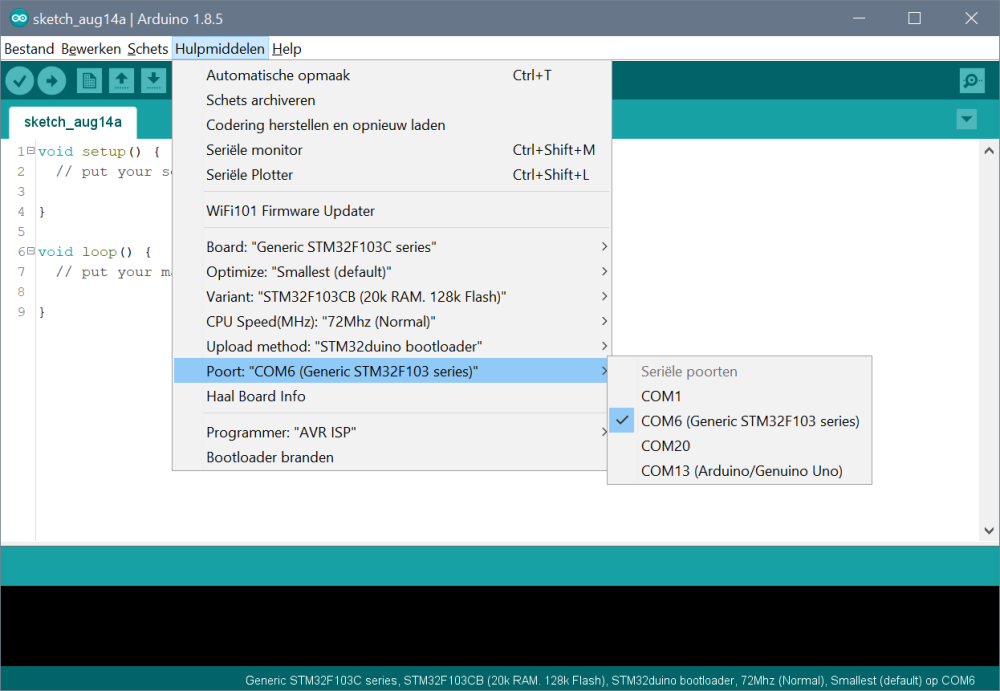
        @gohan that's true for some boards, but in this screenshot COM20 has a clone Nano (with CH340 USB-serial) connected:
        0_1534269833484_08b8068e-1552-4e6b-8d76-84102d13ff3f-image.png

        If I connect more Nano's I'll loose track :white_frowning_face:

        The PopCom tool gives feedback on the port the moment it is plugged in.

        http://yveaux.blogspot.nl

        1 Reply Last reply
        0
        • gohanG Offline
          gohanG Offline
          gohan
          Mod
          wrote on last edited by
          #4

          Well I don't usually use more than 2 Com ports, so I never had a problem 😁

          mfalkviddM 1 Reply Last reply
          0
          • gohanG gohan

            Well I don't usually use more than 2 Com ports, so I never had a problem 😁

            mfalkviddM Offline
            mfalkviddM Offline
            mfalkvidd
            Mod
            wrote on last edited by
            #5

            @gohan well, you weren’t mentioned in the post…

            gohanG 1 Reply Last reply
            0
            • mfalkviddM mfalkvidd

              @gohan well, you weren’t mentioned in the post…

              gohanG Offline
              gohanG Offline
              gohan
              Mod
              wrote on last edited by
              #6

              @mfalkvidd 🤔

              1 Reply Last reply
              0
              • NeverDieN Offline
                NeverDieN Offline
                NeverDie
                Hero Member
                wrote on last edited by NeverDie
                #7

                How do I install PopCom?

                On its github page, it simply says "an installer is supplied." Well, if so, it must be hidden in plain sight, because I'm still not seeing the typical Windows .exe or setup application.

                mfalkviddM 1 Reply Last reply
                0
                • NeverDieN Offline
                  NeverDieN Offline
                  NeverDie
                  Hero Member
                  wrote on last edited by
                  #8

                  In lieu of popcom, I just now found this: https://www.nirsoft.net/utils/usb_devices_view.html
                  which tells the exact date and time when a usb device was connected to the system. So, from that, you can figure out which com port belongs to the device you most recently plugged in.

                  I'd rather use popcom though.

                  YveauxY 1 Reply Last reply
                  0
                  • NeverDieN NeverDie

                    In lieu of popcom, I just now found this: https://www.nirsoft.net/utils/usb_devices_view.html
                    which tells the exact date and time when a usb device was connected to the system. So, from that, you can figure out which com port belongs to the device you most recently plugged in.

                    I'd rather use popcom though.

                    YveauxY Offline
                    YveauxY Offline
                    Yveaux
                    Mod
                    wrote on last edited by
                    #9

                    @neverdie https://github.com/avishorp/PopCom/releases/download/v1.0.0/PopComSetup.msi

                    http://yveaux.blogspot.nl

                    1 Reply Last reply
                    1
                    • NeverDieN NeverDie

                      How do I install PopCom?

                      On its github page, it simply says "an installer is supplied." Well, if so, it must be hidden in plain sight, because I'm still not seeing the typical Windows .exe or setup application.

                      mfalkviddM Offline
                      mfalkviddM Offline
                      mfalkvidd
                      Mod
                      wrote on last edited by
                      #10

                      @neverdie said in Windows PopCom tool shows which USB serial ports are available:

                      it must be hidden in plain sight

                      Indeed :-D
                      0_1536926099429_c387d1dd-f8f9-4a25-b4de-5e478f88b67d-image.png

                      1 Reply Last reply
                      1
                      Reply
                      • Reply as topic
                      Log in to reply
                      • Oldest to Newest
                      • Newest to Oldest
                      • Most Votes


                      16

                      Online

                      11.7k

                      Users

                      11.2k

                      Topics

                      113.1k

                      Posts


                      Copyright 2025 TBD   |   Forum Guidelines   |   Privacy Policy   |   Terms of Service
                      • Login

                      • Don't have an account? Register

                      • Login or register to search.
                      • First post
                        Last post
                      0
                      • MySensors
                      • OpenHardware.io
                      • Categories
                      • Recent
                      • Tags
                      • Popular