Skip to content
  • MySensors
  • OpenHardware.io
  • Categories
  • Recent
  • Tags
  • Popular
Skins
  • Light
  • Brite
  • Cerulean
  • Cosmo
  • Flatly
  • Journal
  • Litera
  • Lumen
  • Lux
  • Materia
  • Minty
  • Morph
  • Pulse
  • Sandstone
  • Simplex
  • Sketchy
  • Spacelab
  • United
  • Yeti
  • Zephyr
  • Dark
  • Cyborg
  • Darkly
  • Quartz
  • Slate
  • Solar
  • Superhero
  • Vapor

  • Default (No Skin)
  • No Skin
Collapse
Brand Logo
  1. Home
  2. Controllers
  3. Home Assistant
  4. sendBatteryLevel not showing up in HA dasboard

sendBatteryLevel not showing up in HA dasboard

Scheduled Pinned Locked Moved Home Assistant
15 Posts 4 Posters 2.6k Views 3 Watching
  • Oldest to Newest
  • Newest to Oldest
  • Most Votes
Reply
  • Reply as topic
Log in to reply
This topic has been deleted. Only users with topic management privileges can see it.
  • P Offline
    P Offline
    peerv
    wrote on last edited by
    #3
    This post is deleted!
    1 Reply Last reply
    0
    • mfalkviddM mfalkvidd

      @peerv could it be related to https://forum.mysensors.org/topic/8838/sendbatterylevel-and-child-sensor-problems/7 ?

      P Offline
      P Offline
      peerv
      wrote on last edited by
      #4

      @mfalkvidd I had seen that discussion on the mysensors forum.
      I my case the battery level % shows up correctly in the HA entities list attributes.
      It just does not show up on the HA Console.
      Have never seen it on the HA Console. What should I expect to see?

      1 Reply Last reply
      0
      • P Offline
        P Offline
        peerv
        wrote on last edited by
        #5

        Can anybody help my with how to display the MySensors sendBatteryLevel percentage on the HA user interface.
        The percentage appears correctly in Home Assistant Developertools - States- Attrributes.
        how to get this attribute displayed on the UI?

        AlaskaDIYA 1 Reply Last reply
        0
        • P peerv

          Can anybody help my with how to display the MySensors sendBatteryLevel percentage on the HA user interface.
          The percentage appears correctly in Home Assistant Developertools - States- Attrributes.
          how to get this attribute displayed on the UI?

          AlaskaDIYA Offline
          AlaskaDIYA Offline
          AlaskaDIY
          wrote on last edited by
          #6

          @peerv Any luck with getting it working?

          P 1 Reply Last reply
          0
          • AlaskaDIYA AlaskaDIY

            @peerv Any luck with getting it working?

            P Offline
            P Offline
            peerv
            wrote on last edited by
            #7

            @alaskadiy No solution still.... I doubt if it has been implemented in the interface

            mfalkviddM 1 Reply Last reply
            0
            • P peerv

              @alaskadiy No solution still.... I doubt if it has been implemented in the interface

              mfalkviddM Offline
              mfalkviddM Offline
              mfalkvidd
              Mod
              wrote on last edited by
              #8

              @peerv for Domoticz, a workaround is to present a separate child id. Maybe that could work for you as well? See https://github.com/mfalkvidd/arduino-plantmoisture/blob/65165ada9b265d4218ef10952ea06b13d6cfdb38/arduino-plantmoisture.ino#L29

              P 1 Reply Last reply
              0
              • mfalkviddM mfalkvidd

                @peerv for Domoticz, a workaround is to present a separate child id. Maybe that could work for you as well? See https://github.com/mfalkvidd/arduino-plantmoisture/blob/65165ada9b265d4218ef10952ea06b13d6cfdb38/arduino-plantmoisture.ino#L29

                P Offline
                P Offline
                peerv
                wrote on last edited by
                #9

                @mfalkvidd
                Thanks, yes your solution could work. Also a voltage divider with a seperate child-id could work.

                But my point is that the Arduino battery_level value is already available in the mysensors.json in Home Assistant.

                "type": 17,
                        "sketch_name": "N60Breed",
                        "sketch_version": "1.0",
                        "battery_level": 91,
                        "protocol_version": "2.3.1",
                        "heartbeat": 0
                

                I just don't know how to get the battery_level value presented in the HA UI.

                M 1 Reply Last reply
                0
                • P peerv

                  @mfalkvidd
                  Thanks, yes your solution could work. Also a voltage divider with a seperate child-id could work.

                  But my point is that the Arduino battery_level value is already available in the mysensors.json in Home Assistant.

                  "type": 17,
                          "sketch_name": "N60Breed",
                          "sketch_version": "1.0",
                          "battery_level": 91,
                          "protocol_version": "2.3.1",
                          "heartbeat": 0
                  

                  I just don't know how to get the battery_level value presented in the HA UI.

                  M Offline
                  M Offline
                  mvader
                  wrote on last edited by
                  #10

                  @peerv said in sendBatteryLevel not showing up in HA dasboard:

                  @mfalkvidd
                  Thanks, yes your solution could work. Also a voltage divider with a seperate child-id could work.

                  But my point is that the Arduino battery_level value is already available in the mysensors.json in Home Assistant.

                  "type": 17,
                          "sketch_name": "N60Breed",
                          "sketch_version": "1.0",
                          "battery_level": 91,
                          "protocol_version": "2.3.1",
                          "heartbeat": 0
                  

                  I just don't know how to get the battery_level value presented in the HA UI.

                  you have to use a template.
                  under the sensors section

                  • platform: template
                    sensors:
                    computer_room_15_0:
                    unit_of_measurement: "%"
                    entity_id: sensor.computer_room_15_1
                    icon_template: mdi:battery
                    value_template: >-
                    {%- if states.sensor.computer_room_15_1 != None -%}
                    {{states.sensor.computer_room_15_1.attributes.battery_level}}
                    {%- else -%}
                    0
                    {%- endif -%}
                  P 1 Reply Last reply
                  2
                  • M Offline
                    M Offline
                    mvader
                    wrote on last edited by
                    #11

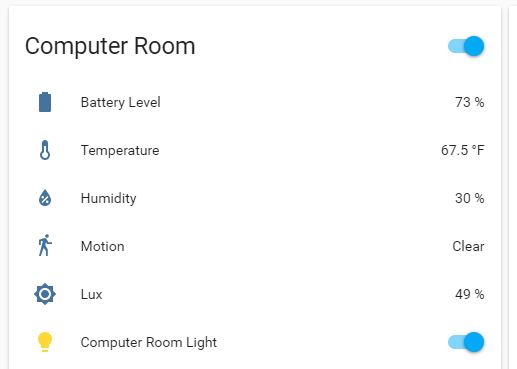
                    0_1548528808270_battery.JPG

                    1 Reply Last reply
                    1
                    • M Offline
                      M Offline
                      mvader
                      wrote on last edited by
                      #12

                      then under groups
                      computer_room_group:
                      name: Computer Room
                      entities:
                      - sensor.computer_room_15_0
                      - sensor.computer_room_15_1
                      - sensor.computer_room_15_2
                      - binary_sensor.computer_room_15_3
                      - sensor.computer_room_15_4

                      1 Reply Last reply
                      0
                      • M mvader

                        @peerv said in sendBatteryLevel not showing up in HA dasboard:

                        @mfalkvidd
                        Thanks, yes your solution could work. Also a voltage divider with a seperate child-id could work.

                        But my point is that the Arduino battery_level value is already available in the mysensors.json in Home Assistant.

                        "type": 17,
                                "sketch_name": "N60Breed",
                                "sketch_version": "1.0",
                                "battery_level": 91,
                                "protocol_version": "2.3.1",
                                "heartbeat": 0
                        

                        I just don't know how to get the battery_level value presented in the HA UI.

                        you have to use a template.
                        under the sensors section

                        • platform: template
                          sensors:
                          computer_room_15_0:
                          unit_of_measurement: "%"
                          entity_id: sensor.computer_room_15_1
                          icon_template: mdi:battery
                          value_template: >-
                          {%- if states.sensor.computer_room_15_1 != None -%}
                          {{states.sensor.computer_room_15_1.attributes.battery_level}}
                          {%- else -%}
                          0
                          {%- endif -%}
                        P Offline
                        P Offline
                        peerv
                        wrote on last edited by
                        #13

                        @mvader Thanks, have a problem translating you example to my situation

                        This is the card were I want to add the battery_level:

                         - type: entities
                                title: Levelmeter breed 
                                show_header_toggle: false
                                entities:
                                  - entity: sensor.n60breed_20_54
                                    name: Battery (V)
                                    icon: mdi:battery 
                                  - entity: sensor.n60breed_20_50
                                    name: Temperature
                                    icon: mdi:temperature-celsius
                                  - entity: sensor.n60breed_20_51
                                    name: Humidity
                                    icon: mdi:water-percent
                                  - entity: sensor.n60breed_20_52
                                    name: Bar
                                  - entity: sensor.n60breed_20_53
                                    name: Waterlevel (cm)
                        

                        I played around with the following entry in configuration.yaml

                        sensor:
                          - platform: template
                            sensors:
                            n60breed_20_55:
                            entity_id: sensor.n60breed_20_53
                            value_template: "{{ states.sensor.n60breed_20_53.attributes.battery_level }}"
                            unit_of_measurement: '%'
                        

                        but could not get it to work! Did not find any docs on platform Template.
                        Please advice

                        M 1 Reply Last reply
                        0
                        • P peerv

                          @mvader Thanks, have a problem translating you example to my situation

                          This is the card were I want to add the battery_level:

                           - type: entities
                                  title: Levelmeter breed 
                                  show_header_toggle: false
                                  entities:
                                    - entity: sensor.n60breed_20_54
                                      name: Battery (V)
                                      icon: mdi:battery 
                                    - entity: sensor.n60breed_20_50
                                      name: Temperature
                                      icon: mdi:temperature-celsius
                                    - entity: sensor.n60breed_20_51
                                      name: Humidity
                                      icon: mdi:water-percent
                                    - entity: sensor.n60breed_20_52
                                      name: Bar
                                    - entity: sensor.n60breed_20_53
                                      name: Waterlevel (cm)
                          

                          I played around with the following entry in configuration.yaml

                          sensor:
                            - platform: template
                              sensors:
                              n60breed_20_55:
                              entity_id: sensor.n60breed_20_53
                              value_template: "{{ states.sensor.n60breed_20_53.attributes.battery_level }}"
                              unit_of_measurement: '%'
                          

                          but could not get it to work! Did not find any docs on platform Template.
                          Please advice

                          M Offline
                          M Offline
                          mvader
                          wrote on last edited by
                          #14

                          @peerv in my situation, if i click on any of my child devices, like temp, lux, humidity, etc. i can see the battery level. so i have to create a new sensor, in this case i'm creating computer_room_15_0, and i pull the value from child 1, i could pull it from 2,3 or 4, but i chose 1. and the value that i'm pulling is an attribute of child 1 called battery_level
                          now that i have created that sensor. i can place it where ever i want.
                          so the newly created sensor computer_room_15_0 is my entity_id that can go in a card or whatever.
                          before you do that, i would trouble shoot in the following way.

                          1. pick a child device and open it, ensure you can see the battery level.
                          2. create a new sensor based on the template above (restart after)
                          3. go into the the states dev tool page and ensure it's there and has the correct value.
                          4. if yes, then open the standard states based screen see if it shows up at the top in the circle.
                          5. if yes, put that entity in your lovelace ui as you see fit, if no, go back and figure out where it's not working.
                            you can also tail the log file and you restart and look for any error messages that may offer a clue to why.
                            here is my states screen for the battery sensor.

                            0_1548686200300_batt.JPG
                          P 1 Reply Last reply
                          0
                          • M mvader

                            @peerv in my situation, if i click on any of my child devices, like temp, lux, humidity, etc. i can see the battery level. so i have to create a new sensor, in this case i'm creating computer_room_15_0, and i pull the value from child 1, i could pull it from 2,3 or 4, but i chose 1. and the value that i'm pulling is an attribute of child 1 called battery_level
                            now that i have created that sensor. i can place it where ever i want.
                            so the newly created sensor computer_room_15_0 is my entity_id that can go in a card or whatever.
                            before you do that, i would trouble shoot in the following way.

                            1. pick a child device and open it, ensure you can see the battery level.
                            2. create a new sensor based on the template above (restart after)
                            3. go into the the states dev tool page and ensure it's there and has the correct value.
                            4. if yes, then open the standard states based screen see if it shows up at the top in the circle.
                            5. if yes, put that entity in your lovelace ui as you see fit, if no, go back and figure out where it's not working.
                              you can also tail the log file and you restart and look for any error messages that may offer a clue to why.
                              here is my states screen for the battery sensor.
                              0_1548686200300_batt.JPG
                            P Offline
                            P Offline
                            peerv
                            wrote on last edited by
                            #15

                            @mvader Thanks, got it working. Your explanation and the right indentions (:angry: ) did it!

                            1 Reply Last reply
                            0
                            Reply
                            • Reply as topic
                            Log in to reply
                            • Oldest to Newest
                            • Newest to Oldest
                            • Most Votes


                            11

                            Online

                            11.7k

                            Users

                            11.2k

                            Topics

                            113.1k

                            Posts


                            Copyright 2025 TBD   |   Forum Guidelines   |   Privacy Policy   |   Terms of Service
                            • Login

                            • Don't have an account? Register

                            • Login or register to search.
                            • First post
                              Last post
                            0
                            • MySensors
                            • OpenHardware.io
                            • Categories
                            • Recent
                            • Tags
                            • Popular