Skip to content
  • MySensors
  • OpenHardware.io
  • Categories
  • Recent
  • Tags
  • Popular
Skins
  • Light
  • Brite
  • Cerulean
  • Cosmo
  • Flatly
  • Journal
  • Litera
  • Lumen
  • Lux
  • Materia
  • Minty
  • Morph
  • Pulse
  • Sandstone
  • Simplex
  • Sketchy
  • Spacelab
  • United
  • Yeti
  • Zephyr
  • Dark
  • Cyborg
  • Darkly
  • Quartz
  • Slate
  • Solar
  • Superhero
  • Vapor

  • Default (No Skin)
  • No Skin
Collapse
Brand Logo
  1. Home
  2. Announcements
  3. 💬 Battery Powered Sensors

💬 Battery Powered Sensors

Scheduled Pinned Locked Moved Announcements
battery
347 Posts 55 Posters 68.1k Views 53 Watching
  • Oldest to Newest
  • Newest to Oldest
  • Most Votes
Reply
  • Reply as topic
Log in to reply
This topic has been deleted. Only users with topic management privileges can see it.
  • skywatchS skywatch

    @tonbor Yes, the capacitor goes from the analog input to ground.

    mfalkviddM Offline
    mfalkviddM Offline
    mfalkvidd
    Mod
    wrote on last edited by mfalkvidd
    #195

    @skywatch @tonbor @benhub @zboblamont thanks for your input. I have updated the page. I added the text in bold:

    The tap point could be bypassed with a 0.1 uF capacitor (connected in parallel with R2) to keep the noise level low

    and updated the image. Please let me know if something is still unclear.

    1 Reply Last reply
    0
    • T Offline
      T Offline
      tonbor
      wrote on last edited by
      #196

      Perfect!

      1 Reply Last reply
      1
      • M Offline
        M Offline
        Macgyver33
        wrote on last edited by
        #197

        If you remove the regulator and power with 2xAA batteries, do you only need the TX and RX pins for the FTDI programmer and if so can you use the RX and TX pins on the left side instead of the top FTDI pin connector? Trying to think how to connect the FTDI programmer without connecting to it's VCC and ground when there is no regulator on the pro mini.

        mfalkviddM 1 Reply Last reply
        0
        • M Macgyver33

          If you remove the regulator and power with 2xAA batteries, do you only need the TX and RX pins for the FTDI programmer and if so can you use the RX and TX pins on the left side instead of the top FTDI pin connector? Trying to think how to connect the FTDI programmer without connecting to it's VCC and ground when there is no regulator on the pro mini.

          mfalkviddM Offline
          mfalkviddM Offline
          mfalkvidd
          Mod
          wrote on last edited by
          #198

          @macgyver33 you need rx, tx and gnd.

          The pins on the left side and the ones on the top work the same way, you can use the ones on the left if you prefer.

          1 Reply Last reply
          0
          • tianaT Offline
            tianaT Offline
            tiana
            wrote on last edited by
            #199

            Is exist something "last wish" in MySensors, when battery go below predefined level the device to send last massage to the GW and go sleep forever.
            The idea is the controller/application to have information about the device and to be known this device is dead and need battery change.

            mfalkviddM 1 Reply Last reply
            0
            • tianaT tiana

              Is exist something "last wish" in MySensors, when battery go below predefined level the device to send last massage to the GW and go sleep forever.
              The idea is the controller/application to have information about the device and to be known this device is dead and need battery change.

              mfalkviddM Offline
              mfalkviddM Offline
              mfalkvidd
              Mod
              wrote on last edited by
              #200

              @tiana the controller will know the last battery level. Just set the predefined level in your controller?

              1 Reply Last reply
              0
              • tianaT Offline
                tianaT Offline
                tiana
                wrote on last edited by
                #201

                Yes but in this case the last massage will be the same like the previous, only the battery level will be below some predefined value. i don't like this. I will think how to solve this.

                zboblamontZ K 2 Replies Last reply
                0
                • skywatchS Offline
                  skywatchS Offline
                  skywatch
                  wrote on last edited by
                  #202

                  @tiana - Of course you can do this in your code.

                  Just read the battery level and when it gets to the lowest level you decide upon (maybe a little testing needed here) then include the line...

                  if(battery_level_read < battery_low_level){
                  send.msg(your last message)
                  sleep(long time period)
                  }

                  You need to define all the things above as normal for variables (floats for the battery reading and levels and UL for the long sleep)....

                  1 Reply Last reply
                  0
                  • tianaT tiana

                    Yes but in this case the last massage will be the same like the previous, only the battery level will be below some predefined value. i don't like this. I will think how to solve this.

                    zboblamontZ Offline
                    zboblamontZ Offline
                    zboblamont
                    wrote on last edited by
                    #203

                    @tiana I agree with @mfalkvidd , normally it is the Controller which sends out the warning to change battery, certainly Domoticz has this provision incorporated?
                    Here the batteries are read at approximate 12 hour intervals, and Domoticz is preset to signal a warning below 1.7v, which is days or even weeks from actually dying. If I'm away or forgetful it will cease updating anyway and flag Red on the display.
                    Once you have established the consumption curve for your batteries until flat, easy enough to set the warning threshhold before the Node dies...

                    1 Reply Last reply
                    1
                    • tianaT tiana

                      Yes but in this case the last massage will be the same like the previous, only the battery level will be below some predefined value. i don't like this. I will think how to solve this.

                      K Offline
                      K Offline
                      kimot
                      wrote on last edited by
                      #204

                      @tiana
                      Create dummy contact sensor on your node and if node sends last message, it will trigger this contact before "die".
                      So controller knows, that it was last message and node is off.
                      But better is allow controller do its job, like wrote all others.
                      I personally check battery level and "no incoming messages in supposed interval" to send alert to my e-mail ( and SMS ).
                      In this example tank level sensors sends every 10min, so after 3 messages lost, I will be informed.
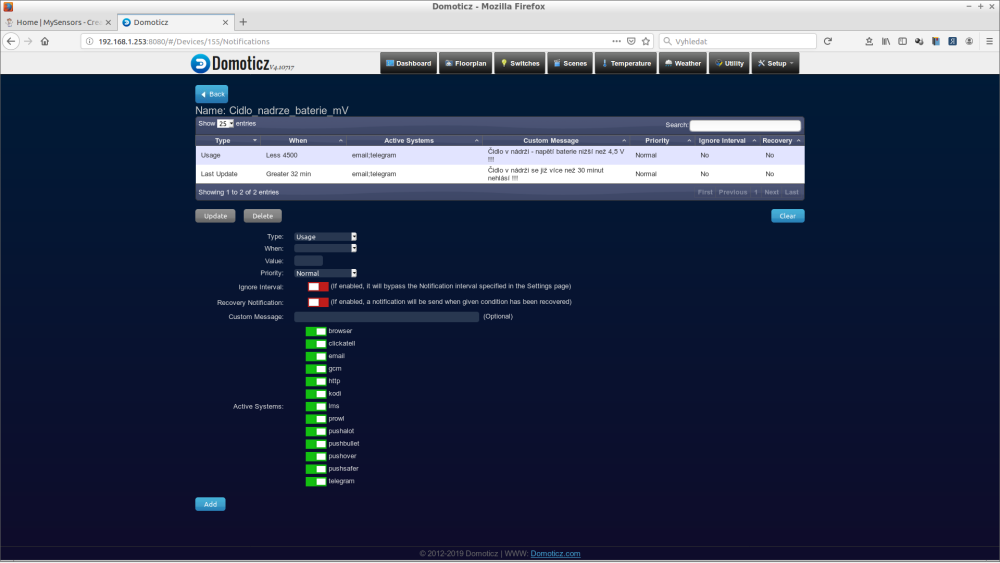
                      0_1560340917673_2019-06-12-135250_1920x1080_scrot.png

                      1 Reply Last reply
                      0
                      • tianaT Offline
                        tianaT Offline
                        tiana
                        wrote on last edited by
                        #205

                        Thanks for the ideas, i will modify the code to use LowPower lib and will cut the power to the radio module to increase battery live, when last massage is send the node will never power the radio module, will be only short interrupt and go again to sleep forever. This will give me power usage 20times more than self battery discharge. Which have to give me node uptime around 260days with coin cell battery.

                        K 1 Reply Last reply
                        0
                        • tianaT tiana

                          Thanks for the ideas, i will modify the code to use LowPower lib and will cut the power to the radio module to increase battery live, when last massage is send the node will never power the radio module, will be only short interrupt and go again to sleep forever. This will give me power usage 20times more than self battery discharge. Which have to give me node uptime around 260days with coin cell battery.

                          K Offline
                          K Offline
                          kimot
                          wrote on last edited by
                          #206

                          @tiana
                          And for what will be that offline node usefull?

                          1 Reply Last reply
                          0
                          • tianaT Offline
                            tianaT Offline
                            tiana
                            wrote on last edited by
                            #207

                            Door/Window/Button

                            K 1 Reply Last reply
                            0
                            • tianaT tiana

                              Door/Window/Button

                              K Offline
                              K Offline
                              kimot
                              wrote on last edited by
                              #208

                              @tiana
                              Forever sleeping door sensor with low battery?

                              "when last massage is send the node will never power the radio module"

                              Why door sensor, if it never sends message?

                              1 Reply Last reply
                              0
                              • tianaT Offline
                                tianaT Offline
                                tiana
                                wrote on last edited by
                                #209

                                @kimot
                                At all of the time 328p will be in sleep forever, when button is pressed interrupt is triggered and wake the 328p power ON the radio send info power OFF radio and go sleep forever.
                                Only when battery level go below critical level. the radio stay OFF and only interrupt and sleep forever.

                                I am almost ready with the drawings of the hardware, and next week start work on software... you can see the project in the openhardware.io i gonna upload it later tomorrow.

                                1 Reply Last reply
                                0
                                • SebexS Offline
                                  SebexS Offline
                                  Sebex
                                  wrote on last edited by
                                  #210

                                  Hi Guys, I need some help on this guide.
                                  I am running a Nano with radio and Si7021 sensor on 1Mhz to lower the required operating voltage, other than this is unmodified no desoldered led or regulators etc.. I tried running it on 2x 1.5v AA batteries connected to Vin and GND, the LED powers on but nothing else happens. When using 3 AA batteries it does send data, so apparently it needs more than 3v. How can I ensure that the setup is fine with 3V, I bought the 3V AA battery holder but I cannot seem to run it at that currently. Which steps can I take to do so? Help is appreciated.

                                  S 1 Reply Last reply
                                  0
                                  • SebexS Sebex

                                    Hi Guys, I need some help on this guide.
                                    I am running a Nano with radio and Si7021 sensor on 1Mhz to lower the required operating voltage, other than this is unmodified no desoldered led or regulators etc.. I tried running it on 2x 1.5v AA batteries connected to Vin and GND, the LED powers on but nothing else happens. When using 3 AA batteries it does send data, so apparently it needs more than 3v. How can I ensure that the setup is fine with 3V, I bought the 3V AA battery holder but I cannot seem to run it at that currently. Which steps can I take to do so? Help is appreciated.

                                    S Offline
                                    S Offline
                                    sineverba
                                    Hardware Contributor
                                    wrote on last edited by sineverba
                                    #211

                                    @Sebex I run all my nodes with 2xAA rechargable NiMh (or 1 x LifePo4) with Si7021.

                                    1. Use MiniCore bootloader (https://github.com/MCUdude/MiniCore)
                                    2. Set BOD at 1.8V for NiMh
                                    3. Set speed @8Mhz :)

                                    Enjoy your 1 or 2 years node life at transmit every 5 minutes.

                                    PS Remove the LED and the regulator, of course ;)

                                    PPS I use spare AtMega328p on custom PCB board, but same result with a couple of Nano without regulator.

                                    SebexS 1 Reply Last reply
                                    0
                                    • S sineverba

                                      @Sebex I run all my nodes with 2xAA rechargable NiMh (or 1 x LifePo4) with Si7021.

                                      1. Use MiniCore bootloader (https://github.com/MCUdude/MiniCore)
                                      2. Set BOD at 1.8V for NiMh
                                      3. Set speed @8Mhz :)

                                      Enjoy your 1 or 2 years node life at transmit every 5 minutes.

                                      PS Remove the LED and the regulator, of course ;)

                                      PPS I use spare AtMega328p on custom PCB board, but same result with a couple of Nano without regulator.

                                      SebexS Offline
                                      SebexS Offline
                                      Sebex
                                      wrote on last edited by
                                      #212

                                      @sineverba thanks, I got it working and it's up and running. Still have to desolder the led and remove the regulator, will do that later.
                                      Regarding the BOD, what happens if I disable it? Will it run for longer as it does not shutdown? Or is any voltage below 1.8v bad for the arduino?

                                      A bit off topic maybe, but I was wondering how the 'pros' around here make the sensor small and sturdy for Arduino's with Si7021+ 2xAA battery pack. My DuPont wires seem a bit loose, so I'm wondering whether I should solder them. And perhaps someone 3d printed a case for an Arduino+Batterypack or some sorts.

                                      mfalkviddM Puneit ThukralP 3 Replies Last reply
                                      1
                                      • SebexS Sebex

                                        @sineverba thanks, I got it working and it's up and running. Still have to desolder the led and remove the regulator, will do that later.
                                        Regarding the BOD, what happens if I disable it? Will it run for longer as it does not shutdown? Or is any voltage below 1.8v bad for the arduino?

                                        A bit off topic maybe, but I was wondering how the 'pros' around here make the sensor small and sturdy for Arduino's with Si7021+ 2xAA battery pack. My DuPont wires seem a bit loose, so I'm wondering whether I should solder them. And perhaps someone 3d printed a case for an Arduino+Batterypack or some sorts.

                                        mfalkviddM Offline
                                        mfalkviddM Offline
                                        mfalkvidd
                                        Mod
                                        wrote on last edited by
                                        #213

                                        @Sebex said in 💬 Battery Powered Sensors:

                                        And perhaps someone 3d printed a case for an Arduino+Batterypack or some sorts.

                                        https://www.mysensors.org/build/print might have something you can use. openhardware.io has a few devices with cases.

                                        1 Reply Last reply
                                        0
                                        • SebexS Sebex

                                          @sineverba thanks, I got it working and it's up and running. Still have to desolder the led and remove the regulator, will do that later.
                                          Regarding the BOD, what happens if I disable it? Will it run for longer as it does not shutdown? Or is any voltage below 1.8v bad for the arduino?

                                          A bit off topic maybe, but I was wondering how the 'pros' around here make the sensor small and sturdy for Arduino's with Si7021+ 2xAA battery pack. My DuPont wires seem a bit loose, so I'm wondering whether I should solder them. And perhaps someone 3d printed a case for an Arduino+Batterypack or some sorts.

                                          mfalkviddM Offline
                                          mfalkviddM Offline
                                          mfalkvidd
                                          Mod
                                          wrote on last edited by
                                          #214

                                          @Sebex said in 💬 Battery Powered Sensors:

                                          Regarding the BOD, what happens if I disable it? Will it run for longer as it does not shutdown? Or is any voltage below 1.8v bad for the arduino?

                                          1.8V is the minimum voltage according to the atmega328 datasheet. Below that it might work, but it might also do all sorts of strange things. We've seen reports of nodes getting stuck on continuous transmit, blasting radio signals all the time which blocks all other nodes from communicating. So keeping the bod at 1.8V is probably a good idea. 2xAA have almost no power left at 1.8V anyway. See https://www.avrfreaks.net/forum/aa-alkaline-discharge-curve-5ma for some discharge curves.

                                          SebexS 1 Reply Last reply
                                          2
                                          Reply
                                          • Reply as topic
                                          Log in to reply
                                          • Oldest to Newest
                                          • Newest to Oldest
                                          • Most Votes


                                          17

                                          Online

                                          11.7k

                                          Users

                                          11.2k

                                          Topics

                                          113.1k

                                          Posts


                                          Copyright 2025 TBD   |   Forum Guidelines   |   Privacy Policy   |   Terms of Service
                                          • Login

                                          • Don't have an account? Register

                                          • Login or register to search.
                                          • First post
                                            Last post
                                          0
                                          • MySensors
                                          • OpenHardware.io
                                          • Categories
                                          • Recent
                                          • Tags
                                          • Popular