
rfm69hw on a raspberry pi 4, power issues
-
Hi,
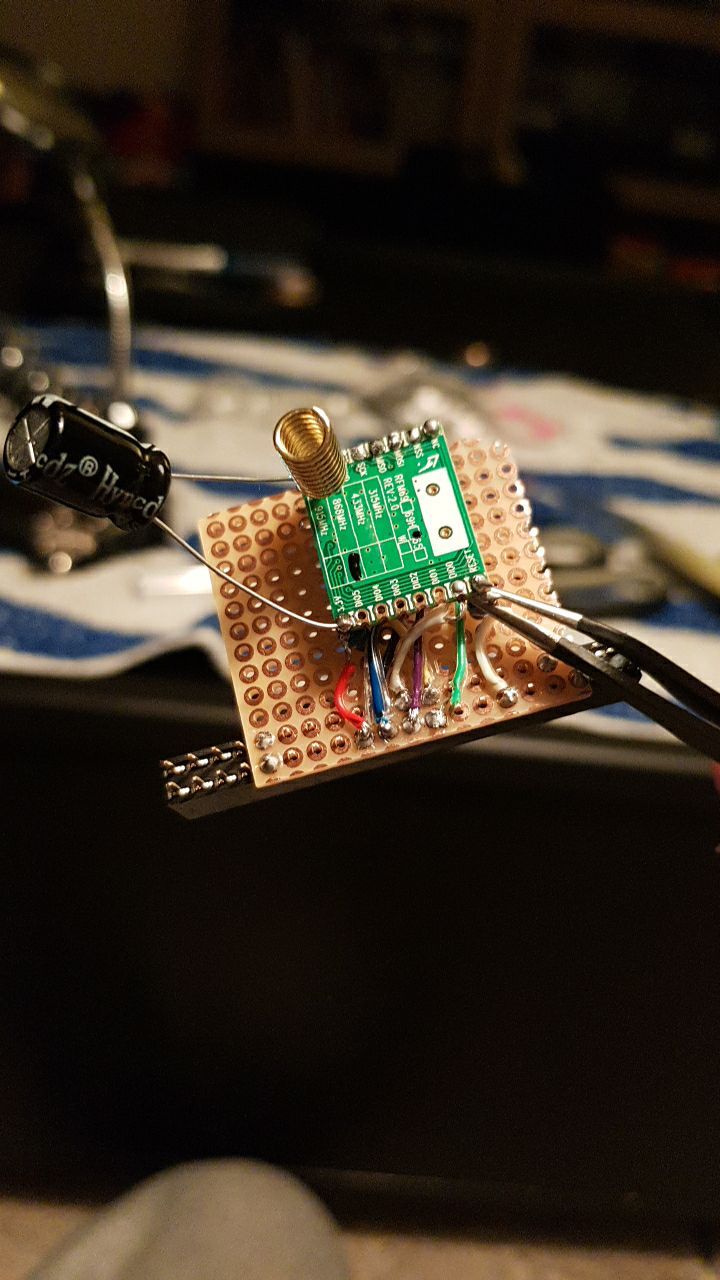
I am trying to build a raspberry pi gateway with a rfm69hw chip.
I built a hat for the pi and the connections seem to be fine, my problem is range.
I am using the signal scanner sketch and it shows me that the sending node has to max out TXPowerLevel when it talks to the gateway.
I repurposed one of my other nodes as a gateway and there sending was fine at TXPowerLevel 0, so it must be the gateway.
I soldered a 470uF capacitor to the radio on the pi and that helps for the first lets say 50 messages, but then the same pattern reappears: The node maxes out its power level.
Any ideas on how to fix this? I know I could just use a serial gateway, but to be honest I got it into my thick skull that the gateway has to be hat for the pi (mostly because otherwise all that time would have been wasted ;)).
I have some step up boosters to 3.3v (the ones I use for the nodes), should I try to power the rfm69-chip from one of the boosters?
-
Hi,
I am trying to build a raspberry pi gateway with a rfm69hw chip.
I built a hat for the pi and the connections seem to be fine, my problem is range.
I am using the signal scanner sketch and it shows me that the sending node has to max out TXPowerLevel when it talks to the gateway.
I repurposed one of my other nodes as a gateway and there sending was fine at TXPowerLevel 0, so it must be the gateway.
I soldered a 470uF capacitor to the radio on the pi and that helps for the first lets say 50 messages, but then the same pattern reappears: The node maxes out its power level.
Any ideas on how to fix this? I know I could just use a serial gateway, but to be honest I got it into my thick skull that the gateway has to be hat for the pi (mostly because otherwise all that time would have been wasted ;)).
I have some step up boosters to 3.3v (the ones I use for the nodes), should I try to power the rfm69-chip from one of the boosters?
So from what I can read here this might not be a power issue after all?
This is the sketch I am using for the signal scanner:
/*
 * The MySensors Arduino library handles the wireless radio link and protocol
 * between your home built sensors/actuators and HA controller of choice.
 * The sensors forms a self healing radio network with optional repeaters. Each
 * repeater and gateway builds a routing tables in EEPROM which keeps track of the
 * network topology allowing messages to be routed to nodes.
 *
 * Created by Henrik Ekblad <henrik.ekblad@mysensors.org>
 * Copyright (C) 2013-2019 Sensnology AB
 * Full contributor list: https://github.com/mysensors/MySensors/graphs/contributors
 *
 * Documentation: http://www.mysensors.org
 * Support Forum: http://forum.mysensors.org
 *
 * This program is free software; you can redistribute it and/or
 * modify it under the terms of the GNU General Public License
 * version 2 as published by the Free Software Foundation.
 *
 *******************************
 *
 * REVISION HISTORY
 * Version 1.0 - tekka
 *
 * DESCRIPTION
 * ATC mode settings and signal report functions, on RFM69 and RFM95 nodes
 *
 */

// Enable debug prints
#define MY_DEBUG
#define MY_SIGNAL_REPORT_ENABLED


#define MY_NODE_ID 3

// Enable and select radio type attached

// RFM69
#define MY_RADIO_RFM69
#define MY_RFM69_NEW_DRIVER   // ATC on RFM69 works only with the new driver (not compatible with old=default driver)
#define MY_IS_RFM69HW
//#define MY_RFM69_ATC_TARGET_RSSI_DBM (-70)  // target RSSI -70dBm
//#define MY_RFM69_MAX_POWER_LEVEL_DBM (10)   // max. TX power 10dBm = 10mW

// RFM95
//#define MY_RADIO_RFM95
//#define MY_RFM95_ATC_TARGET_RSSI_DBM (-70)  // target RSSI -70dBm
//#define MY_RFM95_MAX_POWER_LEVEL_DBM (10)   // max. TX power 10dBm = 10mW

#include <MySensors.h>

// ID of the sensor child
#define CHILD_ID_UPLINK_QUALITY (0)
#define CHILD_ID_TX_LEVEL       (1)
#define CHILD_ID_TX_PERCENT     (2)
#define CHILD_ID_TX_RSSI        (3)
#define CHILD_ID_RX_RSSI        (4)
#define CHILD_ID_TX_SNR         (5)
#define CHILD_ID_RX_SNR         (6)


// Initialize general message
MyMessage msgTxRSSI(CHILD_ID_TX_RSSI, V_CUSTOM);
MyMessage msgRxRSSI(CHILD_ID_RX_RSSI, V_CUSTOM);
MyMessage msgTxSNR(CHILD_ID_TX_SNR, V_CUSTOM);
MyMessage msgRxSNR(CHILD_ID_RX_SNR, V_CUSTOM);
MyMessage msgTxLevel(CHILD_ID_TX_LEVEL, V_CUSTOM);
MyMessage msgTxPercent(CHILD_ID_TX_PERCENT, V_CUSTOM);
MyMessage msgUplinkQuality(CHILD_ID_UPLINK_QUALITY, V_CUSTOM);

void setup()
{
}


void presentation()
{
  // Send the sketch version information to the gateway and controller
  sendSketchInfo("ATC", "1.0");

  // Register all sensors to gw (they will be created as child devices)
  present(CHILD_ID_UPLINK_QUALITY, S_CUSTOM, "UPLINK QUALITY RSSI");
  present(CHILD_ID_TX_LEVEL, S_CUSTOM, "TX LEVEL DBM");
  present(CHILD_ID_TX_PERCENT, S_CUSTOM, "TX LEVEL PERCENT");
  present(CHILD_ID_TX_RSSI, S_CUSTOM, "TX RSSI");
  present(CHILD_ID_RX_RSSI, S_CUSTOM, "RX RSSI");
  present(CHILD_ID_TX_SNR, S_CUSTOM, "TX SNR");
  present(CHILD_ID_RX_SNR, S_CUSTOM, "RX SNR");
}

void loop()
{
  // send messages to GW
  send(msgUplinkQuality.set(transportInternalToRSSI(_transportSM.uplinkQualityRSSI)));
  send(msgTxLevel.set(transportGetTxPowerLevel()));
  send(msgTxPercent.set(transportGetTxPowerPercent()));
  // retrieve RSSI / SNR reports from incoming ACK
  send(msgTxRSSI.set(transportGetSendingRSSI()));
  send(msgRxRSSI.set(transportGetReceivingRSSI()));
  send(msgTxSNR.set(transportGetSendingSNR()));
  send(msgRxSNR.set(transportGetReceivingSNR()));
 //to serial
 Serial.print("transportInternalToRSSI(_transportSM.uplinkQualityRSSI): "); Serial.println(transportInternalToRSSI(_transportSM.uplinkQualityRSSI));
 Serial.print("transportGetTxPowerLevel(): "); Serial.println(transportGetTxPowerLevel());
 Serial.print("transportGetTxPowerPercent(): "); Serial.println(transportGetTxPowerPercent());
 Serial.print("transportGetSendingRSSI(): "); Serial.println(transportGetSendingRSSI());
 Serial.print("transportGetReceivingRSSI(): "); Serial.println(transportGetReceivingRSSI());
 Serial.print("transportGetSendingSNR(): "); Serial.println(transportGetSendingSNR());
 Serial.print("transportGetReceivingSNR(): "); Serial.println(transportGetReceivingSNR());
 Serial.println("Waiting");
  // wait a bit
  wait(10000);
}
And this is how I compiled the gateway:
./configure --my-transport=rfm69 --my-rfm69-frequency=868 --my-gateway=mqtt --my-is-rfm69hw --extra-cxxflags="-DMY_RFM69_RST_PIN=29" --my-controller-ip-address=127.0.0.1 --my-mqtt-publish-topic-prefix=mysensors-out --my-mqtt-subscribe-topic-prefix=mysensors-in --my-mqtt-client-id=mysensorsgateway1 --my-mqtt-user=mysensors --my-mqtt-password=redacted --my-port=1883Any ideas how I can test mysensors 2.2 with the raspberry pi 4? From what I understand that version of the pi isn't supported until version 2.4 alpha?
Hello! It looks like you're interested in this conversation, but you don't have an account yet.
Getting fed up of having to scroll through the same posts each visit? When you register for an account, you'll always come back to exactly where you were before, and choose to be notified of new replies (either via email, or push notification). You'll also be able to save bookmarks and upvote posts to show your appreciation to other community members.
With your input, this post could be even better 💗
Register Login