
[Newbie] Little push in right direction (24nrf to MQTT Broker)

-
@mfalkvidd Great that was a fast forward! Now it seems that the ESP8266 holds a connection to the Mosquitto Gateway. For the curious reader it added to the sketch ESP8266GatewayClient as mfalkvidd said #define MY_NODE_ID 42.
Logs of ESP8266 (irrtitating "sent without radio messages"
dhcp client start...
ip:192.168.1.227,mask:255.255.255.0,gw:192.168.1.1
5510 GWT:TPC:IP=192.168.1.227
5594 GWT:RMQ:CONNECTING...
5637 GWT:RMQ:OK
5654 GWT:TPS:TOPIC=mygateway1-out/0/255/0/0/18,MSG SENT
pm open,type:2 0
111055 TSF:MSG:READ,255-255-255,s=255,c=3,t=7,pt=0,l=0,sg=0:
111118 TSF:MSG:BC
111137 TSF:MSG:FPAR REQ,ID=255
111170 TSF:PNG:SEND,TO=0
111196 TSF:CKU:OK
111214 TSF:MSG:GWL OK
111887 ?TSF:MSG:SEND,0-0-255-255,s=255,c=3,t=8,pt=1,l=1,sg=0,ft=0,st=OK:0
113069 TSF:MSG:READ,255-255-0,s=2,c=3,t=3,pt=0,l=0,sg=0:
113128 GWT:TPS:TOPIC=mygateway1-out/255/2/3/0/3,MSG SENT
115079 TSF:MSG:READ,255-255-0,s=221,c=3,t=3,pt=0,l=0,sg=0:
115141 GWT:TPS:TOPIC=mygateway1-out/255/221/3/0/3,MSG SENT
117090 TSF:MSG:READ,255-255-0,s=184,c=3,t=3,pt=0,l=0,sg=0:
117152 GWT:TPS:TOPIC=mygateway1-out/255/184/3/0/3,MSG SENT
119101 TSF:MSG:READ,255-255-0,s=147,c=3,t=3,pt=0,l=0,sg=0:
119162 GWT:TPS:TOPIC=mygateway1-out/255/147/3/0/3,MSG SENT
131127 TSF:MSG:READ,255-255-255,s=255,c=3,t=7,pt=0,l=0,sg=0:
131191 TSF:MSG:BC
131210 TSF:MSG:FPAR REQ,ID=255
131242 TSF:PNG:SEND,TO=0
131268 TSF:CKU:OK
131287 TSF:MSG:GWL OK
131551 ?TSF:MSG:SEND,0-0-255-255,s=255,c=3,t=8,pt=1,l=1,sg=0,ft=0,st=OK:0
133141 TSF:MSG:READ,255-255-0,s=108,c=3,t=3,pt=0,l=0,sg=0:
133202 GWT:TPS:TOPIC=mygateway1-out/255/108/3/0/3,MSG SENT
135152 TSF:MSG:READ,255-255-0,s=72,c=3,t=3,pt=0,l=0,sg=0:
135213 GWT:TPS:TOPIC=mygateway1-out/255/72/3/0/3,MSG SENT
137163 TSF:MSG:READ,255-255-0,s=35,c=3,t=3,pt=0,l=0,sg=0:
137223 GWT:TPS:TOPIC=mygateway1-out/255/35/3/0/3,MSG SENT
139174 TSF:MSG:READ,255-255-0,s=0,c=3,t=3,pt=0,l=0,sg=0:
139234 GWT:TPS:TOPIC=mygateway1-out/255/0/3/0/3,MSG SENT
151202 TSF:MSG:READ,255-255-255,s=255,c=3,t=7,pt=0,l=0,sg=0:
151266 TSF:MSG:BC
151284 TSF:MSG:FPAR REQ,ID=255
151317 TSF:PNG:SEND,TO=0
151343 TSF:CKU:OK
151362 TSF:MSG:GWL OK
152245 ?TSF:MSG:SEND,0-0-255-255,s=255,c=3,t=8,pt=1,l=1,sg=0,ft=0,st=OK:0
153215 TSF:MSG:READ,255-255-0,s=219,c=3,t=3,pt=0,l=0,sg=0:
153277 GWT:TPS:TOPIC=mygateway1-out/255/219/3/0/3,MSG SENT
155226 TSF:MSG:READ,255-255-0,s=182,c=3,t=3,pt=0,l=0,sg=0:
155288 GWT:TPS:TOPIC=mygateway1-out/255/182/3/0/3,MSG SENT
157237 TSF:MSG:READ,255-255-0,s=145,c=3,t=3,pt=0,l=0,sg=0:
157299 GWT:TPS:TOPIC=mygateway1-out/255/145/3/0/3,MSG SENT
159248 TSF:MSG:READ,255-255-0,s=108,c=3,t=3,pt=0,l=0,sg=0:
159310 GWT:TPS:TOPIC=mygateway1-out/255/108/3/0/3,MSG SENT
171275 TSF:MSG:READ,255-255-255,s=255,c=3,t=7,pt=0,l=0,sg=0:
171338 TSF:MSG:BC
171357 TSF:MSG:FPAR REQ,ID=255
171389 TSF:PNG:SEND,TO=0
171416 TSF:CKU:OK
171434 TSF:MSG:GWL OK
171910 ?TSF:MSG:SEND,0-0-255-255,s=255,c=3,t=8,pt=1,l=1,sg=0,ft=0,st=OK:0
173288 TSF:MSG:READ,255-255-0,s=70,c=3,t=3,pt=0,l=0,sg=0:
173349 GWT:TPS:TOPIC=mygateway1-out/255/70/3/0/3,MSG SENT
175299 TSF:MSG:READ,255-255-0,s=33,c=3,t=3,pt=0,l=0,sg=0:
175360 GWT:TPS:TOPIC=mygateway1-out/255/33/3/0/3,MSG SENT
177311 TSF:MSG:READ,255-255-0,s=253,c=3,t=3,pt=0,l=0,sg=0:
177373 GWT:TPS:TOPIC=mygateway1-out/255/253/3/0/3,MSG SENT
179322 TSF:MSG:READ,255-255-0,s=217,c=3,t=3,pt=0,l=0,sg=0:
179384 GWT:TPS:TOPIC=mygateway1-out/255/217/3/0/3,MSG SENT
191349 TSF:MSG:READ,255-255-255,s=255,c=3,t=7,pt=0,l=0,sg=0:
191413 TSF:MSG:BC
191432 TSF:MSG:FPAR REQ,ID=255
191464 TSF:PNG:SEND,TO=0
191490 TSF:CKU:OK
191509 TSF:MSG:GWL OK
191580 ?TSF:MSG:SEND,0-0-255-255,s=255,c=3,t=8,pt=1,l=1,sg=0,ft=0,st=OK:0
193363 TSF:MSG:READ,255-255-0,s=179,c=3,t=3,pt=0,l=0,sg=0:
193425 GWT:TPS:TOPIC=mygateway1-out/255/179/3/0/3,MSG SENT
195374 TSF:MSG:READ,255-255-0,s=143,c=3,t=3,pt=0,l=0,sg=0:
195436 GWT:TPS:TOPIC=mygateway1-out/255/143/3/0/3,MSG SENT
197385 TSF:MSG:READ,255-255-0,s=106,c=3,t=3,pt=0,l=0,sg=0:
197447 GWT:TPS:TOPIC=mygateway1-out/255/106/3/0/3,MSG SENT
199396 TSF:MSG:READ,255-255-0,s=69,c=3,t=3,pt=0,l=0,sg=0:
199457 GWT:TPS:TOPIC=mygateway1-out/255/69/3/0/3,MSG SENT
211423 TSF:MSG:READ,255-255-255,s=255,c=3,t=7,pt=0,l=0,sg=0:
211486 TSF:MSG:BC
211505 TSF:MSG:FPAR REQ,ID=255
211538 TSF:PNG:SEND,TO=0
211564 TSF:CKU:OK
211583 TSF:MSG:GWL OK
212270 ?TSF:MSG:SEND,0-0-255-255,s=255,c=3,t=8,pt=1,l=1,sg=0,ft=0,st=OK:0
213436 TSF:MSG:READ,255-255-0,s=31,c=3,t=3,pt=0,l=0,sg=0:
213497 GWT:TPS:TOPIC=mygateway1-out/255/31/3/0/3,MSG SENT
215447 TSF:MSG:READ,255-255-0,s=250,c=3,t=3,pt=0,l=0,sg=0:
215509 GWT:TPS:TOPIC=mygateway1-out/255/250/3/0/3,MSG SENT
217459 TSF:MSG:READ,255-255-0,s=215,c=3,t=3,pt=0,l=0,sg=0:
217521 GWT:TPS:TOPIC=mygateway1-out/255/215/3/0/3,MSG SENT
219470 TSF:MSG:READ,255-255-0,s=178,c=3,t=3,pt=0,l=0,sg=0:
219532 GWT:TPS:TOPIC=mygateway1-out/255/178/3/0/3,MSG SENT
231498 TSF:MSG:READ,255-255-255,s=255,c=3,t=7,pt=0,l=0,sg=0:
231561 TSF:MSG:BC
231580 TSF:MSG:FPAR REQ,ID=255
231613 TSF:PNG:SEND,TO=0
231639 TSF:CKU:OK
231657 TSF:MSG:GWL OK
231940 ?TSF:MSG:SEND,0-0-255-255,s=255,c=3,t=8,pt=1,l=1,sg=0,ft=0,st=OK:0
233511 TSF:MSG:READ,255-255-0,s=141,c=3,t=3,pt=0,l=0,sg=0:
233573 GWT:TPS:TOPIC=mygateway1-out/255/141/3/0/3,MSG SENT
235522 TSF:MSG:READ,255-255-0,s=104,c=3,t=3,pt=0,l=0,sg=0:
235584 GWT:TPS:TOPIC=mygateway1-out/255/104/3/0/3,MSG SENT
237533 TSF:MSG:READ,255-255-0,s=67,c=3,t=3,pt=0,l=0,sg=0:
237594 GWT:TPS:TOPIC=mygateway1-out/255/67/3/0/3,MSG SENT
239544 TSF:MSG:READ,255-255-0,s=30,c=3,t=3,pt=0,l=0,sg=0:
239605 GWT:TPS:TOPIC=mygateway1-out/255/30/3/0/3,MSG SENT
On the Mosquitto MQTT Gateway it seems something arrives:
│   1586673064: Received PUBLISH from mysensors-1 (d0, q0, r0, m0, 'mygateway1-out/255/141/3/0/3', ... (0 bytes))                │
│   1586673066: Received PUBLISH from mysensors-1 (d0, q0, r0, m0, 'mygateway1-out/255/104/3/0/3', ... (0 bytes))                │
│   1586673068: Received PUBLISH from mysensors-1 (d0, q0, r0, m0, 'mygateway1-out/255/67/3/0/3', ... (0 bytes))                 │
│   1586673070: Received PUBLISH from mysensors-1 (d0, q0, r0, m0, 'mygateway1-out/255/30/3/0/3', ... (0 bytes))                 │
│   1586673076: Received PINGREQ from mysensors-1                                                                                │
│   1586673076: Sending PINGRESP to mysensors-1
For the side note I had edited the mosquitto.conf to debug logging with log_type all and log_dest stdout.
Is now the PIR sesnors already sucessfully pushing the sensor state to the Mosquitto Gateway or am I missing here something still?
Thank you very much in advance for your ideas/direction.
-
@mfalkvidd Sorry I forget this one:
 __  __       ____
|  \/  |_   _/ ___|  ___ _ __  ___  ___  _ __ ___
| |\/| | | | \___ \ / _ \ `_ \/ __|/ _ \| `__/ __|
| |  | | |_| |___| |  __/ | | \__ \  _  | |  \__ \
|_|  |_|\__, |____/ \___|_| |_|___/\___/|_|  |___/
        |___/                      2.3.2

16 MCO:BGN:INIT NODE,CP=RNNNA---,FQ=16,REL=255,VER=2.3.2
26 TSM:INIT
28 TSF:WUR:MS=0
34 TSM:INIT:TSP OK
36 TSM:FPAR
38 ?TSF:MSG:SEND,255-255-255-255,s=255,c=3,t=7,pt=0,l=0,sg=0,ft=0,st=OK:
2048 !TSM:FPAR:NO REPLY
2050 TSM:FPAR
2052 ?TSF:MSG:SEND,255-255-255-255,s=255,c=3,t=7,pt=0,l=0,sg=0,ft=0,st=OK:
3018 TSF:MSG:READ,0-0-255,s=255,c=3,t=8,pt=1,l=1,sg=0:0
3023 TSF:MSG:FPAR OK,ID=0,D=1
4060 TSM:FPAR:OK
4061 TSM:ID
4062 TSM:ID:REQ
4065 TSF:MSG:SEND,255-255-0-0,s=222,c=3,t=3,pt=0,l=0,sg=0,ft=0,st=OK:
6072 TSM:ID
6073 TSM:ID:REQ
6075 TSF:MSG:SEND,255-255-0-0,s=185,c=3,t=3,pt=0,l=0,sg=0,ft=0,st=OK:
8083 TSM:ID
8084 TSM:ID:REQ
8086 TSF:MSG:SEND,255-255-0-0,s=148,c=3,t=3,pt=0,l=0,sg=0,ft=0,st=OK:
10094 TSM:ID
10095 TSM:ID:REQ
10098 TSF:MSG:SEND,255-255-0-0,s=111,c=3,t=3,pt=0,l=0,sg=0,ft=0,st=OK:
12105 !TSM:ID:FAIL
12106 TSM:FAIL:CNT=1
12108 TSM:FAIL:DIS
12110 TSF:TDI:TSL
22113 TSM:FAIL:RE-INIT
22115 TSM:INIT
22121 TSM:INIT:TSP OK
22123 TSM:FPAR
22126 ?TSF:MSG:SEND,255-255-255-255,s=255,c=3,t=7,pt=0,l=0,sg=0,ft=0,st=OK:
22723 TSF:MSG:READ,0-0-255,s=255,c=3,t=8,pt=1,l=1,sg=0:0
22728 TSF:MSG:FPAR OK,ID=0,D=1
I used the following sketch https://hastebin.com/ulusefigod.cpp
-
@mfalkvidd Great that was a fast forward! Now it seems that the ESP8266 holds a connection to the Mosquitto Gateway. For the curious reader it added to the sketch ESP8266GatewayClient as mfalkvidd said #define MY_NODE_ID 42.
Logs of ESP8266 (irrtitating "sent without radio messages"
dhcp client start...
ip:192.168.1.227,mask:255.255.255.0,gw:192.168.1.1
5510 GWT:TPC:IP=192.168.1.227
5594 GWT:RMQ:CONNECTING...
5637 GWT:RMQ:OK
5654 GWT:TPS:TOPIC=mygateway1-out/0/255/0/0/18,MSG SENT
pm open,type:2 0
111055 TSF:MSG:READ,255-255-255,s=255,c=3,t=7,pt=0,l=0,sg=0:
111118 TSF:MSG:BC
111137 TSF:MSG:FPAR REQ,ID=255
111170 TSF:PNG:SEND,TO=0
111196 TSF:CKU:OK
111214 TSF:MSG:GWL OK
111887 ?TSF:MSG:SEND,0-0-255-255,s=255,c=3,t=8,pt=1,l=1,sg=0,ft=0,st=OK:0
113069 TSF:MSG:READ,255-255-0,s=2,c=3,t=3,pt=0,l=0,sg=0:
113128 GWT:TPS:TOPIC=mygateway1-out/255/2/3/0/3,MSG SENT
115079 TSF:MSG:READ,255-255-0,s=221,c=3,t=3,pt=0,l=0,sg=0:
115141 GWT:TPS:TOPIC=mygateway1-out/255/221/3/0/3,MSG SENT
117090 TSF:MSG:READ,255-255-0,s=184,c=3,t=3,pt=0,l=0,sg=0:
117152 GWT:TPS:TOPIC=mygateway1-out/255/184/3/0/3,MSG SENT
119101 TSF:MSG:READ,255-255-0,s=147,c=3,t=3,pt=0,l=0,sg=0:
119162 GWT:TPS:TOPIC=mygateway1-out/255/147/3/0/3,MSG SENT
131127 TSF:MSG:READ,255-255-255,s=255,c=3,t=7,pt=0,l=0,sg=0:
131191 TSF:MSG:BC
131210 TSF:MSG:FPAR REQ,ID=255
131242 TSF:PNG:SEND,TO=0
131268 TSF:CKU:OK
131287 TSF:MSG:GWL OK
131551 ?TSF:MSG:SEND,0-0-255-255,s=255,c=3,t=8,pt=1,l=1,sg=0,ft=0,st=OK:0
133141 TSF:MSG:READ,255-255-0,s=108,c=3,t=3,pt=0,l=0,sg=0:
133202 GWT:TPS:TOPIC=mygateway1-out/255/108/3/0/3,MSG SENT
135152 TSF:MSG:READ,255-255-0,s=72,c=3,t=3,pt=0,l=0,sg=0:
135213 GWT:TPS:TOPIC=mygateway1-out/255/72/3/0/3,MSG SENT
137163 TSF:MSG:READ,255-255-0,s=35,c=3,t=3,pt=0,l=0,sg=0:
137223 GWT:TPS:TOPIC=mygateway1-out/255/35/3/0/3,MSG SENT
139174 TSF:MSG:READ,255-255-0,s=0,c=3,t=3,pt=0,l=0,sg=0:
139234 GWT:TPS:TOPIC=mygateway1-out/255/0/3/0/3,MSG SENT
151202 TSF:MSG:READ,255-255-255,s=255,c=3,t=7,pt=0,l=0,sg=0:
151266 TSF:MSG:BC
151284 TSF:MSG:FPAR REQ,ID=255
151317 TSF:PNG:SEND,TO=0
151343 TSF:CKU:OK
151362 TSF:MSG:GWL OK
152245 ?TSF:MSG:SEND,0-0-255-255,s=255,c=3,t=8,pt=1,l=1,sg=0,ft=0,st=OK:0
153215 TSF:MSG:READ,255-255-0,s=219,c=3,t=3,pt=0,l=0,sg=0:
153277 GWT:TPS:TOPIC=mygateway1-out/255/219/3/0/3,MSG SENT
155226 TSF:MSG:READ,255-255-0,s=182,c=3,t=3,pt=0,l=0,sg=0:
155288 GWT:TPS:TOPIC=mygateway1-out/255/182/3/0/3,MSG SENT
157237 TSF:MSG:READ,255-255-0,s=145,c=3,t=3,pt=0,l=0,sg=0:
157299 GWT:TPS:TOPIC=mygateway1-out/255/145/3/0/3,MSG SENT
159248 TSF:MSG:READ,255-255-0,s=108,c=3,t=3,pt=0,l=0,sg=0:
159310 GWT:TPS:TOPIC=mygateway1-out/255/108/3/0/3,MSG SENT
171275 TSF:MSG:READ,255-255-255,s=255,c=3,t=7,pt=0,l=0,sg=0:
171338 TSF:MSG:BC
171357 TSF:MSG:FPAR REQ,ID=255
171389 TSF:PNG:SEND,TO=0
171416 TSF:CKU:OK
171434 TSF:MSG:GWL OK
171910 ?TSF:MSG:SEND,0-0-255-255,s=255,c=3,t=8,pt=1,l=1,sg=0,ft=0,st=OK:0
173288 TSF:MSG:READ,255-255-0,s=70,c=3,t=3,pt=0,l=0,sg=0:
173349 GWT:TPS:TOPIC=mygateway1-out/255/70/3/0/3,MSG SENT
175299 TSF:MSG:READ,255-255-0,s=33,c=3,t=3,pt=0,l=0,sg=0:
175360 GWT:TPS:TOPIC=mygateway1-out/255/33/3/0/3,MSG SENT
177311 TSF:MSG:READ,255-255-0,s=253,c=3,t=3,pt=0,l=0,sg=0:
177373 GWT:TPS:TOPIC=mygateway1-out/255/253/3/0/3,MSG SENT
179322 TSF:MSG:READ,255-255-0,s=217,c=3,t=3,pt=0,l=0,sg=0:
179384 GWT:TPS:TOPIC=mygateway1-out/255/217/3/0/3,MSG SENT
191349 TSF:MSG:READ,255-255-255,s=255,c=3,t=7,pt=0,l=0,sg=0:
191413 TSF:MSG:BC
191432 TSF:MSG:FPAR REQ,ID=255
191464 TSF:PNG:SEND,TO=0
191490 TSF:CKU:OK
191509 TSF:MSG:GWL OK
191580 ?TSF:MSG:SEND,0-0-255-255,s=255,c=3,t=8,pt=1,l=1,sg=0,ft=0,st=OK:0
193363 TSF:MSG:READ,255-255-0,s=179,c=3,t=3,pt=0,l=0,sg=0:
193425 GWT:TPS:TOPIC=mygateway1-out/255/179/3/0/3,MSG SENT
195374 TSF:MSG:READ,255-255-0,s=143,c=3,t=3,pt=0,l=0,sg=0:
195436 GWT:TPS:TOPIC=mygateway1-out/255/143/3/0/3,MSG SENT
197385 TSF:MSG:READ,255-255-0,s=106,c=3,t=3,pt=0,l=0,sg=0:
197447 GWT:TPS:TOPIC=mygateway1-out/255/106/3/0/3,MSG SENT
199396 TSF:MSG:READ,255-255-0,s=69,c=3,t=3,pt=0,l=0,sg=0:
199457 GWT:TPS:TOPIC=mygateway1-out/255/69/3/0/3,MSG SENT
211423 TSF:MSG:READ,255-255-255,s=255,c=3,t=7,pt=0,l=0,sg=0:
211486 TSF:MSG:BC
211505 TSF:MSG:FPAR REQ,ID=255
211538 TSF:PNG:SEND,TO=0
211564 TSF:CKU:OK
211583 TSF:MSG:GWL OK
212270 ?TSF:MSG:SEND,0-0-255-255,s=255,c=3,t=8,pt=1,l=1,sg=0,ft=0,st=OK:0
213436 TSF:MSG:READ,255-255-0,s=31,c=3,t=3,pt=0,l=0,sg=0:
213497 GWT:TPS:TOPIC=mygateway1-out/255/31/3/0/3,MSG SENT
215447 TSF:MSG:READ,255-255-0,s=250,c=3,t=3,pt=0,l=0,sg=0:
215509 GWT:TPS:TOPIC=mygateway1-out/255/250/3/0/3,MSG SENT
217459 TSF:MSG:READ,255-255-0,s=215,c=3,t=3,pt=0,l=0,sg=0:
217521 GWT:TPS:TOPIC=mygateway1-out/255/215/3/0/3,MSG SENT
219470 TSF:MSG:READ,255-255-0,s=178,c=3,t=3,pt=0,l=0,sg=0:
219532 GWT:TPS:TOPIC=mygateway1-out/255/178/3/0/3,MSG SENT
231498 TSF:MSG:READ,255-255-255,s=255,c=3,t=7,pt=0,l=0,sg=0:
231561 TSF:MSG:BC
231580 TSF:MSG:FPAR REQ,ID=255
231613 TSF:PNG:SEND,TO=0
231639 TSF:CKU:OK
231657 TSF:MSG:GWL OK
231940 ?TSF:MSG:SEND,0-0-255-255,s=255,c=3,t=8,pt=1,l=1,sg=0,ft=0,st=OK:0
233511 TSF:MSG:READ,255-255-0,s=141,c=3,t=3,pt=0,l=0,sg=0:
233573 GWT:TPS:TOPIC=mygateway1-out/255/141/3/0/3,MSG SENT
235522 TSF:MSG:READ,255-255-0,s=104,c=3,t=3,pt=0,l=0,sg=0:
235584 GWT:TPS:TOPIC=mygateway1-out/255/104/3/0/3,MSG SENT
237533 TSF:MSG:READ,255-255-0,s=67,c=3,t=3,pt=0,l=0,sg=0:
237594 GWT:TPS:TOPIC=mygateway1-out/255/67/3/0/3,MSG SENT
239544 TSF:MSG:READ,255-255-0,s=30,c=3,t=3,pt=0,l=0,sg=0:
239605 GWT:TPS:TOPIC=mygateway1-out/255/30/3/0/3,MSG SENT
On the Mosquitto MQTT Gateway it seems something arrives:
│   1586673064: Received PUBLISH from mysensors-1 (d0, q0, r0, m0, 'mygateway1-out/255/141/3/0/3', ... (0 bytes))                │
│   1586673066: Received PUBLISH from mysensors-1 (d0, q0, r0, m0, 'mygateway1-out/255/104/3/0/3', ... (0 bytes))                │
│   1586673068: Received PUBLISH from mysensors-1 (d0, q0, r0, m0, 'mygateway1-out/255/67/3/0/3', ... (0 bytes))                 │
│   1586673070: Received PUBLISH from mysensors-1 (d0, q0, r0, m0, 'mygateway1-out/255/30/3/0/3', ... (0 bytes))                 │
│   1586673076: Received PINGREQ from mysensors-1                                                                                │
│   1586673076: Sending PINGRESP to mysensors-1
For the side note I had edited the mosquitto.conf to debug logging with log_type all and log_dest stdout.
Is now the PIR sesnors already sucessfully pushing the sensor state to the Mosquitto Gateway or am I missing here something still?
Thank you very much in advance for your ideas/direction.
@myrandow said in [Newbie] Little push in right direction (24nrf to MQTT Broker):
For the curious reader it added to the sketch ESP8266GatewayClient as mfalkvidd said #define MY_NODE_ID 42.
ESP8266GatewayClient is a sketch for a gateway. A gateway is unique in every MySensors network and has the ID 0. You can assign static IDs to any node but the gateway.
When @mfalkvidd suggested to add the static node ID, he meant your sensor node on the Arduino UNO, not the ESP-Gateway. Using static IDs allows your nodes to connect to each other and the gateway even if you have no controller set up (like Home Assistant, Domoticz, WebThings,..).
If you want the IDs to be assigned dynamically, you need a controller. Since you mentioned Home Assistant, I assume you intent to use it as a controller. Did you follow the integration guide and setup the configuration for MySensors and MQTT?
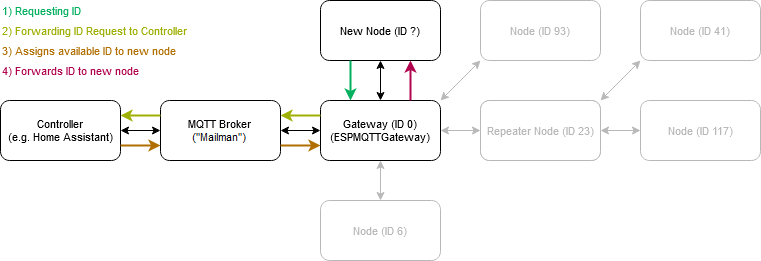
A MQTT broker alone can't assign IDs, nor can a Home Assistant instance which is not properly configured. Think of the MQTT broker as a mailman who delivers messages from the gateway to the controller and vice versa. If the controller doesn't know where its mailbox is (it doesn't subscribe to the MQTT topics), it can't read the messages and return an answer (the ID for the new sensor node), which means that the gateway will continue to send out the sensor node's request for an ID forever and ever.
-
thanks for this fundamental clarification. I got it wrong. So now I changed it as mentioned:
- Gateway/ESP8266 - no ID (as already set to 0)
- Node/Arduino - Id set to 41 before setup() loop
My understanding from reading the introduction is that ESP8266 is capable of working as WifiGateway to MQTT Broker. In Home-Assistant I want to use the mqtt-integration (https://www.home-assistant.io/integrations/mqtt).
@BearWithBeard that means I got the architecture wrong? Is this setup only workable if the Gateway/ESP8266 is attached via USB to Home-Assistant?
Just for the record I have attached the current sketch codes of the devices:
Sketches:
- Gateway/ESP8266: https://hastebin.com/axiralaviq.cpp
- Node/ArduinoUno: https://hastebin.com/yexafimiqe.cpp
Thank you very much for clarification. When dealing with it at first time it is very detailed documented but in a whole hard to get the detailed parts into living things.
-
@BearWithBeard AWESOME ! I understood changed the sketch and it WORKS ! THANK YOU so much! I love it. I cannot express how grateful I am. I donated a coffee for you all
 .
.For others interested: I used the exact original examples without any modification. I just missed the part, that home-assistant controller is required to hand out IDs. So as BearWithBeard's graphic perfectly illustrates the approach is:
- Create MQTT Broker (aka Mailman with i.e. Mosquitto)
- Add (A) mysensor integration and (B) mqtt integration in Home-Assistant
- Flash mysensors examples to MQTTGateway and Node
Done.
Thank you all for your help!
-
@BearWithBeard AWESOME ! I understood changed the sketch and it WORKS ! THANK YOU so much! I love it. I cannot express how grateful I am. I donated a coffee for you all
.For others interested: I used the exact original examples without any modification. I just missed the part, that home-assistant controller is required to hand out IDs. So as BearWithBeard's graphic perfectly illustrates the approach is:
- Create MQTT Broker (aka Mailman with i.e. Mosquitto)
- Add (A) mysensor integration and (B) mqtt integration in Home-Assistant
- Flash mysensors examples to MQTTGateway and Node
Done.
Thank you all for your help!
-
Hey again,
May I come back to my Newbie topic? I tried to creating a repeating node and wanted to attach the PIR AM312 sensor.
Hooked up according instructions with the following sketch I always get motion detected (v_tripped=1). Can someone help? Is the ESP8266 not suported for mysensors except as gateway?
Log from ESP8266 Repeater
31217 TSF:MSG:SEND,2-2-0-0,s=6,c=1,t=16,pt=0,l=1,sg=0,ft=1,st=OK:1
31223 MCO:SLP:MS=120000,SMS=0,I1=3,M1=3,I2=255,M2=255
31228 TSF:TDI:TSL
31229 MCO:SLP:WUP=-2
31231 TSF:TRI:TSB
1
31273 !TSF:MSG:SEND,2-2-0-0,s=6,c=1,t=16,pt=0,l=1,sg=0,ft=0,st=NACK:1
31279 MCO:SLP:MS=120000,SMS=0,I1=3,M1=3,I2=255,M2=255
31284 TSF:TDI:TSL
31286 MCO:SLP:WUP=-2
31288 TSF:TRI:TSB
1
31330 !TSF:MSG:SEND,2-2-0-0,s=6,c=1,t=16,pt=0,l=1,sg=0,ft=1,st=NACK:1
31336 MCO:SLP:MS=120000,SMS=0,I1=3,M1=3,I2=255,M2=255
31341 TSF:TDI:TSL
31342 MCO:SLP:WUP=-2
31344 TSF:TRI:TSB
1
31352 TSF:MSG:SEND,2-2-0-0,s=6,c=1,t=16,pt=0,l=1,sg=0,ft=2,st=OK:1
31358 MCO:SLP:MS=120000,SMS=0,I1=3,M1=3,I2=255,M2=255
31363 TSF:TDI:TSL
31364 MCO:SLP:WUP=-2
31366 TSF:TRI:TSB
1
31408 !TSF:MSG:SEND,2-2-0-0,s=6,c=1,t=16,pt=0,l=1,sg=0,ft=0,st=NACK:1
31414 MCO:SLP:MS=120000,SMS=0,I1=3,M1=3,I2=255,M2=255
31419 TSF:TDI:TSL
31421 MCO:SLP:WUP=-2
31422 TSF:TRI:TSB
1
Sketch
/* * The MySensors Arduino library handles the wireless radio link and protocol * between your home built sensors/actuators and HA controller of choice. * The sensors forms a self healing radio network with optional repeaters. Each * repeater and gateway builds a routing tables in EEPROM which keeps track of the * network topology allowing messages to be routed to nodes. * * Created by Henrik Ekblad <henrik.ekblad@mysensors.org> * Copyright (C) 2013-2019 Sensnology AB * Full contributor list: https://github.com/mysensors/MySensors/graphs/contributors * * Documentation: http://www.mysensors.org * Support Forum: http://forum.mysensors.org * * This program is free software; you can redistribute it and/or * modify it under the terms of the GNU General Public License * version 2 as published by the Free Software Foundation. * ******************************* * * REVISION HISTORY * Version 1.0 - Henrik Ekblad * * DESCRIPTION * Motion Sensor example using HC-SR501 * http://www.mysensors.org/build/motion * */ // Enable Repeating Feature //#define MY_REPEATER_FEATURE // Enable debug prints #define MY_DEBUG // Enable and select radio type attached #define MY_RADIO_RF24 //#define MY_RADIO_NRF5_ESB //#define MY_RADIO_RFM69 //#define MY_RADIO_RFM95 #include <MySensors.h> #include <SPI.h> uint32_t SLEEP_TIME = 120000; // Sleep time between reports (in milliseconds) #define DIGITAL_INPUT_SENSOR 3 // The digital input you attached your motion sensor. (Only 2 and 3 generates interrupt!) #define CHILD_ID 6 // Id of the sensor child // Initialize motion message MyMessage msg(CHILD_ID, V_TRIPPED); void setup() { pinMode(DIGITAL_INPUT_SENSOR, INPUT); // sets the motion sensor digital pin as input } void presentation() { // Send the sketch version information to the gateway and Controller sendSketchInfo("Motion Sensor", "1.0"); // Register all sensors to gw (they will be created as child devices) present(CHILD_ID, S_MOTION); } void loop() { // Read digital motion value bool tripped = digitalRead(DIGITAL_INPUT_SENSOR) == HIGH; Serial.println(tripped); send(msg.set(tripped?"1":"0")); // Send tripped value to gw // Sleep until interrupt comes in on motion sensor. Send update every two minute. sleep(digitalPinToInterrupt(DIGITAL_INPUT_SENSOR), CHANGE, SLEEP_TIME); } -
Hey again,
May I come back to my Newbie topic? I tried to creating a repeating node and wanted to attach the PIR AM312 sensor.
Hooked up according instructions with the following sketch I always get motion detected (v_tripped=1). Can someone help? Is the ESP8266 not suported for mysensors except as gateway?
Log from ESP8266 Repeater
31217 TSF:MSG:SEND,2-2-0-0,s=6,c=1,t=16,pt=0,l=1,sg=0,ft=1,st=OK:1
31223 MCO:SLP:MS=120000,SMS=0,I1=3,M1=3,I2=255,M2=255
31228 TSF:TDI:TSL
31229 MCO:SLP:WUP=-2
31231 TSF:TRI:TSB
1
31273 !TSF:MSG:SEND,2-2-0-0,s=6,c=1,t=16,pt=0,l=1,sg=0,ft=0,st=NACK:1
31279 MCO:SLP:MS=120000,SMS=0,I1=3,M1=3,I2=255,M2=255
31284 TSF:TDI:TSL
31286 MCO:SLP:WUP=-2
31288 TSF:TRI:TSB
1
31330 !TSF:MSG:SEND,2-2-0-0,s=6,c=1,t=16,pt=0,l=1,sg=0,ft=1,st=NACK:1
31336 MCO:SLP:MS=120000,SMS=0,I1=3,M1=3,I2=255,M2=255
31341 TSF:TDI:TSL
31342 MCO:SLP:WUP=-2
31344 TSF:TRI:TSB
1
31352 TSF:MSG:SEND,2-2-0-0,s=6,c=1,t=16,pt=0,l=1,sg=0,ft=2,st=OK:1
31358 MCO:SLP:MS=120000,SMS=0,I1=3,M1=3,I2=255,M2=255
31363 TSF:TDI:TSL
31364 MCO:SLP:WUP=-2
31366 TSF:TRI:TSB
1
31408 !TSF:MSG:SEND,2-2-0-0,s=6,c=1,t=16,pt=0,l=1,sg=0,ft=0,st=NACK:1
31414 MCO:SLP:MS=120000,SMS=0,I1=3,M1=3,I2=255,M2=255
31419 TSF:TDI:TSL
31421 MCO:SLP:WUP=-2
31422 TSF:TRI:TSB
1
Sketch
/* * The MySensors Arduino library handles the wireless radio link and protocol * between your home built sensors/actuators and HA controller of choice. * The sensors forms a self healing radio network with optional repeaters. Each * repeater and gateway builds a routing tables in EEPROM which keeps track of the * network topology allowing messages to be routed to nodes. * * Created by Henrik Ekblad <henrik.ekblad@mysensors.org> * Copyright (C) 2013-2019 Sensnology AB * Full contributor list: https://github.com/mysensors/MySensors/graphs/contributors * * Documentation: http://www.mysensors.org * Support Forum: http://forum.mysensors.org * * This program is free software; you can redistribute it and/or * modify it under the terms of the GNU General Public License * version 2 as published by the Free Software Foundation. * ******************************* * * REVISION HISTORY * Version 1.0 - Henrik Ekblad * * DESCRIPTION * Motion Sensor example using HC-SR501 * http://www.mysensors.org/build/motion * */ // Enable Repeating Feature //#define MY_REPEATER_FEATURE // Enable debug prints #define MY_DEBUG // Enable and select radio type attached #define MY_RADIO_RF24 //#define MY_RADIO_NRF5_ESB //#define MY_RADIO_RFM69 //#define MY_RADIO_RFM95 #include <MySensors.h> #include <SPI.h> uint32_t SLEEP_TIME = 120000; // Sleep time between reports (in milliseconds) #define DIGITAL_INPUT_SENSOR 3 // The digital input you attached your motion sensor. (Only 2 and 3 generates interrupt!) #define CHILD_ID 6 // Id of the sensor child // Initialize motion message MyMessage msg(CHILD_ID, V_TRIPPED); void setup() { pinMode(DIGITAL_INPUT_SENSOR, INPUT); // sets the motion sensor digital pin as input } void presentation() { // Send the sketch version information to the gateway and Controller sendSketchInfo("Motion Sensor", "1.0"); // Register all sensors to gw (they will be created as child devices) present(CHILD_ID, S_MOTION); } void loop() { // Read digital motion value bool tripped = digitalRead(DIGITAL_INPUT_SENSOR) == HIGH; Serial.println(tripped); send(msg.set(tripped?"1":"0")); // Send tripped value to gw // Sleep until interrupt comes in on motion sensor. Send update every two minute. sleep(digitalPinToInterrupt(DIGITAL_INPUT_SENSOR), CHANGE, SLEEP_TIME); }@myrandow there are (at least) two things happening:
- A repeater should never sleep. Because if it sleeps, it can not receive messages and therefore ceases to be a useful repeater.
- esp8266 can not sleep, so all calls to sleep() will return immediately with the return value MY_SLEEP_NOT_POSSIBLE. Documentation: https://www.mysensors.org/apidocs/group__MySensorsCoregrp.html#ga4dcfb8da9716960a85d4b64b8198ecbb
-
@myrandow there are (at least) two things happening:
- A repeater should never sleep. Because if it sleeps, it can not receive messages and therefore ceases to be a useful repeater.
- esp8266 can not sleep, so all calls to sleep() will return immediately with the return value MY_SLEEP_NOT_POSSIBLE. Documentation: https://www.mysensors.org/apidocs/group__MySensorsCoregrp.html#ga4dcfb8da9716960a85d4b64b8198ecbb
@mfalkvidd thank you very much for clarification. Got it. ESP82 should not sleep. How to change the code that the ESP82 can work as motion sensor and repeater at the same time? Cut out all sleep commands? Does this fix the Problem That v_tripped Is always 1? Thank you very much !
-
@mfalkvidd thank you very much for clarification. Got it. ESP82 should not sleep. How to change the code that the ESP82 can work as motion sensor and repeater at the same time? Cut out all sleep commands? Does this fix the Problem That v_tripped Is always 1? Thank you very much !
@myrandow you can change the loop to something like this:
void loop()
{
	// Read digital motion value
	bool tripped = digitalRead(DIGITAL_INPUT_SENSOR) == HIGH;
        static bool sentValue = false;

        if(tripped != sentValue){
            // The state of the motion sensor has changed
            Serial.println(tripped);
            sentValue=tripped;
            send(msg.set(sentValue?"1":"0"));  // Send tripped value to gw
        }
}
If you want the sensor to send updates every 2 minutes even if the state has not changed, you'll need to add some additional logic.


Hello! It looks like you're interested in this conversation, but you don't have an account yet.
Getting fed up of having to scroll through the same posts each visit? When you register for an account, you'll always come back to exactly where you were before, and choose to be notified of new replies (either via email, or push notification). You'll also be able to save bookmarks and upvote posts to show your appreciation to other community members.
With your input, this post could be even better 💗
Register Login