
Send/update Value from HA to Node
-
Dear,
I'm a new user of the MySensor Library. Thank for all your work, it is very impressive !
I successfully installed the Rpi GW and it work with HA.
I successfully follow example to communicate with a node with a RFM69.
I successfully realize a Gas Meter and I convert pulse input to meter cube (M3). I transmit value to HA.
Issue : I suppose that I can lose some pulse and after a period, I need to synchronize the Value in my node with the value on the counter.
Question : I want to update/adjust the value (M3) in my node.
Two possibilities :- Add a keyboard + a LCD on my node to adjust the value which is send to HA. Possible for me, but seems too complicated if another solution exist.
- be able to send a value through HA. I see a discussion link text but I'm lost and I'm not able to understand what to do.
-
Dear,
I'm a new user of the MySensor Library. Thank for all your work, it is very impressive !
I successfully installed the Rpi GW and it work with HA.
I successfully follow example to communicate with a node with a RFM69.
I successfully realize a Gas Meter and I convert pulse input to meter cube (M3). I transmit value to HA.
Issue : I suppose that I can lose some pulse and after a period, I need to synchronize the Value in my node with the value on the counter.
Question : I want to update/adjust the value (M3) in my node.
Two possibilities :- Add a keyboard + a LCD on my node to adjust the value which is send to HA. Possible for me, but seems too complicated if another solution exist.
- be able to send a value through HA. I see a discussion link text but I'm lost and I'm not able to understand what to do.
Dear,
With receive function, I can get back information from HA :
But, which CARD I can use in HA to enter a VALUE or TEXT which can be sent to the NODE.Like a SWITCH which can be controlled by HA GUI, but in place to have a ON/OFF, enter a VALUE or TEXT in a BOX ?
I suppose we can do this but I don't find it....
Need a bit help.void presentation() { // for (uint16_t i=0; i<EEPROM_LOCAL_CONFIG_ADDRESS; i++) { // hwWriteConfig(i,0xFF); // } sendSketchInfo("GasMeter", "1.0"); present(CHILD_ID1, S_GAS,"GAS M3"); present(CHILD_ID2, S_INFO,"GAS SINFO"); present(CHILD_ID3, S_CUSTOM,"GAS SCUSTOM"); present(CHILD_ID4, S_LIGHT); present(CHILD_ID5, S_LIGHT_LEVEL); } void loop() { value = 12347; send(msgVOL.set(value)); send(msgTXT.set("GAS TXT")); send(msgCUSTOM.set("GAS Custom")); send(msgSTATUS.set(1)); send(msgTST.set(50)); wait(5000); if (!initialValueSent) { Serial.println("Sending initial value"); // Send initial values. send(msgTXT.set("-")); Serial.println("Requesting initial value from controller"); request(CHILD_ID2, V_TEXT); wait(2000, C_SET, V_TEXT); } } void receive(const MyMessage &message) { if (message.type == V_TEXT) { if (!initialValueSent) { Serial.println("Receiving initial value from controller"); initialValueSent = true; } // Dummy print Serial.print("Message: "); Serial.print(message.sensor); Serial.print(", Message: "); Serial.println(message.getString()); // Send message to controller send(msgTXT.set(message.getString())); } if (message.isEcho()) // keep message.isAck() for older MySensors version { Serial.println("Ceci est un accusé de réception de la passerelle"); Serial.println("Cmd TL 1.a"); return; } if (message.type==V_STATUS) // V_STATUS pour MyS v2.0, annulé V_LIGHT. { controllerState = message.getBool(); // Write some debug info Serial.print("Changement entrant pour le capteur:"); Serial.print(message.sensor); Serial.print(", New status: "); Serial.println(message.getBool()); } } -
Hello
.... look around a bit here, maybe good.https://forum.mysensors.org/topic/11089/send-a-text-to-node
https://forum.mysensors.org/topic/10488/homeassistant-mysensors-notify-does-nothing-alternatives
https://www.home-assistant.io/integrations/mysensors#notifyPlease let us know if you have any test results.
good code -
Dear JeeLet,
I already read those topic.
But I read it again and make several test again.
I'm not able to receive a message from NOTIFY.
 image url)
I would prefer to have a TEXT box in HA to send a value to a NODE, but is seems such feature doesn't exist.
For me, it is a standard I use in SCADA system since 30 years.
We need to put device in AUTO/MANUAL and SET a static value (Valve).
Or another example is to SET a Setpoint (for a thermostat).Maybe I miss something and I have to read a bit more.
-
"home assistant send a text or value" ---> https://forum.mysensors.org/topic/11089/send-a-text-to-node ?
https://forum.mysensors.org/topic/5731/resolved-send-text-to-node-with-oled-display/4 ?
-
Dear,
I'm a new user of the MySensor Library. Thank for all your work, it is very impressive !
I successfully installed the Rpi GW and it work with HA.
I successfully follow example to communicate with a node with a RFM69.
I successfully realize a Gas Meter and I convert pulse input to meter cube (M3). I transmit value to HA.
Issue : I suppose that I can lose some pulse and after a period, I need to synchronize the Value in my node with the value on the counter.
Question : I want to update/adjust the value (M3) in my node.
Two possibilities :- Add a keyboard + a LCD on my node to adjust the value which is send to HA. Possible for me, but seems too complicated if another solution exist.
- be able to send a value through HA. I see a discussion link text but I'm lost and I'm not able to understand what to do.
@esa1966 I make the assumption you're node is an Arduino
Are you using an interrupt to capture pulses? With this code, you might lose a count from time to time but that would be insignificant:
volatile uint32_t timeOfPulse = 0;
volatile uint32_t pulseCount = 0;  // a 32 bit number is good for about 70 years
uint32_t pulseCountCurrent = 0;            // for flow rate calculation
uint32_t pulsePeriodThreshholdForFlowing = 150;  // pulse period greater than 150 mSec is not flowing.
#define FLOW_SAMPLING_TIME 1000
unsigned long flowSampleTimeStart = 0;
bool flowing = true;
volatile double flow = 0;
volatile uint32_t flowCountStart = 0;
volatile unsigned long flowPeriodStart = 0;

#define DIGITAL_INPUT_SENSOR 3                  // The digital input to which you attached your sensor.  (Only 2 and 3 generates interrupt!)

double countsPerLiter = 400.0;             // double and float are the same on most arduinos
/* DIGITEN G3/4" Brass Water Flow Sensor, Hall Effect Liquid Flow Meter Flowmeter Counter 1-30L/min
 *  n = 6.6
 *  F=nQ L/M (from meter specs)
 *  n * 60  is pulses (counts) per liter yeilds 400 pulse per leter
 *
 *  flow rate 1-30 L/min (from specs)
 *
 *  if time between pulses is greater than 0.15 seconds, there is no flow
 *
 *
 // Pulses per liter
//-----------------------------------------------------------------------------------ISR onPulse
void IRQ_HANDLER_ATTR onPulse(){
  timeOfPulse=millis();
  pulseCount++;
} // make ISR as short as possible.
//-----------------------------------------------------------------------------------setup
void setup(){
	pinMode(DIGITAL_INPUT_SENSOR, INPUT_PULLUP);
	attachInterrupt(digitalPinToInterrupt(DIGITAL_INPUT_SENSOR), onPulse, FALLING);
}
//-----------------------------------------------------------------------------------loop
void loop()
{
	uint32_t currentTime = millis();

  // determine if water is flowing
  // if the time at this moment less than the spec threshhold, water is flowing
  flowing = (currentTime-timeOfPulse < pulsePeriodThreshholdForFlowing) ;

  // determine flow during this period and set maximum flow for all periods
  if ((currentTime - flowPeriodStart > FLOW_SAMPLING_TIME) && flowing ){
    pulseCountCurrent = pulseCount;
    flow = double(pulseCountCurrent - flowCountStart)*1000.0/double(currentTime-flowPeriodStart)/countsPerLiter;
    flowCountStart = pulseCountCurrent;
    flowPeriodStart = currentTime;
    if (flow > maxFlow) maxFlow = flow;
  }


  if (SLEEP_MODE || (currentTime - previousSendTime > SEND_FREQUENCY)) {
    previousSendTime = currentTime;
    pulseCountCurrent = pulseCount;

// MySensors sends here

    if (flowing) Serial.print("   "); else Serial.print("NOT");
    Serial.print(F("Flowing"));
    Serial.print(F(" Pulse Count: "));    Serial.print(pulseCountCurrent);
    Serial.print(F(" volume:"));    Serial.print(volume, 3);
    Serial.print(F(" Maxium flow: "));    Serial.print(maxFlow);
    maxFlow = 0.0;  // reset max flow.

    Serial.println();
  }
}
Having HA send data is not so trivial
On your Arduino you'll have something like this code:
#define CHILD_ID1 1
MyMessage msgCustom(CHILD_ID1, V_TEXT);
#define DELAY_AFTER_SENDS 500
bool initialValueSent = false;
int msgCount =0;

//--------------------------------------------------------------------------------setup
void setup(void) {
}
//--------------------------------------------------------------------------------presentation
void presentation() {
  // Send the sketch version information to the gateway
  sendSketchInfo( "PROGRAM_NAME",1.0 );
  delay(DELAY_AFTER_SENDS);
  present(CHILD_ID1, S_INFO, "CustomSensor1");
  /*
  TextSensor1 will be used as the target.
  YAML script sends "Data from script" to actuator
  alias: SendToArduino
  sequence:
    - service: notify.mysensors
      data:
        message: Data from script
        target: CustomSensor1
  mode: single

  */
}
//--------------------------------------------------------------------------------loop
void loop() {
  if (!initialValueSent) {
    Serial.println("Sending initial value");
    // Send initial message as per Home Assistant docs.
    send(msgCustom.set(0));
    delay(DELAY_AFTER_SENDS);
  }
}
//--------------------------------------------------------------------------------receive
void receive(const MyMessage &message) {
  if (message.type == V_TEXT) {
    if (!initialValueSent) {
      Serial.println("Receiving initial value from controller");
      initialValueSent = true;
    }

    // Dummy print
    Serial.print("Message: ");
    Serial.print(message.sensor);
    Serial.print(", Message: ");
    Serial.println(message.getString());
    // Send message to controller
    send(msgText.set(message.getString()));
    delay(DELAY_AFTER_SENDS);
  }
  Serial.print(F("count: "));Serial.println(++msgCount);
  Serial.print(F("Type: "));Serial.println(message.getType());
  Serial.print(F("Data: "));Serial.println(message.data);
  Serial.print(F("Long: "));Serial.println(message.getLong());
  Serial.print(F("Float: "));Serial.println(message.getFloat());
  Serial.print(F("Sensor: "));Serial.println(message.getSensor());
  Serial.print(F("isAck: "));Serial.println(message.isAck());
}
The commented out code starting with "alias" is the YAML script that will be used to send your data. Note that in this example, "Data from script" is the data that will be sent.
One annoying thing is that the service "notify.mysensors" can't be found until after you've run the Arduino code. But then, now that you know what the service is, you can probably just put it in your code and see what happens.
Good luck
OSD
-
Correct, I use a node based on Arduino.
I'm not able to sent a message using MYSENSORS
My Node :
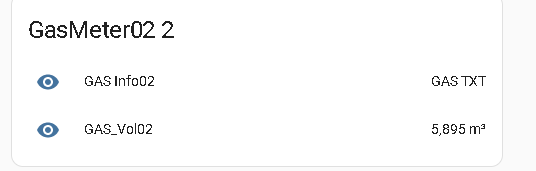
I'm not sure how to format it :
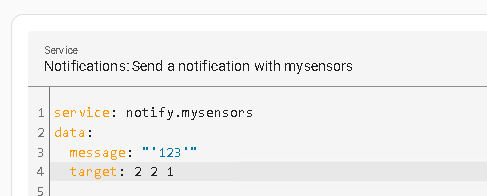
But, I'm able to see it works with MQTT.
In my code, I add this : request(CHILD_ID2, V_TEXT);
The receive function is like :

I receive a message : Received a message: GAS TXT
So, I’m sure the arduino sketch is working and HA send a value correctly.
So, the problem is that I don’t know how to format and send data using MQTT ‘My Sensor’To understand the format, I search in LOG to see how it is formatted :
Line 14260: 2023-01-01 19:38:44.666 DEBUG (MainThread) [homeassistant.components.mqtt.client] Transmitting message on mysensors-in/2/2/1/0/47: 'GAS TXT', mid: 18
So, I use MQTT to do the same :
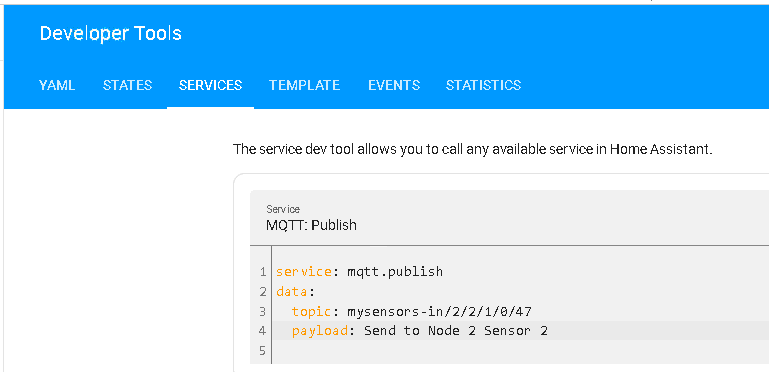
This is the SERIAL output on Arduino Node :

Conclusion : I have a workarround.
Question 1 : Do you think possible to use MYSENSORS NOTIFICATION ?
Question 2 : Is it possible to have a OBJECT in the dashboard to send a value using the MQTT ? -
a test with a numerical value
int val = 850 ; #define val_CHILD_ID 8 MyMessage msgval (val_CHILD_ID, V_PERCENTAGE); //----- reception MyS ------------ void receive(const MyMessage &message) { if (message.getType() == V_PERCENTAGE) { if (message.sensor == 8) { val = atoi( message.data ); } } send ( msgval.set(val) ); } -
Thank.
This is what I do for the receive :
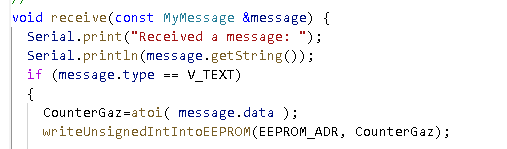
So, I'm now able to SET a VALUE from HA.
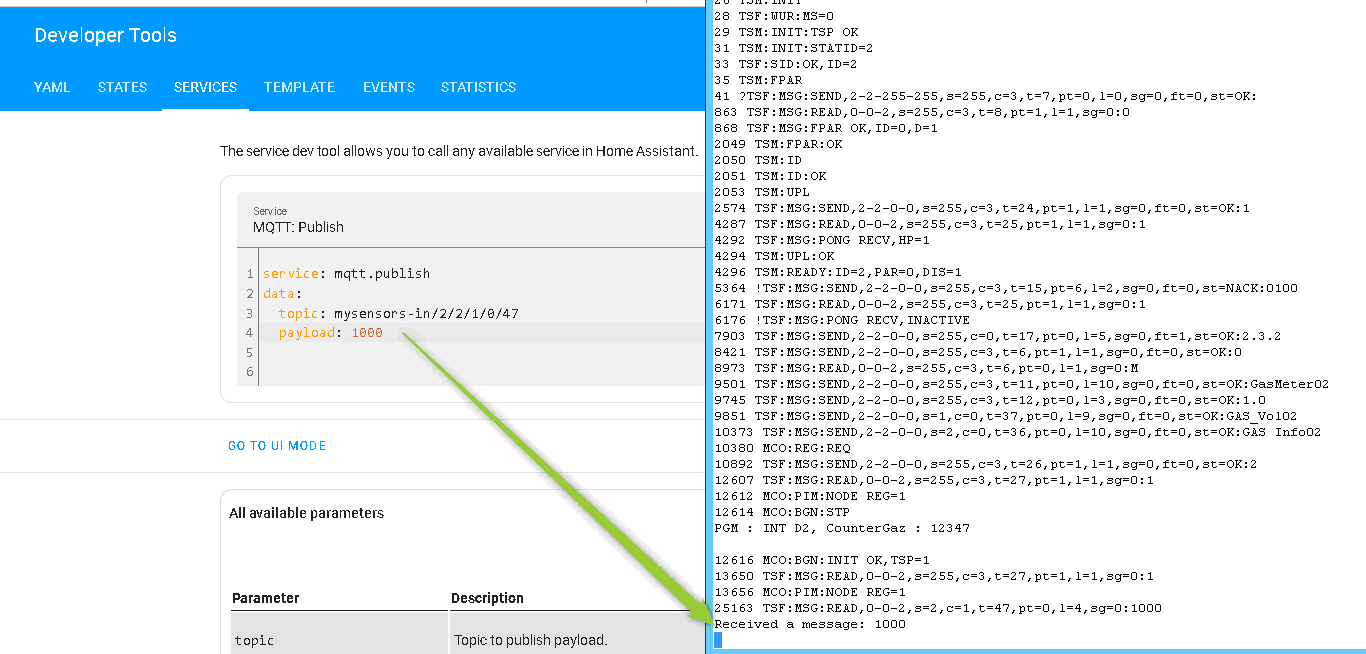
And after a pulse it is updated
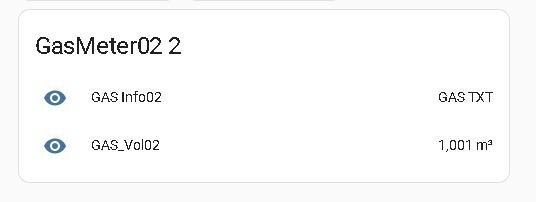
My question is most about how to use HA to do it more easily as possible.
Do you think possible to use an TEXT object which can be sent to node through the MQTT ?Second question : how do you send value to the node (MQTT or other ?)

Hello! It looks like you're interested in this conversation, but you don't have an account yet.
Getting fed up of having to scroll through the same posts each visit? When you register for an account, you'll always come back to exactly where you were before, and choose to be notified of new replies (either via email, or push notification). You'll also be able to save bookmarks and upvote posts to show your appreciation to other community members.
With your input, this post could be even better 💗
Register Login