
Ghost Child

-
Hello,
It's a Nano that is connected to my rasberry pi3 by usb key, declared in domotcz 2024.7, I see somes Child Ghost appearing, below only child 0, 1 and 2 are declared, so where do the others come from.
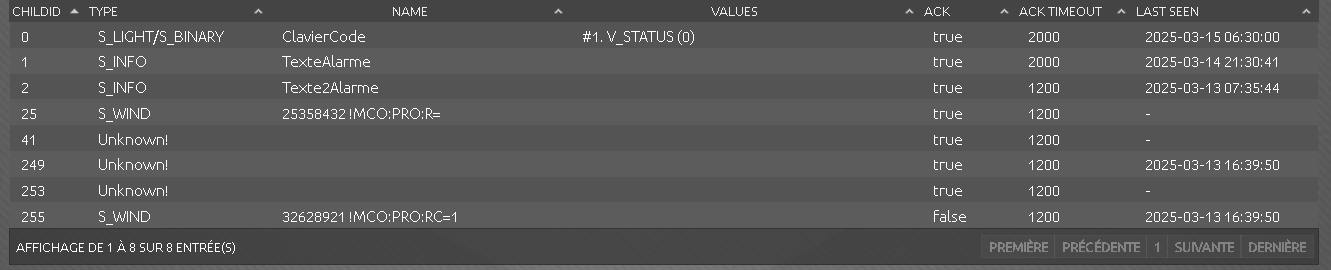
An idea? thanks in advance.
@FcNanoLed I'm a Home Assistant (HA) user so I don't know if this is applicable to you.
I am assuming here, because your nano is connected to your RPi through a USB port that your nano is running MySensors Gateway code. I believe that both gateway and node code has to have a radio connected to start. So I assume this, too.
The source could be an errant RF signal caused this, though unlikely.
Ghost devices in HA also show up when a device gets assigned a new node on a reboot, or were deleted improperly, eg. not deleted using the controller environment.
In either case, what has to be done in HA is basically remove all vestiges of the MySensors environment best you can.
- Ensure that the code on the device(s) that has the sensors (child) is(are) working properly
- Power down this(these) device(s)
- if you have a gateway, stop or power it down
- Delete this(these) device(s) from the host program
- Delete the integration (this is what the code running in the Controller is called in HA)
- If you use MQTT, use a program like MQTT Explorer to remove all vestiges of MySensors.
- reboot the Controller (HA in my case)
- reinstall the integration
- restart the gateway
- At this point you may still see the ghost!
** list itemFor each ghost, create a device that looks like the ghost then delete it using the controller interface.
** Then reboot the host again. - finally reconnect all of your valid devices.
Yes, it is a pain in the ***! Has a lot to do with recoving after a power failure, backups and trying to accomodate all possible scenarios.
Hope this helps
-OSD
-
Hello, Thank you for your OSD answer, I tried to remove them from restarting but they come back! I don't have a declared radio node, the nano program only concerns the three childs 0, 1 and 2 all the others 24, 41, 249, 253 and 255 are parasites.
I noticed that the 249 and 255 were time-stamped and that corresponds to the activation of my alarm. Does this mean that my script is badly constructed?To read you.
-
-
Hello,
First of all thank you for your help. Yesterday I installed everything again after deleting everything in Domoticz. The result of ghost child. It's not blocking for domoticz but still I would have liked to understand. Some photos:

The parasites have returned 25, 249 and 255

Cordially.
-
@FcNanoLed
I have not used a configuration where a Nano is connected directly to the controller. I assume your program has
#define MY_GATEWAY_SERIAL
because I when I compiled a sample program without it and without a radio I got the error:
#error No forward link or gateway feature activated. This means nowhere to send messages! Pretty pointless.;)Your code is probably right, but if you posted the entirety we may be able to find the error. Are CHILD_ID_ARMED, and the IDX_xxxx variables? If this is the case, something could be changing them, which could create the ghosts. Typically, compiler directives are used, eg.
#define CHILD_ID_ARMED 0
#define IDX_PORTAIL2 123
I can't think of anything else right now
-OSD
-
Hello,
To know if we look at the date and time in the column "Last seen" in chilid "0" at 6:30 the alarm was stopped, and that's normal, on the other hand the childid phantoms 25, 249 and 255 were requested at the same time, why? So I'll show you the part of the script that you might be interested in:#define MY_GATEWAY_SERIAL #define MY_TRANSPORT_WAIT_READY_MS 5000 //set how long to wait for transport ready in milliseconds #define MY_GATEWAY_SERIAL_BAUD_RATE 115200 #define MY_DEBUG #define CHILD_ID_ARMED 0 #define IDX_PORTAIL2 635 #define IDX_PORTILLON2 1129 #define IDX_Texte1 1143 #define IDX_Texte2 1144 #define Code_ON 0 #define Code_OFF 1 #include <Tiny4kOLED.h> #include<EEPROM.h> #include <MySensors.h> #include <Keypad.h> int bu1=0; int i=0; int ii=0; int Arme = 0; int value0 = 0; int oldValue0 = 0; char pass1[4]; char customKey; char customKey1; int watchdog1 = 30000; // Fréquence des lectures des données Domoticz unsigned long previousMillis2 = 0; const unsigned long timeout2 = 30000; // Timeout de 30 secondes unsigned long previousMillis1 = 0; unsigned long currentMillis1 = millis(); unsigned long currentMillis2 = millis(); int returnWait = 1500; int returnWait1 = 500; int returnWait2 = 100; int returnWait3 = 10; int returnWait4 = 3000; int returnWait5 = 800; const int PinBuzzer = 10; // *********** Pour MySensors ************************************************************** char newMessage[40]; // taille message reçu char newMessage1[40]; // taille message reçu bool state = 0; MyMessage msg0(CHILD_ID_ARMED, V_STATUS); MyMessage msg1(IDX_PORTAIL2, V_STATUS); MyMessage msg2(IDX_PORTILLON2, V_STATUS); MyMessage Texte1(IDX_Texte1, V_TEXT); MyMessage Texte2(IDX_Texte2, V_TEXT); void presentation(){ // Send the sketch version information to the gateway and Controller sendSketchInfo("ClavierOled", "1.0"); // Register all sensors to gateway (they will be created as child devices) present(CHILD_ID_ARMED, S_BINARY, "Armed"); present(IDX_PORTAIL2, S_BINARY, "Portail2"); present(IDX_PORTILLON2, S_BINARY, "Portillon2"); present(IDX_Texte1, S_INFO, "Texte1"); present(IDX_Texte2, S_INFO, "Texte2"); } void setup() { //Serial.begin(115200); pinMode(PinBuzzer, OUTPUT); digitalWrite(PinBuzzer, LOW); oled.begin(128, 64, sizeof(tiny4koled_init_128x64br), tiny4koled_init_128x64br); oled.setFontX2(FONT6X8P); oled.on(); etablirInformations(); // initialise la structure avec soit le mot de passe par défaut, soit celui qui était déjà en EEPROM si dispo presentation(); } // Fin Setup //+++++++++++++++++++++++++++++++++++++++++++++++++++++++++++++ void loop() { currentMillis1 = millis(); customKey = customKeypad.getKey(); if (customKey) { // si une touche du clavier et que l'alarme est active if (Arme != 0) { Dysarmed(); } switch (customKey) { case '*': MENU(); break; case '#': send(msg1.set(1)); // Envoi la commande Portail oled.clear(); oled.setCursor(20, 3); oled.setFontX2(FONT6X8P); oled.println("PORTAIL"); wait(returnWait + 2000); break; case 'C': send(msg2.set(1)); // Envoi la commande Portillon oled.clear(); oled.setCursor(18, 3); oled.setFontX2(FONT6X8P); oled.println("Portillon"); wait(returnWait + 2000); break; default: // Rien si timeout atteint et aucune touche pressée break; } } customKey = NO_KEY; // Gestion de l'écran de veille if ((currentMillis1 - previousMillis1) > watchdog1) { oled.clear(); oled.setCursor(i, ii); oled.setFont(FONT6X8); oled.println(Arme == 1 ? "Alarme ON" : "Alarme Off"); oled.setFontX2(FONT6X8P); previousMillis1 = currentMillis1; i = (i > 68) ? 0 : i + 1; ii = (ii > 6) ? 0 : ii + 1; watchdog1 = 10000; // Réinitialisation du watchdog } } void receive(const MyMessage &message) { if (message.getType() == V_STATUS) { // check to see if incoming message is for a switch switch (message.sensor) { // message.getCommand will give us the command type of the incomming message case 0: //message is a set command from controller to update relay state state = message.getBool(); // get the new state digitalWrite(0, state ? Code_ON : Code_OFF); // switch relay to new state Arme = state; if (Arme == 1) { oled.setFont(FONT6X8); oled.println("Alarme ON"); oled.setFontX2(FONT6X8P); } if (Arme == 0) { oled.setFont(FONT6X8); oled.println(); oled.println("Alarme Off"); oled.setFontX2(FONT6X8P); } } } if (message.getType()==V_TEXT) { oled.setFont(FONT6X8); if (message.sensor == IDX_Texte1){ strcpy(newMessage, message.getString()); oled.clear(); oled.setCursor(0,2); for (i = 0; i < sizeof(newMessage)-1; i++) { oled.write(newMessage[i]); } } if (message.sensor == IDX_Texte2){ strcpy(newMessage1, message.getString()); oled.setCursor(0,3); for (i = 0; i < sizeof(newMessage1)-1; i++) { oled.write(newMessage1[i]); wait (returnWait3); } } for (int bu=0; bu <= 1; bu++){ digitalWrite(PinBuzzer, HIGH); wait(returnWait4); digitalWrite(PinBuzzer, LOW); wait(returnWait1); } wait (returnWait4); } }If you see anything abnormal, please let me know.
Have a nice day. -
Hello,
To know if we look at the date and time in the column "Last seen" in chilid "0" at 6:30 the alarm was stopped, and that's normal, on the other hand the childid phantoms 25, 249 and 255 were requested at the same time, why? So I'll show you the part of the script that you might be interested in:#define MY_GATEWAY_SERIAL #define MY_TRANSPORT_WAIT_READY_MS 5000 //set how long to wait for transport ready in milliseconds #define MY_GATEWAY_SERIAL_BAUD_RATE 115200 #define MY_DEBUG #define CHILD_ID_ARMED 0 #define IDX_PORTAIL2 635 #define IDX_PORTILLON2 1129 #define IDX_Texte1 1143 #define IDX_Texte2 1144 #define Code_ON 0 #define Code_OFF 1 #include <Tiny4kOLED.h> #include<EEPROM.h> #include <MySensors.h> #include <Keypad.h> int bu1=0; int i=0; int ii=0; int Arme = 0; int value0 = 0; int oldValue0 = 0; char pass1[4]; char customKey; char customKey1; int watchdog1 = 30000; // Fréquence des lectures des données Domoticz unsigned long previousMillis2 = 0; const unsigned long timeout2 = 30000; // Timeout de 30 secondes unsigned long previousMillis1 = 0; unsigned long currentMillis1 = millis(); unsigned long currentMillis2 = millis(); int returnWait = 1500; int returnWait1 = 500; int returnWait2 = 100; int returnWait3 = 10; int returnWait4 = 3000; int returnWait5 = 800; const int PinBuzzer = 10; // *********** Pour MySensors ************************************************************** char newMessage[40]; // taille message reçu char newMessage1[40]; // taille message reçu bool state = 0; MyMessage msg0(CHILD_ID_ARMED, V_STATUS); MyMessage msg1(IDX_PORTAIL2, V_STATUS); MyMessage msg2(IDX_PORTILLON2, V_STATUS); MyMessage Texte1(IDX_Texte1, V_TEXT); MyMessage Texte2(IDX_Texte2, V_TEXT); void presentation(){ // Send the sketch version information to the gateway and Controller sendSketchInfo("ClavierOled", "1.0"); // Register all sensors to gateway (they will be created as child devices) present(CHILD_ID_ARMED, S_BINARY, "Armed"); present(IDX_PORTAIL2, S_BINARY, "Portail2"); present(IDX_PORTILLON2, S_BINARY, "Portillon2"); present(IDX_Texte1, S_INFO, "Texte1"); present(IDX_Texte2, S_INFO, "Texte2"); } void setup() { //Serial.begin(115200); pinMode(PinBuzzer, OUTPUT); digitalWrite(PinBuzzer, LOW); oled.begin(128, 64, sizeof(tiny4koled_init_128x64br), tiny4koled_init_128x64br); oled.setFontX2(FONT6X8P); oled.on(); etablirInformations(); // initialise la structure avec soit le mot de passe par défaut, soit celui qui était déjà en EEPROM si dispo presentation(); } // Fin Setup //+++++++++++++++++++++++++++++++++++++++++++++++++++++++++++++ void loop() { currentMillis1 = millis(); customKey = customKeypad.getKey(); if (customKey) { // si une touche du clavier et que l'alarme est active if (Arme != 0) { Dysarmed(); } switch (customKey) { case '*': MENU(); break; case '#': send(msg1.set(1)); // Envoi la commande Portail oled.clear(); oled.setCursor(20, 3); oled.setFontX2(FONT6X8P); oled.println("PORTAIL"); wait(returnWait + 2000); break; case 'C': send(msg2.set(1)); // Envoi la commande Portillon oled.clear(); oled.setCursor(18, 3); oled.setFontX2(FONT6X8P); oled.println("Portillon"); wait(returnWait + 2000); break; default: // Rien si timeout atteint et aucune touche pressée break; } } customKey = NO_KEY; // Gestion de l'écran de veille if ((currentMillis1 - previousMillis1) > watchdog1) { oled.clear(); oled.setCursor(i, ii); oled.setFont(FONT6X8); oled.println(Arme == 1 ? "Alarme ON" : "Alarme Off"); oled.setFontX2(FONT6X8P); previousMillis1 = currentMillis1; i = (i > 68) ? 0 : i + 1; ii = (ii > 6) ? 0 : ii + 1; watchdog1 = 10000; // Réinitialisation du watchdog } } void receive(const MyMessage &message) { if (message.getType() == V_STATUS) { // check to see if incoming message is for a switch switch (message.sensor) { // message.getCommand will give us the command type of the incomming message case 0: //message is a set command from controller to update relay state state = message.getBool(); // get the new state digitalWrite(0, state ? Code_ON : Code_OFF); // switch relay to new state Arme = state; if (Arme == 1) { oled.setFont(FONT6X8); oled.println("Alarme ON"); oled.setFontX2(FONT6X8P); } if (Arme == 0) { oled.setFont(FONT6X8); oled.println(); oled.println("Alarme Off"); oled.setFontX2(FONT6X8P); } } } if (message.getType()==V_TEXT) { oled.setFont(FONT6X8); if (message.sensor == IDX_Texte1){ strcpy(newMessage, message.getString()); oled.clear(); oled.setCursor(0,2); for (i = 0; i < sizeof(newMessage)-1; i++) { oled.write(newMessage[i]); } } if (message.sensor == IDX_Texte2){ strcpy(newMessage1, message.getString()); oled.setCursor(0,3); for (i = 0; i < sizeof(newMessage1)-1; i++) { oled.write(newMessage1[i]); wait (returnWait3); } } for (int bu=0; bu <= 1; bu++){ digitalWrite(PinBuzzer, HIGH); wait(returnWait4); digitalWrite(PinBuzzer, LOW); wait(returnWait1); } wait (returnWait4); } }If you see anything abnormal, please let me know.
Have a nice day. -
Hello,
@mfalkvidd thank you, that was right, so I changed the values and now no more ghost CHILDID. Thank you very much!#define MY_GATEWAY_SERIAL #define MY_TRANSPORT_WAIT_READY_MS 5000 #define MY_GATEWAY_SERIAL_BAUD_RATE 115200 #define MY_DEBUG #define CHILD_ID_ARMED 0 #define CHILD_ID_PORTAIL2 1 #define CHILD_ID_PORTILLON2 2 #define CHILD_ID_Texte1 3 #define CHILD_ID_Texte2 4 #define Code_ON 0 #define Code_OFF 1Have a nice day
-
Hello,
@mfalkvidd thank you, that was right, so I changed the values and now no more ghost CHILDID. Thank you very much!#define MY_GATEWAY_SERIAL #define MY_TRANSPORT_WAIT_READY_MS 5000 #define MY_GATEWAY_SERIAL_BAUD_RATE 115200 #define MY_DEBUG #define CHILD_ID_ARMED 0 #define CHILD_ID_PORTAIL2 1 #define CHILD_ID_PORTILLON2 2 #define CHILD_ID_Texte1 3 #define CHILD_ID_Texte2 4 #define Code_ON 0 #define Code_OFF 1Have a nice day
-
I saw that, too, but I wasn't sure. This is documented here
bool present(uint8_t childSensorId, uint8_t sensorType, const char *description, bool echo); -
I want to thank @FcNanoLed. I had long thought about a serial gateway. This would be a way to add I/O to a linux computer. In the process of trying to help, I built up a linux machine running virtual box. In the virtual machine I ran Home Assistant The not well documented part of that was to connect the USB port of the computer to the virtual machine (settings-->USB-->USB Device Filters) (note that one can buy a refurbished PC for about the same price as an equivalently configured RPi)
So thanks for the inspiration!



Hello! It looks like you're interested in this conversation, but you don't have an account yet.
Getting fed up of having to scroll through the same posts each visit? When you register for an account, you'll always come back to exactly where you were before, and choose to be notified of new replies (either via email, or push notification). You'll also be able to save bookmarks and upvote posts to show your appreciation to other community members.
With your input, this post could be even better 💗
Register Login