
PIR Motion triggers when switch pressed (Allmost Solved, waiting for testresults)
-
-
I've stripped out MySensors from the sketch and it gives the same result.
I'll think I'll order one of these https://www.sparkfun.com/products/13285 or look for other less sensitive alternatives.
-
Same problem here with HS SR505 mini and sensebender with CR123 for powering. After each transmit of temp/hum, there is false triggering from PIR sensor. I try with 470uF an 10nF caps but it doesn't work too
@Fabien When it's predictable, then why don't you just block the false trig like I do in http://forum.mysensors.org/topic/2715/slim-node-as-a-mini-2aa-battery-pir-motion-sensor ?
-
@Fabien When it's predictable, then why don't you just block the false trig like I do in http://forum.mysensors.org/topic/2715/slim-node-as-a-mini-2aa-battery-pir-motion-sensor ?
@m26872 I've thought about that. But the problem is that The Mini pir sensors starts with a 10 seconds period if signaling movement. So in my case if somebody pressed the door alarm switch I would have to stop monitoring movement in my hall way for 10 seconds.
I'm gonna try a ProMini 5V to see if this has the same problems. If it solves my problem I just have to add a transistor to the circuit, just to trigger the door chime IC. Which is okay. I have a spare ProMini 5V that I'm not using anyway. I'll let you guys know what the out come is.
Thus far I've discovered the following:
- Combining a PIR with the Door chime IC will trigger the door chime whenever I push the door button
- Combining a PIR with an LED instead of the door chime IC will not trigger the PIR sensor when pushing the button.
So it looks like the PIN controlling the door chime IC is drawing to much power. Things I've tried:
- adding a transistor between the door chime IC and the arduino. No luck.
- Adding a 10 uF capacitor between the positive and negative pin of the pir sensor no look.
Options I still have:
- use a ProMini 5V with that I can use the normal PIR instead of the Mini. Which can be adjusted to raise the movement pin for just 2 seconds.
- Search for an alternative motion sensor
- Use batteries to power the door chime IC, make that a separate circuit. this looks okay. I think the doorbell chime ID will run for years on the batteries. They will mostly go empty by normal battery life time.
I measured power usage and there's a huge peak in power consumption when the doorbell chime is being triggered and used. About 60 mA. As far as I've understood it. This shouldn't be a problem for the Arduino.
-
I have implemented the way with powering the door chime IC with batteries. I've used a good old BC548B for sending a trigger signal and it works great. With this I mean that the PIR sensor doesn't go high after a switch press.
My conclussion is what @AWI already said, the PIR is very sensitive when I comes to power and peaks.
I have one question before I'll go down this road. The data sheet of the HK592 says the following:
Operating voltage min. 1.8
Operating current 0.1 to 0.5 mA
standby current 1 to 5 uAAnybody any Idea how long this IC will operate on two AA batteries?
-
I'm posting my progress. So that if I find the solution someone else might benefit from this.
Battery powering the Chime IC works well. It doesn't interfere with the PIR. So I took the next step and added the my sensor code again. Next problem! Node stops receiving messages after a couple of minutes. Notice I powered the antenna directly from the ProMini 3.3V.
Hmmm might this be caused by MySensors libraries?
Anyway. Put a 100mA 3.3V regulator between the power adapter and the radio. And things looked great. Only this times the node took just 15 minutes before it stalled. Except for the motion notification to the gateway everything else stalls. Until I walk around the motion sensor a couple of times and then the node receives all messages send by the gateway. Hmzzzzi strange.
Replaced the regulator with a LD33V with correct capacitors. Node is been running for a longer while. If this node stays stable, I'll hookup the door Chime ID to the LD33V as well.
To be continued.
The question is, why is the LD33V stabilizing the circuit. I'd like to know why, so that I can learn from this.
-
-
Hmmm.. Node stalls after 45 minutes or so. Switched 800 mA to 1A power supply. If that doesn't work I'll give up on the idea of combining the doorbell with a pir sensor.
@TheoL It sounds like the problem which often occur with relay's (inductive loads). From my experience the radio is sensitive to electromagnetic fiels or at least the power issues coming from driving an inductive load. I stopped using relays in the vincinity of the radio oand arduino. Time to switch to an SSD/ MP3 doorbell? :smile:
-
@TheoL It sounds like the problem which often occur with relay's (inductive loads). From my experience the radio is sensitive to electromagnetic fiels or at least the power issues coming from driving an inductive load. I stopped using relays in the vincinity of the radio oand arduino. Time to switch to an SSD/ MP3 doorbell? :smile:
@AWI I think you're right. But I don't use a relay. I use a low power doorbell Chime IC.
Okay. The node is now stable for more than 12 hours. I hooked up the radio to an LD33V. And also changed the interrupt based switch and motion detection to Debounced reading. Both are necessary. Even thought I kept the interrupt handlers really small, they conflicts with - I presume - one of the libraries. I'm pretty confident this problem is solved. But I'm monitoring the node for a but longer.
Next step is the power the doorbell IC from the LD33V as well.
-
So tonight I tried to pinpoint the exact problem with the PIR sensor. It has nothing to do with MySensors but all with the motion sensor. It's internal circuit is really sensitive. I've added an optocoupler between the arduino and the doorbell circuit (that is a much better solution than controlling the circuit through a transistor imo). powered the pir motion sensor from the arduino 5V and hooked an Led to the output pin (no connection to the arduino). Still the same problem. Pir triggers motion whenever the doorbell chime is being controlled from the arduino.
Happy with the opto coupler, so I'm keeping that one. Since the doorbell circuit is it the moment also powered from the same Arduino Nano, the next thing is to power it from a buck converter and see if that will stabilize the PIR.
If that doesn't work as well I have the following options left.
1 Power the pir sensor from another power adapter and hook it up to a opto coupler as well
2 try an the MP3 player that someone suggested.
3 Power the doorbell circuit with batteries to see if this solves the problem
3 Give this one up ;-)My conclusion so far is, that the pir sensor works great as long as the doorbell circuit doesn't play a sound through the speaker.
Keep you guys informed.
Updated: Powering the doorbell circuit and the receiving side of the opto coupler with 2 AA batteries works like a charm. Triggering the doorbell doesn't cause a reset of the PIR motion detection so no motion is being detected when the doorbell chime is playing the melody. Happy with that. It has one disadvantage though. I have to replace the batteries every couple of years, which I probably will forget ;-). But since the circuit is not draining a lot of power I think the batteries will last for a long time.
One step closer! Next step replace the batteries with a buck converter connected to a power adapter that also powers the Arduino and the motion sensor. I'm still trying to power this all from one connector. I know, I'm stubborn.
-
Solved it. I think it was just a beginners mistake. But here's the circuit that causes the problem.
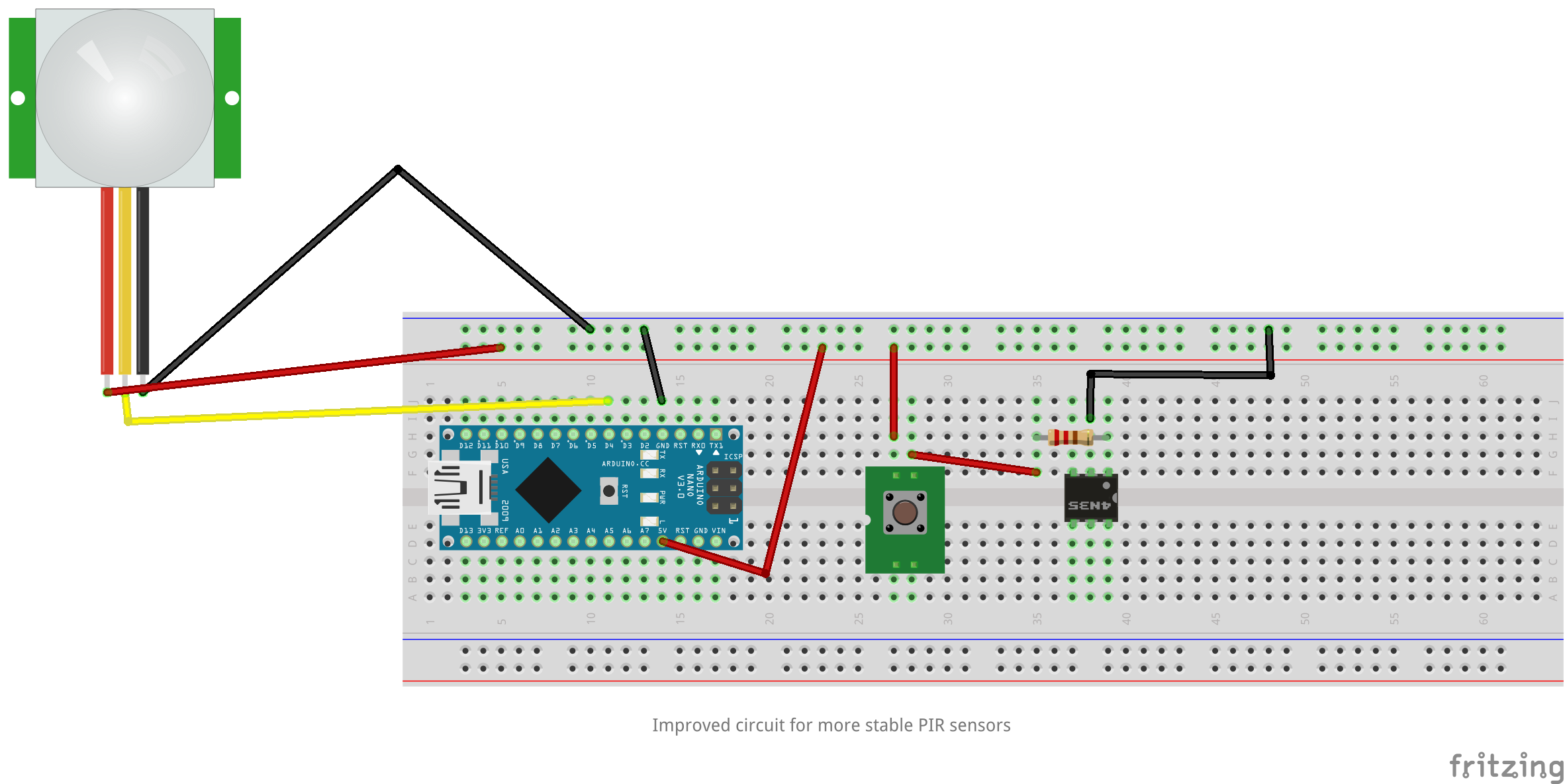
Basicly when you press the switch it'll activate the led in the optocoupler. But for some reason it unstabilizes the PIR sensor. No this was a good start for trying to solve it, because I had a reproducable wrong state. Instead of connecting the output of the pir to an Arduino I hooked it up to an LED. And finally found the solution for this problem.
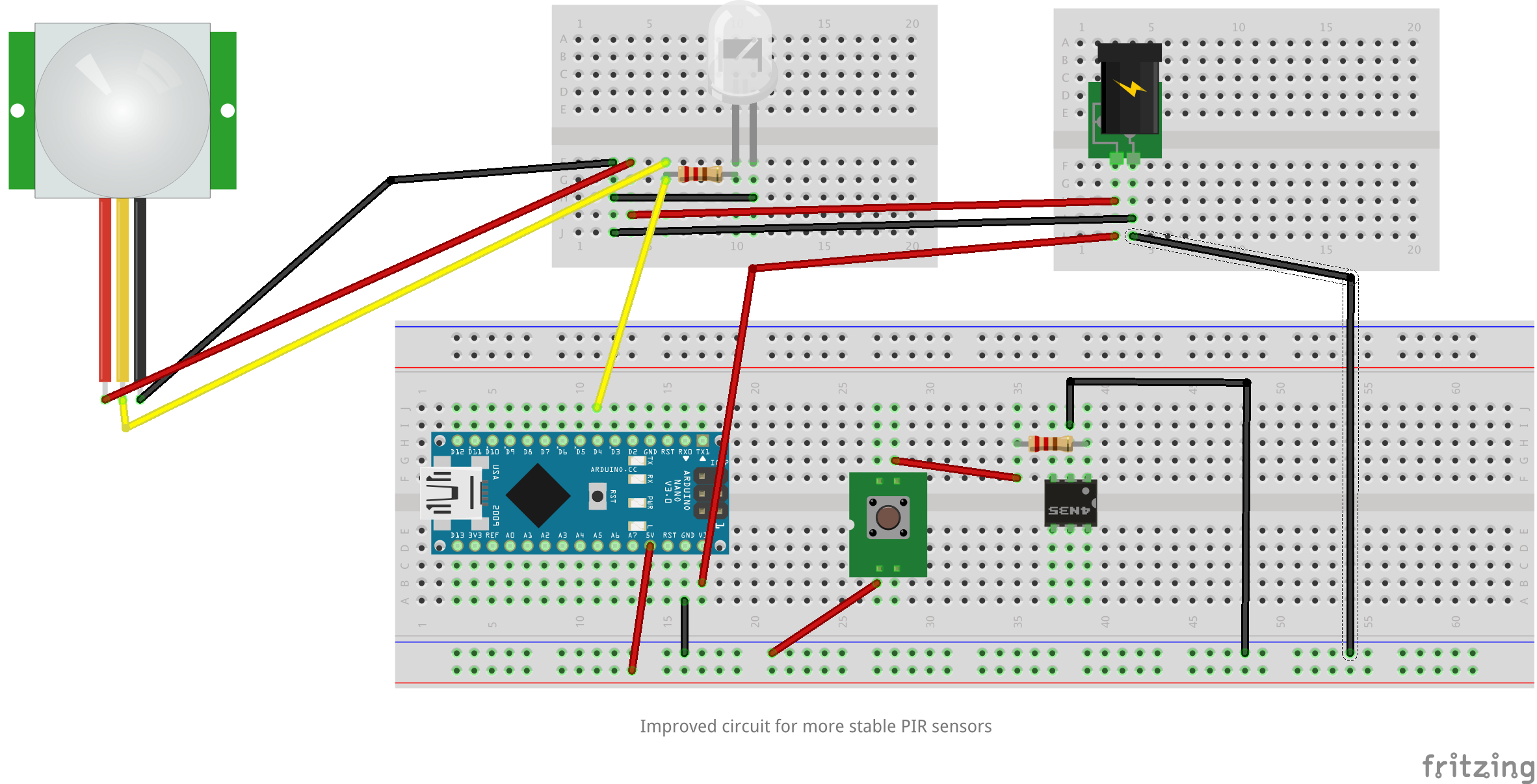
Basicly the circuits are now completely separated and the circuits are both stable. Next thing to do, is hookup an NRF24L01+ and let it run for a couple of days. Just to see if the PIR isn't detecting motion when everyone is in bed or everyone is away from home. Or when the doorbell is being pressed.
I've connected the door chime to the 3.3V of the Arduino, but the volume went down. So I've added a buck converter to power adapter, just the same as I did on the last fritzing - so on the upper right breadboard. And know everything works like a charm.
I'll post the outcome of the MySensors test within a week. But I'm pretty confident that it's stable now.
-
I'm posting my progress. So that if I find the solution someone else might benefit from this.
Battery powering the Chime IC works well. It doesn't interfere with the PIR. So I took the next step and added the my sensor code again. Next problem! Node stops receiving messages after a couple of minutes. Notice I powered the antenna directly from the ProMini 3.3V.
Hmmm might this be caused by MySensors libraries?
Anyway. Put a 100mA 3.3V regulator between the power adapter and the radio. And things looked great. Only this times the node took just 15 minutes before it stalled. Except for the motion notification to the gateway everything else stalls. Until I walk around the motion sensor a couple of times and then the node receives all messages send by the gateway. Hmzzzzi strange.
Replaced the regulator with a LD33V with correct capacitors. Node is been running for a longer while. If this node stays stable, I'll hookup the door Chime ID to the LD33V as well.
To be continued.
The question is, why is the LD33V stabilizing the circuit. I'd like to know why, so that I can learn from this.



Hello! It looks like you're interested in this conversation, but you don't have an account yet.
Getting fed up of having to scroll through the same posts each visit? When you register for an account, you'll always come back to exactly where you were before, and choose to be notified of new replies (either via email, or push notification). You'll also be able to save bookmarks and upvote posts to show your appreciation to other community members.
With your input, this post could be even better 💗
Register Login