
Skip to content
  • MySensors
  • OpenHardware.io
  • Categories
  • Recent
  • Tags
  • Popular
Skins
  • Light
  • Brite
  • Cerulean
  • Cosmo
  • Flatly
  • Journal
  • Litera
  • Lumen
  • Lux
  • Materia
  • Minty
  • Morph
  • Pulse
  • Sandstone
  • Simplex
  • Sketchy
  • Spacelab
  • United
  • Yeti
  • Zephyr
  • Dark
  • Cyborg
  • Darkly
  • Quartz
  • Slate
  • Solar
  • Superhero
  • Vapor

  • Default (No Skin)
  • No Skin
Collapse
Brand Logo
  1. Home
  2. Controllers
  3. Domoticz
  4. My garage door sensor

My garage door sensor

Scheduled Pinned Locked Moved Domoticz
12 Posts 4 Posters 4.6k Views 4 Watching
  • Oldest to Newest
  • Newest to Oldest
  • Most Votes
Reply
  • Reply as topic
Log in to reply
This topic has been deleted. Only users with topic management privileges can see it.
  • dbemowskD Offline
    dbemowskD Offline
    dbemowsk
    wrote on last edited by
    #3

    @Lemme You say that ACK is enabled by default on all child nodes. If that is the case and Domoticz is expecting it, shouldn't it work? On the flip side, if it is not expecting it and it is sent, wouldn't it just ignore it? I will look into how to disable it and test that, but it would be nice to know for sure that that is the way Domoticz is set up to work.

    Vera Plus running UI7 with MySensors, Sonoffs and 1-Wire devices
    Visit my website for more Bits, Bytes and Ramblings from me: http://dan.bemowski.info/

    1 Reply Last reply
    0
    • L Offline
      L Offline
      Lemme
      wrote on last edited by
      #4

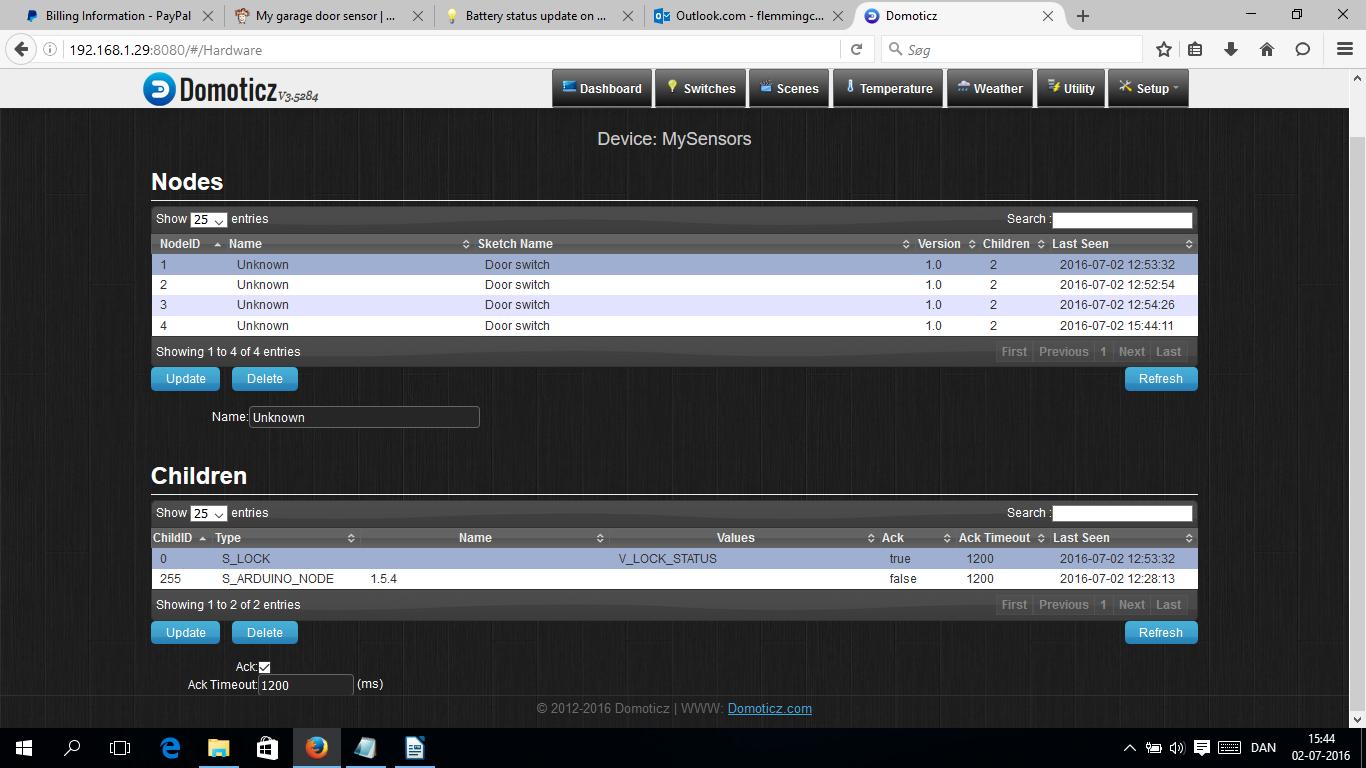
      I cannot see that your code are handling ACK's. So if Domoticz are expecting ACK, and your code do not respond, it could cause the problem.

      I have had an issu myself with the error "Error sending switch command, check device/hardware !". I first disabled the ACK - update, and then enabled ACK - update, and then it worked correctely.

      You find it at the buttom of the screen.
      0_1467467252349_ACK.jpg

      1 Reply Last reply
      0
      • dbemowskD Offline
        dbemowskD Offline
        dbemowsk
        wrote on last edited by
        #5

        I did some searching and did find this post regarding my first question.
        https://forum.mysensors.org/topic/2553/error-sending-switch-command-check-device-hardware/8
        One response was this:

        @hek said:

        The gateway code running on RPI doesn't remember routing information when restated (the EEPROM emulation is just in-memory).
        This means you have to restart the actuator nodes after RPI was restarted to fill the routing information again.
        It's on the grand TODO list. Anyone: Feel free to fix.

        But I am not sure if that is only for the Raspberry Pi or not. I am running an Orange Pi which may run the same gateway code, but I am not sure. I am going to try resetting my node later today to see if that works.

        Vera Plus running UI7 with MySensors, Sonoffs and 1-Wire devices
        Visit my website for more Bits, Bytes and Ramblings from me: http://dan.bemowski.info/

        1 Reply Last reply
        0
        • dbemowskD Offline
          dbemowskD Offline
          dbemowsk
          wrote on last edited by
          #6

          So I restarted my garage door node and I am no longer getting the error message. I am still wondering though how I can display the responses sent from the node. The node responds with Open, Closed, Opening, Closing and Obstruction. I would like to display that for the node instead of the state of the relay. The relay is just a momentary toggle to open and close the door, so that information I don't need, but the state of the door is crucial.

          Thanks for all the help

          Vera Plus running UI7 with MySensors, Sonoffs and 1-Wire devices
          Visit my website for more Bits, Bytes and Ramblings from me: http://dan.bemowski.info/

          AWIA 1 Reply Last reply
          0
          • dbemowskD dbemowsk

            So I restarted my garage door node and I am no longer getting the error message. I am still wondering though how I can display the responses sent from the node. The node responds with Open, Closed, Opening, Closing and Obstruction. I would like to display that for the node instead of the state of the relay. The relay is just a momentary toggle to open and close the door, so that information I don't need, but the state of the door is crucial.

            Thanks for all the help

            AWIA Offline
            AWIA Offline
            AWI
            Hero Member
            wrote on last edited by
            #7

            @dbemowsk you would need a V_TEXT type to send text information to domoticz. V_VAR types in Domoticz are not available in the Web and other interfaces.

            dbemowskD 1 Reply Last reply
            0
            • AWIA AWI

              @dbemowsk you would need a V_TEXT type to send text information to domoticz. V_VAR types in Domoticz are not available in the Web and other interfaces.

              dbemowskD Offline
              dbemowskD Offline
              dbemowsk
              wrote on last edited by
              #8

              @AWI Looking at the API documentation for 1.5 and I don't see a V_TEXT type. Is there a way to do this with MySensors?

              Vera Plus running UI7 with MySensors, Sonoffs and 1-Wire devices
              Visit my website for more Bits, Bytes and Ramblings from me: http://dan.bemowski.info/

              AWIA 1 Reply Last reply
              0
              • dbemowskD dbemowsk

                @AWI Looking at the API documentation for 1.5 and I don't see a V_TEXT type. Is there a way to do this with MySensors?

                AWIA Offline
                AWIA Offline
                AWI
                Hero Member
                wrote on last edited by AWI
                #9

                @dbemowsk This is added in 2.0 but you can patch it in v1.5 by defining it yourself.

                // new V_TEXT variable type (development 20150905)
                const int V_TEXT = 47 ;
                // new S_INFO sensor type (development 20150905)
                const int S_INFO = 36 ;
                
                dbemowskD 1 Reply Last reply
                0
                • AWIA AWI

                  @dbemowsk This is added in 2.0 but you can patch it in v1.5 by defining it yourself.

                  // new V_TEXT variable type (development 20150905)
                  const int V_TEXT = 47 ;
                  // new S_INFO sensor type (development 20150905)
                  const int S_INFO = 36 ;
                  
                  dbemowskD Offline
                  dbemowskD Offline
                  dbemowsk
                  wrote on last edited by
                  #10

                  @AWI I added those two types to my sketch and it worked perfect. I now have a device that shows up as "Garage door position" under the utility tab. Thanks a million for the help.

                  Vera Plus running UI7 with MySensors, Sonoffs and 1-Wire devices
                  Visit my website for more Bits, Bytes and Ramblings from me: http://dan.bemowski.info/

                  1 Reply Last reply
                  1
                  • D Offline
                    D Offline
                    Dringie
                    wrote on last edited by
                    #11

                    Hello guys,

                    I am very interested in this project. Did you simply change V_VAR1 to V_Text to make it work?

                    Would you mind posting your fully working code?

                    Thanks

                    dbemowskD 1 Reply Last reply
                    0
                    • D Dringie

                      Hello guys,

                      I am very interested in this project. Did you simply change V_VAR1 to V_Text to make it work?

                      Would you mind posting your fully working code?

                      Thanks

                      dbemowskD Offline
                      dbemowskD Offline
                      dbemowsk
                      wrote on last edited by
                      #12

                      @Dringie As @AWI pointed out, the V_TEXT variable and S_INFO sensor type have not been implemented until version 2.0. He mentions that you can add them by putting these lines in your sketch:

                      // new V_TEXT variable type (development 20150905)
                      const int V_TEXT = 47 ;
                      // new S_INFO sensor type (development 20150905)
                      const int S_INFO = 36 ;
                      

                      I did that and it worked like a charm. I now havemy "Garage door position object that shows me the current state of the door as one of {Open, Closed, Opening, Closing, Obstruction}. As for posting the code, I will do that in another thread. I have a thread started under the Hardware section of the forum called "Automate garage door". Here is the link.
                      https://forum.mysensors.org/topic/4059/automated-garage-door
                      I will be posting the new code later tonight. I just want to tidy it up a bit before posting.

                      Vera Plus running UI7 with MySensors, Sonoffs and 1-Wire devices
                      Visit my website for more Bits, Bytes and Ramblings from me: http://dan.bemowski.info/

                      1 Reply Last reply
                      1
                      Reply
                      • Reply as topic
                      Log in to reply
                      • Oldest to Newest
                      • Newest to Oldest
                      • Most Votes


                      15

                      Online

                      11.7k

                      Users

                      11.2k

                      Topics

                      113.1k

                      Posts


                      Copyright 2025 TBD   |   Forum Guidelines   |   Privacy Policy   |   Terms of Service
                      • Login

                      • Don't have an account? Register

                      • Login or register to search.
                      • First post
                        Last post
                      0
                      • MySensors
                      • OpenHardware.io
                      • Categories
                      • Recent
                      • Tags
                      • Popular
