
MySensors Fancy porchlight
-
So Im building a porch light using some ws2812b's. I am connecting it to openhab so I can do all kinds of fun things based on the time of year, football games and such.
I would like to see if anyone can see in my code, sense I am a beginner, ways to clean it up as what I have already takes up 86% and I would like it to do a few more things. I would really like any feedback, including other things to do with it.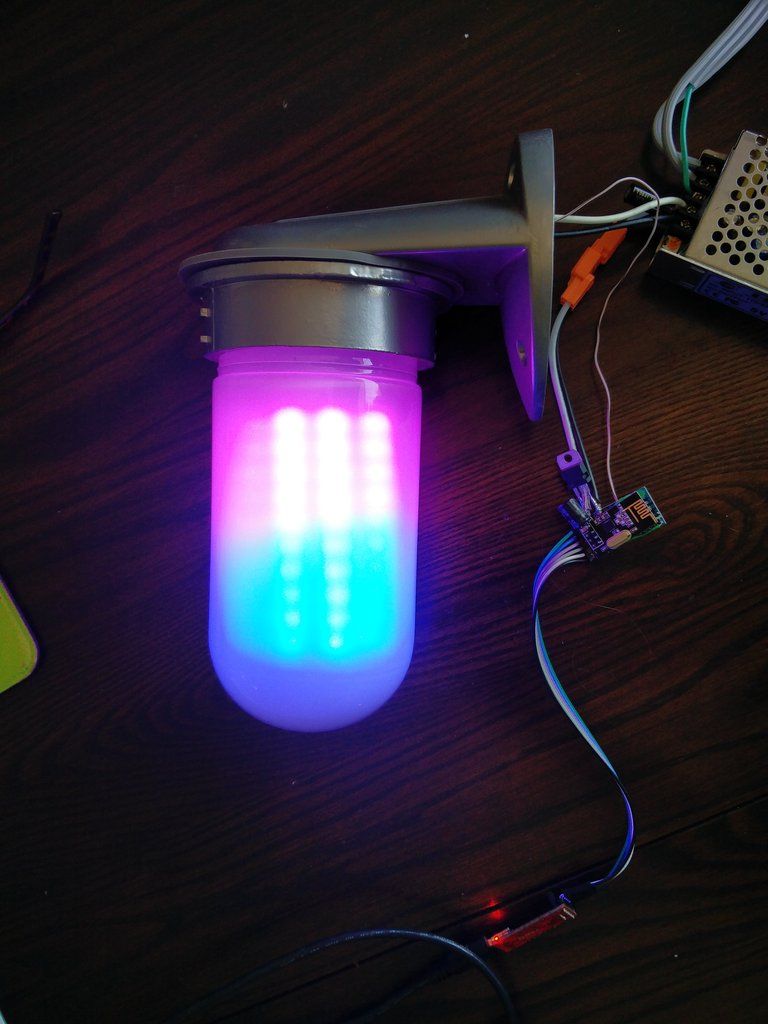
#include <Adafruit_GFX.h> #include <Adafruit_NeoMatrix.h> #include <Adafruit_NeoPixel.h> #include "RGB.h" #include <SPI.h> #define MY_NODE_ID 16 #define MY_RADIO_NRF24 #define MY_DEBUG #define MY_REPEATER_FEATURE #include <MySensors.h> #include <MyConfig.h> #define PIN 5 #define CHILD_ID_LED 1 #define CHILD_ID_C1 2 #define CHILD_ID_C2 3 #define CHILD_ID_C3 4 #define CHILD_ID_C4 5 #define CHILD_ID_C5 6 #define CHILD_ID_C6 7 // NEO_MATRIX_TOP, NEO_MATRIX_BOTTOM, NEO_MATRIX_LEFT, NEO_MATRIX_RIGHT: // Position of the FIRST LED in the matrix; pick two, e.g. // NEO_MATRIX_TOP + NEO_MATRIX_LEFT for the top-left corner. // NEO_MATRIX_ROWS, NEO_MATRIX_COLUMNS: LEDs are arranged in horizontal // rows or in vertical columns, respectively; pick one or the other. // NEO_MATRIX_PROGRESSIVE, NEO_MATRIX_ZIGZAG: all rows/columns proceed // in the same order, or alternate lines reverse direction; pick one. // See example below for these values in action. Adafruit_NeoMatrix matrix = Adafruit_NeoMatrix(8, 10, 1, 1, PIN, NEO_MATRIX_TOP + NEO_MATRIX_LEFT + NEO_MATRIX_COLUMNS + NEO_MATRIX_ZIGZAG, NEO_GRB + NEO_KHZ800); const uint16_t colors[] = { matrix.Color(orange.r, orange.g, orange.b), matrix.Color(blue.r, blue.g, blue.b) }; int x = matrix.width(); int pass = 0; int LEDMODE = 0; RGB Color1 = seanwhite; RGB Color2 = {20,20,20}; RGB Color3 = {20,20,20}; RGB Color4 = {20,20,20}; RGB Color5 = {20,20,20}; RGB Color6 = {20,20,20}; void setup() { Serial.begin(115200); matrix.begin(); matrix.setTextWrap(false); matrix.setBrightness(100); } void presentation() { sendSketchInfo("Porchlight", ".9"); present(CHILD_ID_LED, S_CUSTOM); present(CHILD_ID_C1, S_INFO); present(CHILD_ID_C2, S_INFO); present(CHILD_ID_C3, S_INFO); present(CHILD_ID_C4, S_INFO); present(CHILD_ID_C5, S_INFO); present(CHILD_ID_C6, S_INFO); } void loop() { if(LEDMODE == 0) { matrix.fillScreen(matrix.Color(Color1.r, Color1.g, Color1.b)); matrix.show(); } if(LEDMODE == 1) { if(++pass >= 2) pass = 0; if(pass == 0) colorWipe(orange, 10); if(pass == 1) colorWipe(blue, 10); matrix.show(); String twitterHandle = "B R O N C O S"; scrollText(twitterHandle); delay(100); } if(LEDMODE == 2) { // You can put this code in loop() int r; int c; r = random(10); c = random(8); fadePixel(c, r, Color1, Color2, 140, 0); matrix.show(); } if(LEDMODE == 3) { matrix.fillScreen(matrix.Color(Color1.r, Color1.g, Color1.b)); colorWipe(Color2, 100); } if(LEDMODE == 4) { colorWipe(red, 30); colorWipe(orange, 30); colorWipe(yellow, 30); colorWipe(green,30); colorWipe(blue, 30); colorWipe(purple, 30); } if(LEDMODE == 5) { crossFade(orange, blue, 50, 10); crossFade(blue, orange, 50, 10); } if(LEDMODE == 6) { colorWipe(seanwhite,10); drawLogo(); } if(LEDMODE == 7) { colorWipe(off, 10); } } // Fill the pixels one after the other with a color void colorWipe(RGB color, uint8_t wait) { for(uint16_t row=0; row < 10; row++) { for(uint16_t column=0; column < 8; column++) { matrix.drawPixel(column, row, matrix.Color(color.r, color.g, color.b)); matrix.show(); delay(wait); } } } // Crossfade entire screen from startColor to endColor void crossFade(RGB startColor, RGB endColor, int steps, int wait) { for(int i = 0; i <= steps; i++) { int newR = startColor.r + (endColor.r - startColor.r) * i / steps; int newG = startColor.g + (endColor.g - startColor.g) * i / steps; int newB = startColor.b + (endColor.b - startColor.b) * i / steps; matrix.fillScreen(matrix.Color(newR, newG, newB)); matrix.show(); delay(wait); } } void drawLogo() { // This 8x8 array represents the LED matrix pixels. // A value of 1 means we’ll fade the pixel to white int logo[10][8] = { {0, 0, 0, 0, 0, 0, 0, 0}, {0, 1, 0, 0, 0, 1, 0, 0}, {0, 1, 1, 0, 1, 1, 0, 0}, {0, 1, 0, 1, 0, 1, 0, 0}, {0, 1, 0, 1, 0, 1, 0, 0}, {0, 1, 0, 0, 0, 1, 0, 0}, {0, 1, 0, 0, 0, 1, 0, 0}, {0, 1, 0, 0, 0, 1, 0, 0}, {0, 1, 0, 0, 0, 1, 0, 0}, {0, 0, 0, 0, 0, 0, 0, 0}, }; for(int row = 0; row < 10; row++) { for(int column = 0; column < 8; column++) { if(logo[row][column] == 1) { fadePixel(column, row, purple, white, 120, 0); } } } } // Fade pixel (x, y) from startColor to endColor void fadePixel(int x, int y, RGB startColor, RGB endColor, int steps, int wait) { for(int i = 0; i <= steps; i++) { int newR = startColor.r + (endColor.r - startColor.r) * i / steps; int newG = startColor.g + (endColor.g - startColor.g) * i / steps; int newB = startColor.b + (endColor.b - startColor.b) * i / steps; matrix.drawPixel(x, y, matrix.Color(newR, newG, newB)); matrix.show(); delay(wait); } } void scrollText(String textToDisplay) { int x = matrix.width(); // Account for 6 pixel wide characters plus a space int pixelsInText = textToDisplay.length() * 7; matrix.setCursor(x, 0); matrix.print(textToDisplay); matrix.show(); while(x > (matrix.width() - pixelsInText)) { matrix.fillScreen(colors[pass]); matrix.setCursor(--x, 1); matrix.print(textToDisplay); matrix.show(); delay(75); } } void receive(const MyMessage &message) { // We only expect one type of message from controller. But we better check anyway. if (message.type == V_CUSTOM) { Serial.println( "Porchlight mode recieved..." ); int porchvalue= atoi( message.data ); if ((porchvalue<0)||(porchvalue>7)) { Serial.print(porchvalue); Serial.println( " is not a defined value." ); return; } else { LEDMODE = porchvalue; } } if (message.type == V_TEXT) { Serial.println( "New message V_TEXT type recieved..."); Serial.print("Message: "); Serial.print(message.sensor); Serial.print(", Message: "); Serial.println(message.getString()); String input = message.getString(); Serial.println(input); int commaIndex = input.indexOf(','); // Search for the next comma just after the first int secondCommaIndex = input.indexOf(',', commaIndex+1); String firstValue = input.substring(0, commaIndex); String secondValue = input.substring(commaIndex+1, secondCommaIndex); String thirdValue = input.substring(secondCommaIndex+1); // To the end of the string int firstValueI = firstValue.toInt(); int secondValueI = secondValue.toInt(); int thirdValueI = thirdValue.toInt(); if (message.sensor == 2) { Color1 = (RGB){firstValueI,secondValueI,thirdValueI}; Serial.print("Color1 updated: "); Serial.print(Color1.r); Serial.print(" "); Serial.print(Color1.g); Serial.print(" "); Serial.println(Color1.b); } if (message.sensor == 3) { Color2 = (RGB){firstValueI,secondValueI,thirdValueI}; Serial.print("Color2 updated: "); Serial.print(Color2.r); Serial.print(" "); Serial.print(Color2.g); Serial.print(" "); Serial.println(Color2.b); } if (message.sensor == 4) { Color3 = (RGB){firstValueI,secondValueI,thirdValueI}; Serial.print("Color3 updated: "); Serial.print(Color3.r); Serial.print(" "); Serial.print(Color3.g); Serial.print(" "); Serial.println(Color3.b); } if (message.sensor == 5) { Color4 = (RGB){firstValueI,secondValueI,thirdValueI}; Serial.print("Color4 updated: "); Serial.print(Color4.r); Serial.print(" "); Serial.print(Color4.g); Serial.print(" "); Serial.println(Color4.b); } if (message.sensor == 6) { Color5 = (RGB){firstValueI,secondValueI,thirdValueI}; Serial.print("Color5 updated: "); Serial.print(Color5.r); Serial.print(" "); Serial.print(Color5.g); Serial.print(" "); Serial.println(Color5.b); } if (message.sensor == 7) { Color6 = (RGB){firstValueI,secondValueI,thirdValueI}; Serial.print("Color6 updated: "); Serial.print(Color6.r); Serial.print(" "); Serial.print(Color6.g); Serial.print(" "); Serial.println(Color6.b); } } } -
Hello,
a first thing to do when you want to clean up your code is to see everything that is repetitive and remove it. If it's repetitive, it must but changed either with a function (and you pass the changing values as parameters) or with an array.
I cannot build your script because I'm missing the RGB.h file, can you give a link to all libraries you use in your script, or post the code of the other files in your arduino project ? -
-
There are a couple of places you could replace the multiple if statements with case instead.
Like this
void loop() { switch (LEDMODE){ case 0: matrix.fillScreen(matrix.Color(Color1.r, Color1.g, Color1.b)); matrix.show(); break; case 1: if(++pass >= 2) pass = 0; if(pass == 0) colorWipe(orange, 10); if(pass == 1) colorWipe(blue, 10); matrix.show(); String twitterHandle = "B R O N C O S"; scrollText(twitterHandle); delay(100); break; case 2: // You can put this code in loop() int r; int c; r = random(10); c = random(8); fadePixel(c, r, Color1, Color2, 140, 0); matrix.show(); break; case 3: matrix.fillScreen(matrix.Color(Color1.r, Color1.g, Color1.b)); colorWipe(Color2, 100); break; case 4: colorWipe(red, 30); colorWipe(orange, 30); colorWipe(yellow, 30); colorWipe(green,30); colorWipe(blue, 30); colorWipe(purple, 30); break; case 5: crossFade(orange, blue, 50, 10); crossFade(blue, orange, 50, 10); break; case 6: colorWipe(seanwhite,10); drawLogo(); break; case 7: colorWipe(off, 10); break; } } -
The most efficient change will be to have only one method to log color change to replace
    if (message.sensor == 2) {
      Color1 = (RGB){firstValueI,secondValueI,thirdValueI};
      Serial.print("Color1 updated: ");
      Serial.print(Color1.r);
      Serial.print(" ");
      Serial.print(Color1.g);
      Serial.print(" ");
      Serial.println(Color1.b);
    }
with
    if (message.sensor == 2) {
      Color1 = (RGB){firstValueI,secondValueI,thirdValueI};
      LogColorChange(1, Color1);
    }
And method LogColorChange like this :
void LogColorChange(byte colorID, RGB newColor) {
      Serial.print(F("Color"));
      Serial.print(colorID)
      Serial.print(F(" updated: "));
      Serial.print(Color1.r);
      Serial.print(" ");
      Serial.print(Color1.g);
      Serial.print(" ");
      Serial.println(Color1.b);
}
Of course it's even more efficient to use and array of colors so no need to have case for each color ID but I need to be able to compile the original script to avoid giving wrong code :)
-
types.




Hello! It looks like you're interested in this conversation, but you don't have an account yet.
Getting fed up of having to scroll through the same posts each visit? When you register for an account, you'll always come back to exactly where you were before, and choose to be notified of new replies (either via email, or push notification). You'll also be able to save bookmarks and upvote posts to show your appreciation to other community members.
With your input, this post could be even better 💗
Register Login