
1mhz hardware
-
I checked, no REPEATER on.
Here is the code for my loop()
int whichbutton = 0;

whichbutton = sleep(digitalPinToInterrupt(2),LOW,digitalPinToInterrupt(3),LOW,86400000);

switch (whichbutton) {
  case digitalPinToInterrupt(2):
      {//off
      send(msg_light.set(0),true);
      wait(300);
      break;
      }
  case digitalPinToInterrupt(3):
      {//on
      send(msg_light.set(1),true);
      wait(300);
      break;
      }

  }
sleep(250);
CheckBattery();
It's not running that over and over for sure. Otherwise I would see the battery value publishing regularly to the broker.
I broke the regulator off and the LEDs.
This is the one I have.
https://www.sparkfun.com/products/11114I don't think the multimeter is misreading it. I can see the battery percentage dropping over the course of a day so it definitely seems like it's pulling more mA than it should sleeping.
-
@m26872 said:
@Nca78 True. And I suppose you've also double checked the verbose output from that process.
In case someone doesn't believe the Arduino docs ;)
This is at the beginning of the bootloader writing process in Arduino IDE:Writing | ################################################## | 100% 0.01s avrdude: 1 bytes of efuse written avrdude: verifying efuse memory against 0x06: avrdude: load data efuse data from input file 0x06: avrdude: input file 0x06 contains 1 bytes avrdude: reading on-chip efuse data: Reading | ################################################## | 100% 0.01s avrdude: verifying ... avrdude: 1 bytes of efuse verified avrdude: reading input file "0xde" avrdude: writing hfuse (1 bytes): Writing | ################################################## | 100% 0.01s avrdude: 1 bytes of hfuse written avrdude: verifying hfuse memory against 0xde: avrdude: load data hfuse data from input file 0xde: avrdude: input file 0xde contains 1 bytes avrdude: reading on-chip hfuse data: Reading | ################################################## | 100% 0.01s avrdude: verifying ... avrdude: 1 bytes of hfuse verified avrdude: reading input file "0x62" avrdude: writing lfuse (1 bytes): Writing | ################################################## | 100% 0.00s avrdude: 1 bytes of lfuse written avrdude: verifying lfuse memory against 0x62: avrdude: load data lfuse data from input file 0x62: avrdude: input file 0x62 contains 1 bytes avrdude: reading on-chip lfuse data: -
@m26872 said:
@Nca78 True. And I suppose you've also double checked the verbose output from that process.
In case someone doesn't believe the Arduino docs ;)
This is at the beginning of the bootloader writing process in Arduino IDE:Writing | ################################################## | 100% 0.01s avrdude: 1 bytes of efuse written avrdude: verifying efuse memory against 0x06: avrdude: load data efuse data from input file 0x06: avrdude: input file 0x06 contains 1 bytes avrdude: reading on-chip efuse data: Reading | ################################################## | 100% 0.01s avrdude: verifying ... avrdude: 1 bytes of efuse verified avrdude: reading input file "0xde" avrdude: writing hfuse (1 bytes): Writing | ################################################## | 100% 0.01s avrdude: 1 bytes of hfuse written avrdude: verifying hfuse memory against 0xde: avrdude: load data hfuse data from input file 0xde: avrdude: input file 0xde contains 1 bytes avrdude: reading on-chip hfuse data: Reading | ################################################## | 100% 0.01s avrdude: verifying ... avrdude: 1 bytes of hfuse verified avrdude: reading input file "0x62" avrdude: writing lfuse (1 bytes): Writing | ################################################## | 100% 0.00s avrdude: 1 bytes of lfuse written avrdude: verifying lfuse memory against 0x62: avrdude: load data lfuse data from input file 0x62: avrdude: input file 0x62 contains 1 bytes avrdude: reading on-chip lfuse data: -
hmmm. ok so I have verified I am writing the 1mhz boot loader.
My multimeter says when it's sleeping i am still running at 1.5mah
I have my openhab system tracking the battery usage. IN 6 days I have lost 30% of the battery and it's been in sleep mode.
|| *Time* || *Value* ||
|| 2016-08-14 19:29:27 || 100 ||
|| 2016-08-15 19:07:57 || 80 ||
|| 2016-08-15 19:11:18 || 81 ||
|| 2016-08-15 19:12:48 || 83 ||
|| 2016-08-15 19:13:14 || 76 ||
|| 2016-08-15 19:13:17 || 84 ||
|| 2016-08-15 19:13:56 || 80 ||
|| 2016-08-15 19:16:48 || 78 ||
|| 2016-08-19 15:07:57 || 76 ||
|| 2016-08-19 15:10:09 || 80 ||
|| 2016-08-19 15:12:43 || 79 ||
|| 2016-08-19 15:13:49 || 82 ||
|| 2016-08-19 15:14:20 || 84 ||
|| 2016-08-20 11:44:01 || 69 ||
|| 2016-08-20 11:44:23 || 48 ||
|| 2016-08-20 11:44:31 || 71 ||
Any thoughts? Any recommendations on maybe a replacement pro mini that will for sure run at <1mah?
-
@cimba007 Led was already removed. :(
-
I would only imagine that the VoltageRegulator might be the culprit.
As you said you use a "3v battery" so there is no need for the VoltageRegulator at all. Where do you apply the power? RAW or VCC? To power your Arduino with higher voltages you connect them to RAW which leads to the regulator.
On most of my projects I use 2x AA Battery which are connected directly to VCC .. even with the VoltageRegulator intact I am at 66% for the last 7 days .. not loosing a single %.
PS: Sry .. I missed that you have already removed the voltage regulator + the led.
The library states to use RISING, FALLING, CHANGE as the interrupt mode but you use LOW .. I don't know to which of the 3 this mapps.But my guess is you are using FALLING .. thus waking your node up if you connect pin 2 or 3 to ground .. which means you have some kind of pull up don't you?
Do you have anything connected to the Arduino ProMini? If so maybe try an empty sketch and remove all connected peripherals. Maybe even you can find some inspiration on this link: http://electronics.stackexchange.com/questions/49182/how-can-i-get-my-atmega328-to-run-for-a-year-on-batteries
Another really good test on the powerdown current is here:
http://www.rocketscream.com/blog/2011/07/04/lightweight-low-power-arduino-library/
with this library (not compatible with mysensor so dont't use at the same time)
-
I would only imagine that the VoltageRegulator might be the culprit.
As you said you use a "3v battery" so there is no need for the VoltageRegulator at all. Where do you apply the power? RAW or VCC? To power your Arduino with higher voltages you connect them to RAW which leads to the regulator.
On most of my projects I use 2x AA Battery which are connected directly to VCC .. even with the VoltageRegulator intact I am at 66% for the last 7 days .. not loosing a single %.
PS: Sry .. I missed that you have already removed the voltage regulator + the led.
The library states to use RISING, FALLING, CHANGE as the interrupt mode but you use LOW .. I don't know to which of the 3 this mapps.But my guess is you are using FALLING .. thus waking your node up if you connect pin 2 or 3 to ground .. which means you have some kind of pull up don't you?
Do you have anything connected to the Arduino ProMini? If so maybe try an empty sketch and remove all connected peripherals. Maybe even you can find some inspiration on this link: http://electronics.stackexchange.com/questions/49182/how-can-i-get-my-atmega328-to-run-for-a-year-on-batteries
Another really good test on the powerdown current is here:
http://www.rocketscream.com/blog/2011/07/04/lightweight-low-power-arduino-library/
with this library (not compatible with mysensor so dont't use at the same time)
@cimba007 thanks! will definitely test out some of this stuff. I am connecting power to vcc and the regulator has been removed.
2 buttons connected to the interrupt pins, 1 for on 1 for off.
here is my sleep statement
whichbutton = sleep(digitalPinToInterrupt(2),LOW,digitalPinToInterrupt(3),LOW,86400000);Could my resistors connected to the buttons be causing the extra power?
I would expect that to be the cause because even a door sensor or something would have to trigger the interrupt.
A buddy of mine suggested I throw an additional multimeter in line so i am actually measuring with 2 and see if maybe my readings are just off or my multimeter is wonky reading it. He thinks maybe the fact i am measuring it is causing the extra current... (sounds like quantum entanglement stuff there, "It changed cause you measured it!!")
-
Putting a multimeter in series will most likeley only cause a voltage drop of up to 200mV (just a rough number). If your circuit draws very little current even routing this current trough the resistor (which is causing the voltage drop) would not result in additional consumption.
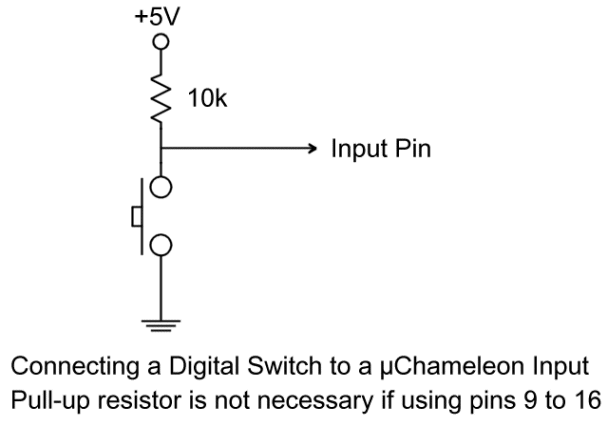
Lets look at your switches .. if you are using a setup like this:
http://www.starting-point-systems.com/images/pullup_example.gif
http://www.microchip.com/forums/m341654.aspx states that there should be zero current consumption while the button is not pressed. Are u using this button setup? If not can u provide a drawing?
I don't think that the multimeter is to blame. You reported a very weak batterylife even when you are not measuring the current I guess.
He thinks maybe the fact i am measuring it is causing the extra current... (sounds like quantum entanglement stuff there, "It changed cause you measured it!!")https://en.wikipedia.org/wiki/Multimeter#Burden_voltage
http://alternatezone.com/electronics/ucurrent/uCurrentArticle.pdfLong story short .. I would not suspect the burden Voltage to be the problem .. I can measure in the 200µA range with my cheapish Multimeter when the Atmega328p is in deep sleep mode .. so something must be drawing current in your setup.
-
To get the fastest results I would try to disconnect everything from your circuit .. hook up the Multimeter to measure current in lets say 200mA range (if available) and try the deep sleep example from https://github.com/rocketscream/Low-Power
If the pro mini is in deep sleep mode you can switch from 200mA to 2mA or even 200µA range if available. (just don't let the pro mini wake up while you have the range set very low)
Lower measure range = higher burden voltage = potential less power for your µC .. maybe even to the point it will go into brown out or start to behave strange
-
Putting a multimeter in series will most likeley only cause a voltage drop of up to 200mV (just a rough number). If your circuit draws very little current even routing this current trough the resistor (which is causing the voltage drop) would not result in additional consumption.
Lets look at your switches .. if you are using a setup like this:
http://www.starting-point-systems.com/images/pullup_example.gif
http://www.microchip.com/forums/m341654.aspx states that there should be zero current consumption while the button is not pressed. Are u using this button setup? If not can u provide a drawing?
I don't think that the multimeter is to blame. You reported a very weak batterylife even when you are not measuring the current I guess.
He thinks maybe the fact i am measuring it is causing the extra current... (sounds like quantum entanglement stuff there, "It changed cause you measured it!!")https://en.wikipedia.org/wiki/Multimeter#Burden_voltage
http://alternatezone.com/electronics/ucurrent/uCurrentArticle.pdfLong story short .. I would not suspect the burden Voltage to be the problem .. I can measure in the 200µA range with my cheapish Multimeter when the Atmega328p is in deep sleep mode .. so something must be drawing current in your setup.
@cimba007 Thanks for the details. Let me get you back some info.
yes, my buttons are setup like the pullup example image
i didn't think the multimeter would do it, but at this point i am willing to try anything :)
I will pull my mini tonight and remove everything and do a test.
my code only wakes up when button is pressed or every 24 hours. so it shouldn't come on while testing. Ill try with my code and with the sleep example you referenced.
Thanks!!!!


Hello! It looks like you're interested in this conversation, but you don't have an account yet.
Getting fed up of having to scroll through the same posts each visit? When you register for an account, you'll always come back to exactly where you were before, and choose to be notified of new replies (either via email, or push notification). You'll also be able to save bookmarks and upvote posts to show your appreciation to other community members.
With your input, this post could be even better 💗
Register Login