
💬 Power Meter Pulse Sensor
-
Hi
I have done search of this thread and no one seems to have mentioned latency.
I have a test setup using a LM393 running on a particle photon with a sketch that also runs a flashing led. I have tested this with various led flash lengths and intervals, the highest rate being a 10ms flash with 10ms interval . I have a consistent precise reading of pulse interval and number but have identified that there is a 1ms delay between the flash and the start of the interrupt function. This latency is consistent, whatever the interval between and I can only assume it is a result of latency caused by LM393 and interrupt, though I find it strange that the latency is exactly 1millisecond even when measured in micros. Under low meter loads this discrepancy would most likely go unnoticed but with high loads of 72kWs it results in a significant error when calculating the instant power.
Has anyone else noticed this or can give another reason for this that I am missing?
A subtraction of the identified latency from the pulse interval reading, calibrates the setup and produces exact readings -
-
I've been building one of these pulse meters up, it seems to be working on the bench very nice. Just got to build a case and get a power supply of the Arduino. But I have designed a case to hold the LM393 sensor onto the meter. I removed the light sensor and re-soldered it flush to the board making it easier to mount on the meter. Its a simple box but works quite well.
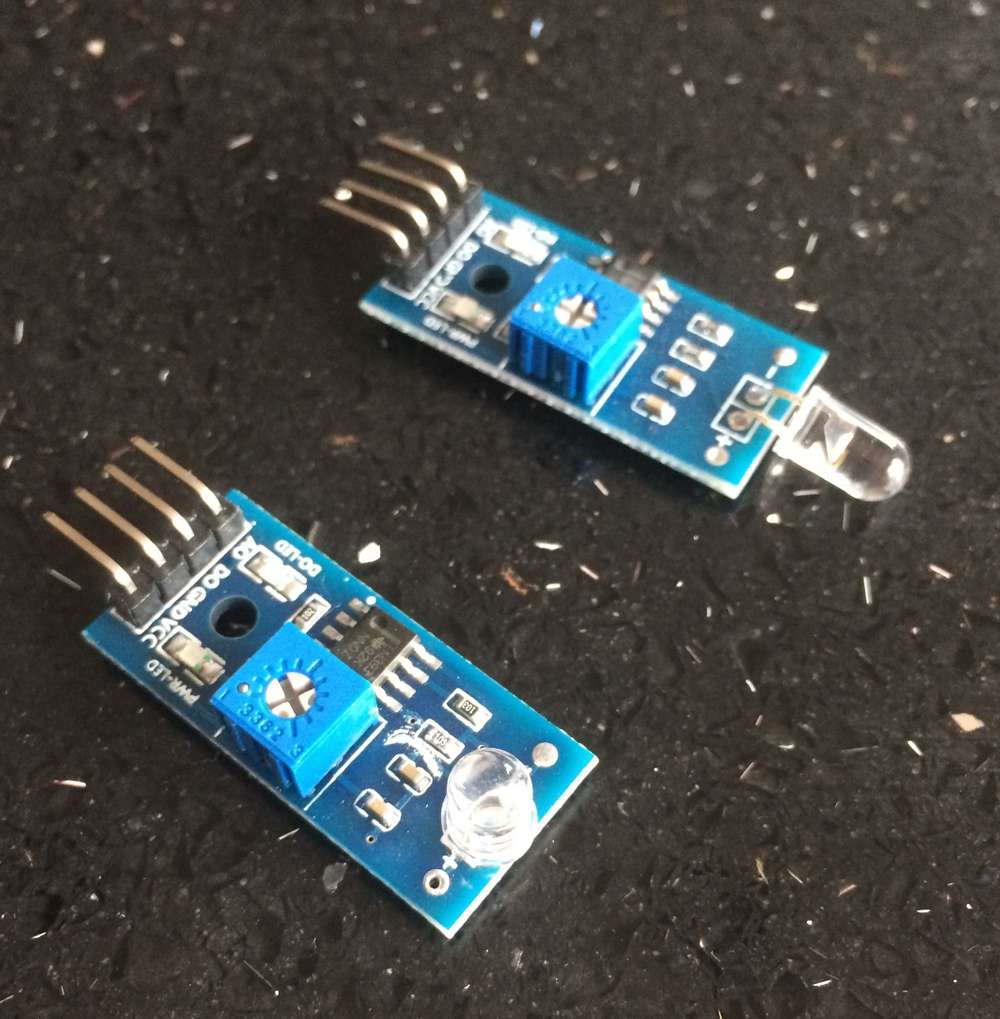
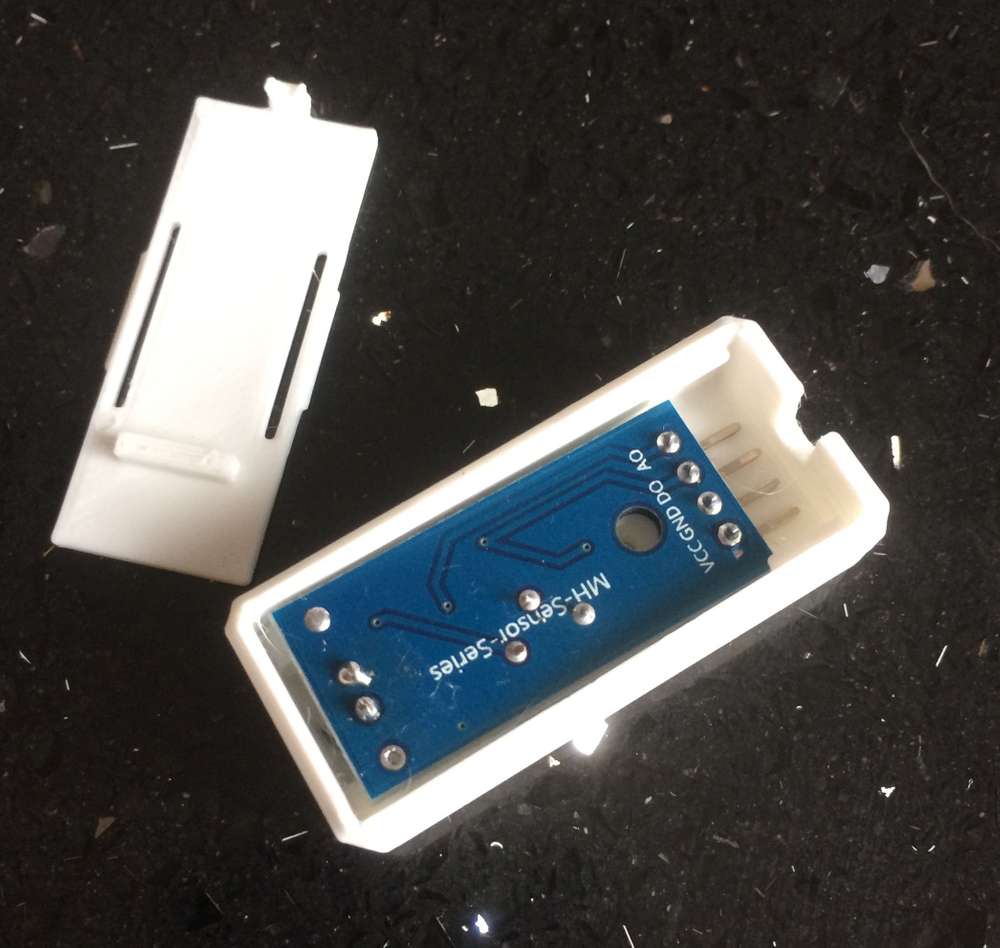
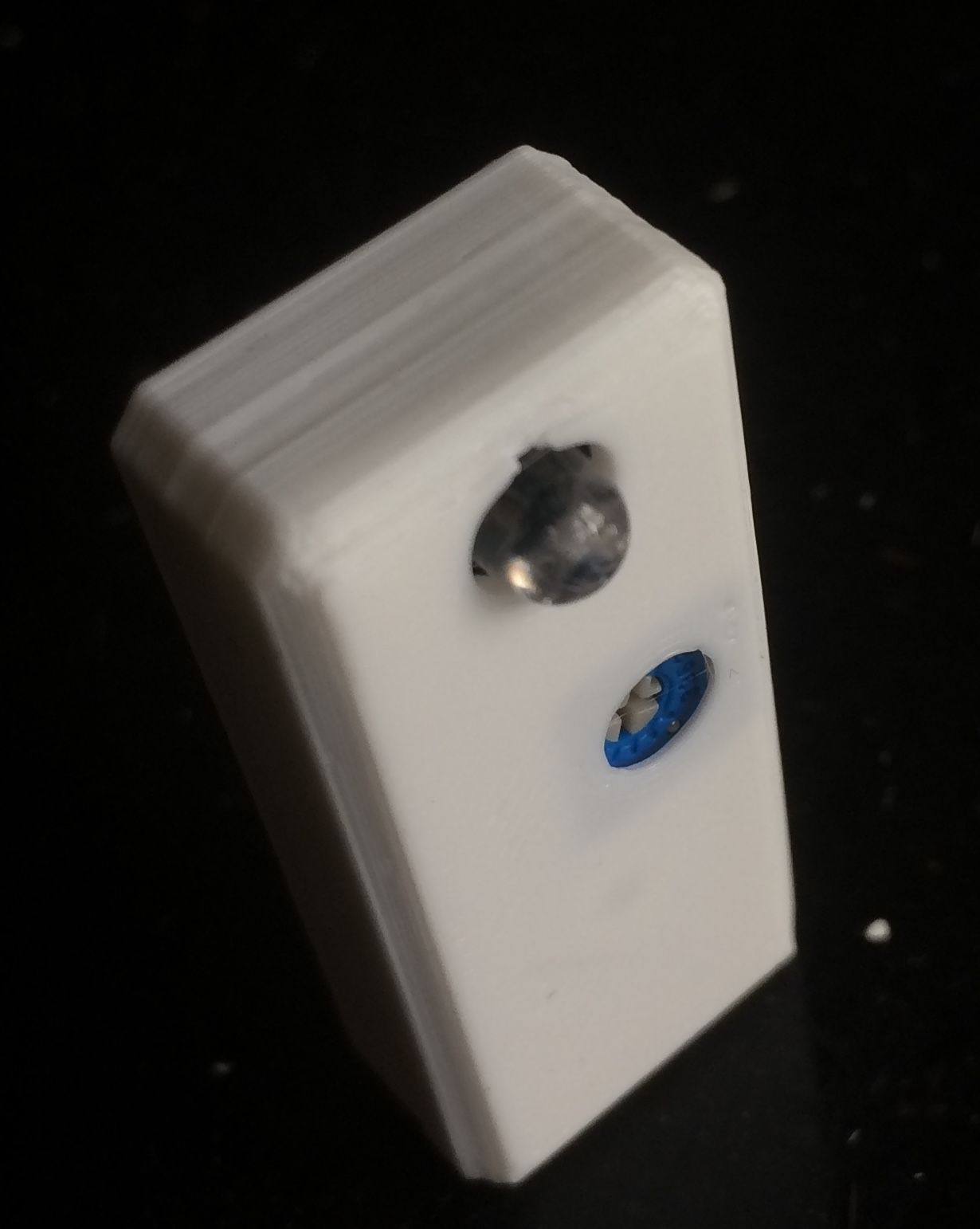
The files are on thingiverse here
Hope this is useful.
-
Hi! I have just revised my pulse sensor and have a few suggestions to the code. I have mentioned this before but there can be issues when requesting V_VAR1.
In current code we request V_VAR1 one time and then goes to sleep, and if you like me have a 10 minute sleep period it can take along time to get V_VAR1 if you have a radio on the outside of your GW range.
I would suggest adding:
} else if (now - lastSend > 5000 && !pcReceived) {
    // No pulse count value received from controller. Try requesting it again.
    request(CHILD_ID, V_VAR1);
    recrequestcount = recrequestcount + 1;
#ifdef MY_DEBUG
    Serial.println("Req p-cnt");
#endif
    lastSend = now;
    return;
  }
and before sleep:
else if (!pcReceived) {
    //We dont want to sleep if !pcRecieved. Return and wait 5 sec to request a new value.
    return;
  }
In HomeAssisant you also have the specific problem that if V_VAR1 isnt stored, the controller will not answer - so you can keep asking for a pulsecount forever without an reply. To avoid this the first time I have added:
else if (recrequestcount == 5 && !pcReceived) {
    //For some controllers, if you dont have any V_VAR1 stored node will not get an answer.
    //Try 5 times, then set V_VAR1 to 0 and update controller
#ifdef MY_DEBUG
    Serial.println("Set p-cnt and update controller");
#endif
    pcReceived = true;
    recrequestcount = 0;
    send(pcMsg.set(pulseCount));  // Send pulse count 0 value to gw
    double kWh = ((double)pulseCount / ((double)PULSE_FACTOR));
    send(kWhMsg.set(kWh, 4));  // Send kWh value 0 to gw
    lastSend = now;
  }
This setup works great for me, but I dont have the bigger picture - might break something else.
I can add a pull request if you think this should fit.Here is my full code (but It includes battery measurments)
https://github.com/sundberg84/HomeAutomation/blob/master/Ver 2.X/2.3/EnergyMeterPulseSensor_Feb2020/EnergyMeterPulseSensor_Feb2020.inoAlso there is a strange error with SEND_FREQUENCY / timer when you have this interrupt. Works great if you dont have any interrupts but as soon as you get pulses the timer gets about 4 times as fast as it should be - I have added a correction to this, but I dont know whats causing this.
uint32_t SEND_FREQUENCY = 4*60000*15; // Minimum time between send (in milliseconds). We don't want to spam the gateway. (Corr * 60sek * minutes)@sundberg84 Thanks very much for this post. I was struggling to get the sensor appear in Home-Assistant. Your note on the fact that HA never returns
V_VAR1on first use was very useful and pointed me in the right direction.My modifications looked like this:
} else if (sendTime && !pcReceived) {
		// No pulse count value received from controller. Try requesting it again.
		request(CHILD_ID, V_VAR1);
    retryCount++;
		lastSend = now;
	} else if (retryCount >= 5 && !pcReceived) {
      //For some controllers, if you dont have any V_VAR1 stored node will not get an answer.
      //Try 5 times, then set V_VAR1 to 0 and update controller
    pcReceived = true;
    retryCount = 0;
    send(pcMsg.set(pulseCount));  // Send pulse count 0 value to gw
    double kWh = ((double)pulseCount / ((double)PULSE_FACTOR));
    send(kWhMsg.set(kWh, 4));  // Send kWh value 0 to gw
    lastSend = now;
  }
The whole sketch is here:
/* The MySensors Arduino library handles the wireless radio link and protocol between your home built sensors/actuators and HA controller of choice. The sensors forms a self healing radio network with optional repeaters. Each repeater and gateway builds a routing tables in EEPROM which keeps track of the network topology allowing messages to be routed to nodes. Created by Henrik Ekblad <henrik.ekblad@mysensors.org> Copyright (C) 2013-2019 Sensnology AB Full contributor list: https://github.com/mysensors/MySensors/graphs/contributors Documentation: http://www.mysensors.org Support Forum: http://forum.mysensors.org This program is free software; you can redistribute it and/or modify it under the terms of the GNU General Public License version 2 as published by the Free Software Foundation. ******************************* REVISION HISTORY Version 1.0 - Henrik Ekblad Version 1.1 - Peter Andersson added millis watt calculation if time between pulses > 1h DESCRIPTION This sketch provides an example how to implement a LM393 PCB Use this sensor to measure kWh and Watt of your house meter You need to set the correct pulsefactor of your meter (blinks per kWh). The sensor starts by fetching current kWh value from gateway. Reports both kWh and Watt back to gateway. Unfortunately millis() won't increment when the Arduino is in sleepmode. So we cannot make this sensor sleep if we also want to calculate/report watt value. http://www.mysensors.org/build/pulse_power */ // Enable debug prints #define MY_DEBUG // Enable and select radio type attached #define MY_RADIO_RF24 //#define MY_RADIO_NRF5_ESB //#define MY_RADIO_RFM69 //#define MY_RADIO_RFM95 #include <MySensors.h> #define DIGITAL_INPUT_SENSOR 3 // The digital input you attached your light sensor. (Only 2 and 3 generates interrupt!) #define PULSE_FACTOR 1000 // Number of blinks per kWh of your meter. Normally 1000. #define SLEEP_MODE false // Watt value can only be reported when sleep mode is false. #define MAX_WATT 10000 // Max watt value to report. This filters outliers. #define CHILD_ID 1 // Id of the sensor child uint32_t SEND_FREQUENCY = 20000; // Minimum time between send (in milliseconds). We don't want to spam the gateway. double ppwh = ((double)PULSE_FACTOR) / 1000; // Pulses per watt hour bool pcReceived = false; volatile uint32_t pulseCount = 0; volatile uint32_t lastBlinkmicros = 0; volatile uint32_t lastBlinkmillis = 0; volatile uint32_t watt = 0; uint32_t retryCount = 0; //If value not being returned from controller, increment this counter uint32_t oldPulseCount = 0; uint32_t oldWatt = 0; double oldkWh; uint32_t lastSend; MyMessage wattMsg(CHILD_ID, V_WATT); MyMessage kWhMsg(CHILD_ID, V_KWH); MyMessage pcMsg(CHILD_ID, V_VAR1); #if defined(ARDUINO_ARCH_ESP8266) || defined(ARDUINO_ARCH_ESP32) #define IRQ_HANDLER_ATTR ICACHE_RAM_ATTR #else #define IRQ_HANDLER_ATTR #endif void IRQ_HANDLER_ATTR onPulse() { if (!SLEEP_MODE) { uint32_t newBlinkmicros = micros(); uint32_t newBlinkmillis = millis(); uint32_t intervalmicros = newBlinkmicros - lastBlinkmicros; uint32_t intervalmillis = newBlinkmillis - lastBlinkmillis; if (intervalmicros < 10000L && intervalmillis < 10L) { // Sometimes we get interrupt on RISING return; } if (intervalmillis < 360000) { // Less than an hour since last pulse, use microseconds watt = (3600000000.0 / intervalmicros) / ppwh; } else { watt = (3600000.0 / intervalmillis) / ppwh; // more thAn an hour since last pulse, use milliseconds as micros will overflow after 70min } lastBlinkmicros = newBlinkmicros; lastBlinkmillis = newBlinkmillis; } pulseCount++; } void setup() { // Fetch last known pulse count value from gw request(CHILD_ID, V_VAR1); // Use the internal pullup to be able to hook up this sketch directly to an energy meter with S0 output // If no pullup is used, the reported usage will be too high because of the floating pin pinMode(DIGITAL_INPUT_SENSOR, INPUT_PULLUP); attachInterrupt(digitalPinToInterrupt(DIGITAL_INPUT_SENSOR), onPulse, RISING); lastSend = millis(); } void presentation() { // Send the sketch version information to the gateway and Controller sendSketchInfo(F("Energy Meter"), F("1.1")); // Register this device as power sensor present(CHILD_ID, S_POWER); } void loop() { uint32_t now = millis(); // Only send values at a maximum frequency or woken up from sleep bool sendTime = now - lastSend > SEND_FREQUENCY; if (pcReceived && (SLEEP_MODE || sendTime)) { // New watt value has been calculated if (!SLEEP_MODE && watt != oldWatt) { // Check that we don't get unreasonable large watt value, which // could happen when long wraps or false interrupt triggered if (watt < ((uint32_t)MAX_WATT)) { send(wattMsg.set(watt)); // Send watt value to gw } Serial.print("Watt:"); Serial.println(watt); oldWatt = watt; } // Pulse count value has changed if (pulseCount != oldPulseCount) { send(pcMsg.set(pulseCount)); // Send pulse count value to gw double kWh = ((double)pulseCount / ((double)PULSE_FACTOR)); oldPulseCount = pulseCount; if (kWh != oldkWh) { send(kWhMsg.set(kWh, 4)); // Send kWh value to gw oldkWh = kWh; } } lastSend = now; } else if (sendTime && !pcReceived) { // No pulse count value received from controller. Try requesting it again. request(CHILD_ID, V_VAR1); retryCount++; lastSend = now; } else if (retryCount >= 5 && !pcReceived) { //For some controllers, if you dont have any V_VAR1 stored node will not get an answer. //Try 5 times, then set V_VAR1 to 0 and update controller pcReceived = true; retryCount = 0; send(pcMsg.set(pulseCount)); // Send pulse count 0 value to gw double kWh = ((double)pulseCount / ((double)PULSE_FACTOR)); send(kWhMsg.set(kWh, 4)); // Send kWh value 0 to gw lastSend = now; } if (SLEEP_MODE) { sleep(SEND_FREQUENCY, false); } } void receive(const MyMessage &message) { if (message.getType()==V_VAR1) { pulseCount = oldPulseCount = message.getLong(); Serial.print("Received last pulse count value from gw:"); Serial.println(pulseCount); pcReceived = true; } } -
Got this sensor up and running now. Comparing it to my old clamp meter the kWh reading was reading 2-3 times higher, the Watts was about right. I added a 0.1uF capacity across the ground and data pins of the sensor and it is working well now.
The graph below shows the comparison of my two sensors. the old clamp meter isEnergy previous hour, the new pulse sensor isTemp energy previous hour
You can see they are not aligned, until about 20:00 when I added the capacitor and they drop in line.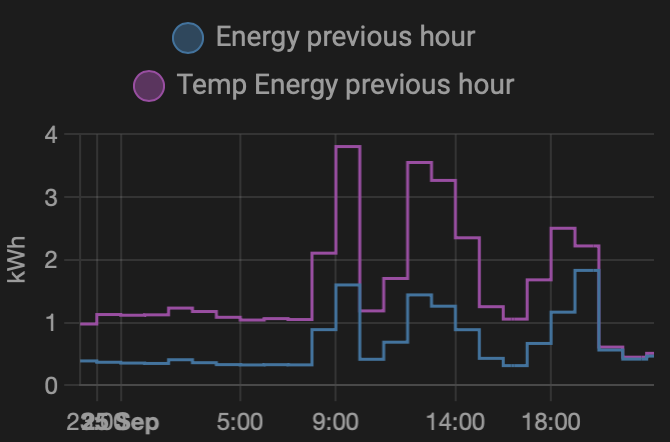
-
Hi everyone, I just implemented this energy meter and it's working quite good. Thanks for all the help.
I have 1 question, however. Since my sensors runs on batteries, it sometimes dies. I then need to replace the batteries and "restart" the counting. It's not ideal, but I have no way of plugin the sensor to power next to the meter.
When the sensor dies, I read the kWh reading of the meter manually and store it in an input variable. How can I use this to set the kWh value of the mysensor variable at initialization?
I see this line:
request(PC_CHILD_ID, V_VAR1);, however it's never running for me. Somehow it does not work properly with home assistant.Would
request(KWH_CHILD_ID, V_KWH);do the trick? (provided that I store the kWh value from the meter in the same state created by the mysensor S0 pulse counter)thanks a lot
-
Done that... reset everything..still the same
here is my code
#define DIGITAL_INPUT_SENSOR 3 // The digital input you attached your light sensor. (Only 2 and 3 generates interrupt!)
#define PULSE_FACTOR 1000 // Nummber of blinks per KWH of your meeter
#define SLEEP_MODE false // Watt-value can only be reported when sleep mode is false.
#define MAX_WATT 10000 // Max watt value to report. This filetrs outliers.
#define CHILD_ID 1 // Id of the sensor childunsigned long SEND_FREQUENCY = 5000; // Minimum time between send (in milliseconds). We don't wnat to spam the gateway.
double ppwh = ((double)PULSE_FACTOR)/1000; // Pulses per watt hour
bool pcReceived = true;
volatile unsigned long pulseCount = 0;
volatile unsigned long lastBlink = 0;
volatile unsigned long watt = 0;
unsigned long oldPulseCount = 0;
unsigned long oldWatt = 0;
double oldKwh;
unsigned long lastSend;
MyMessage wattMsg(CHILD_ID,V_WATT);
MyMessage kwhMsg(CHILD_ID,V_KWH);
MyMessage pcMsg(CHILD_ID,V_VAR1);void setup()
{
// Fetch last known pulse count value from gw
request(CHILD_ID, V_VAR1);// Use the internal pullup to be able to hook up this sketch directly to an energy meter with S0 output
// If no pullup is used, the reported usage will be too high because of the floating pin
pinMode(DIGITAL_INPUT_SENSOR,INPUT_PULLUP);attachInterrupt(digitalPinToInterrupt(DIGITAL_INPUT_SENSOR), onPulse, RISING);
lastSend=millis();
}void presentation() {
// Send the sketch version information to the gateway and Controller
sendSketchInfo("Energy Meter", "1.0");// Register this device as power sensor
present(CHILD_ID, S_POWER);
}void loop()
{
unsigned long now = millis();
// Only send values at a maximum frequency or woken up from sleep
bool sendTime = now - lastSend > SEND_FREQUENCY;
if (pcReceived && (SLEEP_MODE || sendTime)) {
// New watt value has been calculated
if (!SLEEP_MODE && watt != oldWatt) {
// Check that we dont get unresonable large watt value.
// could hapen when long wraps or false interrupt triggered
if (watt<((unsigned long)MAX_WATT)) {
send(wattMsg.set(watt)); // Send watt value to gw
}
Serial.print("Watt:");
Serial.println(watt);
oldWatt = watt;
}// Pulse cout has changed if (pulseCount != oldPulseCount) { send(pcMsg.set(pulseCount)); // Send pulse count value to gw double kwh = ((double)pulseCount/((double)PULSE_FACTOR)); oldPulseCount = pulseCount; if (kwh != oldKwh) { send(kwhMsg.set(kwh, 4)); // Send kwh value to gw oldKwh = kwh; } } lastSend = now;} else if (sendTime && !pcReceived) {
// No count received. Try requesting it again
request(CHILD_ID, V_VAR1);
lastSend=now;
}if (SLEEP_MODE) {
sleep(SEND_FREQUENCY);
}
}void receive(const MyMessage &message) {
if (message.type==V_VAR1) {
pulseCount = oldPulseCount = message.getLong();
Serial.print("Received last pulse count from gw:");
Serial.println(pulseCount);
pcReceived = true;
}
}void onPulse()
{
if (!SLEEP_MODE) {
unsigned long newBlink = micros();
unsigned long interval = newBlink-lastBlink;
if (interval<10000L) { // Sometimes we get interrupt on RISING
return;
}
watt = (3600000000.0 /interval) / ppwh;
lastBlink = newBlink;
}
pulseCount++;
}@asgardro Thanks for your nice prompt feedback.
-
Pulse Power Measurement: Measuring Instantaneous Power of a Short Pulse. ... Thermopile sensors are often used to measure single shot pulse energy;
-
I've been building one of these pulse meters up, it seems to be working on the bench very nice. Just got to build a case and get a power supply of the Arduino. But I have designed a case to hold the LM393 sensor onto the meter. I removed the light sensor and re-soldered it flush to the board making it easier to mount on the meter. Its a simple box but works quite well.
The files are on thingiverse here
Hope this is useful.
@keithellis Lovely idea.
I've followed suit and knocked up one but with the sensor facing the other way, so that it faces the meter, and the preset pot is and LEDs are facing away from the meter.That way the sensor side of the case can be stuck to the face of the meter, and the pot adjusted without removing it from the meter. The flashing light on DO flashes in sync with the LED on the meter. Theres a little ring that holds the sensor flush with the face of the case so it can lie flat on the front of the meter.
Also, its a good idea to use black / dark coloured PLA so as to block out the any stray light that may illuminate the sensor (such as when the meter man comes to read it and shines a bright torch to see the dials).
-
The ambiguity is likely because MyMessage::set has overloads for different integer types, and the volatile qualifier on pulseCount/watt leaves no exact match. Rather than replacing every unsigned long, try copying the ISR-shared value into a plain uint32_t under noInterrupts()/interrupts() and pass that to set(), or add an explicit (uint32_t) cast at the call site. Keep pulseCount volatile since it is modified in the ISR; only the value sent needs to be non-volatile.



Hello! It looks like you're interested in this conversation, but you don't have an account yet.
Getting fed up of having to scroll through the same posts each visit? When you register for an account, you'll always come back to exactly where you were before, and choose to be notified of new replies (either via email, or push notification). You'll also be able to save bookmarks and upvote posts to show your appreciation to other community members.
With your input, this post could be even better 💗
Register Login