simple ping check - sensor to gw
-
I have experienced with recivetime from Domoticz and are getting the same behavior like @abrasha
Its hard for a node to fetch the time. I have a whileloop which will request the time every 5 sec if not recieved and it can take a long time.
I have tried different radios and also different distances without success and was thinking it was some error I made before seeing this...
I will follow this thread and see...Controller: Proxmox VM - Home Assistant
MySensors GW: Arduino Uno - W5100 Ethernet, Gw Shield Nrf24l01+ 2,4Ghz
MySensors GW: Arduino Uno - Gw Shield RFM69, 433mhz
RFLink GW - Arduino Mega + RFLink Shield, 433mhz -
I have experienced with recivetime from Domoticz and are getting the same behavior like @abrasha
Its hard for a node to fetch the time. I have a whileloop which will request the time every 5 sec if not recieved and it can take a long time.
I have tried different radios and also different distances without success and was thinking it was some error I made before seeing this...
I will follow this thread and see...@sundberg84 did you track the request from the node to the controller and back? If it is troublesome for whatever reason we should be able to figure out where it goes wrong...
E.g. does the request end up at the controller? Does the response arrive at the sensor?http://yveaux.blogspot.nl
-
@sundberg84 did you track the request from the node to the controller and back? If it is troublesome for whatever reason we should be able to figure out where it goes wrong...
E.g. does the request end up at the controller? Does the response arrive at the sensor?@Yveaux - I can dig deeper into it if that will help.
So far, yes - both request (receive) and response (send) is seen in the gateway - but the error led is blinking when it sends the response back to the node. The response cant be seen in the node log (off course - since everything would be ok then). My guess is its lost in the responce back between the gw and node. There might also be a repeater involved but I can make a more detailed trace with logs.Controller: Proxmox VM - Home Assistant
MySensors GW: Arduino Uno - W5100 Ethernet, Gw Shield Nrf24l01+ 2,4Ghz
MySensors GW: Arduino Uno - Gw Shield RFM69, 433mhz
RFLink GW - Arduino Mega + RFLink Shield, 433mhz -
@Yveaux - I can dig deeper into it if that will help.
So far, yes - both request (receive) and response (send) is seen in the gateway - but the error led is blinking when it sends the response back to the node. The response cant be seen in the node log (off course - since everything would be ok then). My guess is its lost in the responce back between the gw and node. There might also be a repeater involved but I can make a more detailed trace with logs. -
@abrasha small detail, but what you've made is a 'watchdog' between sensor and controller. The time requests are handled by the controller, so if the gateway responds, but the controller is down you will still get no time response.
i just need something like an "ack" or any value that will show me that the GW responds, and if not - execute hw_reboot() to power-cycle the node and force it to reconnect to the GW.
I wonder if a lost connection between gateway and sensor will be re-established by rebooting the sensor.
Some failure modes:- Non-responsive sensor (sensor 'hangs'): it will not be able to communicate at all, or reboot itself -> the hardware watchdog will provide a better solution
- Non-responsive radio: the radio might recover by initialising it again (executed when the sensor restarts). If radio 'hangs' you'll probably need to powercycle it to become responsive again.
- Non-responsive gateway: bad luck, as reboot of the sensor will not recover the gateway.
- Non-responsive controller: bad luck, as reboot of the sensor will not recover the controller.
Am I forgetting something?
@Yveaux well, this topic started when i want to check my system and i see red bars in domoticz, so if domoticz doesnt show at all, i know the controller is down and for this issue youre right i dont have any solution right now (maybe a node with relay to repower the Rpi?:sunglasses: ) and this is a rare situation.
now after digging in the forum and upgrading nodes and repeaters with seperate power, decaps and tinfoil wrap, i still get sometimes hangouts which magically dissappear after pulling the plug and reinserting it. cant explain why but thats always work. unless a repeater is down...
now - a non repsonisve sensor - you mean like DHT? so i'll see there is abnormal reading - e.g. high temp at night - and this wont trigger the reset because the connection is fine.
non responsive radio - if thats the point after the reset upgrade - thats also a rare situation, and i'll replace it.
non responsive GW - i'll see too much nodes not reconnecting, also rare, but more easy to discover and debug.
non repsonsive controller - also rare and discoverable quickly.now, i dont think there is any downside of resetting a node - well a hw_reboot seem to stuck an arduino... - and resending the find parent procedure from time to time wont flood the network . or im wrong?
@sundberg84 well about the response time, i think there is a delay but it is still good to recieve it within the time i define as critical for a node to lose connection e.g. 30 minutes or so.
the problem is, if a temp node is sending its data without any problem for a long time but there is only problem in recieving the ping from the GW - GW busy, repeaters too busy, or the fact that every node sends time requests flood the network and cause data to dissapear - NOW THAT CAN MAKE THING WORSE....
currently i dont have any controllable nodes so my gw dosent send any data to any node - only recieving so all the data goes in one direction.
i'll test and see.
Happy Hannuka!!
as my network is used at my work, and im looking for commercial alternatives because of the connection failures issue im struggling to overcome(like in this post), reading this thread woke up the urge to finally esatblish my own home network, so i sat now and reinstalled domoticz and registered my first node - for controlling my living room blind!! at last after year from the arrival of the order from aliexepress...thank you all guys, learnt a lot from you and other forum members.
good night!
-
@abrasha small detail, but what you've made is a 'watchdog' between sensor and controller. The time requests are handled by the controller, so if the gateway responds, but the controller is down you will still get no time response.
i just need something like an "ack" or any value that will show me that the GW responds, and if not - execute hw_reboot() to power-cycle the node and force it to reconnect to the GW.
I wonder if a lost connection between gateway and sensor will be re-established by rebooting the sensor.
Some failure modes:- Non-responsive sensor (sensor 'hangs'): it will not be able to communicate at all, or reboot itself -> the hardware watchdog will provide a better solution
- Non-responsive radio: the radio might recover by initialising it again (executed when the sensor restarts). If radio 'hangs' you'll probably need to powercycle it to become responsive again.
- Non-responsive gateway: bad luck, as reboot of the sensor will not recover the gateway.
- Non-responsive controller: bad luck, as reboot of the sensor will not recover the controller.
Am I forgetting something?
@Yveaux & @sundberg84 & @mfalkvidd
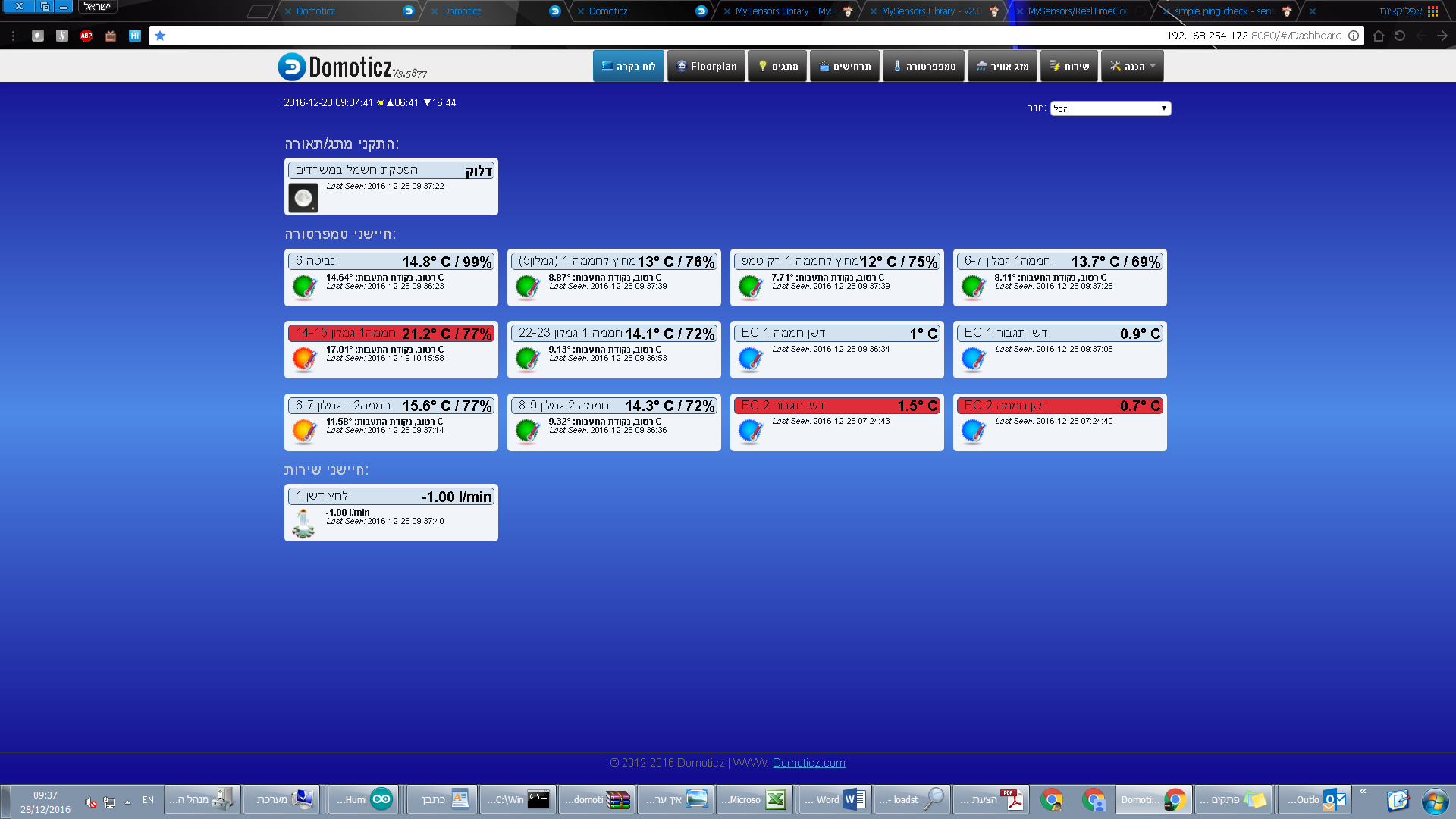
really frustrating to see this pitcture in the morning:
the left one is old disconnection (i was too lazy to repower it...) but the two right ones (actually one node with two childs) are fresh from 2 hours ago.
now these are the last nodes i upgraded with the tinfoil and decap (10uF), and they're also with seperate power (nano-io-shield), and its not a GW issue because the two nodes to the left transmit to the same E-GW and they are slightly farer than this node in respect to the E-GW, and also all the nodes and the E-GW itself upgraded with tinfoil and decap, and the E-GW itsefl (uno + w5100 shield) has nrf powered with dc-dc buck converter connected to VIN.now thats the node i'll choose for my test.
BTW thats a two channel 4-20ma node connected to two industrial EC (electric conductivity) to measure fertilizer concentration in irrigation pipes. to inform me when there's a failure in the fertilizer pump
-
@Yveaux well, this topic started when i want to check my system and i see red bars in domoticz, so if domoticz doesnt show at all, i know the controller is down and for this issue youre right i dont have any solution right now (maybe a node with relay to repower the Rpi?:sunglasses: ) and this is a rare situation.
now after digging in the forum and upgrading nodes and repeaters with seperate power, decaps and tinfoil wrap, i still get sometimes hangouts which magically dissappear after pulling the plug and reinserting it. cant explain why but thats always work. unless a repeater is down...
now - a non repsonisve sensor - you mean like DHT? so i'll see there is abnormal reading - e.g. high temp at night - and this wont trigger the reset because the connection is fine.
non responsive radio - if thats the point after the reset upgrade - thats also a rare situation, and i'll replace it.
non responsive GW - i'll see too much nodes not reconnecting, also rare, but more easy to discover and debug.
non repsonsive controller - also rare and discoverable quickly.now, i dont think there is any downside of resetting a node - well a hw_reboot seem to stuck an arduino... - and resending the find parent procedure from time to time wont flood the network . or im wrong?
@sundberg84 well about the response time, i think there is a delay but it is still good to recieve it within the time i define as critical for a node to lose connection e.g. 30 minutes or so.
the problem is, if a temp node is sending its data without any problem for a long time but there is only problem in recieving the ping from the GW - GW busy, repeaters too busy, or the fact that every node sends time requests flood the network and cause data to dissapear - NOW THAT CAN MAKE THING WORSE....
currently i dont have any controllable nodes so my gw dosent send any data to any node - only recieving so all the data goes in one direction.
i'll test and see.
Happy Hannuka!!
as my network is used at my work, and im looking for commercial alternatives because of the connection failures issue im struggling to overcome(like in this post), reading this thread woke up the urge to finally esatblish my own home network, so i sat now and reinstalled domoticz and registered my first node - for controlling my living room blind!! at last after year from the arrival of the order from aliexepress...thank you all guys, learnt a lot from you and other forum members.
good night!
@abrasha said:
now - a non repsonisve sensor - you mean like DHT? so i'll see there is abnormal reading - e.g. high temp at night - and this wont trigger the reset because the connection is fine.
No, I mean a sensor that should be running your code but apparently is executing some code that prevents your code from running -- e.g. it runs an endless loop or resets over and over again.
When a sensor reports abnormal readings I would first try to debug the sensor itself. The data sent from the sensor to the gateway is protected by a checksum, so the data is already corrupt when sent by the node.now, i dont think there is any downside of resetting a node - well a hw_reboot seem to stuck an arduino... - and resending the find parent procedure from time to time wont flood the network . or im wrong?
The penalty of announcing a node on the network is limited, provided you only do it once in a while.
Anyway, if you have multiple nodes sending to your gateway and only one fails, we can pretty safely nail things down to this single node; rest of your network seems ok.
Some things to check:
- I think you're using an amplified nRF on this node. Correct? They are especially sensitive to power (due to their high power usage). Maybe you can attach a regular nRF and try again.
- Exactly how do you power the nRF on the faulty node? Using the power from a nano might not be sufficient for the radio. You could try using 2xAA battery to directly power the radio -- no stepup/regulator inbetween. This will give a very stable and powerful power supply to your radio.
- I would try swapping the radio anyhow and see how it performs. A flaky radio can cause hangups.
- You could try stripping down the sketch on the node so it will send a value at regular intervals. Leave out the code to collect the sensor values to rule out the sensor hangs there.
- Post your sketch + schematic + photo's here for review -- it has helped numerous others in the past
-
@abrasha said:
now - a non repsonisve sensor - you mean like DHT? so i'll see there is abnormal reading - e.g. high temp at night - and this wont trigger the reset because the connection is fine.
No, I mean a sensor that should be running your code but apparently is executing some code that prevents your code from running -- e.g. it runs an endless loop or resets over and over again.
When a sensor reports abnormal readings I would first try to debug the sensor itself. The data sent from the sensor to the gateway is protected by a checksum, so the data is already corrupt when sent by the node.now, i dont think there is any downside of resetting a node - well a hw_reboot seem to stuck an arduino... - and resending the find parent procedure from time to time wont flood the network . or im wrong?
The penalty of announcing a node on the network is limited, provided you only do it once in a while.
Anyway, if you have multiple nodes sending to your gateway and only one fails, we can pretty safely nail things down to this single node; rest of your network seems ok.
Some things to check:
- I think you're using an amplified nRF on this node. Correct? They are especially sensitive to power (due to their high power usage). Maybe you can attach a regular nRF and try again.
- Exactly how do you power the nRF on the faulty node? Using the power from a nano might not be sufficient for the radio. You could try using 2xAA battery to directly power the radio -- no stepup/regulator inbetween. This will give a very stable and powerful power supply to your radio.
- I would try swapping the radio anyhow and see how it performs. A flaky radio can cause hangups.
- You could try stripping down the sketch on the node so it will send a value at regular intervals. Leave out the code to collect the sensor values to rule out the sensor hangs there.
- Post your sketch + schematic + photo's here for review -- it has helped numerous others in the past
@Yveaux said:
The penalty of announcing a node on the network is limited, provided you only do it once in a while.
well in my experience i dont think so, i tried sometime to check a node with a bug in its sensor (dht sending only temp) and i reset it several times in a minute or two and i didnt get any penalty execpt for my time burnt up..:suspect:
ok, so these are the pictures of the node:
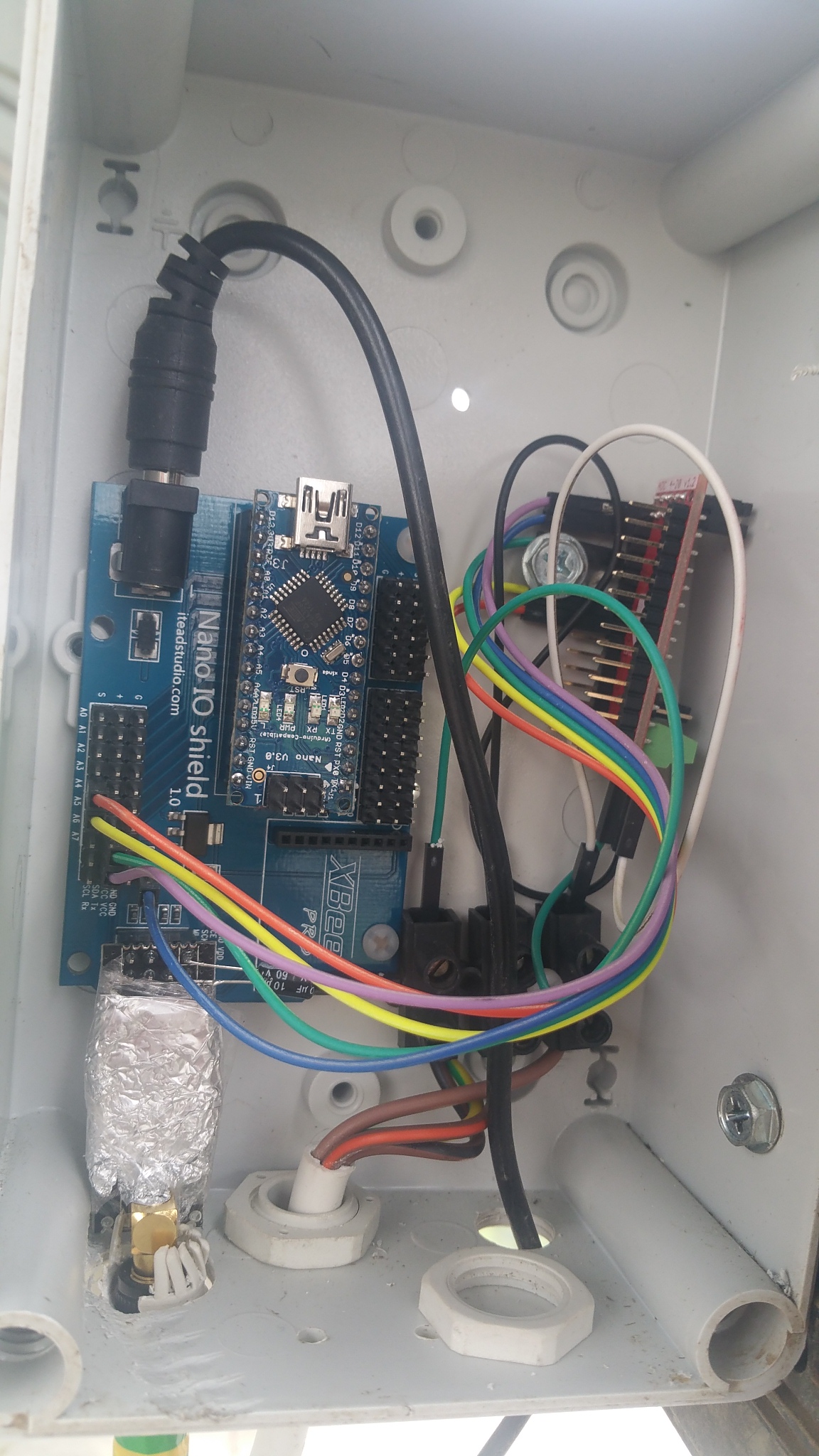
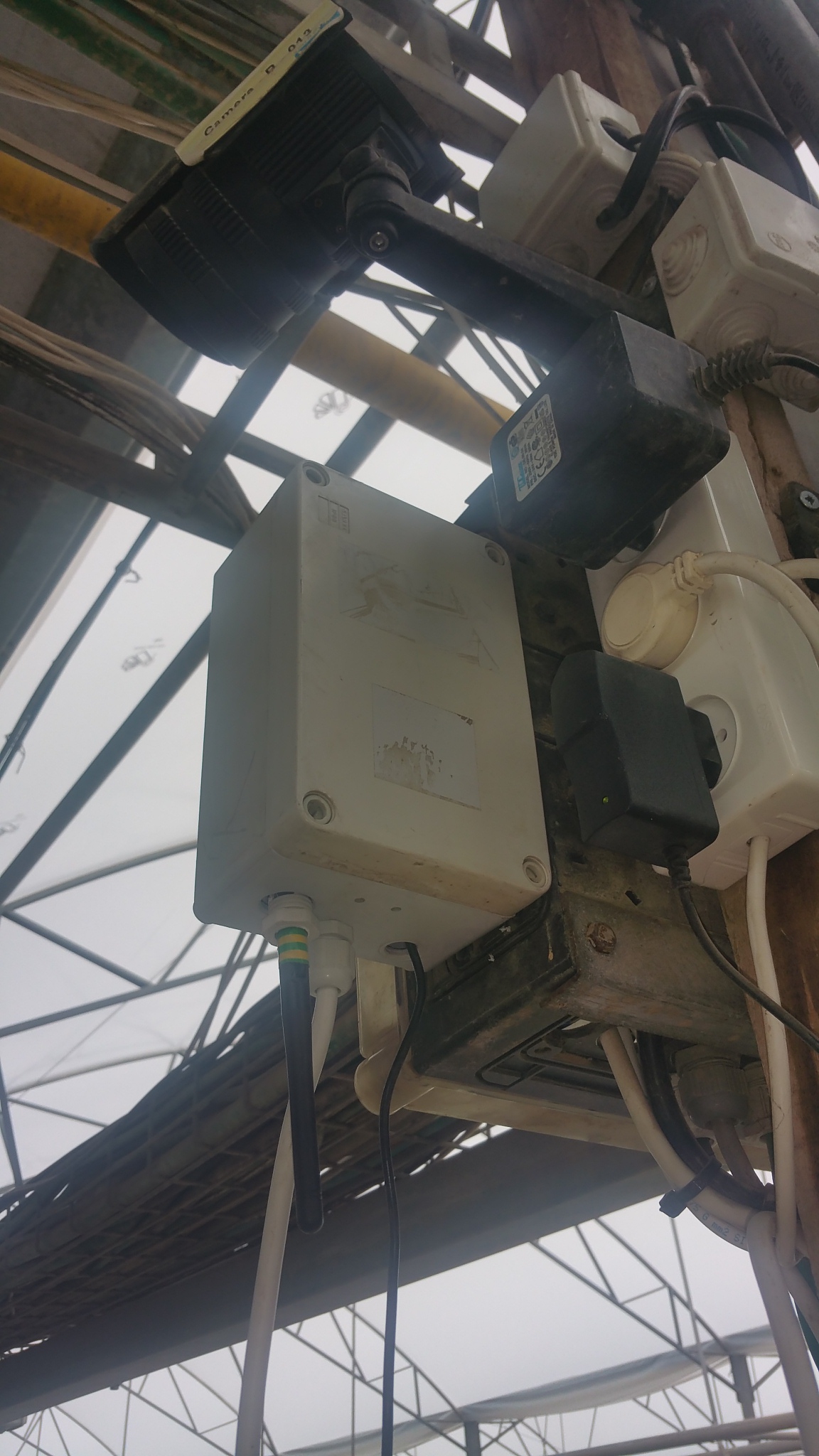
you can see the nano-io-shield which these days used in almost all of my nodes - even for repeaters, the tinfoil cover i added a week ago to the E-GW and all 3 nodes which transmit to it, and a 10uF cap - which is somehow smaller in size from a 4.7uF i bought from somewhere else which makes me wonder if its really 10uF.... all parts are chinese from this seller.
the power comes from 12v dc wall socket.
the red nano-like circiuit on the right is the 4-20ma ADC from circuitar which connect to the industrial EC meter on its 4-20ma signal output.and the final code is this:
/**
   Read a 4-20mA sensor.

   Copyright (c) 2014 Circuitar
   All rights reserved.

   This software is released under a BSD license. See the attached LICENSE file for details.
*/
#include <Wire.h>
#include <Nanoshield_ADC.h>
#include <MySensor.h>
#include <SPI.h>


unsigned long SLEEP_TIME = 30000; // Sleep time between reads (in milliseconds)
#define CHILD_ID1 0
#define CHILD_ID2 1


Nanoshield_ADC adc;
float value = 0;
float value2 = 0;

//time check (ping) variables
boolean timeReceived = false;
unsigned long premil = 0, lastRequest = 0;

MySensor gw;
MyMessage msg1(CHILD_ID1, V_TEMP);
MyMessage msg2(CHILD_ID2, V_TEMP);

void setup()
{
  Serial.begin(115200);
  gw.begin();
  gw.sendSketchInfo("circuitar EC   H1-2ch WITH-WTD", "1.1");
  gw.present(CHILD_ID1, S_TEMP);
  gw.present(CHILD_ID2, S_TEMP);


  Serial.print("16-bit ADC Nanoshield Test - Read 4-20mA sensor (channel A");
  Serial.println(")");
  adc.begin();

  // Adjust gain to two (2.048V range) to get maximum resolution for 4-20mA range
  adc.setGain(GAIN_TWO);
  gw.requestTime(receiveTime);
}

// This is called when a new time value was received
void receiveTime(unsigned long controllerTime) {
  // Ok, set incoming time
  Serial.print("Time value received: ");
  Serial.println(controllerTime);
  timeReceived = true;
}

void loop()
{
  unsigned long now = millis();
  gw.process();
  // If no time has been received yet, request it every 10 second from controller
  // When time has been received, request update every hour

  if ((timeReceived && (now - lastRequest) > (1800UL * 1000UL))){ //if 30 min passed and request answered - send again
    // Request time from controller.
    Serial.println("requesting time");
    gw.requestTime(receiveTime);
    lastRequest = now;
  }
  else if ((!timeReceived && (now - lastRequest) > (2400UL * 1000UL))){ //if no response within 40 min - reconnect to gw
    Serial.println("no connection - reconnect to gw");
    gw.begin();
  }

  Serial.print(adc.read4to20mA(0), 6);
  Serial.println("mA");
  value = (1.2636 * adc.read4to20mA(0)) - 5.0669; //a   נוסחה ע"פ עקומת כיול לטווח 0-20
  Serial.print(value);
  Serial.println(" mS EC for deshen hamama");
  gw.send(msg1.set(value, 2));

  gw.wait(3000);

  Serial.print(adc.read4to20mA(1), 6);
  Serial.println("mA");
  value2 = (1.2636 * adc.read4to20mA(1)) - 5.0669; //a   נוסחה ע"פ עקומת כיול לטווח 0-20
  Serial.print(value2);
  Serial.println(" mS EC for tigbur");
  gw.send(msg2.set(value2, 2));

  gw.wait(30000); // every 0.5 min sample
}
it uses the original circuitar library for the ADC unit, and combined to mysensors 1.5.4 example. the variable chosen is V_TEMP because afer various checkings i found that the temperature device in domoticz has the most detailed history of values that make it easier to track problems over time. the downside is only aesthetic.. but i can live with it.
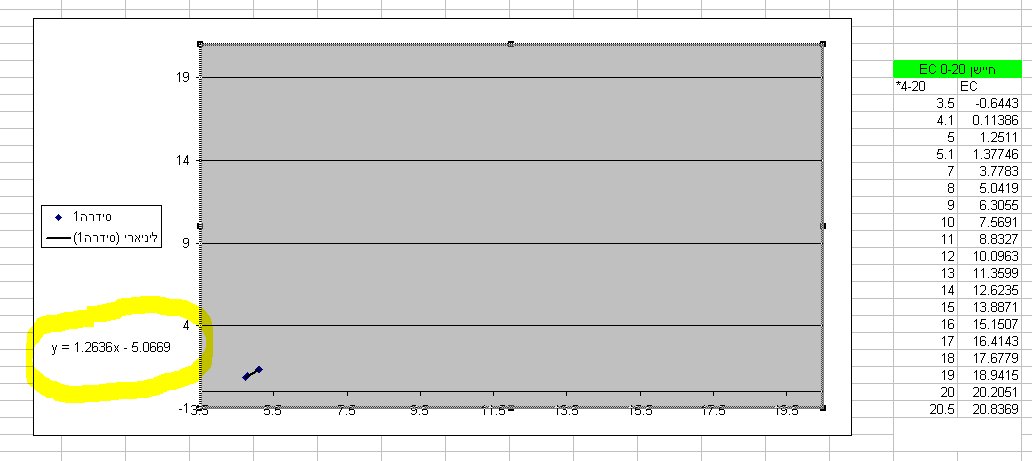
the principle of the 4-20ma output is based on the range of the EC sensor - e.g. from 0ms (milli-siemens) to 20ms, checking several values and theire corresponding 4-20ma output value and placing them into calibration chart in excel to retrieve the trend line equation used to calculate the EC value from the 4-20ma value.
something like this:thanks to my laboratory classes in the university...
-
@Yveaux said:
The penalty of announcing a node on the network is limited, provided you only do it once in a while.
well in my experience i dont think so, i tried sometime to check a node with a bug in its sensor (dht sending only temp) and i reset it several times in a minute or two and i didnt get any penalty execpt for my time burnt up..:suspect:
ok, so these are the pictures of the node:
you can see the nano-io-shield which these days used in almost all of my nodes - even for repeaters, the tinfoil cover i added a week ago to the E-GW and all 3 nodes which transmit to it, and a 10uF cap - which is somehow smaller in size from a 4.7uF i bought from somewhere else which makes me wonder if its really 10uF.... all parts are chinese from this seller.
the power comes from 12v dc wall socket.
the red nano-like circiuit on the right is the 4-20ma ADC from circuitar which connect to the industrial EC meter on its 4-20ma signal output.and the final code is this:
/**
   Read a 4-20mA sensor.

   Copyright (c) 2014 Circuitar
   All rights reserved.

   This software is released under a BSD license. See the attached LICENSE file for details.
*/
#include <Wire.h>
#include <Nanoshield_ADC.h>
#include <MySensor.h>
#include <SPI.h>


unsigned long SLEEP_TIME = 30000; // Sleep time between reads (in milliseconds)
#define CHILD_ID1 0
#define CHILD_ID2 1


Nanoshield_ADC adc;
float value = 0;
float value2 = 0;

//time check (ping) variables
boolean timeReceived = false;
unsigned long premil = 0, lastRequest = 0;

MySensor gw;
MyMessage msg1(CHILD_ID1, V_TEMP);
MyMessage msg2(CHILD_ID2, V_TEMP);

void setup()
{
  Serial.begin(115200);
  gw.begin();
  gw.sendSketchInfo("circuitar EC   H1-2ch WITH-WTD", "1.1");
  gw.present(CHILD_ID1, S_TEMP);
  gw.present(CHILD_ID2, S_TEMP);


  Serial.print("16-bit ADC Nanoshield Test - Read 4-20mA sensor (channel A");
  Serial.println(")");
  adc.begin();

  // Adjust gain to two (2.048V range) to get maximum resolution for 4-20mA range
  adc.setGain(GAIN_TWO);
  gw.requestTime(receiveTime);
}

// This is called when a new time value was received
void receiveTime(unsigned long controllerTime) {
  // Ok, set incoming time
  Serial.print("Time value received: ");
  Serial.println(controllerTime);
  timeReceived = true;
}

void loop()
{
  unsigned long now = millis();
  gw.process();
  // If no time has been received yet, request it every 10 second from controller
  // When time has been received, request update every hour

  if ((timeReceived && (now - lastRequest) > (1800UL * 1000UL))){ //if 30 min passed and request answered - send again
    // Request time from controller.
    Serial.println("requesting time");
    gw.requestTime(receiveTime);
    lastRequest = now;
  }
  else if ((!timeReceived && (now - lastRequest) > (2400UL * 1000UL))){ //if no response within 40 min - reconnect to gw
    Serial.println("no connection - reconnect to gw");
    gw.begin();
  }

  Serial.print(adc.read4to20mA(0), 6);
  Serial.println("mA");
  value = (1.2636 * adc.read4to20mA(0)) - 5.0669; //a   נוסחה ע"פ עקומת כיול לטווח 0-20
  Serial.print(value);
  Serial.println(" mS EC for deshen hamama");
  gw.send(msg1.set(value, 2));

  gw.wait(3000);

  Serial.print(adc.read4to20mA(1), 6);
  Serial.println("mA");
  value2 = (1.2636 * adc.read4to20mA(1)) - 5.0669; //a   נוסחה ע"פ עקומת כיול לטווח 0-20
  Serial.print(value2);
  Serial.println(" mS EC for tigbur");
  gw.send(msg2.set(value2, 2));

  gw.wait(30000); // every 0.5 min sample
}
it uses the original circuitar library for the ADC unit, and combined to mysensors 1.5.4 example. the variable chosen is V_TEMP because afer various checkings i found that the temperature device in domoticz has the most detailed history of values that make it easier to track problems over time. the downside is only aesthetic.. but i can live with it.
the principle of the 4-20ma output is based on the range of the EC sensor - e.g. from 0ms (milli-siemens) to 20ms, checking several values and theire corresponding 4-20ma output value and placing them into calibration chart in excel to retrieve the trend line equation used to calculate the EC value from the 4-20ma value.
something like this:thanks to my laboratory classes in the university...
@abrasha I had a quick look at your code:
- timeReceived is never set to true (apart from initial value). This means once the time is received it will no longer wait for new incoming timestamps again.
- I'm not sure what will happen when gw.begin() is called multiple times. It's better to reset the node.
- I had a quick look at the implementation of adc.read4to20mA(). There are some waiting loops and I2C communication in there. If the implementation is not 100% robust this library could also cause a hang of your microcontroller. As suggested, run the sensor without the adc code and see if it keeps running.
The nano IO shield seems to use an AMS1117 to convert the 12V from the adapter to 5V / 3.3V. I've seen cheap China clones of the AMS1117 which could barely produce 100mA output.
100mA is too low for the amplified nRF24L01+, nano and ADC.
As said, try powering the radio from 2xAA batteries without regulator (at least for now, to get an idea if it runs stable then). -
@abrasha I had a quick look at your code:
- timeReceived is never set to true (apart from initial value). This means once the time is received it will no longer wait for new incoming timestamps again.
- I'm not sure what will happen when gw.begin() is called multiple times. It's better to reset the node.
- I had a quick look at the implementation of adc.read4to20mA(). There are some waiting loops and I2C communication in there. If the implementation is not 100% robust this library could also cause a hang of your microcontroller. As suggested, run the sensor without the adc code and see if it keeps running.
The nano IO shield seems to use an AMS1117 to convert the 12V from the adapter to 5V / 3.3V. I've seen cheap China clones of the AMS1117 which could barely produce 100mA output.
100mA is too low for the amplified nRF24L01+, nano and ADC.
As said, try powering the radio from 2xAA batteries without regulator (at least for now, to get an idea if it runs stable then).@Yveaux I think you meant timereceived never set to false.
Yes you're right i need to set it false every time i send the request again.About the reset there is an issue with it in some bootloaders that cause the arduino to stuck in a bootloop (too much Familiar with me in my android rom flashing...). I had two nanos this week that one reset normally and one got bootlooped.
I don't have time to check this on batteries because it randomly fails so it can take two weeks until next failure...
Time will tell... Let's meet in month from now :smiley:
-
@Yveaux I think you meant timereceived never set to false.
Yes you're right i need to set it false every time i send the request again.About the reset there is an issue with it in some bootloaders that cause the arduino to stuck in a bootloop (too much Familiar with me in my android rom flashing...). I had two nanos this week that one reset normally and one got bootlooped.
I don't have time to check this on batteries because it randomly fails so it can take two weeks until next failure...
Time will tell... Let's meet in month from now :smiley:
-
if ((timeReceived && (now - lastRequest) > (1800UL * 1000UL))) { //if 30 min passed and request answered - send again
    // Request time from controller.
    Serial.println("requesting time");
    timeReceived = false;
    gw.requestTime(receiveTime);
    lastRequest = now;
  }
  else if ((!timeReceived && (now - lastRequest) > (2400UL * 1000UL))) { //if no response within 40 min - reconnect to gw
    Serial.println("no connection - reconnect to gw");
    lastRequest = now;
    gw.begin();
  }
added two lines:
timeReceived = false; at the IF statement
and
lastRequest = now; at the ELSE IF statmentnow, time will tell :bowtie:
finally, i think these are really last attempts to revive my network until 433mhz chips arrive, and also im looking for some commercial alternatives, so im not going to play too much with this issue if im going to install new system. but all my knowledge will be used for my home network :wink:
-
@abrasha I had a quick look at your code:
- timeReceived is never set to true (apart from initial value). This means once the time is received it will no longer wait for new incoming timestamps again.
- I'm not sure what will happen when gw.begin() is called multiple times. It's better to reset the node.
- I had a quick look at the implementation of adc.read4to20mA(). There are some waiting loops and I2C communication in there. If the implementation is not 100% robust this library could also cause a hang of your microcontroller. As suggested, run the sensor without the adc code and see if it keeps running.
The nano IO shield seems to use an AMS1117 to convert the 12V from the adapter to 5V / 3.3V. I've seen cheap China clones of the AMS1117 which could barely produce 100mA output.
100mA is too low for the amplified nRF24L01+, nano and ADC.
As said, try powering the radio from 2xAA batteries without regulator (at least for now, to get an idea if it runs stable then).@Yveaux said:
The nano IO shield seems to use an AMS1117 to convert the 12V from the adapter to 5V / 3.3V. I've seen cheap China clones of the AMS1117 which could barely produce 100mA output.
100mA is too low for the amplified nRF24L01+, nano and ADC.I use this shield (china clone) with RFM69 and I have a lot of power issues when i try to transmit several packets.
-
@Yveaux said:
The nano IO shield seems to use an AMS1117 to convert the 12V from the adapter to 5V / 3.3V. I've seen cheap China clones of the AMS1117 which could barely produce 100mA output.
100mA is too low for the amplified nRF24L01+, nano and ADC.I use this shield (china clone) with RFM69 and I have a lot of power issues when i try to transmit several packets.
-
@Fabien said:
I have a lot of power issues when i try to transmit several packets.
Well, not surprised :satisfied:
I think 80% of all these strange, non reproducible issues at this forum originate from bad power supplies...and i suppose everyone use chinese clone now and then - thats why my SWATCH-DOG tm:dog: is vital to take over this problems.
now thats my log for the placement of the node after last sketch update:
2016-12-30 10:48:19.509 MySensors: Node: 254, Sketch Name: circuitar EC H1-2ch WIT
2016-12-30 10:48:19.510 MySensors: Node: 254, Sketch Version: 1.1
WIT = WITH-WTD - cut by domoticz/mysensorsif there's another disconnection, i'll post here. well, maybe i'll wait for some of them to prevent spamming..
stay tuned.