Skip to content
  • MySensors
  • OpenHardware.io
  • Categories
  • Recent
  • Tags
  • Popular
Skins
  • Light
  • Brite
  • Cerulean
  • Cosmo
  • Flatly
  • Journal
  • Litera
  • Lumen
  • Lux
  • Materia
  • Minty
  • Morph
  • Pulse
  • Sandstone
  • Simplex
  • Sketchy
  • Spacelab
  • United
  • Yeti
  • Zephyr
  • Dark
  • Cyborg
  • Darkly
  • Quartz
  • Slate
  • Solar
  • Superhero
  • Vapor

  • Default (No Skin)
  • No Skin
Collapse
Brand Logo
  1. Home
  2. General Discussion
  3. CNC PCB milling

CNC PCB milling

Scheduled Pinned Locked Moved General Discussion
933 Posts 28 Posters 140.2k Views 27 Watching
  • Oldest to Newest
  • Newest to Oldest
  • Most Votes
Reply
  • Reply as topic
Log in to reply
This topic has been deleted. Only users with topic management privileges can see it.
  • NeverDieN NeverDie

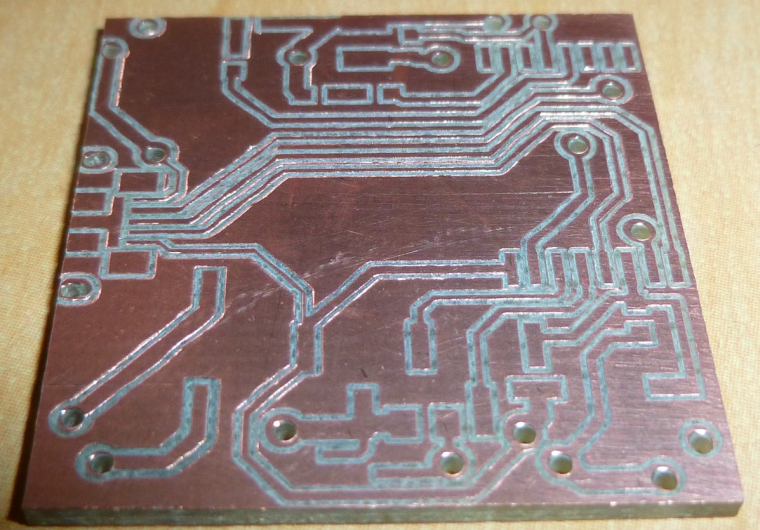
    Here's the final product:
    0_1516743797376_final.jpg
    Three of the vias are located under an SMD module, so I'll just have to try to minimize any solder bumps over them.

    NeverDieN Offline
    NeverDieN Offline
    NeverDie
    Hero Member
    wrote on last edited by
    #460

    Unfortunately, even a tiny solder bump prevents the module from being soldered. I would have to redesign this so that the vias are not under the module.

    1 Reply Last reply
    0
    • dbemowskD Offline
      dbemowskD Offline
      dbemowsk
      wrote on last edited by
      #461

      @NeverDie Just have to say, I have been following this thread for a while now and you have come a long way with this. Great job.

      Vera Plus running UI7 with MySensors, Sonoffs and 1-Wire devices
      Visit my website for more Bits, Bytes and Ramblings from me: http://dan.bemowski.info/

      1 Reply Last reply
      2
      • NeverDieN Offline
        NeverDieN Offline
        NeverDie
        Hero Member
        wrote on last edited by
        #462

        Another good thing for people to know is that you can leave a single-sided blank PCB installed in the CNC and then, as the need arises, cut out additional modules from it:
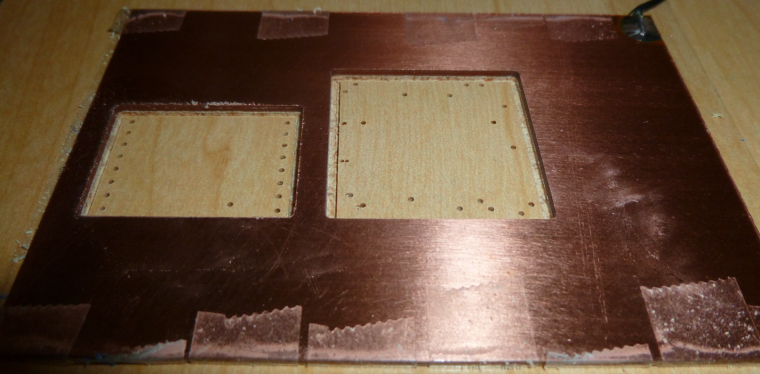
        0_1516811876071_multiple.jpg

        For instance, this morning I cut this module carrier out of the above, already used, copper clad PCB:
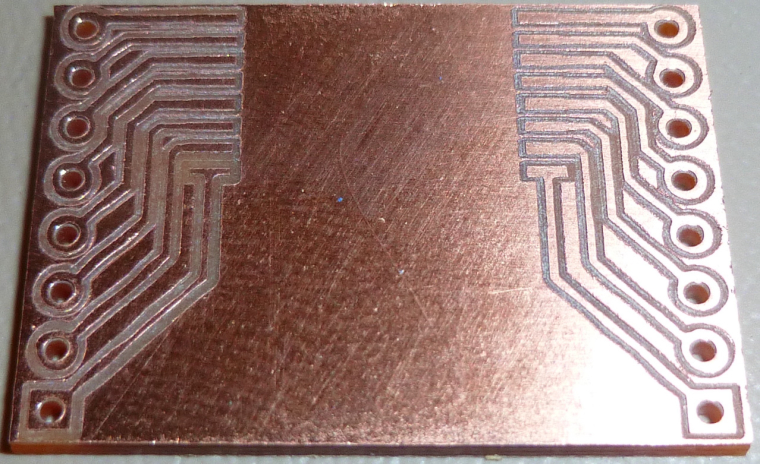
        0_1516811948868_carrier.jpg

        So, for simple small things, it's a handy arrangement, and the incremental cost is negligible.

        zboblamontZ 1 Reply Last reply
        1
        • NeverDieN NeverDie

          Another good thing for people to know is that you can leave a single-sided blank PCB installed in the CNC and then, as the need arises, cut out additional modules from it:
          0_1516811876071_multiple.jpg

          For instance, this morning I cut this module carrier out of the above, already used, copper clad PCB:
          0_1516811948868_carrier.jpg

          So, for simple small things, it's a handy arrangement, and the incremental cost is negligible.

          zboblamontZ Offline
          zboblamontZ Offline
          zboblamont
          wrote on last edited by
          #463

          @neverdie Perhaps a clearer explanation ?

          1 Reply Last reply
          0
          • NeverDieN Offline
            NeverDieN Offline
            NeverDie
            Hero Member
            wrote on last edited by NeverDie
            #464

            One problem I've run into though is that the foil traces can sometimes lift up in the course of ordinary soldering. For instance, the traces connecting the second to the right pin on the Fanstel module seems to have utterly disappeared, leaving that pin unconnected:
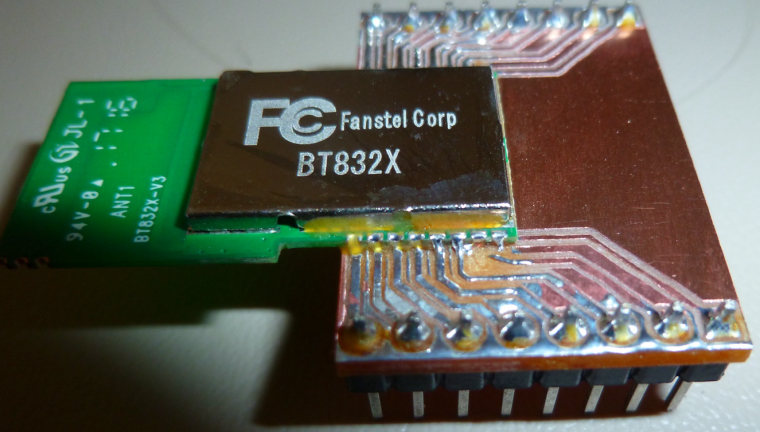
            0_1516822629761_peel.jpg
            Maybe it's the quality of the blank PCB? I just don't know.

            dbemowskD 1 Reply Last reply
            0
            • NeverDieN NeverDie

              One problem I've run into though is that the foil traces can sometimes lift up in the course of ordinary soldering. For instance, the traces connecting the second to the right pin on the Fanstel module seems to have utterly disappeared, leaving that pin unconnected:
              0_1516822629761_peel.jpg
              Maybe it's the quality of the blank PCB? I just don't know.

              dbemowskD Offline
              dbemowskD Offline
              dbemowsk
              wrote on last edited by
              #465

              @neverdie It looks like you could potentially make those traces just a touch wider looking at the receiving end of the module. Woulld that be an option?

              Vera Plus running UI7 with MySensors, Sonoffs and 1-Wire devices
              Visit my website for more Bits, Bytes and Ramblings from me: http://dan.bemowski.info/

              NeverDieN 1 Reply Last reply
              0
              • dbemowskD dbemowsk

                @neverdie It looks like you could potentially make those traces just a touch wider looking at the receiving end of the module. Woulld that be an option?

                NeverDieN Offline
                NeverDieN Offline
                NeverDie
                Hero Member
                wrote on last edited by
                #466

                @dbemowsk said in CNC PCB milling:

                Woulld that be an option?

                Maybe: I'll try a 10 degree bit and tighter autoleveling to see if that gives wider traces.

                dbemowskD 1 Reply Last reply
                0
                • NeverDieN NeverDie

                  @dbemowsk said in CNC PCB milling:

                  Woulld that be an option?

                  Maybe: I'll try a 10 degree bit and tighter autoleveling to see if that gives wider traces.

                  dbemowskD Offline
                  dbemowskD Offline
                  dbemowsk
                  wrote on last edited by
                  #467

                  @neverdie i say that because in your previous pic of the board it looked like that trace was a bit narrow. Because of that it probably couldn't take the heat.

                  Vera Plus running UI7 with MySensors, Sonoffs and 1-Wire devices
                  Visit my website for more Bits, Bytes and Ramblings from me: http://dan.bemowski.info/

                  1 Reply Last reply
                  0
                  • NeverDieN Offline
                    NeverDieN Offline
                    NeverDie
                    Hero Member
                    wrote on last edited by
                    #468

                    It's funny, because I redid the soldering using an altogether new board, and it failed in exactly the same place:
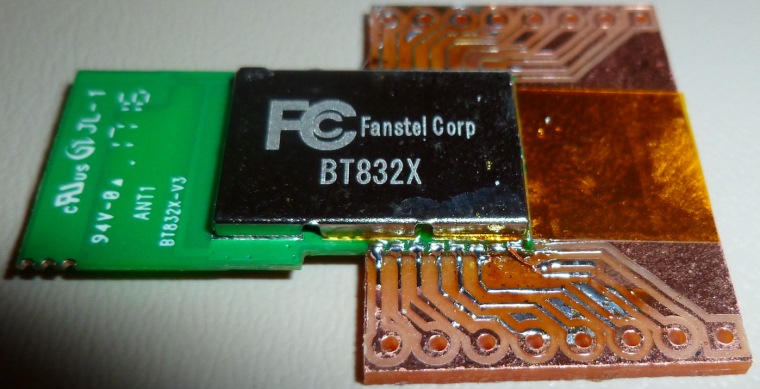
                    0_1516837780290_refail.jpg
                    This time, though, you can actually see the copper trace has curled up away from the board.

                    dbemowskD 1 Reply Last reply
                    0
                    • NeverDieN NeverDie

                      It's funny, because I redid the soldering using an altogether new board, and it failed in exactly the same place:
                      0_1516837780290_refail.jpg
                      This time, though, you can actually see the copper trace has curled up away from the board.

                      dbemowskD Offline
                      dbemowskD Offline
                      dbemowsk
                      wrote on last edited by
                      #469

                      @neverdie It is quite odd that that one did it and some of the others didn't on that side of the board. Looking at your previous image, the pads and traces on the side marked in green look noticeably larger than the ones marked in red. Look at the ones marked with the blue arrow. It looks like those should, or at least could be the same size. Your thru hole pads on the left for the breakout headers also look smaller than the ones on the right. Shouldn't the two sides be a mirror image of each other?
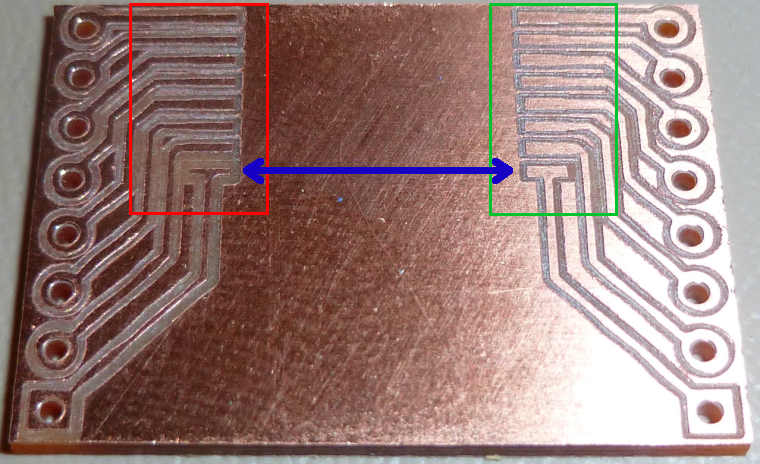
                      0_1516838909597_613075bd-af72-4a92-8663-eb4012fe714a-image.png

                      Vera Plus running UI7 with MySensors, Sonoffs and 1-Wire devices
                      Visit my website for more Bits, Bytes and Ramblings from me: http://dan.bemowski.info/

                      NeverDieN 1 Reply Last reply
                      0
                      • dbemowskD dbemowsk

                        @neverdie It is quite odd that that one did it and some of the others didn't on that side of the board. Looking at your previous image, the pads and traces on the side marked in green look noticeably larger than the ones marked in red. Look at the ones marked with the blue arrow. It looks like those should, or at least could be the same size. Your thru hole pads on the left for the breakout headers also look smaller than the ones on the right. Shouldn't the two sides be a mirror image of each other?
                        0_1516838909597_613075bd-af72-4a92-8663-eb4012fe714a-image.png

                        NeverDieN Offline
                        NeverDieN Offline
                        NeverDie
                        Hero Member
                        wrote on last edited by
                        #470

                        @dbemowsk It's because the left side of the board is higher than the righthand side, and apparently the autoleveling isn't working all that precisely.

                        dbemowskD 1 Reply Last reply
                        0
                        • NeverDieN NeverDie

                          @dbemowsk It's because the left side of the board is higher than the righthand side, and apparently the autoleveling isn't working all that precisely.

                          dbemowskD Offline
                          dbemowskD Offline
                          dbemowsk
                          wrote on last edited by
                          #471

                          @neverdie I can see that the left side looks like it cut deeper, which would cause that. I still think it is the thin traces though. Can you do any manual leveling of the bed? If so, I would attempt that. My Anet A8 3D printer, though not a CNC, is all manual leveling and I do have to check it from time to time.

                          Vera Plus running UI7 with MySensors, Sonoffs and 1-Wire devices
                          Visit my website for more Bits, Bytes and Ramblings from me: http://dan.bemowski.info/

                          NeverDieN 1 Reply Last reply
                          1
                          • dbemowskD dbemowsk

                            @neverdie I can see that the left side looks like it cut deeper, which would cause that. I still think it is the thin traces though. Can you do any manual leveling of the bed? If so, I would attempt that. My Anet A8 3D printer, though not a CNC, is all manual leveling and I do have to check it from time to time.

                            NeverDieN Offline
                            NeverDieN Offline
                            NeverDie
                            Hero Member
                            wrote on last edited by NeverDie
                            #472

                            @dbemowsk said in CNC PCB milling:

                            @neverdie I can see that the left side looks like it cut deeper, which would cause that. I still think it is the thin traces though. Can you do any manual leveling of the bed? If so, I would attempt that. My Anet A8 3D printer, though not a CNC, is all manual leveling and I do have to check it from time to time.

                            I suppose I could shim under the sacrifice board with slips of paper to get the right height.

                            I would have thought that the autoleveling would have accurately compensated though. Not sure why it isn't, especially if I'm autoleveling at 2mm spacing. Maybe this is an area where a future version of the GRBL driver will get it right.

                            E dbemowskD andrewA 3 Replies Last reply
                            0
                            • NeverDieN NeverDie

                              @dbemowsk said in CNC PCB milling:

                              @neverdie I can see that the left side looks like it cut deeper, which would cause that. I still think it is the thin traces though. Can you do any manual leveling of the bed? If so, I would attempt that. My Anet A8 3D printer, though not a CNC, is all manual leveling and I do have to check it from time to time.

                              I suppose I could shim under the sacrifice board with slips of paper to get the right height.

                              I would have thought that the autoleveling would have accurately compensated though. Not sure why it isn't, especially if I'm autoleveling at 2mm spacing. Maybe this is an area where a future version of the GRBL driver will get it right.

                              E Offline
                              E Offline
                              executivul
                              wrote on last edited by executivul
                              #473

                              @neverdie cnc milling auto leveling is not like 3d printing bed leveling.
                              In 3d printing the firmware probes the bed, stores the values and automagically compensates at every move.
                              In cnc milling the host control software asks the grbl to move and probe each point, then it modifies the gcode accordingly and sends that gcode to the controller which in turn just moves in the xyz coordinate system.
                              Now, are you sure your gcode is updated to reflect the leveling?
                              Normal flatcam gcode has a few Z-0.1 moves, the rest are only G1X...Y... (without Z) and autoleveled gcode has almost every move with z, like G1X...Y...Z.... Chilipeppr also adds some comments at the end of the lines like "new Z" or "Z mod".
                              If you run the autoleveling probing but do not hit "send autoleveled gcode to workspace" in CP or "apply height map" in OpenCNCPilot the probing is useless.

                              dbemowskD 1 Reply Last reply
                              0
                              • NeverDieN NeverDie

                                @dbemowsk said in CNC PCB milling:

                                @neverdie I can see that the left side looks like it cut deeper, which would cause that. I still think it is the thin traces though. Can you do any manual leveling of the bed? If so, I would attempt that. My Anet A8 3D printer, though not a CNC, is all manual leveling and I do have to check it from time to time.

                                I suppose I could shim under the sacrifice board with slips of paper to get the right height.

                                I would have thought that the autoleveling would have accurately compensated though. Not sure why it isn't, especially if I'm autoleveling at 2mm spacing. Maybe this is an area where a future version of the GRBL driver will get it right.

                                dbemowskD Offline
                                dbemowskD Offline
                                dbemowsk
                                wrote on last edited by
                                #474

                                @neverdie I just wasn't sure if your CNC had any way of manually leveling the bed. My 3D printer has screws in the 4 corners of the bed for me to manually level. I have been sticking to manual leveling on it because I have heard of people that have switched to auto-leveling that have had a number of problems. Maybe you need to switch to a different type of auto-leveling sensor.

                                Vera Plus running UI7 with MySensors, Sonoffs and 1-Wire devices
                                Visit my website for more Bits, Bytes and Ramblings from me: http://dan.bemowski.info/

                                E 1 Reply Last reply
                                0
                                • E executivul

                                  @neverdie cnc milling auto leveling is not like 3d printing bed leveling.
                                  In 3d printing the firmware probes the bed, stores the values and automagically compensates at every move.
                                  In cnc milling the host control software asks the grbl to move and probe each point, then it modifies the gcode accordingly and sends that gcode to the controller which in turn just moves in the xyz coordinate system.
                                  Now, are you sure your gcode is updated to reflect the leveling?
                                  Normal flatcam gcode has a few Z-0.1 moves, the rest are only G1X...Y... (without Z) and autoleveled gcode has almost every move with z, like G1X...Y...Z.... Chilipeppr also adds some comments at the end of the lines like "new Z" or "Z mod".
                                  If you run the autoleveling probing but do not hit "send autoleveled gcode to workspace" in CP or "apply height map" in OpenCNCPilot the probing is useless.

                                  dbemowskD Offline
                                  dbemowskD Offline
                                  dbemowsk
                                  wrote on last edited by
                                  #475

                                  @executivul Interesting. I did not know this. That is quite different.

                                  Vera Plus running UI7 with MySensors, Sonoffs and 1-Wire devices
                                  Visit my website for more Bits, Bytes and Ramblings from me: http://dan.bemowski.info/

                                  1 Reply Last reply
                                  0
                                  • dbemowskD dbemowsk

                                    @neverdie I just wasn't sure if your CNC had any way of manually leveling the bed. My 3D printer has screws in the 4 corners of the bed for me to manually level. I have been sticking to manual leveling on it because I have heard of people that have switched to auto-leveling that have had a number of problems. Maybe you need to switch to a different type of auto-leveling sensor.

                                    E Offline
                                    E Offline
                                    executivul
                                    wrote on last edited by executivul
                                    #476

                                    @dbemowsk said in CNC PCB milling:

                                    @neverdie I just wasn't sure if your CNC had any way of manually leveling the bed. My 3D printer has screws in the 4 corners of the bed for me to manually level. I have been sticking to manual leveling on it because I have heard of people that have switched to auto-leveling that have had a number of problems. Maybe you need to switch to a different type of auto-leveling sensor.

                                    What firmware? BEST sensor ever = piezo sensor. I get 3 micron accuracy and repeatability. I use it on Marlin 1.1.8 with UBL on a corexy printer and also on a Smoothie delta.

                                    dbemowskD 2 Replies Last reply
                                    0
                                    • E executivul

                                      @dbemowsk said in CNC PCB milling:

                                      @neverdie I just wasn't sure if your CNC had any way of manually leveling the bed. My 3D printer has screws in the 4 corners of the bed for me to manually level. I have been sticking to manual leveling on it because I have heard of people that have switched to auto-leveling that have had a number of problems. Maybe you need to switch to a different type of auto-leveling sensor.

                                      What firmware? BEST sensor ever = piezo sensor. I get 3 micron accuracy and repeatability. I use it on Marlin 1.1.8 with UBL on a corexy printer and also on a Smoothie delta.

                                      dbemowskD Offline
                                      dbemowskD Offline
                                      dbemowsk
                                      wrote on last edited by
                                      #477

                                      @executivul I don't have a sensor yet. If I was going to switch to one I would have to flash a different firmware on my board. It is a newer version of Marlin.

                                      Vera Plus running UI7 with MySensors, Sonoffs and 1-Wire devices
                                      Visit my website for more Bits, Bytes and Ramblings from me: http://dan.bemowski.info/

                                      E 1 Reply Last reply
                                      0
                                      • dbemowskD dbemowsk

                                        @executivul I don't have a sensor yet. If I was going to switch to one I would have to flash a different firmware on my board. It is a newer version of Marlin.

                                        E Offline
                                        E Offline
                                        executivul
                                        wrote on last edited by executivul
                                        #478

                                        @dbemowsk said in CNC PCB milling:

                                        @executivul I don't have a sensor yet. If I was going to switch to one I would have to flash a different firmware on my board. It is a newer version of Marlin.

                                        Marlin=Arduino (usually Mega2560). So UBL. What type of printer?

                                        1 Reply Last reply
                                        0
                                        • E executivul

                                          @dbemowsk said in CNC PCB milling:

                                          @neverdie I just wasn't sure if your CNC had any way of manually leveling the bed. My 3D printer has screws in the 4 corners of the bed for me to manually level. I have been sticking to manual leveling on it because I have heard of people that have switched to auto-leveling that have had a number of problems. Maybe you need to switch to a different type of auto-leveling sensor.

                                          What firmware? BEST sensor ever = piezo sensor. I get 3 micron accuracy and repeatability. I use it on Marlin 1.1.8 with UBL on a corexy printer and also on a Smoothie delta.

                                          dbemowskD Offline
                                          dbemowskD Offline
                                          dbemowsk
                                          wrote on last edited by
                                          #479

                                          @executivul I do manual leveling and I rarely have to level the bed itself.

                                          Vera Plus running UI7 with MySensors, Sonoffs and 1-Wire devices
                                          Visit my website for more Bits, Bytes and Ramblings from me: http://dan.bemowski.info/

                                          E 1 Reply Last reply
                                          0
                                          Reply
                                          • Reply as topic
                                          Log in to reply
                                          • Oldest to Newest
                                          • Newest to Oldest
                                          • Most Votes


                                          24

                                          Online

                                          11.7k

                                          Users

                                          11.2k

                                          Topics

                                          113.1k

                                          Posts


                                          Copyright 2025 TBD   |   Forum Guidelines   |   Privacy Policy   |   Terms of Service
                                          • Login

                                          • Don't have an account? Register

                                          • Login or register to search.
                                          • First post
                                            Last post
                                          0
                                          • MySensors
                                          • OpenHardware.io
                                          • Categories
                                          • Recent
                                          • Tags
                                          • Popular