Skip to content
  • MySensors
  • OpenHardware.io
  • Categories
  • Recent
  • Tags
  • Popular
Skins
  • Light
  • Brite
  • Cerulean
  • Cosmo
  • Flatly
  • Journal
  • Litera
  • Lumen
  • Lux
  • Materia
  • Minty
  • Morph
  • Pulse
  • Sandstone
  • Simplex
  • Sketchy
  • Spacelab
  • United
  • Yeti
  • Zephyr
  • Dark
  • Cyborg
  • Darkly
  • Quartz
  • Slate
  • Solar
  • Superhero
  • Vapor

  • Default (No Skin)
  • No Skin
Collapse
Brand Logo
  1. Home
  2. Troubleshooting
  3. Uploading to Pro Mini fails with FTDI

Uploading to Pro Mini fails with FTDI

Scheduled Pinned Locked Moved Troubleshooting
19 Posts 7 Posters 4.0k Views 7 Watching
  • Oldest to Newest
  • Newest to Oldest
  • Most Votes
Reply
  • Reply as topic
Log in to reply
This topic has been deleted. Only users with topic management privileges can see it.
  • rejoe2R Offline
    rejoe2R Offline
    rejoe2
    wrote on last edited by
    #2

    OK, there seem to be others out there with similar problems, and I'm rather sure, the hardware I used the last days was also working before...
    Can't test it, but this may be related to the recent changes in boards.txt (did you do any updates on that the last days?):

    https://github.com/arduino/Arduino/commit/1cf34c8250658c5c4a5c488f7a7a0d7071e3430f#diff-4ead488680453362ffec01d74609315c

    So you may either try to use the "old bootloader"-Variant (didn't work for me), try to upload a different bootloader or try, if changing just the upload speed back to 57600 Baud may help.

    Good luck and keep us updated how you solved that problem!

    Controller: FHEM; MySensors: 2.3.1, RS485,nRF24,RFM69, serial Gateways

    ben999B 1 Reply Last reply
    1
    • gohanG Offline
      gohanG Offline
      gohan
      Mod
      wrote on last edited by
      #3

      what is the voltage supplied by batteries when you are trying to upload the sketch?

      ben999B 1 Reply Last reply
      0
      • rejoe2R rejoe2

        OK, there seem to be others out there with similar problems, and I'm rather sure, the hardware I used the last days was also working before...
        Can't test it, but this may be related to the recent changes in boards.txt (did you do any updates on that the last days?):

        https://github.com/arduino/Arduino/commit/1cf34c8250658c5c4a5c488f7a7a0d7071e3430f#diff-4ead488680453362ffec01d74609315c

        So you may either try to use the "old bootloader"-Variant (didn't work for me), try to upload a different bootloader or try, if changing just the upload speed back to 57600 Baud may help.

        Good luck and keep us updated how you solved that problem!

        ben999B Offline
        ben999B Offline
        ben999
        wrote on last edited by
        #4

        Hi @rejoe2

        Thanks a lot for your reply

        That is indeed a starting point, thank you very much

        Your explanations sounds a bit like foreign language to me :D this problem will hopefully take my knowledge one step up as i have never faced the need to play with "bootloader", "fota" and friends ;)

        I sure will keep you updated about my findings!

        1 Reply Last reply
        0
        • gohanG gohan

          what is the voltage supplied by batteries when you are trying to upload the sketch?

          ben999B Offline
          ben999B Offline
          ben999
          wrote on last edited by
          #5

          Hi @gohan

          2x AA. Same as before. I tried new batteries to be sure

          1 Reply Last reply
          0
          • gohanG Offline
            gohanG Offline
            gohan
            Mod
            wrote on last edited by
            #6

            there is a limit in voltage difference between vcc and GPIO pins, can't remember now exactly but it could be a cause.

            1 Reply Last reply
            2
            • petewillP Offline
              petewillP Offline
              petewill
              Admin
              wrote on last edited by
              #7

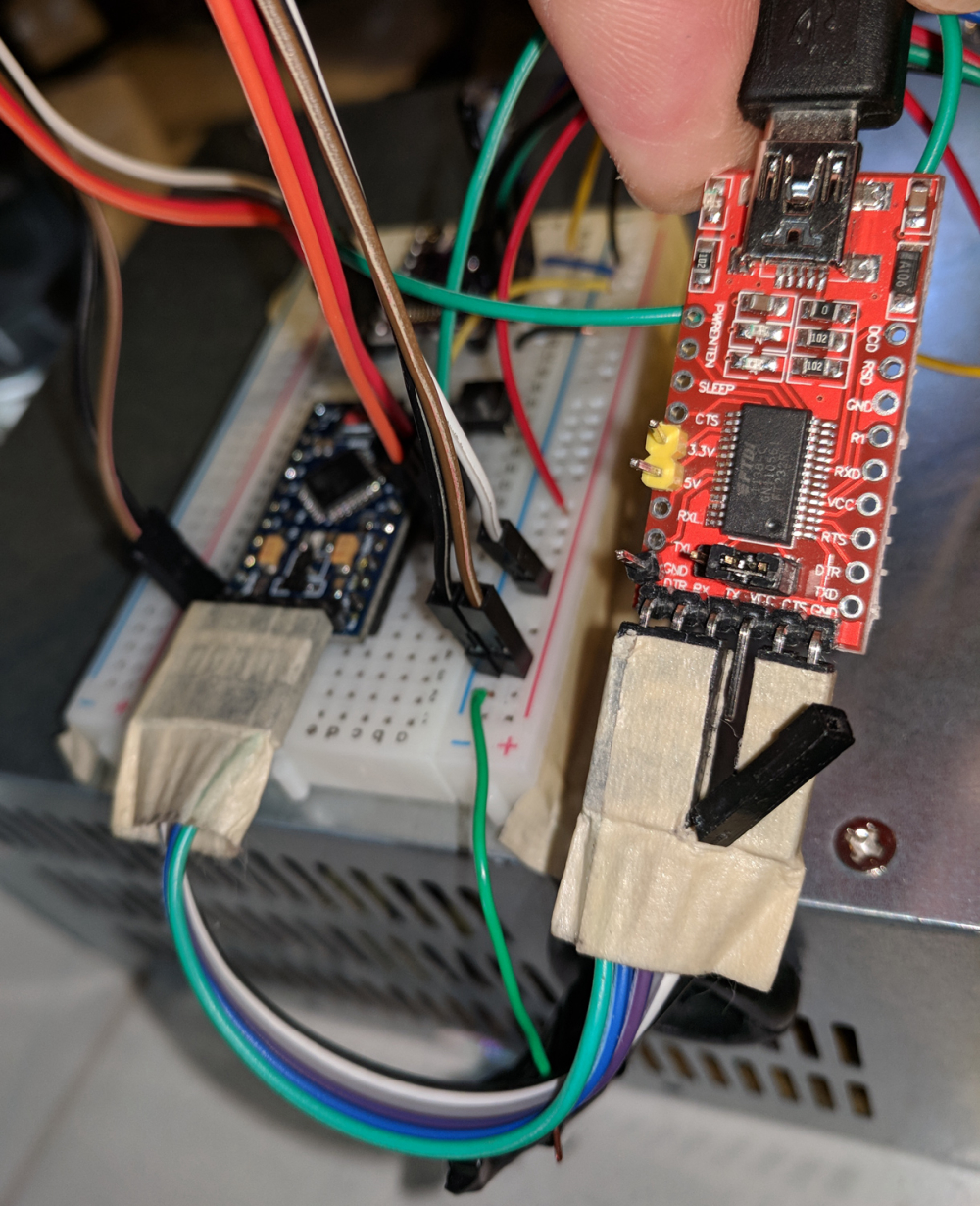
              @ben999 I think I understand what you're asking. If so, I do it frequently with my projects. What I do is just unplug the VCC DuPont cable from the FTDI adapter. Here is a picture of what I mean.
              0_1520091743625_IMG_20180303_083811.jpg

              My "How To" home automation video channel: https://www.youtube.com/channel/UCq_Evyh5PQALx4m4CQuxqkA

              ben999B mfalkviddM 2 Replies Last reply
              1
              • petewillP petewill

                @ben999 I think I understand what you're asking. If so, I do it frequently with my projects. What I do is just unplug the VCC DuPont cable from the FTDI adapter. Here is a picture of what I mean.
                0_1520091743625_IMG_20180303_083811.jpg

                ben999B Offline
                ben999B Offline
                ben999
                wrote on last edited by
                #8

                Hi @petewill

                Thanks a lot for your suggestion (nice picture BTW)

                This is exactly the way i (used to) do. But sadly it doesn't work anymore. I can only upload sketches with VCC connected and external power source disconnected. (what would be the outcome in case i leave FTDI's Vcc AND external power source connected to Pro Mini?)

                So it is for now impossible to get the serial monitor feedback while using the node in real-life condition... :(

                petewillP 1 Reply Last reply
                0
                • gohanG Offline
                  gohanG Offline
                  gohan
                  Mod
                  wrote on last edited by
                  #9

                  Maybe nothing maybe something could get fried. You could still make a SD logger that @sundberg84 published on Openhardware.io

                  1 Reply Last reply
                  0
                  • petewillP petewill

                    @ben999 I think I understand what you're asking. If so, I do it frequently with my projects. What I do is just unplug the VCC DuPont cable from the FTDI adapter. Here is a picture of what I mean.
                    0_1520091743625_IMG_20180303_083811.jpg

                    mfalkviddM Offline
                    mfalkviddM Offline
                    mfalkvidd
                    Mod
                    wrote on last edited by mfalkvidd
                    #10

                    @petewill I have something that might make things even easier: wouldn't you get the same result by removing the 5/3.3V jumper on the ftdi?
                    EDIT: No, not a good idea (see discussion below)

                    1 Reply Last reply
                    1
                    • gohanG Offline
                      gohanG Offline
                      gohan
                      Mod
                      wrote on last edited by
                      #11

                      That jumper should also set the logic level of the data pins, doesn't it?

                      mfalkviddM YveauxY 2 Replies Last reply
                      1
                      • gohanG gohan

                        That jumper should also set the logic level of the data pins, doesn't it?

                        mfalkviddM Offline
                        mfalkviddM Offline
                        mfalkvidd
                        Mod
                        wrote on last edited by
                        #12

                        @gohan good point. I guess the best way to figure out is to bring out a multimeter.

                        1 Reply Last reply
                        0
                        • gohanG gohan

                          That jumper should also set the logic level of the data pins, doesn't it?

                          YveauxY Offline
                          YveauxY Offline
                          Yveaux
                          Mod
                          wrote on last edited by Yveaux
                          #13

                          @gohan said in Uploading to Pro Mini fails with FTDI:

                          That jumper should also set the logic level of the data pins, doesn't it?

                          Typically, from my experience, that jumper only sets the logic level of the serial interface. The VCC pin stays at the USB supply level, so around 5V.

                          Update: Apparently the Sparkfun board does also change the VCC level (ref: https://learn.sparkfun.com/tutorials/serial-basic-hookup-guide)

                          Conclusion: Better check with your board!

                          http://yveaux.blogspot.nl

                          1 Reply Last reply
                          1
                          • gohanG Offline
                            gohanG Offline
                            gohan
                            Mod
                            wrote on last edited by
                            #14

                            I used it to program my sonoff and it didn't fry it so it also sets vcc to 3.3v

                            YveauxY 1 Reply Last reply
                            0
                            • gohanG gohan

                              I used it to program my sonoff and it didn't fry it so it also sets vcc to 3.3v

                              YveauxY Offline
                              YveauxY Offline
                              Yveaux
                              Mod
                              wrote on last edited by Yveaux
                              #15

                              @gohan said in Uploading to Pro Mini fails with FTDI:

                              I used it to program my sonoff and it didn't fry it

                              That's one way to find out ;-)

                              I just want to stress there are multiple designs out there (also with FTDI alternatives) and it's better to be safe than sorry.

                              http://yveaux.blogspot.nl

                              gohanG 1 Reply Last reply
                              0
                              • mfalkviddM Offline
                                mfalkviddM Offline
                                mfalkvidd
                                Mod
                                wrote on last edited by
                                #16

                                I checked my FTDI adapter. The jumper does switch both Vcc and logic levels, so removing the jumper is probably a bad idea.

                                1 Reply Last reply
                                1
                                • YveauxY Yveaux

                                  @gohan said in Uploading to Pro Mini fails with FTDI:

                                  I used it to program my sonoff and it didn't fry it

                                  That's one way to find out ;-)

                                  I just want to stress there are multiple designs out there (also with FTDI alternatives) and it's better to be safe than sorry.

                                  gohanG Offline
                                  gohanG Offline
                                  gohan
                                  Mod
                                  wrote on last edited by
                                  #17

                                  @yveaux I know, I fried a sonoff with a supposedly "universal" ftdi adapter

                                  1 Reply Last reply
                                  0
                                  • dbemowskD Offline
                                    dbemowskD Offline
                                    dbemowsk
                                    wrote on last edited by
                                    #18

                                    I have all my FTDI adapters set to 3.3v. I too use them to flash my sonoff modules, and those WILL fry if you try to flash them with 5v. My pro minis flash just fine at 3.3v.

                                    Some time back before I got my Vera controller I tried using an FTDI adapter for my gateway and could not get the thing to work. Testing it, I found that my TXD line was transmitting, but my RXD was not receiving. Check that you have communication in both directions.

                                    Vera Plus running UI7 with MySensors, Sonoffs and 1-Wire devices
                                    Visit my website for more Bits, Bytes and Ramblings from me: http://dan.bemowski.info/

                                    1 Reply Last reply
                                    0
                                    • ben999B ben999

                                      Hi @petewill

                                      Thanks a lot for your suggestion (nice picture BTW)

                                      This is exactly the way i (used to) do. But sadly it doesn't work anymore. I can only upload sketches with VCC connected and external power source disconnected. (what would be the outcome in case i leave FTDI's Vcc AND external power source connected to Pro Mini?)

                                      So it is for now impossible to get the serial monitor feedback while using the node in real-life condition... :(

                                      petewillP Offline
                                      petewillP Offline
                                      petewill
                                      Admin
                                      wrote on last edited by
                                      #19

                                      @ben999 Sorry for the delay. Work has been crazy lately. I see there are plenty of answers above and I echo them. I try not to upload with two power sources connected. If everything is 5v you are probably safe but I see you're using batteries and I'd not risk it just to be safe. I have used two power sources in the past but I have since changed my ways. I can't remember what stopped me but I believe I was getting strange results. I don't think I ever fried any hardware but why risk it...? :)

                                      If you are still having this issue have you tried with another Pro Mini and different code? Is anything coming out of the serial monitor or is it just blank?


                                      My "How To" home automation video channel: https://www.youtube.com/channel/UCq_Evyh5PQALx4m4CQuxqkA

                                      1 Reply Last reply
                                      1
                                      Reply
                                      • Reply as topic
                                      Log in to reply
                                      • Oldest to Newest
                                      • Newest to Oldest
                                      • Most Votes


                                      23

                                      Online

                                      11.7k

                                      Users

                                      11.2k

                                      Topics

                                      113.1k

                                      Posts


                                      Copyright 2025 TBD   |   Forum Guidelines   |   Privacy Policy   |   Terms of Service
                                      • Login

                                      • Don't have an account? Register

                                      • Login or register to search.
                                      • First post
                                        Last post
                                      0
                                      • MySensors
                                      • OpenHardware.io
                                      • Categories
                                      • Recent
                                      • Tags
                                      • Popular