
[solved] raspberry gateway - installation problems (and more)
-
Hello!
I just tried to set up a raspberry gateway according to this https://www.mysensors.org/build/raspberry .
(on raspberry1). everything went smooth, but somehow it's not working:pi@MysensorPi:~/MySensors $ ./configure --my-gateway=mqtt --my-controller-ip-address=127.0.0.1 --my-mqtt-publish-topic-prefix=mysensors-out --my-mqtt-subscribe-topic-prefix=mysensors-in --my-mqtt-client-id=mygateway1pi@MysensorPi:~/MySensors $ sudo ./bin/mysgw Nov 10 22:35:30 INFO Config file /etc/mysensors.conf does not exist, creating new file. Nov 10 22:35:30 INFO Starting gateway... Nov 10 22:35:30 INFO Protocol version - 2.3.0 Nov 10 22:35:30 INFO EEPROM file /etc/mysensors.eeprom does not exist, creating new file. Nov 10 22:35:30 DEBUG MCO:BGN:INIT GW,CP=RNNGL---,VER=2.3.0 Nov 10 22:35:30 DEBUG TSF:LRT:OK Nov 10 22:35:30 DEBUG TSM:INIT Nov 10 22:35:30 DEBUG TSF:WUR:MS=0 Nov 10 22:35:30 DEBUG !TSM:INIT:TSP FAIL Nov 10 22:35:30 DEBUG TSM:FAIL:CNT=1 Nov 10 22:35:30 DEBUG TSM:FAIL:DIS Nov 10 22:35:30 DEBUG TSF:TDI:TSLso now on i should ask here =)
i used one of these radios (recomendation from @gohan in 2017 :)): https://gearbest.com/transmitters-receivers-module/pp_453011.html and connected it accordingly (except i used 5v pin for VCC)
first of all i don't understand why it's not working when there were just top c&p a few lines?an then i'm not really sure in general what i need to do. what i WANT to do:
sensors > raspberry pi gateway > openhab controller
mosquitto is running on my openhab installation, so mqtt would be ok. i searched for a while, but i couldn't find anything noob-proved... -
Hello!
I just tried to set up a raspberry gateway according to this https://www.mysensors.org/build/raspberry .
(on raspberry1). everything went smooth, but somehow it's not working:pi@MysensorPi:~/MySensors $ ./configure --my-gateway=mqtt --my-controller-ip-address=127.0.0.1 --my-mqtt-publish-topic-prefix=mysensors-out --my-mqtt-subscribe-topic-prefix=mysensors-in --my-mqtt-client-id=mygateway1pi@MysensorPi:~/MySensors $ sudo ./bin/mysgw Nov 10 22:35:30 INFO Config file /etc/mysensors.conf does not exist, creating new file. Nov 10 22:35:30 INFO Starting gateway... Nov 10 22:35:30 INFO Protocol version - 2.3.0 Nov 10 22:35:30 INFO EEPROM file /etc/mysensors.eeprom does not exist, creating new file. Nov 10 22:35:30 DEBUG MCO:BGN:INIT GW,CP=RNNGL---,VER=2.3.0 Nov 10 22:35:30 DEBUG TSF:LRT:OK Nov 10 22:35:30 DEBUG TSM:INIT Nov 10 22:35:30 DEBUG TSF:WUR:MS=0 Nov 10 22:35:30 DEBUG !TSM:INIT:TSP FAIL Nov 10 22:35:30 DEBUG TSM:FAIL:CNT=1 Nov 10 22:35:30 DEBUG TSM:FAIL:DIS Nov 10 22:35:30 DEBUG TSF:TDI:TSLso now on i should ask here =)
i used one of these radios (recomendation from @gohan in 2017 :)): https://gearbest.com/transmitters-receivers-module/pp_453011.html and connected it accordingly (except i used 5v pin for VCC)
first of all i don't understand why it's not working when there were just top c&p a few lines?an then i'm not really sure in general what i need to do. what i WANT to do:
sensors > raspberry pi gateway > openhab controller
mosquitto is running on my openhab installation, so mqtt would be ok. i searched for a while, but i couldn't find anything noob-proved...Nov 10 22:35:30 DEBUG !TSM:INIT:TSP FAIL
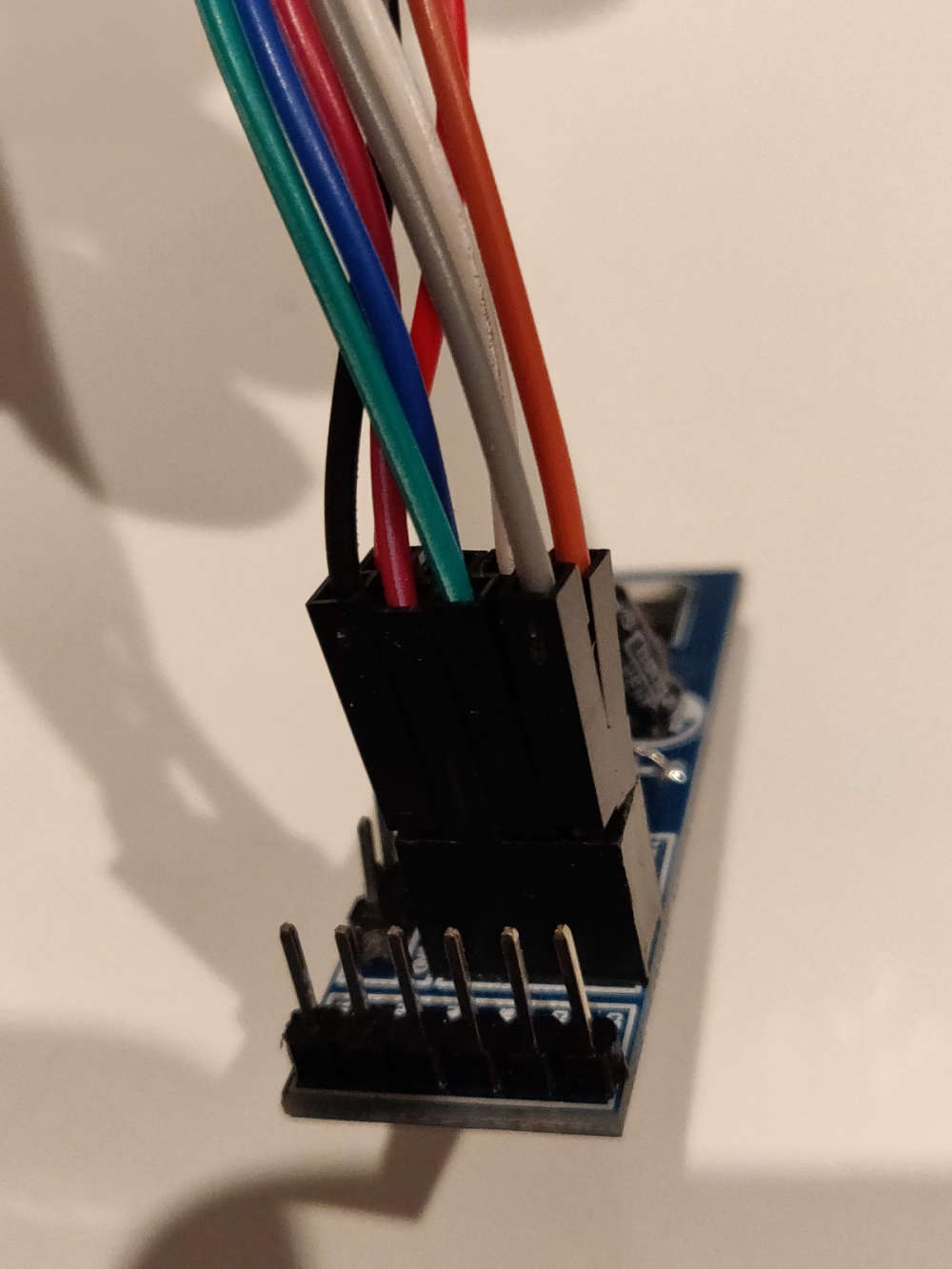
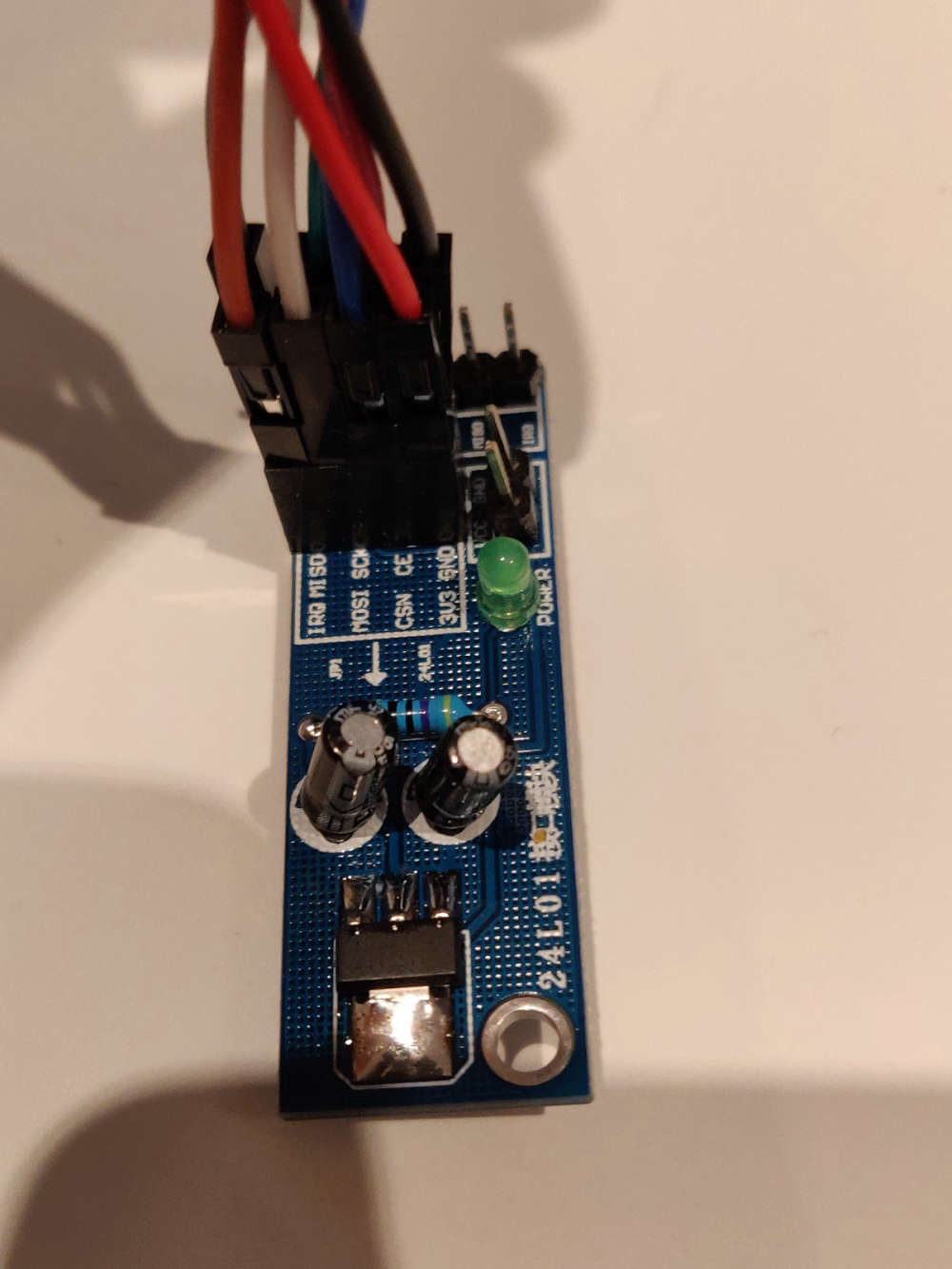
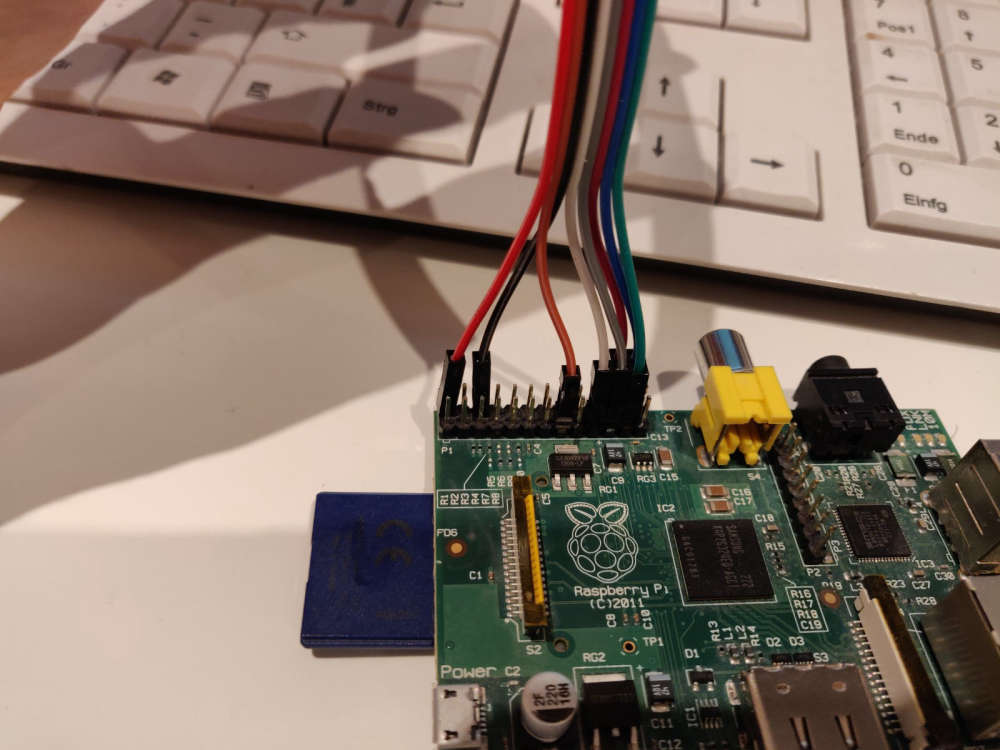
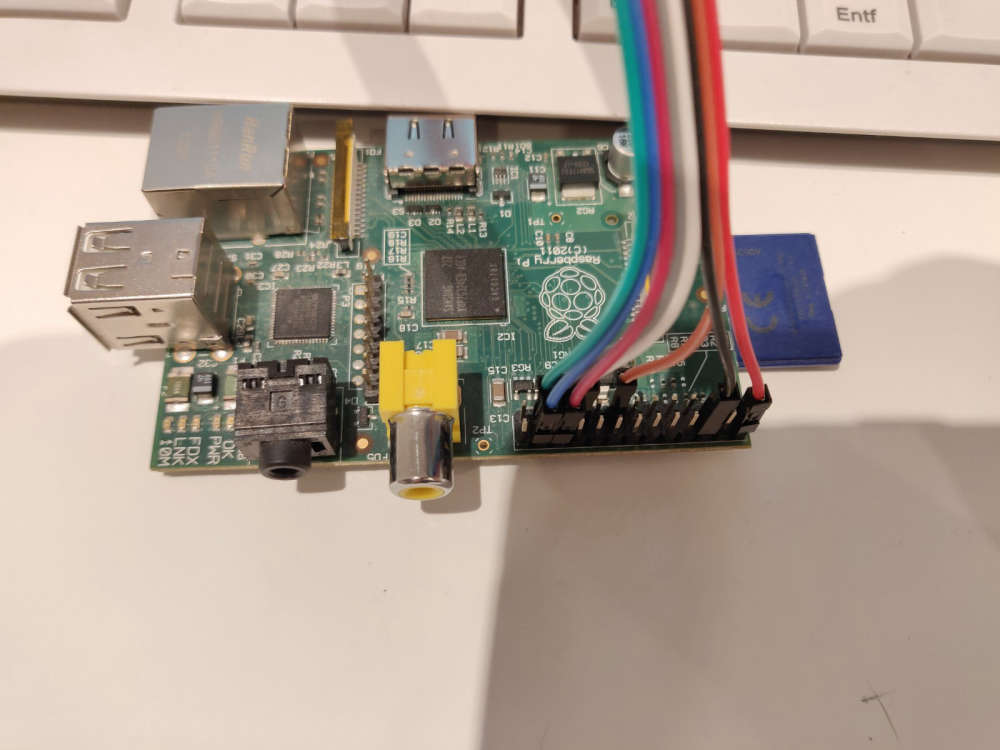
This means the Raspberry Pi is unable to communicate with the radio module. The most common reason is a wiring problem. Could you post a few photos of the wiring (from different angles)? Maybe we can help spot a problem.
If you have more than one nrf24 module, see if switching helps to check if the radio is broken.
-
here's the wiring. i checked 3 times and now i rewired again with another nrf24 module - error remains the same:
-
oh boi. had to connect the radio to the board mentioned in the opening post:

and connect the other boards to my raspberry... now it seems to work! unfortunately i can't test it because i'm not able to upload anything to my Sensebender Micro boards. now i'm waiting for my new ftdi programmer :rage: -
oh boi. had to connect the radio to the board mentioned in the opening post:
and connect the other boards to my raspberry... now it seems to work! unfortunately i can't test it because i'm not able to upload anything to my Sensebender Micro boards. now i'm waiting for my new ftdi programmer :rage: -
alright! now with new programmer a was able to upload the "standard" sketch to my sensebender micro and the gateway even gets "something":
Nov 14 20:11:52 DEBUG TSF:MSG:READ,3-3-255,s=255,c=3,t=7,pt=0,l=0,sg=0:
Nov 14 20:11:52 DEBUG TSF:MSG:BC
Nov 14 20:11:52 DEBUG TSF:MSG:FPAR REQ,ID=3
Nov 14 20:11:52 DEBUG TSF:PNG:SEND,TO=0
Nov 14 20:11:52 DEBUG TSF:CKU:OK
Nov 14 20:11:52 DEBUG TSF:MSG:GWL OK
Nov 14 20:11:52 DEBUG TSF:MSG:SEND,0-0-3-3,s=255,c=3,t=8,pt=1,l=1,sg=0,ft=0,st=O                                                                                                                                                             K:0
Nov 14 20:11:54 DEBUG TSF:MSG:READ,3-3-0,s=255,c=3,t=24,pt=1,l=1,sg=0:1
Nov 14 20:11:54 DEBUG TSF:MSG:PINGED,ID=3,HP=1
Nov 14 20:11:54 DEBUG TSF:MSG:SEND,0-0-3-3,s=255,c=3,t=25,pt=1,l=1,sg=0,ft=0,st=                                                                                                                                                             OK:1
Nov 14 20:11:54 DEBUG TSF:MSG:READ,3-3-0,s=255,c=4,t=0,pt=6,l=10,sg=0:FFFFFFFFFF                                                                                                                                                             FFFFFF0300
Nov 14 20:11:54 DEBUG GWT:TPS:TOPIC=mysensors-out/3/255/4/0/0,MSG SENT
Nov 14 20:11:54 DEBUG TSF:MSG:READ,3-3-0,s=255,c=3,t=15,pt=6,l=2,sg=0:0100
Nov 14 20:11:54 DEBUG TSF:MSG:SEND,0-0-3-3,s=255,c=3,t=15,pt=6,l=2,sg=0,ft=0,st=                                                                                                                                                             OK:0100
Nov 14 20:11:54 DEBUG TSF:MSG:READ,3-3-0,s=255,c=0,t=17,pt=0,l=5,sg=0:2.1.1
Nov 14 20:11:54 DEBUG GWT:TPS:TOPIC=mysensors-out/3/255/0/0/17,MSG SENT
Nov 14 20:11:54 DEBUG TSF:MSG:READ,3-3-0,s=255,c=3,t=6,pt=1,l=1,sg=0:0
Nov 14 20:11:54 DEBUG GWT:TPS:TOPIC=mysensors-out/3/255/3/0/6,MSG SENT
Nov 14 20:11:56 DEBUG TSF:MSG:READ,3-3-0,s=255,c=3,t=11,pt=0,l=17,sg=0:Sensebend                                                                                                                                                             er Micro
Nov 14 20:11:56 DEBUG GWT:TPS:TOPIC=mysensors-out/3/255/3/0/11,MSG SENT
Nov 14 20:11:56 DEBUG TSF:MSG:READ,3-3-0,s=255,c=3,t=12,pt=0,l=3,sg=0:1.4
Nov 14 20:11:56 DEBUG GWT:TPS:TOPIC=mysensors-out/3/255/3/0/12,MSG SENT
Nov 14 20:11:56 DEBUG TSF:MSG:READ,3-3-0,s=1,c=0,t=6,pt=0,l=0,sg=0:
Nov 14 20:11:56 DEBUG GWT:TPS:TOPIC=mysensors-out/3/1/0/0/6,MSG SENT
Nov 14 20:11:56 DEBUG TSF:MSG:READ,3-3-0,s=2,c=0,t=7,pt=0,l=0,sg=0:
Nov 14 20:11:56 DEBUG GWT:TPS:TOPIC=mysensors-out/3/2/0/0/7,MSG SENT
Nov 14 20:11:56 DEBUG TSF:MSG:READ,3-3-0,s=255,c=3,t=26,pt=1,l=1,sg=0:2
Nov 14 20:11:56 DEBUG TSF:MSG:SEND,0-0-3-3,s=255,c=3,t=27,pt=1,l=1,sg=0,ft=0,st=                                                                                                                                                             OK:1
Nov 14 20:11:56 DEBUG TSF:MSG:READ,3-3-0,s=1,c=1,t=0,pt=7,l=5,sg=0:24.7
Nov 14 20:11:56 DEBUG GWT:TPS:TOPIC=mysensors-out/3/1/1/0/0,MSG SENT
Nov 14 20:11:56 DEBUG TSF:MSG:READ,3-3-0,s=2,c=1,t=1,pt=2,l=2,sg=0:55
Nov 14 20:11:56 DEBUG GWT:TPS:TOPIC=mysensors-out/3/2/1/0/1,MSG SENT
Nov 14 20:11:56 DEBUG TSF:MSG:READ,3-3-0,s=255,c=3,t=0,pt=1,l=1,sg=0:88
Nov 14 20:11:56 DEBUG GWT:TPS:TOPIC=mysensors-out/3/255/3/0/0,MSG SENT
is this right? and if so, how can i translate all this stuff? :eye:
ohhhhhhh. this makes sense:
[20:17:18] openhabian@openHABianPi:~$ mosquitto_sub -t mysensors-out/#
22.3
61
cool cool. now i just have to figure out how to define my items on the openhab part!
cheers


Hello! It looks like you're interested in this conversation, but you don't have an account yet.
Getting fed up of having to scroll through the same posts each visit? When you register for an account, you'll always come back to exactly where you were before, and choose to be notified of new replies (either via email, or push notification). You'll also be able to save bookmarks and upvote posts to show your appreciation to other community members.
With your input, this post could be even better 💗
Register Login