
ok thank you :)
B
beanl
@beanl
Posts
-
Customizable Sonar Sensor -
Customizable Sonar Sensorcan someone can just answer this question :
"gw.request(CHILD_ID_SONAR_MIN_RANGE, V_DISTANCE);", response is provided by the controller ?thank you :)
-
Customizable Sonar SensorHi,
I would like to build a customizable node (customizable by the controller) wich can detect presence for a certain distance.
The node comportement is good...- Is it good practice to do a sketch like this ?
- "gw.request(CHILD_ID_SONAR_MIN_RANGE, V_DISTANCE);", response is provided by the controller ?
- Can i store my minimum range distance in EEPROM ? or is it better to do a "gw.request" ?
#include <SPI.h> #include <MySensor.h> #include <NewPing.h> #define TRIGGER_PIN 6 // Arduino pin tied to trigger pin on the ultrasonic sensor. #define ECHO_PIN 5 // Arduino pin tied to echo pin on the ultrasonic sensor. /** Default value **/ #define MAX_DISTANCE 300 // Maximum distance we want to ping for (in centimeters). Maximum sensor distance is rated at 400-500cm. unsigned long SLEEP_TIME = 5000; // Sleep time between reads (in milliseconds) // NRFRF24L01 radio driver (set low transmit power by default) MyTransportNRF24 radio(RF24_CE_PIN, RF24_CS_PIN, RF24_PA_LEVEL_GW); //MyTransportRFM69 radio; // Message signing driver (none default) //MySigningNone signer; // Select AtMega328 hardware profile MyHwATMega328 hw; // Construct MySensors library MySensor gw(radio, hw); // Id of the sensor child #define CHILD_ID_SONAR 0 #define CHILD_ID_SONAR_MIN_RANGE 1 //Setting default min / max range default value int minRange = 50; boolean inRange = false; boolean outRange = false; NewPing sonar(TRIGGER_PIN, ECHO_PIN, MAX_DISTANCE); // NewPing setup of pins and maximum distance. MyMessage SonarMessage(CHILD_ID_SONAR, V_DISTANCE); unsigned long lastSend; // the timeStamp you use to constantly check vs the current time (millis() returns an unsigned long timestamp) unsigned long IntervalBetweenSend = 2000; // the frequency that this timer will execute here... 10 seconds. boolean metric = true; void setup() { gw.begin(incomingMessage, AUTO, true); // Send the sketch version information to the gateway and Controller gw.sendSketchInfo("Distance Sensor", "1.0"); // Register all sensors to gw (they will be created as child devices) gw.present(0, S_DISTANCE); // Presenting custom gw.present(CHILD_ID_SONAR_MIN_RANGE, S_DISTANCE); //minRange // Request/wait for dimmer status //gw.request(CHILD_ID_SONAR_MIN_RANGE, V_VAR1); gw.request(CHILD_ID_SONAR_MIN_RANGE, V_DISTANCE); //gw.process(); //gw.request(CHILD_ID_SONAR_MAX_RANGE, V_DISTANCE); //gw.process(); //gw.saveState(1,2); boolean metric = gw.getConfig().isMetric; } void loop(){ // Process incomming message gw.process(); int dist = metric?sonar.ping_cm():sonar.ping_in(); //Serial.print("Ping: "); //Serial.print(dist); // Convert ping time to distance in cm and print result (0 = outside set distance range) //Serial.println(metric?" cm":" in"); if (millis() - lastSend > IntervalBetweenSend) { int dist = metric?sonar.ping_cm():sonar.ping_in(); if ( dist <= minRange && inRange == false) { gw.send(SonarMessage.set(dist)); inRange = true; lastSend = millis(); } if ( dist > minRange && inRange == true) { gw.send(SonarMessage.set(dist)); inRange = false; lastSend = millis(); } } } void incomingMessage(const MyMessage &message) { // echo "1;1;2;1;13;40" >> /dev/ttyUSB0 (Defining minrange to 40) // echo "1;2;2;1;13;50" >> /dev/ttyUSB0 (Defining maxrange to 50) Serial.print("Incoming Message"); // We wait for V_VAR1 value if (message.type == V_DISTANCE) { // Store state in eeprom //gw.saveState(message.sensor, message.getBool()); // Write some debug info Serial.print("Incoming change for sensor:"); Serial.print(message.sensor); Serial.print(" (type : "); Serial.print(message.type); Serial.print(")"); Serial.print(", New status: "); Serial.println(message.getInt()); if ( message.sensor == CHILD_ID_SONAR_MIN_RANGE ){ Serial.println("Updating Minrange"); minRange = message.getInt(); } } }``` -
How to update sensor relay from serial gatewayI used a mini pro whith FTDI :
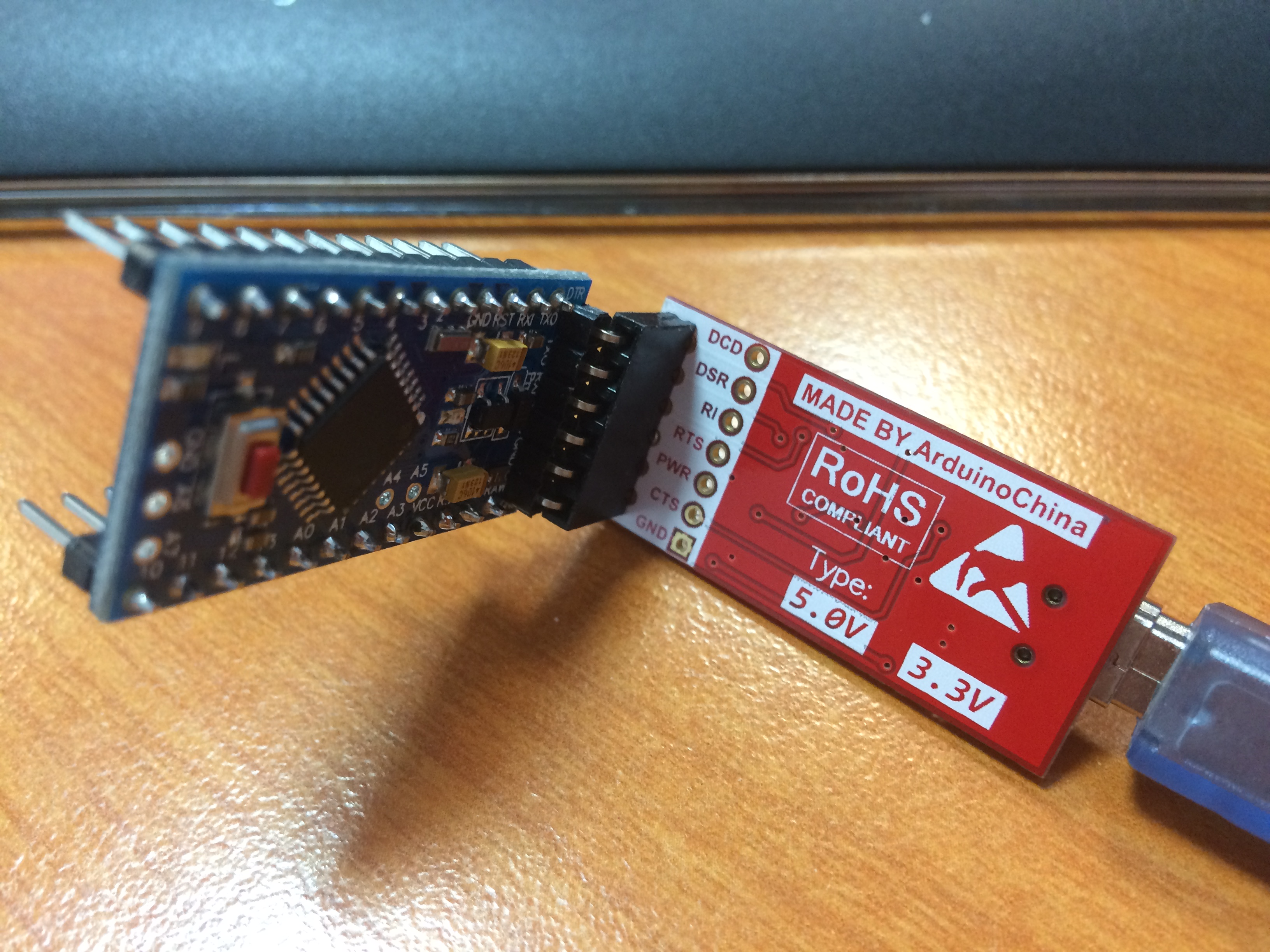
It wasn't working the serial gateway don't send data.
I test with a nano and all is ok now ...
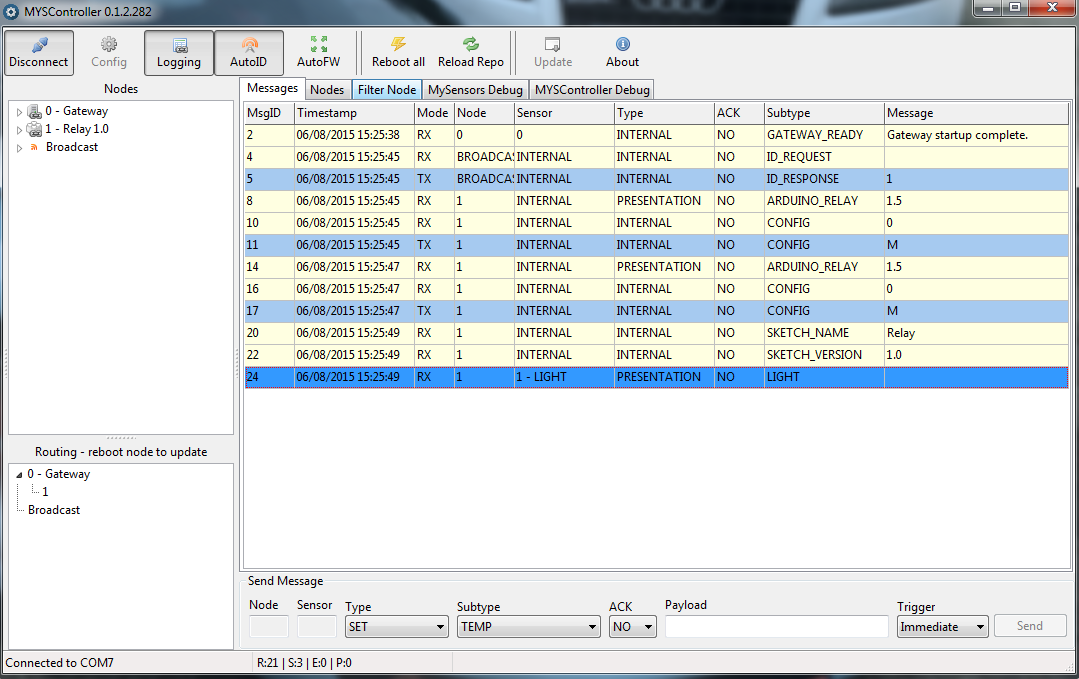
And on my relay sensor :
Terminal ready req id send: 255-255-0-0 s=255,c=3,t=3,pt=0,l=0,sg=0,st=ok: read: 0-0-255 s=255,c=3,t=4,pt=0,l=1,sg=0:1 send: 1-1-0-0 s=255,c=0,t=18,pt=0,l=3,sg=0,st=ok:1.5 send: 1-1-0-0 s=255,c=3,t=6,pt=1,l=1,sg=0,st=ok:0 read: 0-0-1 s=255,c=3,t=6,pt=0,l=1,sg=0:M id=1 send: 1-1-0-0 s=255,c=0,t=18,pt=0,l=3,sg=0,st=ok:1.5 send: 1-1-0-0 s=255,c=3,t=6,pt=1,l=1,sg=0,st=ok:0 read: 0-0-1 s=255,c=3,t=6,pt=0,l=1,sg=0:M repeater started, id=1, parent=0, distance=1 send: 1-1-0-0 s=255,c=3,t=11,pt=0,l=5,sg=0,st=ok:Relay send: 1-1-0-0 s=255,c=3,t=12,pt=0,l=3,sg=0,st=ok:1.0 send: 1-1-0-0 s=1,c=0,t=3,pt=0,l=0,sg=0,st=ok: -
How to update sensor relay from serial gatewayi try with the option without success.
I also try to reset EEPROM & assigning Node ID with "MYScontroller" :
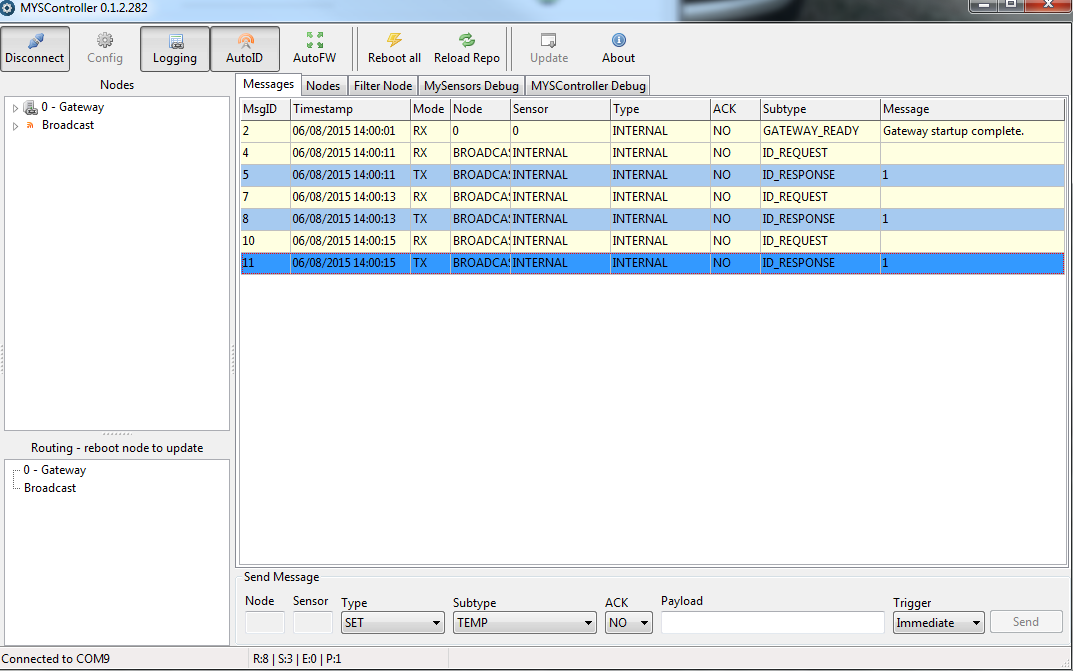
On my node :
Terminal ready
req id
send: 255-255-0-0 s=255,c=3,t=3,pt=0,l=0,sg=0,st=fail:
repeater started, id=255, parent=0, distance=1
req id
send: 255-255-0-0 s=255,c=3,t=3,pt=0,l=0,sg=0,st=ok:
req id
send: 255-255-0-0 s=255,c=3,t=3,pt=0,l=0,sg=0,st=ok:
req id
send: 255-255-0-0 s=255,c=3,t=3,pt=0,l=0,sg=0,st=ok:
I think my gateway don't really send message ...
Any idea why ? -
How to update sensor relay from serial gatewayyep it's the french version of arduino IDE :)
-
How to update sensor relay from serial gatewayI also try to put my gateway on a widows machine and on arduino ide :
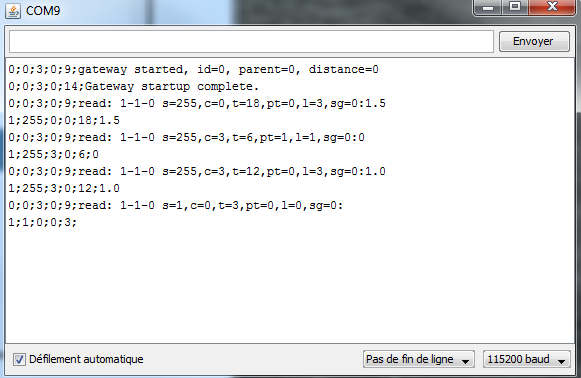
I send : 1;1;1;0;2;1
But on my node :
bash> picocom /dev/ttyUSB1 -b 115200 -r -l --omap lfcrlf --imap lfcrlf --emap lfcrlf picocom v1.7 port is : /dev/ttyUSB1 flowcontrol : none baudrate is : 115200 parity is : none databits are : 8 escape is : C-a local echo is : no noinit is : no noreset is : yes nolock is : yes send_cmd is : sz -vv receive_cmd is : rz -vv imap is : lfcrlf, omap is : lfcrlf, emap is : lfcrlf, Terminal ready send: 1-1-0-0 s=255,c=0,t=18,pt=0,l=3,sg=0,st=ok:1.5 send: 1-1-0-0 s=255,c=3,t=6,pt=1,l=1,sg=0,st=ok:0 repeater started, id=1, parent=0, distance=1 send: 1-1-0-0 s=255,c=3,t=11,pt=0,l=5,sg=0,st=fail:Relay send: 1-1-0-0 s=255,c=3,t=12,pt=0,l=3,sg=0,st=ok:1.0 send: 1-1-0-0 s=1,c=0,t=3,pt=0,l=0,sg=0,st=ok: -
How to update sensor relay from serial gatewayI also tried using node.js ...
I check if i receive serial data on my gateway using :
bash> picocom /dev/ttyUSB1 -b 115200 -r -l --omap lfcrlf --imap lfcrlf --emap lfcrlf
Terminal ready
send: 1-1-0-0 s=255,c=0,t=18,pt=0,l=3,sg=0,st=ok:1.5
send: 1-1-0-0 s=255,c=3,t=6,pt=1,l=1,sg=0,st=ok:0
repeater started, id=1, parent=0, distance=1
send: 1-1-0-0 s=255,c=3,t=11,pt=0,l=5,sg=0,st=ok:Relay
send: 1-1-0-0 s=255,c=3,t=12,pt=0,l=3,sg=0,st=ok:1.0
send: 1-1-0-0 s=1,c=0,t=3,pt=0,l=0,sg=0,st=ok:
Here is my node.js script :
const gwType = 'Serial';
//const gwPort = 'COM4';
const gwPort = '/dev/ttyUSB0';
const gwBaud = 115200;

//var SerialPort = require('/home/bxl/node-v0.12.0-linux-x64/lib/node_modules/serialport');
var serialport = require('/home/bxl/node-v0.12.0-linux-x64/lib/node_modules/serialport');
var SerialPort = serialport.SerialPort;


gw = new SerialPort(gwPort,
        { baudrate: gwBaud
          ,parser: serialport.parsers.readline("\n")
});

            gw.on('open', function() {
                        console.log('connected to serial gateway at ' + gwPort);
                        gw.write('1;1;1;0;2;1');
                        console.log('Write done.');
                }).on('end', function() {
                        console.log('disconnected from gateway');
                }).on('error', function() {
                        console.log('connection error - trying to reconnect');
                        gw.open();
                });
but nothing move on my serial gateway :(
-
How to update sensor relay from serial gatewaytried :
echo "1;1;1;0;2;1" >> /dev/ttyUSB0without success :(
-
How to update sensor relay from serial gatewayi can't update my relay trhough serial ...
My gateway is on : /dev/ttyUSB0
My relay sensor is on : /dev/ttyUSB1both sketch are from mysensors sample code except i force sensor node to 1 for my sensor relay.
This is what i read from gateway serial :
0;0;3;0;9;gateway started, id=0, parent=0, distance=0
0;0;3;0;14;Gateway startup complete.
0;0;3;0;9;read: 1-1-0 s=255,c=0,t=18,pt=0,l=3,sg=0:1.5
1;255;0;0;18;1.5
0;0;3;0;9;read: 1-1-0 s=255,c=3,t=6,pt=1,l=1,sg=0:0
1;255;3;0;6;0
0;0;3;0;9;read: 1-1-0 s=255,c=3,t=11,pt=0,l=5,sg=0:Relay
1;255;3;0;11;Relay
0;0;3;0;9;read: 1-1-0 s=255,c=3,t=12,pt=0,l=3,sg=0:1.0
1;255;3;0;12;1.0
0;0;3;0;9;read: 1-1-0 s=1,c=0,t=3,pt=0,l=0,sg=0:
1;1;0;0;3;
0;0;3;0;9;read: 1-1-0 s=255,c=0,t=18,pt=0,l=3,sg=0:1.5
1;255;0;0;18;1.5
0;0;3;0;9;read: 1-1-0 s=255,c=3,t=6,pt=1,l=1,sg=0:0
1;255;3;0;6;0
0;0;3;0;9;read: 1-1-0 s=255,c=3,t=11,pt=0,l=5,sg=0:Relay
1;255;3;0;11;Relay
0;0;3;0;9;read: 1-1-0 s=255,c=3,t=12,pt=0,l=3,sg=0:1.0
1;255;3;0;12;1.0
0;0;3;0;9;read: 1-1-0 s=1,c=0,t=3,pt=0,l=0,sg=0:
1;1;0;0;3;
And on my relay sensor :
send: 1-1-0-0 s=255,c=0,t=18,pt=0,l=3,sg=0,st=ok:1.5
send: 1-1-0-0 s=255,c=3,t=6,pt=1,l=1,sg=0,st=ok:0
repeater started, id=1, parent=0, distance=1
send: 1-1-0-0 s=255,c=3,t=11,pt=0,l=5,sg=0,st=ok:Relay
send: 1-1-0-0 s=255,c=3,t=12,pt=0,l=3,sg=0,st=ok:1.0
send: 1-1-0-0 s=1,c=0,t=3,pt=0,l=0,sg=0,st=ok:
What can i do to update my relay status ?
i try :
bash> echo "1;1;1;0;1;\n" >> /dev/ttyUSB0tx led blink but i have nothing in my serial :(