Skip to content
  • MySensors
  • OpenHardware.io
  • Categories
  • Recent
  • Tags
  • Popular
Skins
  • Light
  • Brite
  • Cerulean
  • Cosmo
  • Flatly
  • Journal
  • Litera
  • Lumen
  • Lux
  • Materia
  • Minty
  • Morph
  • Pulse
  • Sandstone
  • Simplex
  • Sketchy
  • Spacelab
  • United
  • Yeti
  • Zephyr
  • Dark
  • Cyborg
  • Darkly
  • Quartz
  • Slate
  • Solar
  • Superhero
  • Vapor

  • Default (No Skin)
  • No Skin
Collapse
Brand Logo
M

Marcus

@Marcus
About
Posts
22
Topics
1
Shares
0
Groups
0
Followers
0
Following
0

Posts

Recent Best Controversial

  • Openhab MQTT Example
    M Marcus

    Please stop helping me now. Now i have pidome and the first sensor is running after 30 minutes with my ethernet mqtt gateway ;-)

    That is what i want. Maybe one day there are nice tutorials for Openhab. Thank u very much for trying to help. If i now start with mosquitto to get openhab run is the same as when i make a patch for a patch....

    It seems that pidome has wait for me it is really nice and not much complicated.

    This thread can be closed here.Unbenannt.JPG
    OpenHAB openhab mqtt ex

  • Openhab MQTT Example
    M Marcus

    Thank u anyway for your help @tboha . I think this is too much complicated. I tried ur last idea, but i got connection refused error. Really frustrating.... I want to see results. I hope pidome gave me faster results than openhab.

    OpenHAB openhab mqtt ex

  • Openhab MQTT Example
    M Marcus

    @John Thank u very much. I think i will stop with Openhab and give PiDome a try. it seems to be better described what to do to get it run.

    In the thread u mentioned i looked for some examples but didnt get them to work and no one could help.

    OpenHAB openhab mqtt ex

  • Openhab MQTT Example
    M Marcus

    @b0rmann Please read the whole thread and tell me what to do now!!! I only want openhab and mysensors work together. But i want to use my mqtt-ethernet-gateway. Not the serial way.

    OpenHAB openhab mqtt ex

  • Openhab MQTT Example
    M Marcus

    Good morning community.

    Here is what i did now for installing mosquitto on my raspberry pi.

    This infos are from here (http://jpmens.net/2013/09/01/installing-mosquitto-on-a-raspberry-pi/).

      curl -O http://repo.mosquitto.org/debian/mosquitto-repo.gpg.key
    
      sudo apt-key add mosquitto-repo.gpg.key
    
      rm mosquitto-repo.gpg.key
    
      cd /etc/apt/sources.list.d/
    
      sudo curl -O http://repo.mosquitto.org/debian/mosquitto-repo.list
    
      sudo apt-get update
    
      sudo apt-get install mosquitto mosquitto-clients python-mosquitto
    

    Now mosquitto is running.

    With:

    sudo /etc/init.d/mosquitto stop
    

    I can stop it.

    With

    sudo /etc/init.d/mosquitto start
    

    I can start it.

    But what to do now???
    How do i connect mosquitto to my MQTT-Ethernet-Gateway?
    How do i connect mosquitto to Openhab?

    Please help!

    OpenHAB openhab mqtt ex

  • Openhab MQTT Example
    M Marcus

    Thank u for your answers.

    I love the look of openhab. So i will try the it with mosquitto.

    If it will not work then i will try pidome and serial gateway.

    If i have new infos i will post them here!

    OpenHAB openhab mqtt ex

  • Openhab MQTT Example
    M Marcus

    @Crazy Do u need Mosquitto?

    OpenHAB openhab mqtt ex

  • Openhab MQTT Example
    M Marcus

    Is there a big difference between serial and ethernet?

    OpenHAB openhab mqtt ex

  • Openhab MQTT Example
    M Marcus

    Hmm, now i am nearly at the beginning. It would be nice if i dont need mosquitto.

    Maybe here are others who can help.

    Thank u anyway for ur help.

    Are we both the only who want to use openhab???

    Is there no other way to check if openhab recieves the messages from the broker (ethernet gateway)?

    OpenHAB openhab mqtt ex

  • Openhab MQTT Example
    M Marcus

    @John
    I use MyMQTT on my smartphone is this a client? There are messages coming in.

    Do i need mosquitto for make mysensors work with openhab or not. Thats the only thing that is interesting for me at the moment.

    OpenHAB openhab mqtt ex

  • Openhab MQTT Example
    M Marcus

    Its not a broker????

    "The MQTT gateway is basically a Ethernet Gateway with modified software which makes it act as a MQTT broker. "
    

    This text in the build instructions has to be fixed. In no minute i thought about installing mosquitto.

    But i hope the installation of mosquitto will get it to work.

    OpenHAB openhab mqtt ex

  • Openhab MQTT Example
    M Marcus

    I use the MQTT Ethernet-Ethernet Gateway as broker http://www.mysensors.org/build/mqtt_gateway

    And with MyMQTT on my Smartphone i can see that its working.

    Later i will test the other thing.

    OpenHAB openhab mqtt ex

  • Openhab MQTT Example
    M Marcus

    Good morning.

    I did what u said. But i dont see the status of my switch.

     Switch mqttsw1 "MQTT Switch 1" (all,mqtt) {mqtt=">[mysensor:MyMQTT/20/3/V_TRIPPED:command:on:RED],>[mysensor:MyMQTT/20/3/V_TRIPPED:command:off:Green]"}
    Switch mqttsw2 "MQTT Switch 2" (all,mqtt) {mqtt=">[mysensor:MyMQTT/20/3/V_TRIPPED:command:off:default],>[mysensor:MyMQTT/20/3/V_TRIPPED:command:on:default]"}
    Switch mqttsw3 "MQTT Switch 3" (all,mqtt) {mqtt=">[mysensor:MyMQTT/20/3/V_TRIPPED:command:*:Switch ${itemName} was turned ${command}]"}
    
    String mqttsw1s "MQtt Switch 1 Status [%s]" (all,mqtt) {mqtt="<[mysensor:MyMQTT/20/3/V_TRIPPED:state:default]"}
    String mqttsw2s "MQtt Switch 2 Status [%s]" (all,mqtt) {mqtt="<[mysensor:MyMQTT/20/3/V_TRIPPED:state:default]"}
    String mqttsw3s "MQtt Switch 3 Status [%s]" (all,mqtt) {mqtt="<[mysensor:MyMQTT/20/3/V_TRIPPED:state:default]"}
    
    String sketch20 "Sketch name 20 [%s]"  (all,mqtt) {mqtt="<[mysensor:MyMQTT/20/3/V_TRIPPED:state:default]"}
    

    The sitemap is the same as yours.

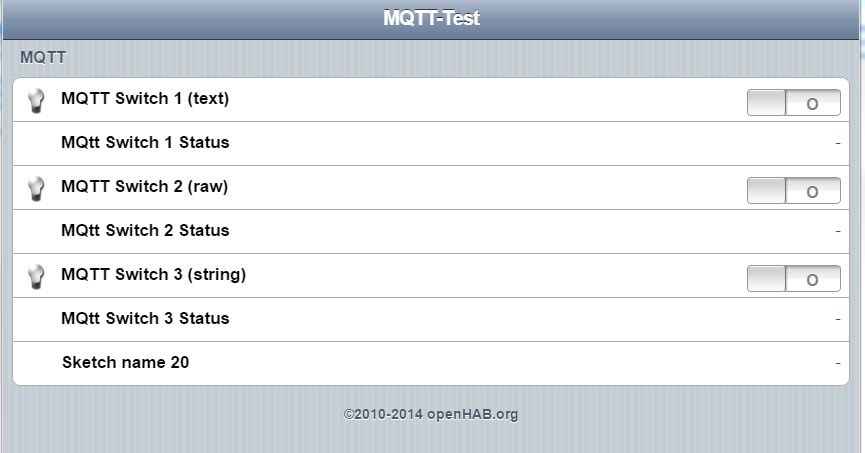
    mqtt-test.JPG

    As u can see there is no red/green and no well formed text-message.

    Thanks anyway! Would be very nice if we get this to work.

    OpenHAB openhab mqtt ex

  • Openhab MQTT Example
    M Marcus

    I only wanna see the state of the switch.

    For example i wanna know if the window is open or not.

    But the line does not work. i cannot see the state of the switch.

    I used the example and edited the line u gave me in there:

     Group all
     Group node1  (all)
     Group node2  (all)
     Group sketch (all)
    
     Number node1_temp  "Temp [%.1f °C]"     (node1,all)  {mqtt="<[mysensor:MyMQTT/20/10/V_TEMP:state:default]"}
     Number node1_humid "Humid [%.1f %%Rh]" (node1,all)  {mqtt="<[mysensor:MyMQTT/20/11/V_HUM:state:default]"}
    
     Switch node2_sw1  "sw2"  (node2,all)  {mqtt=">[mysensor:MyMQTT/21/1/V_LIGHT:command:ON:1],>[mysensor:MyMQTT/21/1/V_LIGHT:command:OFF:0]"}
     Switch node2_sw2  "sw2 send + recieve example"  (node2,all)      {mqtt=">[mysensor:MyMQTT/21/2/V_LIGHT:command:ON:1],>[mysensor:MyMQTT/21/2/V_LIGHT:command:OFF:0],<[mysensor:MyMQTT/21/2/V_LIGHT:command:MAP(1on0off.map)]"}
    
      String sketch20 "Switch name 20 [%s]"  (sketch,all) {mqtt="<[mysensor:MyMQTT/20/3/V_TRIPPED:state:default]"}
    
    OpenHAB openhab mqtt ex

  • Openhab MQTT Example
    M Marcus

    I did what u said.

    This is what openhab says after start.

     pi@raspberrypi /opt/openhab $ sudo ./start.sh
     Launching the openHAB runtime...
     osgi> 2014-12-10 17:32:36.323 [INFO ] [.o.core.internal.CoreActivator] - openHAB runtime has been started (v1.6.1).
     2014-12-10 17:32:56.766 [INFO ] [o.o.i.s.i.DiscoveryServiceImpl] - mDNS service has been started
     2014-12-10 17:32:57.084 [DEBUG] [.io.transport.mqtt.MqttService] - Starting MQTT Service...
     2014-12-10 17:32:58.022 [INFO ] [o.o.i.s.i.DiscoveryServiceImpl] - Service Discovery initialization completed.
     2014-12-10 17:32:58.139 [INFO ] [.io.transport.mqtt.MqttService] - MQTT Service initialization completed.
     2014-12-10 17:32:58.154 [INFO ] [o.i.t.m.i.MqttBrokerConnection] - Starting MQTT broker connection 'mymqtt'
     2014-12-10 17:32:58.232 [DEBUG] [o.i.t.m.i.MqttBrokerConnection] - Creating new client for 'tcp://192.168.0.3:1883' using id 'MyMQTT' and file store '/tmp/mymqtt'
     2014-12-10 17:33:01.703 [INFO ] [c.internal.ModelRepositoryImpl] - Loading model 'exec.persist'
     2014-12-10 17:33:04.772 [INFO ] [c.internal.ModelRepositoryImpl] - Loading model 'logging.persist'
     2014-12-10 17:33:05.181 [INFO ] [c.internal.ModelRepositoryImpl] - Loading model 'db4o.persist'
     2014-12-10 17:33:05.437 [INFO ] [c.internal.ModelRepositoryImpl] - Loading model 'rrd4j.persist'
     2014-12-10 17:33:06.092 [INFO ] [c.internal.ModelRepositoryImpl] - Loading model 'test.items'
     2014-12-10 17:33:29.493 [INFO ] [c.internal.ModelRepositoryImpl] - Loading model 'test.sitemap'
     2014-12-10 17:33:33.644 [INFO ] [c.internal.ModelRepositoryImpl] - Loading model 'test.script'
     2014-12-10 17:33:47.367 [INFO ] [penhab.io.rest.RESTApplication] - Started REST API at /rest
     2014-12-10 17:33:53.419 [INFO ] [.o.u.w.i.servlet.WebAppServlet] - Started Classic UI at /openhab.app
     2014-12-10 17:34:15.084 [INFO ] [.o.io.habmin.HABminApplication] - Started HABmin REST API at /services/habmin
     2014-12-10 17:34:20.543 [DEBUG] [.b.mqtt.internal.MqttActivator] - MQTT binding has been started.
     2014-12-10 17:34:20.703 [DEBUG] [b.mqtt.internal.MqttItemConfig] - Loaded MQTT config for item 'mqttsw1' : 0 subscribers, 2 publishers
     2014-12-10 17:34:20.722 [DEBUG] [b.mqtt.internal.MqttItemConfig] - Loaded MQTT config for item 'mqttsw2' : 0 subscribers, 2 publishers
     2014-12-10 17:34:20.794 [DEBUG] [m.internal.MqttEventBusBinding] - MQTT: Activating event bus binding.
    

    0 subscribers, 2 publishers???

    OpenHAB openhab mqtt ex

  • Openhab MQTT Example
    M Marcus

    Now I installed MyMQTT on my smartphone and connected it to my MQTT Gateway.

    If i activate and deactivate the switch on the node it prints this:

    1
    MyMQTT/20/3/V_TRIPPED
    0 
    MyMQTT/20/3/V_TRIPPED
    

    I hope this helps.

    OpenHAB openhab mqtt ex

  • Openhab MQTT Example
    M Marcus

    Well u are back.

    pi@raspberrypi /opt/openhab $ sudo ./start.sh
    Launching the openHAB runtime...
    osgi> 2014-12-10 14:59:25.455 [INFO ] [.o.core.internal.CoreActivator] - openHAB runtime has been     started (v1.6.1).
    2014-12-10 14:59:45.668 [INFO ] [o.o.i.s.i.DiscoveryServiceImpl] - mDNS service has been started
    2014-12-10 14:59:46.488 [INFO ] [o.o.i.s.i.DiscoveryServiceImpl] - Service Discovery initialization completed.
    2014-12-10 14:59:46.589 [INFO ] [.io.transport.mqtt.MqttService] - MQTT Service initialization completed.
    2014-12-10 14:59:46.597 [INFO ] [o.i.t.m.i.MqttBrokerConnection] - Starting MQTT broker connection 'mymqtt'
    2014-12-10 14:59:50.693 [INFO ] [c.internal.ModelRepositoryImpl] - Loading model 'exec.persist'
    2014-12-10 14:59:55.287 [INFO ] [c.internal.ModelRepositoryImpl] - Loading model 'logging.persist'
    2014-12-10 14:59:55.513 [INFO ] [c.internal.ModelRepositoryImpl] - Loading model 'db4o.persist'
    2014-12-10 14:59:55.702 [INFO ] [c.internal.ModelRepositoryImpl] - Loading model 'rrd4j.persist'
    2014-12-10 14:59:56.627 [INFO ] [c.internal.ModelRepositoryImpl] - Loading model 'test.items'
    2014-12-10 15:00:10.357 [INFO ] [c.internal.ModelRepositoryImpl] - Loading model 'test.script'
    2014-12-10 15:00:24.527 [INFO ] [c.internal.ModelRepositoryImpl] - Loading model 'test.sitemap'
    2014-12-10 15:00:31.120 [INFO ] [penhab.io.rest.RESTApplication] - Started REST API at /rest
    2014-12-10 15:00:38.539 [INFO ] [.o.u.w.i.servlet.WebAppServlet] - Started Classic UI at /openhab.app
    2014-12-10 15:00:59.480 [INFO ] [.o.io.habmin.HABminApplication] - Started HABmin REST API at /services/habmin
    

    This happened when i activated/deactivated the switches in the "test-environment" on the webpage.

     2014-12-10 15:02:30.560 [INFO ] [runtime.busevents             ] - mqttsw1 received command ON
    2014-12-10 15:02:31.060 [INFO ] [runtime.busevents             ] - mqttsw1 received command OFF
    2014-12-10 15:02:31.969 [INFO ] [runtime.busevents             ] - mqttsw2 received command ON
     2014-12-10 15:02:32.736 [INFO ] [runtime.busevents             ] - mqttsw2 received command OFF
    

    This is everything it prints. but if i switch on the node it prints nothing.

    This must be simple problem with the item definition i think. But there are less examples where i can look an figure out how it works.

    OpenHAB openhab mqtt ex

  • Openhab MQTT Example
    M Marcus

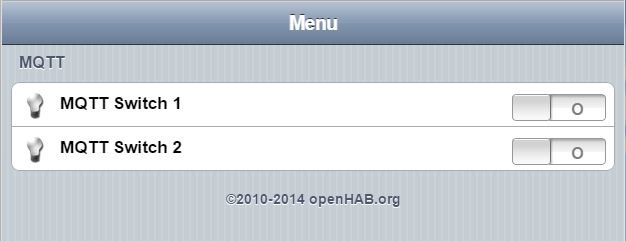
    openhab screen.JPG

    Now it looks like this.

    But i still have the problem that i cant see the position of my window switch.

    {mqtt=">[mysensor:/testsw/1:command:on:default],>[mysensor:/testsw/1:command:off:default]"}
    

    This line has to be modified i think. Plz tell me how it must be to show the status of my sensor-node.

    send: 20-20-0-0 s=3,c=1,t=16,pt=2,l=2,st=ok:0
    send: 20-20-0-0 s=3,c=1,t=16,pt=2,l=2,st=ok:1
    

    this is what the serial monitor from my sensor node prints.
    Can someone explain what this meesage mean?!

    OpenHAB openhab mqtt ex

  • Openhab MQTT Example
    M Marcus

    Okay, i found the mistake.

    test.sitemap schould look like this:

    sitemap Test label="Menu"
    {
    	
    Frame label="MQTT" 
    	{
    	Switch item=mqttsw1 label="MQTT Switch 1"    
    	Switch item=mqttsw2 label="MQTT Switch 2"
    	}
    	
    }
    

    Now i can go on with testing.

    OpenHAB openhab mqtt ex

  • Openhab MQTT Example
    M Marcus

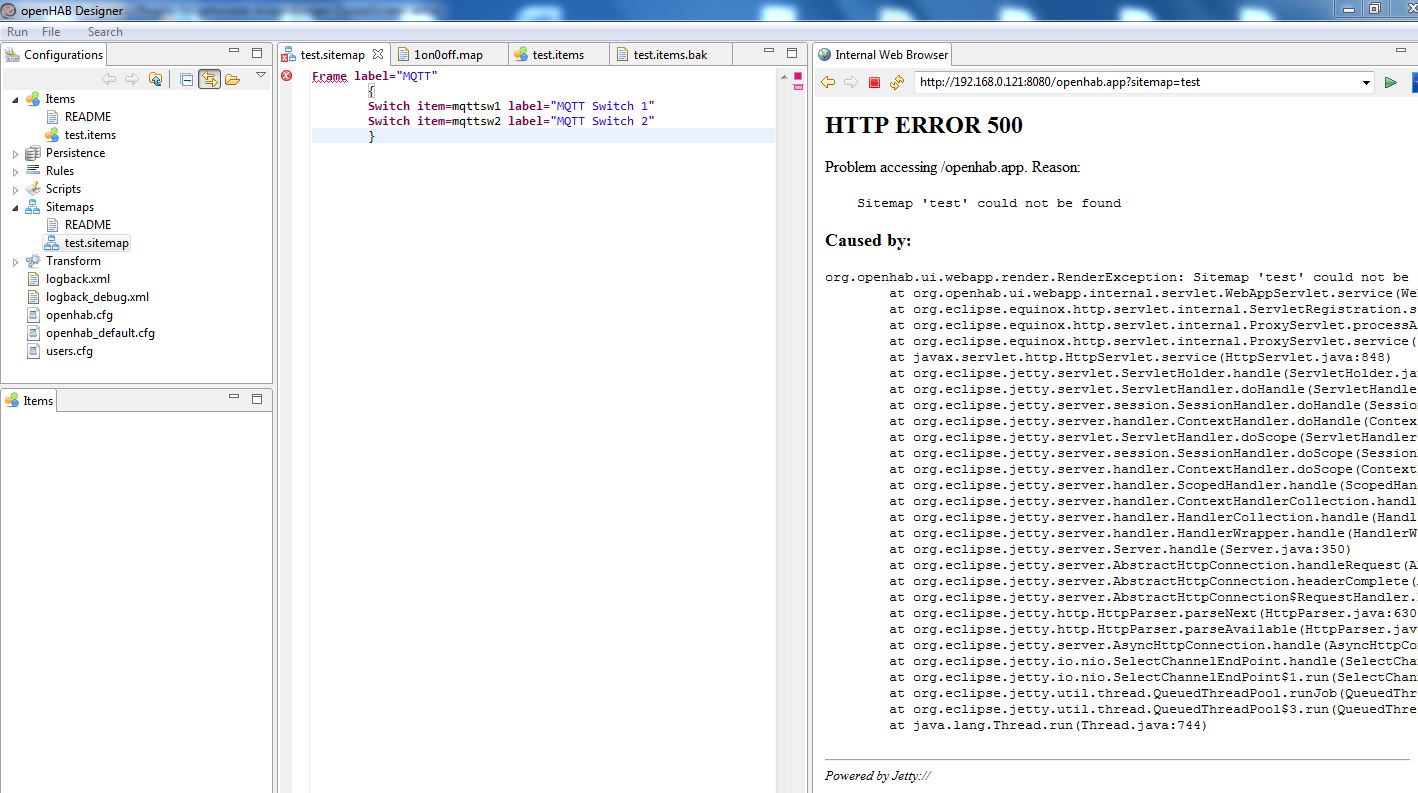
    openhab designer.JPG

    And here Screenshot from openhab designer.

    OpenHAB openhab mqtt ex
  • Login

  • Don't have an account? Register

  • Login or register to search.
  • First post
    Last post
0
  • MySensors
  • OpenHardware.io
  • Categories
  • Recent
  • Tags
  • Popular