
@martinhjelmare
This was indeed the problem. Thank you for your help.
S
sjofel
@sjofel
Posts
-
Multiple sensors home assistant -
Multiple sensors home assistantThank you. I'll try this tonight when i'll get home and report back if it works.
-
Multiple sensors home assistantI've programmed the sketch in C++ so i've made classes of the temperature, door and battery sensor. I shall post the cpp files only to keep this post short. Every class and the main includes the config.h were the defines are located. Thanks in advance.
Main:
#define SLEEP_TIME 300000

#include "Config.h"
#include <MySensors.h>

#include "Battery/Battery.h"
#include "Temperature/Temperature.h"
#include "Door/Door.h"

#include <SPI.h>

CBattery battery;
CTemperature temperature;
CDoor door;

void before()
{
	temperature.BeforeSetupTemperature();
}

void setup()
{
	temperature.SetupTemperature();
	door.SetupDoor();
}

void presentation()
{
  sendSketchInfo("FrontdoorSensor", "1.0");
  temperature.Present();
  door.Present();
}

void loop()
{
	temperature.sendTemperature();
	battery.sendBatteryStatus();
	door.SendDoorState();
	sleep(DOOR_PIN - 2, CHANGE, SLEEP_TIME);
}

void receive(const MyMessage &message) {
  if (message.isAck()) {
     Serial.println("This is an ack from gateway");
  }

  if (message.type == V_TEMP) {
    if (temperature.getInitialValueSend() == false) {
      Serial.println("Receiving initial value from controller");
      temperature.InitialValueIsSend();
    }
  }
}
Temperature class:
#include "Temperature.h"

CTemperature::CTemperature()
: temperature(0),
  lastTemperature(0),
  initialValueSend(false),
  oneWire(ONE_WIRE_BUS),
  sensors(&oneWire),
  temperatureMsg(CHILD_TEMP, V_TEMP)
{

}

CTemperature::~CTemperature() {
	// TODO Auto-generated destructor stub
}

void CTemperature::BeforeSetupTemperature()
{
	  sensors.begin();
}

void CTemperature::SetupTemperature()
{
	sensors.setWaitForConversion(false);
}

void CTemperature::Present()
{
	present(CHILD_TEMP, S_TEMP);
}

void CTemperature::getTemperature(float &temp)
{
  sensors.requestTemperatures();

  // query conversion time and sleep until conversion completed
  int16_t conversionTime = sensors.millisToWaitForConversion(sensors.getResolution());
  // sleep() call can be replaced by wait() call if node need to process incoming messages (or if node is repeater)
  wait(conversionTime);

  // Read temperatures and send them to controller
  // Fetch and round temperature to one decimal
  temp = sensors.getTempCByIndex(0);
}

void CTemperature::sendTemperature()
{
	getTemperature(temperature);

	SendInitialValue(temperature);

	if (temperature != -127.00 && temperature != 85.00)
	{
	 if(temperature != lastTemperature)
	 {
		#ifdef MY_DEBUG
		 Serial.print("Temperature: ");
		 Serial.print(temperature);
		 Serial.println(" C");
		#endif
	   // Send in the new temperature
	   send(temperatureMsg.setSensor(1).set(temperature,1));
	   // Save new temperatures for next compare
	   lastTemperature = temperature;
	 }
  }
}

void CTemperature::SendInitialValue(float &rTemperature)
{
if (!initialValueSend)
	{
#ifdef MY_DEBUG
		Serial.println("Sending initial value");
#endif
		send(temperatureMsg.set(static_cast<int>(rTemperature)));
#ifdef MY_DEBUG
		Serial.println("Requesting initial value from controller");
#endif
		request(CHILD_TEMP, V_TEMP);
		wait(2000, C_SET, V_TEMP); //misschien niet nodig???
	  }
}

void CTemperature::InitialValueIsSend()
{
	initialValueSend = true;
}
Door class:
#include "Door.h"

CDoor::CDoor()
: oldValue(-1),
  doorMessage(CHILD_DOOR, V_TRIPPED)
{
	// TODO Auto-generated constructor stub

}

CDoor::~CDoor() {
	// TODO Auto-generated destructor stub
}

void CDoor::SetupDoor()
{
	  // Setup the button
	  pinMode(DOOR_PIN,INPUT);
	  // Activate internal pull-up
	  digitalWrite(DOOR_PIN,HIGH);

	  // After setting up the button, setup debouncer
}

void CDoor::Present()
{
	present(CHILD_DOOR, S_DOOR);
}

void CDoor::SendDoorState()
{
	  delay(100);
	  // Get the update value
	  int value = digitalRead(DOOR_PIN);
#ifdef MY_DEBUG
	  Serial.print("Doorstate: ");
	  Serial.println(value);
#endif

	  if (value != oldValue) {
	     // Send in the new value
		 Serial.println("Sending door state!");
	     send(doorMessage.set(value==HIGH ? 1 : 0));
	     oldValue = value;
	  }
}
Config.h
#ifndef CONFIG_H_
#define CONFIG_H_

//Default defines
#define MY_DEBUG
#define MY_RADIO_NRF24
#define MY_NODE_ID 1

//Child id's
#define CHILD_DOOR 1
#define CHILD_TEMP 2

//Pin defines
#define BATT_PIN A0
#define TEMP_PIN 2
#define DOOR_PIN 3


#endif /* CONFIG_H_ */
Battery class:
#include "Battery.h" CBattery::CBattery() : oldBatteryLvl(0), batteryLvl(0) { // TODO Auto-generated constructor stub } CBattery::~CBattery() { // TODO Auto-generated destructor stub } void CBattery::BatterySetup() { pinMode(BATT_PIN, INPUT); } void CBattery::getBatteryStatus(int &level) { int batterylvl = analogRead(BATT_PIN); #ifdef MY_DEBUG Serial.println(batterylvl); #endif // 1M, 470K divider across battery and using internal ADC ref of 1.1V // Sense point is bypassed with 0.1 uF cap to reduce noise at that point // ((1e6+470e3)/470e3)*1.1 = Vmax = 3.44 Volts // 3.44/1023 = Volts per bit = 0.003363075 level = batterylvl / 10; #ifdef MY_DEBUG float batteryV = batterylvl * 0.003363075; Serial.print("Battery Voltage: "); Serial.print(batteryV); Serial.println(" V"); Serial.print("Battery percent: "); Serial.print(batterylvl); Serial.println(" %"); #endif } void CBattery::sendBatteryStatus() { getBatteryStatus(batteryLvl); if (oldBatteryLvl != batteryLvl) { // Power up radio after sleep sendBatteryLevel(batteryLvl); oldBatteryLvl = batteryLvl; } } -
Multiple sensors home assistantI've verified that. In my sketch i've one node id and two child id's. One for the door and the other for the temperature sensor. The battery status is send using the interal message of mysensors.
-
Multiple sensors home assistantThanks for your response. I did that. I've disconnected my node and then deleted my persistence file (when i don't disconnect my node the persistence file comes back after deletion?). Next, i've rebooted my pi and reconnected my node. When this is done i'll get the output shown in my post above.
-
Multiple sensors home assistantHello everyone,
I've succesfully created a node which will send it's battery status, temperature and doorstate (reedswitch) to home-assistant. However, in the home-assistant dashboard both the child 1.1 (Door) and child 1.2 (Temperature) show temperature see pictures below:
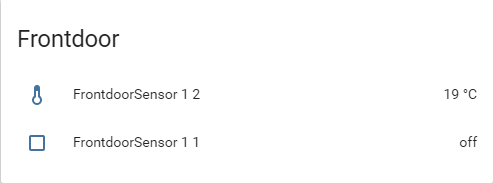
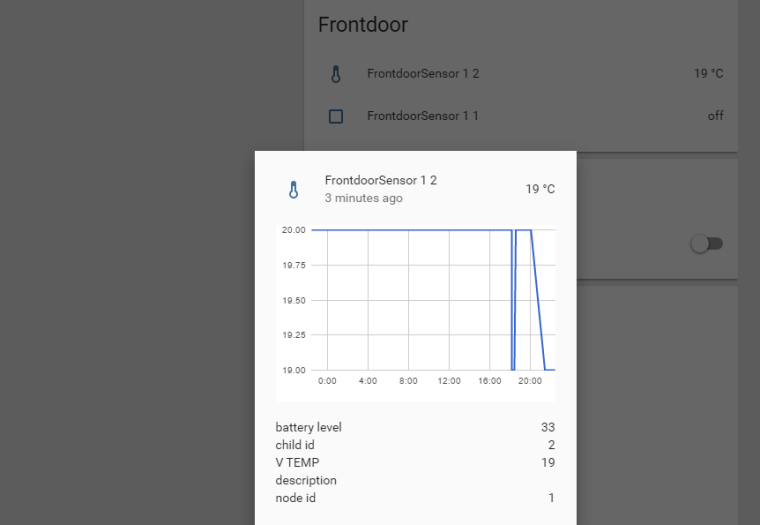
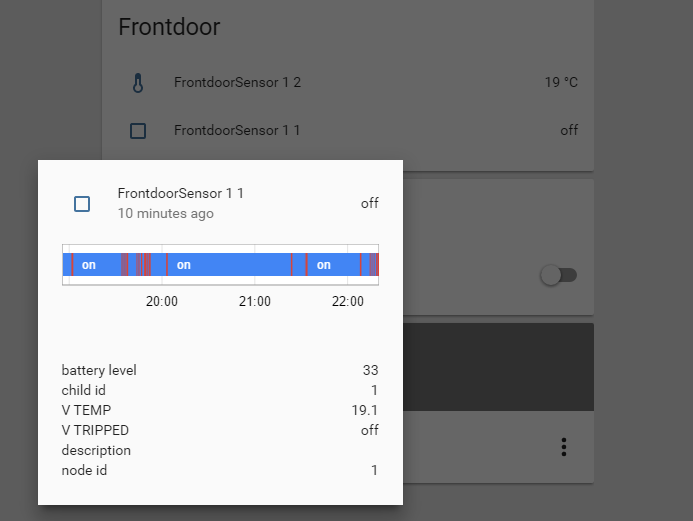
My question is it possible to show only the relevant data per child sensor, so sensor 1.1 only show doorstate and battery and sensor 1.2 shows only temperature and battery?
Thanks in advance.