Skip to content
  • MySensors
  • OpenHardware.io
  • Categories
  • Recent
  • Tags
  • Popular
Skins
  • Light
  • Brite
  • Cerulean
  • Cosmo
  • Flatly
  • Journal
  • Litera
  • Lumen
  • Lux
  • Materia
  • Minty
  • Morph
  • Pulse
  • Sandstone
  • Simplex
  • Sketchy
  • Spacelab
  • United
  • Yeti
  • Zephyr
  • Dark
  • Cyborg
  • Darkly
  • Quartz
  • Slate
  • Solar
  • Superhero
  • Vapor

  • Default (No Skin)
  • No Skin
Collapse
Brand Logo
  1. Home
  2. Troubleshooting
  3. Serial gateway with several sensors connected to it

Serial gateway with several sensors connected to it

Scheduled Pinned Locked Moved Troubleshooting
26 Posts 5 Posters 9.7k Views 5 Watching
  • Oldest to Newest
  • Newest to Oldest
  • Most Votes
Reply
  • Reply as topic
Log in to reply
This topic has been deleted. Only users with topic management privileges can see it.
  • S skatun

    @AWI
    So I copied ower evrything in the library folder of the development branch. When i then try to compile the serial gateway i get this error:

    Arduino: 1.6.7 (Windows 7), Board: "NodeMCU 1.0 (ESP-12E Module), 80 MHz, Serial, 115200, 4M (3M SPIFFS)"
    
    In file included from C:\Program Files (x86)\Arduino\libraries\MySensors\examples\SerialGateway\SerialGateway.ino:50:0:
    
    C:\Program Files (x86)\Arduino\libraries\MySensors/MySensor.h:285:4: error: #error No forward link or gateway feature activated. This means nowhere to send messages! Pretty pointless.
    
       #error No forward link or gateway feature activated. This means nowhere to send messages! Pretty pointless.
    
        ^
    
    In file included from C:\Program Files (x86)\Arduino\libraries\MySensors\examples\SerialGateway\SerialGateway.ino:52:0:
    
    
    C:\Program Files (x86)\Arduino\libraries\PinChangeInt/PinChangeInt.h:103:19: fatal error: new.h: No such file or directory
    
       #include <new.h>
    
                       ^
    
    compilation terminated.
    
    exit status 1
    Error compiling.
    
      This report would have more information with
      "Show verbose output during compilation"
      enabled in File > Preferences.
    
    A Offline
    A Offline
    AWI
    Hero Member
    wrote on last edited by
    #14

    @skatun It's hard to tell (for me ;-)) from the messages what is going wrong. Which Arduino are you programming for? Are you using the "GatewaySerial.ino" sketch from the development branch examples?

    S 1 Reply Last reply
    0
    • A AWI

      @skatun It's hard to tell (for me ;-)) from the messages what is going wrong. Which Arduino are you programming for? Are you using the "GatewaySerial.ino" sketch from the development branch examples?

      S Offline
      S Offline
      skatun
      wrote on last edited by
      #15

      @AWI
      I just copied all the files in libraries and hardware in the development zip into c:\program files\Arduino\

      I am trying to get it to run on arduino due and yes I was trying the run the Serial gateway in Library\My Sensor\SerialGateway

      S 1 Reply Last reply
      0
      • S skatun

        @AWI
        I just copied all the files in libraries and hardware in the development zip into c:\program files\Arduino\

        I am trying to get it to run on arduino due and yes I was trying the run the Serial gateway in Library\My Sensor\SerialGateway

        S Offline
        S Offline
        skatun
        wrote on last edited by
        #16

        @AWI How do I Install the development branch correctly? Does it only work with nano 328?

        1 Reply Last reply
        0
        • S Offline
          S Offline
          sundberg84
          Hardware Contributor
          wrote on last edited by sundberg84
          #17

          Hi @skatun did you check this http://www.mysensors.org/about/arduino#installing-the-sensor-libraries ? You install it the same way but download it from https://github.com/mysensors/Arduino (press Download ZIP) and make sure its Branch: Development.

          Controller: Proxmox VM - Home Assistant
          MySensors GW: Arduino Uno - W5100 Ethernet, Gw Shield Nrf24l01+ 2,4Ghz
          MySensors GW: Arduino Uno - Gw Shield RFM69, 433mhz
          RFLink GW - Arduino Mega + RFLink Shield, 433mhz

          S 1 Reply Last reply
          0
          • S sundberg84

            Hi @skatun did you check this http://www.mysensors.org/about/arduino#installing-the-sensor-libraries ? You install it the same way but download it from https://github.com/mysensors/Arduino (press Download ZIP) and make sure its Branch: Development.

            S Offline
            S Offline
            skatun
            wrote on last edited by
            #18

            @sundberg84

            Well I tried to save it both here:
            C:\Program Files (x86)\Arduino\libraries\Mysensor
            C:\Program Files (x86)\Arduino\hardware\MySensors

            As well as here as described in your link:
            C:\Users\kim\Documents\Arduino

            But I get compile errors no matter where I try to compile serialgateway on due which I found in the C:\Program Files (x86)\Arduino\libraries\MySensors\examples\SerialGateway

            Cheers

            1 Reply Last reply
            0
            • S Offline
              S Offline
              sundberg84
              Hardware Contributor
              wrote on last edited by
              #19

              @skatun having the files in multiple folders isnt a good idea.
              Maybe you should remove the IDE and all folders and start over?

              Controller: Proxmox VM - Home Assistant
              MySensors GW: Arduino Uno - W5100 Ethernet, Gw Shield Nrf24l01+ 2,4Ghz
              MySensors GW: Arduino Uno - Gw Shield RFM69, 433mhz
              RFLink GW - Arduino Mega + RFLink Shield, 433mhz

              S 1 Reply Last reply
              0
              • S sundberg84

                @skatun having the files in multiple folders isnt a good idea.
                Maybe you should remove the IDE and all folders and start over?

                S Offline
                S Offline
                skatun
                wrote on last edited by
                #20

                @sundberg84
                So the IDE by default get installed C:\Program Files (x86)\Arduino but the files folder get default set to this:

                C:\Users\kim\Documents\Arduino

                I guess arduino made it that way so that you can load examples from C:\Program Files (x86)\Arduino then mess around with them and save them here C:\Users\kim\Documents\Arduino

                So I never had duplicate files, i tried both locations without sucsess. So which version of the IDE should I use? 1.6.7 is what I have now.

                1 Reply Last reply
                0
                • S Offline
                  S Offline
                  sundberg84
                  Hardware Contributor
                  wrote on last edited by
                  #21

                  @skatun Dont know if there are any version conflicts at the moment.
                  I dont have the latest version.

                  Controller: Proxmox VM - Home Assistant
                  MySensors GW: Arduino Uno - W5100 Ethernet, Gw Shield Nrf24l01+ 2,4Ghz
                  MySensors GW: Arduino Uno - Gw Shield RFM69, 433mhz
                  RFLink GW - Arduino Mega + RFLink Shield, 433mhz

                  S 1 Reply Last reply
                  0
                  • S sundberg84

                    @skatun Dont know if there are any version conflicts at the moment.
                    I dont have the latest version.

                    S Offline
                    S Offline
                    skatun
                    wrote on last edited by
                    #22

                    @sundberg84
                    So which directory should i put the files in? BOth hardware and library?

                    1 Reply Last reply
                    0
                    • S Offline
                      S Offline
                      sundberg84
                      Hardware Contributor
                      wrote on last edited by
                      #23

                      I install the ide. download and extract mys to same path as ide. That's it.

                      Controller: Proxmox VM - Home Assistant
                      MySensors GW: Arduino Uno - W5100 Ethernet, Gw Shield Nrf24l01+ 2,4Ghz
                      MySensors GW: Arduino Uno - Gw Shield RFM69, 433mhz
                      RFLink GW - Arduino Mega + RFLink Shield, 433mhz

                      S 1 Reply Last reply
                      0
                      • S sundberg84

                        I install the ide. download and extract mys to same path as ide. That's it.

                        S Offline
                        S Offline
                        skatun
                        wrote on last edited by
                        #24

                        @sundberg84

                        I will then delete C:\Users\kim\Documents\Arduino which the ide creates.. Will upgrtade today, and let you know how it goes

                        barduinoB 1 Reply Last reply
                        0
                        • S skatun

                          @sundberg84

                          I will then delete C:\Users\kim\Documents\Arduino which the ide creates.. Will upgrtade today, and let you know how it goes

                          barduinoB Offline
                          barduinoB Offline
                          barduino
                          wrote on last edited by
                          #25

                          @skatun

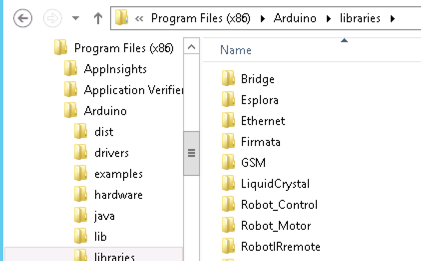
                          Default libraries included in the IDE

                          0_1459942591088_upload-a9ff62dc-42ba-4ef2-9f12-16091cd52ad0

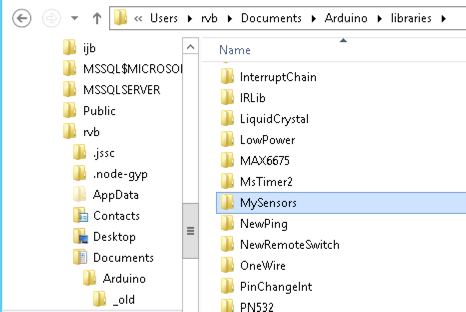
                          User libraries

                          0_1459942680955_upload-c18bf0b4-2121-46ae-8fe3-d2441be6dedd

                          Its not uncommon to have compile issues when:

                          • The IDE is not restarted after uncompressing/copy file to the libraries

                          • When upgrading MySensors without deleting the old version first

                          I have Arduino IDE 1.6.4

                          Cheers

                          S 1 Reply Last reply
                          1
                          • barduinoB barduino

                            @skatun

                            Default libraries included in the IDE

                            0_1459942591088_upload-a9ff62dc-42ba-4ef2-9f12-16091cd52ad0

                            User libraries

                            0_1459942680955_upload-c18bf0b4-2121-46ae-8fe3-d2441be6dedd

                            Its not uncommon to have compile issues when:

                            • The IDE is not restarted after uncompressing/copy file to the libraries

                            • When upgrading MySensors without deleting the old version first

                            I have Arduino IDE 1.6.4

                            Cheers

                            S Offline
                            S Offline
                            skatun
                            wrote on last edited by
                            #26

                            @barduino
                            Upgrading to Arduino 1.6.8 did the trick.
                            Thanks.

                            1 Reply Last reply
                            0

                            Hello! It looks like you're interested in this conversation, but you don't have an account yet.

                            Getting fed up of having to scroll through the same posts each visit? When you register for an account, you'll always come back to exactly where you were before, and choose to be notified of new replies (either via email, or push notification). You'll also be able to save bookmarks and upvote posts to show your appreciation to other community members.

                            With your input, this post could be even better 💗

                            Register Login
                            Reply
                            • Reply as topic
                            Log in to reply
                            • Oldest to Newest
                            • Newest to Oldest
                            • Most Votes


                            11

                            Online

                            12.0k

                            Users

                            11.2k

                            Topics

                            113.4k

                            Posts


                            Copyright 2025 TBD   |   Forum Guidelines   |   Privacy Policy   |   Terms of Service
                            • Login

                            • Don't have an account? Register

                            • Login or register to search.
                            • First post
                              Last post
                            0
                            • MySensors
                            • OpenHardware.io
                            • Categories
                            • Recent
                            • Tags
                            • Popular