Skip to content
  • MySensors
  • OpenHardware.io
  • Categories
  • Recent
  • Tags
  • Popular
Skins
  • Light
  • Brite
  • Cerulean
  • Cosmo
  • Flatly
  • Journal
  • Litera
  • Lumen
  • Lux
  • Materia
  • Minty
  • Morph
  • Pulse
  • Sandstone
  • Simplex
  • Sketchy
  • Spacelab
  • United
  • Yeti
  • Zephyr
  • Dark
  • Cyborg
  • Darkly
  • Quartz
  • Slate
  • Solar
  • Superhero
  • Vapor

  • Default (No Skin)
  • No Skin
Collapse
Brand Logo
  1. Home
  2. Hardware
  3. Battery powered sensor last 1 week

Battery powered sensor last 1 week

Scheduled Pinned Locked Moved Hardware
29 Posts 7 Posters 8.0k Views 6 Watching
  • Oldest to Newest
  • Newest to Oldest
  • Most Votes
Reply
  • Reply as topic
Log in to reply
This topic has been deleted. Only users with topic management privileges can see it.
  • Martin TellblomM Martin Tellblom

    @sundberg84 Hmm What you are saying is that I need to buy a new and better Multimeter :) This is the reason I was waiting for ..... :9

    sundberg84S Offline
    sundberg84S Offline
    sundberg84
    Hardware Contributor
    wrote on last edited by
    #18

    @Martin-Tellblom - I hope you dont give up! Battery operations was the hardest part for me to figure out...

    Controller: Proxmox VM - Home Assistant
    MySensors GW: Arduino Uno - W5100 Ethernet, Gw Shield Nrf24l01+ 2,4Ghz
    MySensors GW: Arduino Uno - Gw Shield RFM69, 433mhz
    RFLink GW - Arduino Mega + RFLink Shield, 433mhz

    1 Reply Last reply
    0
    • Martin TellblomM Offline
      Martin TellblomM Offline
      Martin Tellblom
      wrote on last edited by
      #19

      I only have two kind of sensors that I need to be battery operated and that's the plants warning that they are out of water and soon gonna die and the dogs water bowl warning that they soon gonna die (KIDDING). The dogs bowl I like to measure the levels and have that to compare with the temperature, just for fun.
      I hope I get this working aswell, It wont be pretty with a cable around the few plants we got

      MySensors MQTT Client Gateway, Openhab, Dashing, Razberry, 1-wire

      1 Reply Last reply
      0
      • N Offline
        N Offline
        Nicklas Starkel
        wrote on last edited by
        #20

        @Martin-Tellblom , I'm in this mess as well. Just ordered a new Multimeter off aliexpress :)

        @sundberg84 , have you tried other batteries? I bough some ultrafire 3.7V 8800mAh and will try these.
        They were cheap so no loss if they do not work out..

        sundberg84S 1 Reply Last reply
        0
        • Martin TellblomM Martin Tellblom

          @sundberg84 said:

          to HIGH to power the sensor and then LOW before you sleep the node.

          If you have a multimeter

          Alright so if I connect the Vcc sron the sensor to D2 (since I use D3 for measurement) and set that HIGH before I measure, should I have a sleep for it to power up aswell?

          Something Like this?

            digitalWrite(SOIL_POWER_PIN , HIGH);  
            delayMicroseconds(25);
          
            moisture = analogRead(SOIL_SENSE_PIN);
            
            delayMicroseconds(25);
            digitalWrite(SOIL_POWER_PIN , LOW);  
          
          Nca78N Offline
          Nca78N Offline
          Nca78
          Hardware Contributor
          wrote on last edited by
          #21

          @Martin-Tellblom said:

          Alright so if I connect the Vcc sron the sensor to D2

          Hello, you should use another digital pin than D2 as it is used by MySensors library and on the EastPCB it is connected to the INT pin of the NRF24. I had problems using D2 pin before because of this reason. Use D4,5,6,7 or 8 and you will be sure to have no problem.

          sundberg84S 1 Reply Last reply
          0
          • N Nicklas Starkel

            @Martin-Tellblom , I'm in this mess as well. Just ordered a new Multimeter off aliexpress :)

            @sundberg84 , have you tried other batteries? I bough some ultrafire 3.7V 8800mAh and will try these.
            They were cheap so no loss if they do not work out..

            sundberg84S Offline
            sundberg84S Offline
            sundberg84
            Hardware Contributor
            wrote on last edited by
            #22

            @Nicklas-Starkel - Nope I have not, but @AWI has experienced with some other batteries and i know he recommends some sort to be able to avoid the booster.

            Controller: Proxmox VM - Home Assistant
            MySensors GW: Arduino Uno - W5100 Ethernet, Gw Shield Nrf24l01+ 2,4Ghz
            MySensors GW: Arduino Uno - Gw Shield RFM69, 433mhz
            RFLink GW - Arduino Mega + RFLink Shield, 433mhz

            1 Reply Last reply
            0
            • Martin TellblomM Offline
              Martin TellblomM Offline
              Martin Tellblom
              wrote on last edited by
              #23

              Alright, my sensor has used 5% battery in 124,5 hrs that means that 100% is almost 104 days. Don't know how low the battery works but let say 20% at that is 83 days.

              I will start another test with D4 and see how that goes .....

              MySensors MQTT Client Gateway, Openhab, Dashing, Razberry, 1-wire

              1 Reply Last reply
              0
              • Nca78N Nca78

                @Martin-Tellblom said:

                Alright so if I connect the Vcc sron the sensor to D2

                Hello, you should use another digital pin than D2 as it is used by MySensors library and on the EastPCB it is connected to the INT pin of the NRF24. I had problems using D2 pin before because of this reason. Use D4,5,6,7 or 8 and you will be sure to have no problem.

                sundberg84S Offline
                sundberg84S Offline
                sundberg84
                Hardware Contributor
                wrote on last edited by
                #24

                @Nca78 - good! And i have this fixed with a jumper in the upcoming rev 9 of EasyPCB as well so it will be possible to use D2.

                Controller: Proxmox VM - Home Assistant
                MySensors GW: Arduino Uno - W5100 Ethernet, Gw Shield Nrf24l01+ 2,4Ghz
                MySensors GW: Arduino Uno - Gw Shield RFM69, 433mhz
                RFLink GW - Arduino Mega + RFLink Shield, 433mhz

                1 Reply Last reply
                0
                • N Offline
                  N Offline
                  Nicklas Starkel
                  wrote on last edited by
                  #25

                  @Martin-Tellblom , how is your project going!
                  Did you manage to get longer lasting nodes?

                  I have one reed magnetic switch. It seems this only draws 7-10ua in sleep mode and upwards 17ma when sending.
                  However, it still drains my batteries very quick which I find odd.
                  It wakes up once every hour to send and that should not be much..
                  Could be that my rechargable battery is bad so I'll try to replace it with 2AA instead of one 3,7v.

                  Martin TellblomM 1 Reply Last reply
                  0
                  • N Nicklas Starkel

                    @Martin-Tellblom , how is your project going!
                    Did you manage to get longer lasting nodes?

                    I have one reed magnetic switch. It seems this only draws 7-10ua in sleep mode and upwards 17ma when sending.
                    However, it still drains my batteries very quick which I find odd.
                    It wakes up once every hour to send and that should not be much..
                    Could be that my rechargable battery is bad so I'll try to replace it with 2AA instead of one 3,7v.

                    Martin TellblomM Offline
                    Martin TellblomM Offline
                    Martin Tellblom
                    wrote on last edited by
                    #26

                    @Nicklas-Starkel
                    I did not with the Soil Moisture sensor. I choose the easy way to use the Xiaomi Mi plant sensor that I check with BlueTooth instead.

                    But I did succeed with a DHT22 sensor that now have been running 32 days and sending every hour with battery level of 98% now so that one is a success.

                    MySensors MQTT Client Gateway, Openhab, Dashing, Razberry, 1-wire

                    1 Reply Last reply
                    0
                    • bjacobseB Offline
                      bjacobseB Offline
                      bjacobse
                      wrote on last edited by
                      #27

                      The DHT22 sensor will also quickly use all your battery power
                      Replace your NRF24L01+ module, I have had a few that consume too much power, and drain the battery...

                      sundberg84S 1 Reply Last reply
                      1
                      • bjacobseB bjacobse

                        The DHT22 sensor will also quickly use all your battery power
                        Replace your NRF24L01+ module, I have had a few that consume too much power, and drain the battery...

                        sundberg84S Offline
                        sundberg84S Offline
                        sundberg84
                        Hardware Contributor
                        wrote on last edited by
                        #28

                        @bjacobse @Martin-Tellblom I have DHT22 sensor lasting 1.5year, no worries but there are better options! (Both battery and for how good the can measure).

                        Controller: Proxmox VM - Home Assistant
                        MySensors GW: Arduino Uno - W5100 Ethernet, Gw Shield Nrf24l01+ 2,4Ghz
                        MySensors GW: Arduino Uno - Gw Shield RFM69, 433mhz
                        RFLink GW - Arduino Mega + RFLink Shield, 433mhz

                        bjacobseB 1 Reply Last reply
                        0
                        • sundberg84S sundberg84

                          @bjacobse @Martin-Tellblom I have DHT22 sensor lasting 1.5year, no worries but there are better options! (Both battery and for how good the can measure).

                          bjacobseB Offline
                          bjacobseB Offline
                          bjacobse
                          wrote on last edited by bjacobse
                          #29

                          @sundberg84
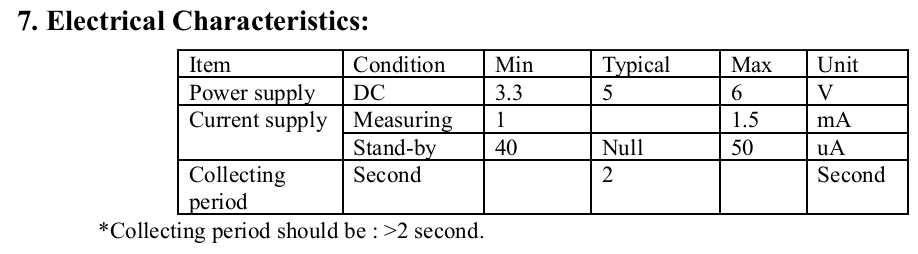
                          Can I assume that you are using power to DHT22 via a FET or directly from Arduino pin, so you are controlling when the DHT22 is getting power/voltage?
                          I personally think using a DHT22 that requires min 3.3 V is not a good option for battery device - but I understand it can be managed ;-)

                          http://www.datasheetcafe.com/dht22-datasheet-pdf/
                          DHT22:
                          0_1478973630852_DHT22.png

                          My opinion is is use HTU21D instead since it can operate on a much lower battery voltage. Watch out, some breakout boards have a 3,3V voltage regulator, that is just using battery consumption and isn't needed when using Arduino 3.3V 1Mhz battery operated
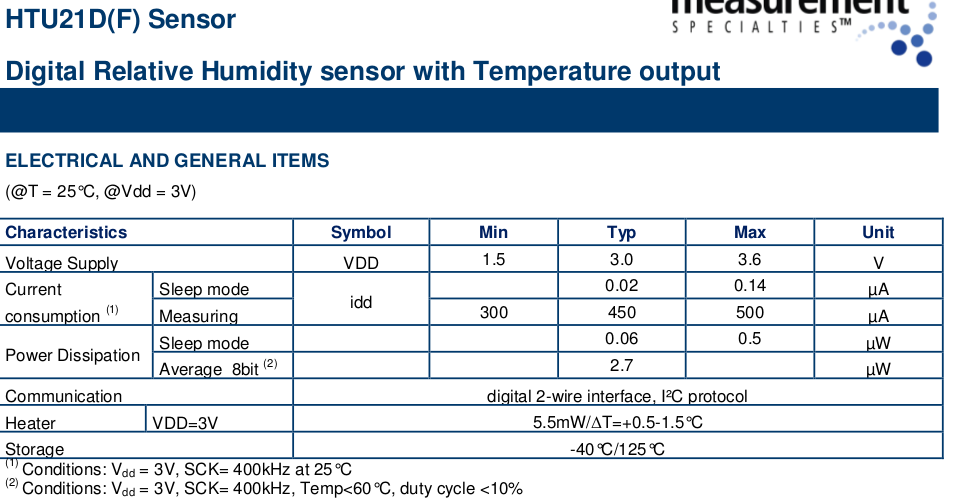

                          0_1478974581628_HTU21D.png

                          1 Reply Last reply
                          2
                          Reply
                          • Reply as topic
                          Log in to reply
                          • Oldest to Newest
                          • Newest to Oldest
                          • Most Votes


                          13

                          Online

                          11.7k

                          Users

                          11.2k

                          Topics

                          113.1k

                          Posts


                          Copyright 2025 TBD   |   Forum Guidelines   |   Privacy Policy   |   Terms of Service
                          • Login

                          • Don't have an account? Register

                          • Login or register to search.
                          • First post
                            Last post
                          0
                          • MySensors
                          • OpenHardware.io
                          • Categories
                          • Recent
                          • Tags
                          • Popular