
DHT22 on Arduino Pro Mini 8Mhz 3.3V - Failed
-
@mfalkvidd pro mini is powered through a 3.3 V power supply. There is no voltage leak ground terminals on the power supply. It measures 0 volt. Let me try everything again and I will post the results. I must also share that I used another DHT library and DHT22 test sketch on the same setup, and I was able to read data on serial interface.
I am not ruling out what you said about power issues, but just wanted to put this on the table.
I will continue to debug. Its frustrating at times, but good fun. ! -
Hi,
I changed the powersupply and tried again. Also, I checked for any loose connections.Starting sensor (RNNNA-, 2.0.0) TSM:INIT TSM:RADIO:OK TSP:ASSIGNID:OK (ID=1) TSM:FPAR TSP:MSG:SEND 1-1-255-255 s=255,c=3,t=7,pt=0,l=0,sg=0,ft=0,st=bc: TSM:FPAR TSP:MSG:SEND 1-1-255-255 s=255,c=3,t=7,pt=0,l=0,sg=0,ft=0,st=bc: TSP:MSG:READ 0-0-1 s=255,c=3,t=8,pt=1,l=1,sg=0:0 TSP:MSG:FPAR RES (ID=0, dist=0) TSP:MSG:PAR OK (ID=0, dist=1) TSM:FPAR:OK TSM:ID TSM:CHKID:OK (ID=1) TSM:UPL TSP:PING:SEND (dest=0) TSP:MSG:SEND 1-1-0-0 s=255,c=3,t=24,pt=1,l=1,sg=0,ft=0,st=ok:1 TSP:MSG:READ 0-0-1 s=255,c=3,t=25,pt=1,l=1,sg=0:1 TSP:MSG:PONG RECV (hops=1) TSP:CHKUPL:OK TSM:UPL:OK TSM:READY TSP:MSG:SEND 1-1-0-0 s=255,c=3,t=15,pt=6,l=2,sg=0,ft=0,st=ok:0100 !TSP:MSG:SEND 1-1-0-0 s=255,c=0,t=17,pt=0,l=5,sg=0,ft=0,st=fail:2.0.0 TSP:MSG:SEND 1-1-0-0 s=255,c=3,t=6,pt=1,l=1,sg=0,ft=1,st=ok:0 !TSP:MSG:SEND 1-1-0-0 s=255,c=3,t=11,pt=0,l=22,sg=0,ft=0,st=fail:TemperatureAndHumidity TSP:MSG:SEND 1-1-0-0 s=255,c=3,t=12,pt=0,l=3,sg=0,ft=1,st=ok:1.1 TSP:MSG:SEND 1-1-0-0 s=0,c=0,t=7,pt=0,l=0,sg=0,ft=0,st=ok: !TSP:MSG:SEND 1-1-0-0 s=1,c=0,t=6,pt=0,l=0,sg=0,ft=0,st=fail: Request registration... TSP:MSG:SEND 1-1-0-0 s=255,c=3,t=26,pt=1,l=1,sg=0,ft=1,st=ok:2 TSP:MSG:READ 0-0-1 s=255,c=3,t=27,pt=1,l=1,sg=0:1 Node registration=1 Init complete, id=1, parent=0, distance=1, registration=1 Failed reading temperature from DHT! Failed reading humidity from DHT Failed reading temperature from DHT! Failed reading humidity from DHTI am still stuck. Should I try another arduino and radio and sensor?
-
I tried again with a new arduino pro mini - no luck. Then I replicated the node on an Arduino Uno and same result "Failed to read". There must be something I must be doing wrong which I can't see.
-
Strange.
I just looked through the sketch and it looks fine to me.
The st=fail during presentation is worrisome.
What is the distance between the node and the gateway? Does moving the sensor further away (>2m) or closer help?
If you can, trying another radio and sensor might be the easiest way to pinpoint the problem.
-
Strange.
I just looked through the sketch and it looks fine to me.
The st=fail during presentation is worrisome.
What is the distance between the node and the gateway? Does moving the sensor further away (>2m) or closer help?
If you can, trying another radio and sensor might be the easiest way to pinpoint the problem.
@mfalkvidd Thanks for vetting the sketch.
For troubleshooting I brought the gateway and the node to the close to me (read centimeters between them).
Also, on the node on which I first discovered the error, serial print occurs at baud 230400 and on other nodes (arduinos running same sketch ) serial print occurs at baud 115200. I understand that the serial debug print should occur at 115200. Is it unexpected or odd that one arduino prints at 230400 while others are printing at 115200?I will moving the nodes closer and away and report.
I bought 10 pro minis all 3.3v. So, for now, I think I should start something very simple. How about door close sensors? They should be pretty simple, right? If even these don't work, then either the hardware is bad or I am. Anyway, thanks a lot for your time. This is a great forum and resource and I hope I am able to foray into this amazing world of IoT.
-
@mfalkvidd Thanks for vetting the sketch.
For troubleshooting I brought the gateway and the node to the close to me (read centimeters between them).
Also, on the node on which I first discovered the error, serial print occurs at baud 230400 and on other nodes (arduinos running same sketch ) serial print occurs at baud 115200. I understand that the serial debug print should occur at 115200. Is it unexpected or odd that one arduino prints at 230400 while others are printing at 115200?I will moving the nodes closer and away and report.
I bought 10 pro minis all 3.3v. So, for now, I think I should start something very simple. How about door close sensors? They should be pretty simple, right? If even these don't work, then either the hardware is bad or I am. Anyway, thanks a lot for your time. This is a great forum and resource and I hope I am able to foray into this amazing world of IoT.
-
@Puneit-Thukral if the baud rate is wrong, the Arduino runs at a different speed than was is selected in the Arduino IDE. Maybe you got a 5V 16Mhz instead of 3.3V 8Mhz? That could explain why the node doesn't get enough power.
@mfalkvidd And the way to test that would be to input 9 v at RAW and measure the VCC, right? While I added 3.3 v to my ebay cart, the boards have 8Mhz 16 Mhz 3.3V 5V printed on them. This is what you get in India over ebay and Amazon. I trust that the seller picked and packed them correctly. I will (tomorrow) test the VCC after inputting 9 V at RAW and see if that changes anything.
-
@mfalkvidd And the way to test that would be to input 9 v at RAW and measure the VCC, right? While I added 3.3 v to my ebay cart, the boards have 8Mhz 16 Mhz 3.3V 5V printed on them. This is what you get in India over ebay and Amazon. I trust that the seller picked and packed them correctly. I will (tomorrow) test the VCC after inputting 9 V at RAW and see if that changes anything.
-
@Puneit-Thukral good plan. That's probably the easiest way to test. It might also be possible to read the text on the regulator, but reading the small text is usually pretty hard.
@mfalkvidd
The diagnosis solved the issue. The Arduino pro mini 3.3V 8 MHz sold to me was actually a 5v 16 MHz. No more Failed reading temperature from DHT!. However, there are still a few st:fail during initialisation but later goes away.
Should I work towards eliminating these or would it be fine. The Openhab2 still is not reading from this node and shows NaN (even though the sensor is online).Thanks for your continued help.
TSM:FPAR TSP:MSG:SEND 1-1-255-255 s=255,c=3,t=7,pt=0,l=0,sg=0,ft=0,st=bc: TSM:FPAR TSP:MSG:SEND 1-1-255-255 s=255,c=3,t=7,pt=0,l=0,sg=0,ft=0,st=bc: TSP:MSG:READ 0-0-1 s=255,c=3,t=8,pt=1,l=1,sg=0:0 TSP:MSG:FPAR RES (ID=0, dist=0) TSP:MSG:PAR OK (ID=0, dist=1) TSM:FPAR:OK TSM:ID TSM:CHKID:OK (ID=1) TSM:UPL TSP:PING:SEND (dest=0) TSP:MSG:SEND 1-1-0-0 s=255,c=3,t=24,pt=1,l=1,sg=0,ft=0,st=ok:1 TSP:MSG:READ 0-0-1 s=255,c=3,t=25,pt=1,l=1,sg=0:1 TSP:MSG:PONG RECV (hops=1) TSP:CHKUPL:OK TSM:UPL:OK TSM:READY TSP:MSG:SEND 1-1-0-0 s=255,c=3,t=15,pt=6,l=2,sg=0,ft=0,st=ok:0100 !TSP:MSG:SEND 1-1-0-0 s=255,c=0,t=17,pt=0,l=5,sg=0,ft=0,st=fail:2.0.0 !TSP:MSG:SEND 1-1-0-0 s=255,c=3,t=6,pt=1,l=1,sg=0,ft=1,st=fail:0 !TSP:MSG:SEND 1-1-0-0 s=255,c=3,t=11,pt=0,l=22,sg=0,ft=2,st=fail:TemperatureAndHumidity TSP:MSG:SEND 1-1-0-0 s=255,c=3,t=12,pt=0,l=3,sg=0,ft=3,st=ok:1.1 TSP:MSG:SEND 1-1-0-0 s=0,c=0,t=7,pt=0,l=0,sg=0,ft=0,st=ok: TSP:MSG:SEND 1-1-0-0 s=1,c=0,t=6,pt=0,l=0,sg=0,ft=0,st=ok: Request registration... TSP:MSG:SEND 1-1-0-0 s=255,c=3,t=26,pt=1,l=1,sg=0,ft=0,st=ok:2 TSP:MSG:READ 0-0-1 s=255,c=3,t=27,pt=1,l=1,sg=0:1 Node registration=1 Init complete, id=1, parent=0, distance=1, registration=1 TSP:MSG:SEND 1-1-0-0 s=1,c=1,t=0,pt=7,l=5,sg=0,ft=0,st=ok:24.6 T: 24.60 TSP:MSG:SEND 1-1-0-0 s=0,c=1,t=1,pt=7,l=5,sg=0,ft=0,st=ok:41.9 H: 41.90 TSP:MSG:SEND 1-1-0-0 s=0,c=1,t=1,pt=7,l=5,sg=0,ft=0,st=ok:42.0 H: 42.00 -
@mfalkvidd
The diagnosis solved the issue. The Arduino pro mini 3.3V 8 MHz sold to me was actually a 5v 16 MHz. No more Failed reading temperature from DHT!. However, there are still a few st:fail during initialisation but later goes away.
Should I work towards eliminating these or would it be fine. The Openhab2 still is not reading from this node and shows NaN (even though the sensor is online).Thanks for your continued help.
TSM:FPAR TSP:MSG:SEND 1-1-255-255 s=255,c=3,t=7,pt=0,l=0,sg=0,ft=0,st=bc: TSM:FPAR TSP:MSG:SEND 1-1-255-255 s=255,c=3,t=7,pt=0,l=0,sg=0,ft=0,st=bc: TSP:MSG:READ 0-0-1 s=255,c=3,t=8,pt=1,l=1,sg=0:0 TSP:MSG:FPAR RES (ID=0, dist=0) TSP:MSG:PAR OK (ID=0, dist=1) TSM:FPAR:OK TSM:ID TSM:CHKID:OK (ID=1) TSM:UPL TSP:PING:SEND (dest=0) TSP:MSG:SEND 1-1-0-0 s=255,c=3,t=24,pt=1,l=1,sg=0,ft=0,st=ok:1 TSP:MSG:READ 0-0-1 s=255,c=3,t=25,pt=1,l=1,sg=0:1 TSP:MSG:PONG RECV (hops=1) TSP:CHKUPL:OK TSM:UPL:OK TSM:READY TSP:MSG:SEND 1-1-0-0 s=255,c=3,t=15,pt=6,l=2,sg=0,ft=0,st=ok:0100 !TSP:MSG:SEND 1-1-0-0 s=255,c=0,t=17,pt=0,l=5,sg=0,ft=0,st=fail:2.0.0 !TSP:MSG:SEND 1-1-0-0 s=255,c=3,t=6,pt=1,l=1,sg=0,ft=1,st=fail:0 !TSP:MSG:SEND 1-1-0-0 s=255,c=3,t=11,pt=0,l=22,sg=0,ft=2,st=fail:TemperatureAndHumidity TSP:MSG:SEND 1-1-0-0 s=255,c=3,t=12,pt=0,l=3,sg=0,ft=3,st=ok:1.1 TSP:MSG:SEND 1-1-0-0 s=0,c=0,t=7,pt=0,l=0,sg=0,ft=0,st=ok: TSP:MSG:SEND 1-1-0-0 s=1,c=0,t=6,pt=0,l=0,sg=0,ft=0,st=ok: Request registration... TSP:MSG:SEND 1-1-0-0 s=255,c=3,t=26,pt=1,l=1,sg=0,ft=0,st=ok:2 TSP:MSG:READ 0-0-1 s=255,c=3,t=27,pt=1,l=1,sg=0:1 Node registration=1 Init complete, id=1, parent=0, distance=1, registration=1 TSP:MSG:SEND 1-1-0-0 s=1,c=1,t=0,pt=7,l=5,sg=0,ft=0,st=ok:24.6 T: 24.60 TSP:MSG:SEND 1-1-0-0 s=0,c=1,t=1,pt=7,l=5,sg=0,ft=0,st=ok:41.9 H: 41.90 TSP:MSG:SEND 1-1-0-0 s=0,c=1,t=1,pt=7,l=5,sg=0,ft=0,st=ok:42.0 H: 42.00 -
@Puneit-Thukral Great work!
The failed presentation could be preventing OpenHab2 from displaying the node correctly.
Have you switched to a "real" 3.3V pro mini now or are you using the 5V? If 5V, do you use a regulator to 3.3V for the nrf?
@mfalkvidd Yes, I connected the 3.3v regulator to VCC of the radio. I will continue to debug tonight. Maybe now something is amiss at the gateway side. The gateway radio is connected via dupont cables on the Uno and I am not very happy with dupont. I should solder the radio to Uno.
-
Hi,
I believe I have been able to eliminate all the errors between node and gateway.Here is the outputStarting sensor (RNNNA-, 2.0.0) TSM:INIT TSM:RADIO:OK TSP:ASSIGNID:OK (ID=2) TSM:FPAR TSP:MSG:SEND 2-2-255-255 s=255,c=3,t=7,pt=0,l=0,sg=0,ft=0,st=bc: TSP:MSG:READ 0-0-2 s=255,c=3,t=8,pt=1,l=1,sg=0:0 TSP:MSG:FPAR RES (ID=0, dist=0) TSP:MSG:PAR OK (ID=0, dist=1) TSM:FPAR:OK TSM:ID TSM:CHKID:OK (ID=2) TSM:UPL TSP:PING:SEND (dest=0) TSP:MSG:SEND 2-2-0-0 s=255,c=3,t=24,pt=1,l=1,sg=0,ft=0,st=ok:1 TSP:MSG:READ 0-0-2 s=255,c=3,t=25,pt=1,l=1,sg=0:1 TSP:MSG:PONG RECV (hops=1) TSP:CHKUPL:OK TSM:UPL:OK TSM:READY TSP:MSG:SEND 2-2-0-0 s=255,c=3,t=15,pt=6,l=2,sg=0,ft=0,st=ok:0100 TSP:MSG:SEND 2-2-0-0 s=255,c=0,t=17,pt=0,l=5,sg=0,ft=0,st=ok:2.0.0 TSP:MSG:SEND 2-2-0-0 s=255,c=3,t=6,pt=1,l=1,sg=0,ft=0,st=ok:0 TSP:MSG:READ 0-0-2 s=255,c=3,t=15,pt=6,l=2,sg=0:0100 TSP:MSG:SEND 2-2-0-0 s=255,c=3,t=11,pt=0,l=22,sg=0,ft=0,st=ok:TemperatureAndHumidity TSP:MSG:SEND 2-2-0-0 s=255,c=3,t=12,pt=0,l=3,sg=0,ft=0,st=ok:1.1 TSP:MSG:SEND 2-2-0-0 s=0,c=0,t=7,pt=0,l=0,sg=0,ft=0,st=ok: TSP:MSG:SEND 2-2-0-0 s=1,c=0,t=6,pt=0,l=0,sg=0,ft=0,st=ok: Request registration... TSP:MSG:SEND 2-2-0-0 s=255,c=3,t=26,pt=1,l=1,sg=0,ft=0,st=ok:2 TSP:MSG:READ 0-0-2 s=255,c=3,t=27,pt=1,l=1,sg=0:1 Node registration=1 Init complete, id=2, parent=0, distance=1, registration=1 TSP:MSG:SEND 2-2-0-0 s=1,c=1,t=0,pt=7,l=5,sg=0,ft=0,st=ok:22.5 T: 22.50 TSP:MSG:SEND 2-2-0-0 s=0,c=1,t=1,pt=7,l=5,sg=0,ft=0,st=ok:39.2 H: 39.20 TSP:MSG:SEND 2-2-0-0 s=0,c=1,t=1,pt=7,l=5,sg=0,ft=0,st=ok:38.7 H: 38.70 TSP:MSG:SEND 2-2-0-0 s=1,c=1,t=0,pt=7,l=5,sg=0,ft=0,st=ok:22.7 T: 22.70 TSP:MSG:SEND 2-2-0-0 s=0,c=1,t=1,pt=7,l=5,sg=0,ft=0,st=ok:36.6 H: 36.60While, the node is detected at Openhab2, it remains offline. What am I missing now?
This is what I changed now- Re-created (fresh solder) the node on a 8Mhz 3.3V arduino pro mini
- Changed the gateway from arduino Uno connected serial to raspberry pi gateway (mysensorsgateway). Now gateways connected as MySesnorsEthernet.
Please help!
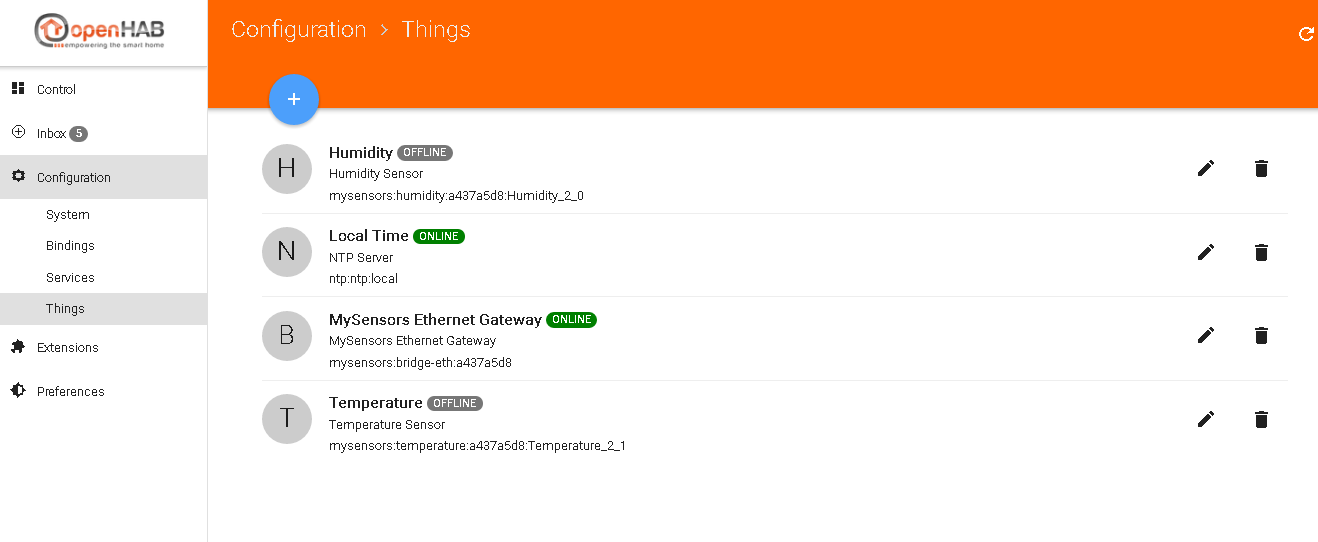
-
Hi,
I believe I have been able to eliminate all the errors between node and gateway.Here is the outputStarting sensor (RNNNA-, 2.0.0) TSM:INIT TSM:RADIO:OK TSP:ASSIGNID:OK (ID=2) TSM:FPAR TSP:MSG:SEND 2-2-255-255 s=255,c=3,t=7,pt=0,l=0,sg=0,ft=0,st=bc: TSP:MSG:READ 0-0-2 s=255,c=3,t=8,pt=1,l=1,sg=0:0 TSP:MSG:FPAR RES (ID=0, dist=0) TSP:MSG:PAR OK (ID=0, dist=1) TSM:FPAR:OK TSM:ID TSM:CHKID:OK (ID=2) TSM:UPL TSP:PING:SEND (dest=0) TSP:MSG:SEND 2-2-0-0 s=255,c=3,t=24,pt=1,l=1,sg=0,ft=0,st=ok:1 TSP:MSG:READ 0-0-2 s=255,c=3,t=25,pt=1,l=1,sg=0:1 TSP:MSG:PONG RECV (hops=1) TSP:CHKUPL:OK TSM:UPL:OK TSM:READY TSP:MSG:SEND 2-2-0-0 s=255,c=3,t=15,pt=6,l=2,sg=0,ft=0,st=ok:0100 TSP:MSG:SEND 2-2-0-0 s=255,c=0,t=17,pt=0,l=5,sg=0,ft=0,st=ok:2.0.0 TSP:MSG:SEND 2-2-0-0 s=255,c=3,t=6,pt=1,l=1,sg=0,ft=0,st=ok:0 TSP:MSG:READ 0-0-2 s=255,c=3,t=15,pt=6,l=2,sg=0:0100 TSP:MSG:SEND 2-2-0-0 s=255,c=3,t=11,pt=0,l=22,sg=0,ft=0,st=ok:TemperatureAndHumidity TSP:MSG:SEND 2-2-0-0 s=255,c=3,t=12,pt=0,l=3,sg=0,ft=0,st=ok:1.1 TSP:MSG:SEND 2-2-0-0 s=0,c=0,t=7,pt=0,l=0,sg=0,ft=0,st=ok: TSP:MSG:SEND 2-2-0-0 s=1,c=0,t=6,pt=0,l=0,sg=0,ft=0,st=ok: Request registration... TSP:MSG:SEND 2-2-0-0 s=255,c=3,t=26,pt=1,l=1,sg=0,ft=0,st=ok:2 TSP:MSG:READ 0-0-2 s=255,c=3,t=27,pt=1,l=1,sg=0:1 Node registration=1 Init complete, id=2, parent=0, distance=1, registration=1 TSP:MSG:SEND 2-2-0-0 s=1,c=1,t=0,pt=7,l=5,sg=0,ft=0,st=ok:22.5 T: 22.50 TSP:MSG:SEND 2-2-0-0 s=0,c=1,t=1,pt=7,l=5,sg=0,ft=0,st=ok:39.2 H: 39.20 TSP:MSG:SEND 2-2-0-0 s=0,c=1,t=1,pt=7,l=5,sg=0,ft=0,st=ok:38.7 H: 38.70 TSP:MSG:SEND 2-2-0-0 s=1,c=1,t=0,pt=7,l=5,sg=0,ft=0,st=ok:22.7 T: 22.70 TSP:MSG:SEND 2-2-0-0 s=0,c=1,t=1,pt=7,l=5,sg=0,ft=0,st=ok:36.6 H: 36.60While, the node is detected at Openhab2, it remains offline. What am I missing now?
This is what I changed now- Re-created (fresh solder) the node on a 8Mhz 3.3V arduino pro mini
- Changed the gateway from arduino Uno connected serial to raspberry pi gateway (mysensorsgateway). Now gateways connected as MySesnorsEthernet.
Please help!
@Puneit-Thukral Please do a restart of OH2 after discovery of a new thing, there is a bug that prevents the thing from coming online.
-
@Puneit-Thukral Please do a restart of OH2 after discovery of a new thing, there is a bug that prevents the thing from coming online.
@TimO Thanks, it's finally working! Time to add more nodes.


Hello! It looks like you're interested in this conversation, but you don't have an account yet.
Getting fed up of having to scroll through the same posts each visit? When you register for an account, you'll always come back to exactly where you were before, and choose to be notified of new replies (either via email, or push notification). You'll also be able to save bookmarks and upvote posts to show your appreciation to other community members.
With your input, this post could be even better 💗
Register Login