
💬 Building a Raspberry Pi Gateway
-
Can I just check that this is OK? .....
./configure --my-gateway=serial --my-serial-is-pty --my-serial-pty=/dev/ttyMySensorsGateway --my-transport=nrf24 --my-rf24-irq-pin=15 --my-leds-err-pin=12 --my-leds-rx-pin=16 --my-leds-tx-pin=18
Can you see any problems here, it seemed to work but I hope to test fully this week, maybe tomorrow.....
-
Can I just check that this is OK? .....
./configure --my-gateway=serial --my-serial-is-pty --my-serial-pty=/dev/ttyMySensorsGateway --my-transport=nrf24 --my-rf24-irq-pin=15 --my-leds-err-pin=12 --my-leds-rx-pin=16 --my-leds-tx-pin=18
Can you see any problems here, it seemed to work but I hope to test fully this week, maybe tomorrow.....
-
-
What makes you think that the cabling is wrong? - I checked and can't see any problem....can you be less cryptic please? :)
-
-
hi
yesterday i tried to build a rpi-gateway but i had trouble to access, after changeing the rights on the port to 777 and group to dialout i could access via
fhem. and i didn't use the symlink, i used the port directly /dev/pts/0@115200 andthen it works perfectly!thanks...
p.s.: i uses always sudo while make and the other installation commands.
greets mike
-
Get this error from the gateway installed on Raspberry Pi2 with RFM69 Radio.
From the IDE it works fine:
0;255;3;0;9;Starting gateway (RRNGA-, 2.0.0)
0;255;3;0;9;TSM:INIT
0;255;3;0;9;TSM:RADIO:OK
0;255;3;0;9;TSM:GW MODE
0;255;3;0;9;TSM:READY
0;255;3;0;14;Gateway startup complete.
0;255;0;0;18;2.0.0
0;255;3;0;9;No registration required
0;255;3;0;9;Init complete, id=0, parent=0, distance=0, registration=1
0;255;3;0;9;TSP:MSG:READ 255-255-255 s=255,c=3,t=7,pt=0,l=0,sg=0:
0;255;3;0;9;TSP:MSG:BC
0;255;3;0;9;TSP:MSG:FPAR REQ (sender=255)
0;255;3;0;9;TSP:CHKUPL:OK
0;255;3;0;9;TSP:MSG:GWL OK
0;255;3;0;9;TSP:MSG:SEND 0-0-255-255 s=255,c=3,t=8,pt=1,l=1,sg=0,ft=0,st=bc:0
0;255;3;0;9;TSP:MSG:READ 255-255-0 s=255,c=3,t=3,pt=0,l=0,sg=0:
255;255;3;0;3;
0;255;3;0;9;TSP:MSG:READ 255-255-0 s=255,c=3,t=3,pt=0,l=0,sg=0:
255;255;3;0;3;
0;255;3;0;9;TSP:MSG:READ 255-255-0 s=255,c=3,t=3,pt=0,l=0,sg=0:
255;255;3;0;3;
0;255;3;0;9;TSP:MSG:READ 255-255-0 s=255,c=3,t=3,pt=0,l=0,sg=0:
255;255;3;0;3;mysgw: Starting gateway...
mysgw: Protocol version - 2.1.0-beta
mysgw: MCO:BGN:INIT GW,CP=RNNG---,VER=2.1.0-beta
mysgw: TSF:LRT:OK
mysgw: TSM:INIT
mysgw: TSF:WUR:MS=0
mysgw: !TSM:INIT:TSP FAIL
mysgw: TSM:FAIL:CNT=1From the gateway on the Pi this is the error:
./bin/mysgw -d
mysgw: Starting gateway...
mysgw: Protocol version - 2.1.0-beta
mysgw: MCO:BGN:INIT GW,CP=RNNG---,VER=2.1.0-beta
mysgw: TSF:LRT:OK
mysgw: TSM:INIT
mysgw: TSF:WUR:MS=0
mysgw: !TSM:INIT:TSP FAIL
mysgw: TSM:FAIL:CNT=1
mysgw: TSM:FAIL:PDT
mysgw: TSM:FAIL:RE-INIT
mysgw: TSM:INIT
mysgw: !TSM:INIT:TSP FAIL
mysgw: TSM:FAIL:CNT=2
mysgw: TSM:FAIL:PDT
mysgw: TSM:FAIL:RE-INIT
mysgw: TSM:INIT
mysgw: !TSM:INIT:TSP FAIL
mysgw: TSM:FAIL:CNT=3
mysgw: TSM:FAIL:PDT
mysgw: TSM:FAIL:RE-INIT
mysgw: TSM:INIT
mysgw: !TSM:INIT:TSP FAIL
mysgw: TSM:FAIL:CNT=4
mysgw: TSM:FAIL:PDTAny ideas where I might start looking at?
Thanks,
Martin -
Get this error from the gateway installed on Raspberry Pi2 with RFM69 Radio.
From the IDE it works fine:
0;255;3;0;9;Starting gateway (RRNGA-, 2.0.0)
0;255;3;0;9;TSM:INIT
0;255;3;0;9;TSM:RADIO:OK
0;255;3;0;9;TSM:GW MODE
0;255;3;0;9;TSM:READY
0;255;3;0;14;Gateway startup complete.
0;255;0;0;18;2.0.0
0;255;3;0;9;No registration required
0;255;3;0;9;Init complete, id=0, parent=0, distance=0, registration=1
0;255;3;0;9;TSP:MSG:READ 255-255-255 s=255,c=3,t=7,pt=0,l=0,sg=0:
0;255;3;0;9;TSP:MSG:BC
0;255;3;0;9;TSP:MSG:FPAR REQ (sender=255)
0;255;3;0;9;TSP:CHKUPL:OK
0;255;3;0;9;TSP:MSG:GWL OK
0;255;3;0;9;TSP:MSG:SEND 0-0-255-255 s=255,c=3,t=8,pt=1,l=1,sg=0,ft=0,st=bc:0
0;255;3;0;9;TSP:MSG:READ 255-255-0 s=255,c=3,t=3,pt=0,l=0,sg=0:
255;255;3;0;3;
0;255;3;0;9;TSP:MSG:READ 255-255-0 s=255,c=3,t=3,pt=0,l=0,sg=0:
255;255;3;0;3;
0;255;3;0;9;TSP:MSG:READ 255-255-0 s=255,c=3,t=3,pt=0,l=0,sg=0:
255;255;3;0;3;
0;255;3;0;9;TSP:MSG:READ 255-255-0 s=255,c=3,t=3,pt=0,l=0,sg=0:
255;255;3;0;3;mysgw: Starting gateway...
mysgw: Protocol version - 2.1.0-beta
mysgw: MCO:BGN:INIT GW,CP=RNNG---,VER=2.1.0-beta
mysgw: TSF:LRT:OK
mysgw: TSM:INIT
mysgw: TSF:WUR:MS=0
mysgw: !TSM:INIT:TSP FAIL
mysgw: TSM:FAIL:CNT=1From the gateway on the Pi this is the error:
./bin/mysgw -d
mysgw: Starting gateway...
mysgw: Protocol version - 2.1.0-beta
mysgw: MCO:BGN:INIT GW,CP=RNNG---,VER=2.1.0-beta
mysgw: TSF:LRT:OK
mysgw: TSM:INIT
mysgw: TSF:WUR:MS=0
mysgw: !TSM:INIT:TSP FAIL
mysgw: TSM:FAIL:CNT=1
mysgw: TSM:FAIL:PDT
mysgw: TSM:FAIL:RE-INIT
mysgw: TSM:INIT
mysgw: !TSM:INIT:TSP FAIL
mysgw: TSM:FAIL:CNT=2
mysgw: TSM:FAIL:PDT
mysgw: TSM:FAIL:RE-INIT
mysgw: TSM:INIT
mysgw: !TSM:INIT:TSP FAIL
mysgw: TSM:FAIL:CNT=3
mysgw: TSM:FAIL:PDT
mysgw: TSM:FAIL:RE-INIT
mysgw: TSM:INIT
mysgw: !TSM:INIT:TSP FAIL
mysgw: TSM:FAIL:CNT=4
mysgw: TSM:FAIL:PDTAny ideas where I might start looking at?
Thanks,
Martin@martins RFM69 is not yet supported in RPi.
-
@martins RFM69 is not yet supported in RPi.
@marceloaqno
OK let me explain better. I've build an arduino serial gateway and connecting it on the uart of the pi. If I do tail -f /dev/ttyAMA0 I can see the messages comming in on the serial interface. However if I run ./bin/mysgw -d I get this error:mysgw: Starting gateway...
mysgw: Protocol version - 2.1.0-beta
mysgw: MCO:BGN:INIT GW,CP=RNNG---,VER=2.1.0-beta
mysgw: TSF:LRT:OK
mysgw: TSM:INIT
mysgw: TSF:WUR:MS=0
mysgw: !TSM:INIT:TSP FAIL
mysgw: TSM:FAIL:CNT=1
mysgw: TSM:FAIL:PDT
mysgw: TSM:FAIL:RE-INITThis is the configure I used to build it:
./configure --my-gateway=serial --my-serial-port=/dev/ttyAMA0 --my-serial-baudrate=38400So the RFM69 Radio in not directly on the PI but on the arduino and is used as the serial gateway.
Hope this clarify it more.
Regards,
Martin -
@marceloaqno
OK let me explain better. I've build an arduino serial gateway and connecting it on the uart of the pi. If I do tail -f /dev/ttyAMA0 I can see the messages comming in on the serial interface. However if I run ./bin/mysgw -d I get this error:mysgw: Starting gateway...
mysgw: Protocol version - 2.1.0-beta
mysgw: MCO:BGN:INIT GW,CP=RNNG---,VER=2.1.0-beta
mysgw: TSF:LRT:OK
mysgw: TSM:INIT
mysgw: TSF:WUR:MS=0
mysgw: !TSM:INIT:TSP FAIL
mysgw: TSM:FAIL:CNT=1
mysgw: TSM:FAIL:PDT
mysgw: TSM:FAIL:RE-INITThis is the configure I used to build it:
./configure --my-gateway=serial --my-serial-port=/dev/ttyAMA0 --my-serial-baudrate=38400So the RFM69 Radio in not directly on the PI but on the arduino and is used as the serial gateway.
Hope this clarify it more.
Regards,
Martin@marceloaqno
Issue solved. Domoticz read directly the serial inputs from the arduino that's connected on the PI. I was under the impression that you need a gateway (software) running on the PI to interface with Domoticz.Thanks,
Martin -
Hi there,
I'm trying to make a gateway on my pi and since the begining i'm stuck!
Using this: git clone https://github.com/mysensors/MySensors.git
i get: fatal: unable to access 'https://github.com/mysensors/MySensors.git/': Could not resolve host: github.com
I tried with sudo too! am i the only one getting this? -
Hi there,
I'm trying to make a gateway on my pi and since the begining i'm stuck!
Using this: git clone https://github.com/mysensors/MySensors.git
i get: fatal: unable to access 'https://github.com/mysensors/MySensors.git/': Could not resolve host: github.com
I tried with sudo too! am i the only one getting this?@ewgor "Could not resolve host" means dns is not working on your raspberry pi. Is the network working properly (can you access other web sites from the pi?) http://www.suntimebox.com/raspberry-pi-tutorial-course/week-3/day-5/ seems to have a guide if you need help configuring network settings.
-
@ewgor "Could not resolve host" means dns is not working on your raspberry pi. Is the network working properly (can you access other web sites from the pi?) http://www.suntimebox.com/raspberry-pi-tutorial-course/week-3/day-5/ seems to have a guide if you need help configuring network settings.
(sorry, I hit reply on mfalkvidd's post)
I have a strange problem:I tried to be smart (haha) and updated my Raspberry2 with
sudo apt-get update
sudo apt-get dist-upgrade
This took quite a while and looked successful to me.
Unfortunately the MySensors Gateway and/or controller setup is not working correctly anymore. For troubleshooting I disabled my controller (MyController running on the Pi and for sniffing also MYSController available on my Windows machine). I stopped the gateway service and manually ran the gateway with -d debug information and get this:
mysGateway: Starting gateway...
mysGateway: Protocol version - 2.0.1-beta
mysGateway: MCO:BGN:INIT GW,CP=RNNG--Q,VER=2.0.1-beta
mysGateway: TSF:LRT:OK
mysGateway: TSM:INIT
mysGateway: TSM:INIT:TSP OK
mysGateway: TSM:INIT:GW MODE
mysGateway: TSM:READY
mysGateway: Listening for connections on 0.0.0.0:5003
mysGateway: MCO:REG:NOT NEEDED
mysGateway: MCO:BGN:STP
mysGateway: MCO:BGN:INIT OK,ID=0,PAR=0,DIS=0,REG=1
mysGateway: TSF:MSG:READ,7-7-255,s=255,c=3,t=7,pt=0,l=0,sg=0:
mysGateway: TSF:MSG:BC
mysGateway: TSF:MSG:FPAR REQ,ID=7
mysGateway: TSF:PNG:SEND,TO=0
mysGateway: TSF:CKU:OK
mysGateway: TSF:MSG:GWL OK
mysGateway: TSF:MSG:SEND,0-0-7-7,s=255,c=3,t=8,pt=1,l=1,sg=0,ft=0,st=OK:0
mysGateway: TSF:MSG:READ,7-7-0,s=255,c=3,t=24,pt=1,l=1,sg=0:1
mysGateway: TSF:MSG:PINGED,ID=7,HP=1
mysGateway: TSF:MSG:SEND,0-0-7-7,s=255,c=3,t=25,pt=1,l=1,sg=0,ft=0,st=OK:1
mysGateway: TSF:MSG:READ,7-7-0,s=255,c=3,t=15,pt=6,l=2,sg=0:0100
mysGateway: TSF:MSG:SEND,0-0-7-7,s=255,c=3,t=15,pt=6,l=2,sg=0,ft=0,st=OK:0100
mysGateway: TSF:MSG:READ,7-7-0,s=255,c=0,t=17,pt=0,l=5,sg=0:2.0.0
mysGateway: TSF:MSG:READ,7-7-0,s=255,c=3,t=6,pt=1,l=1,sg=0:0
mysGateway: TSF:MSG:READ,7-7-0,s=255,c=3,t=11,pt=0,l=17,sg=0:Ernie Giess-O-Mat
mysGateway: TSF:MSG:READ,7-7-0,s=255,c=3,t=12,pt=0,l=4,sg=0:0.17
mysGateway: TSF:MSG:READ,7-7-0,s=2,c=0,t=6,pt=0,l=0,sg=0:
mysGateway: TSF:MSG:READ,7-7-0,s=0,c=0,t=7,pt=0,l=0,sg=0:
mysGateway: TSF:MSG:READ,7-7-0,s=3,c=0,t=30,pt=0,l=0,sg=0:
mysGateway: TSF:MSG:READ,7-7-0,s=4,c=0,t=21,pt=0,l=0,sg=0:
mysGateway: TSF:MSG:READ,7-7-0,s=255,c=3,t=26,pt=1,l=1,sg=0:2
mysGateway: TSF:MSG:SEND,0-0-7-7,s=255,c=3,t=27,pt=1,l=1,sg=0,ft=0,st=OK:1
mysGateway: TSF:MSG:READ,7-7-0,s=0,c=1,t=1,pt=7,l=5,sg=0:8219.0
mysGateway: TSF:MSG:READ,7-7-0,s=2,c=1,t=0,pt=7,l=5,sg=0:29.66
mysGateway: TSF:MSG:READ,7-7-0,s=3,c=1,t=38,pt=7,l=5,sg=0:9.0
mysGateway: TSF:MSG:READ,7-7-0,s=4,c=1,t=34,pt=1,l=1,sg=0:0
mysGateway: TSF:MSG:READ,17-17-255,s=255,c=3,t=7,pt=0,l=0,sg=0:
mysGateway: TSF:MSG:BC
mysGateway: TSF:MSG:FPAR REQ,ID=17
mysGateway: TSF:PNG:SEND,TO=0
mysGateway: TSF:CKU:OK
mysGateway: TSF:MSG:GWL OK
mysGateway: TSF:MSG:SEND,0-0-17-17,s=255,c=3,t=8,pt=1,l=1,sg=0,ft=0,st=OK:0
mysGateway: TSF:MSG:READ,17-17-0,s=255,c=3,t=24,pt=1,l=1,sg=0:1
mysGateway: TSF:MSG:PINGED,ID=17,HP=1
mysGateway: TSF:MSG:SEND,0-0-17-17,s=255,c=3,t=25,pt=1,l=1,sg=0,ft=0,st=OK:1
mysGateway: TSF:MSG:READ,7-7-0,s=0,c=1,t=1,pt=7,l=5,sg=0:10834.0
mysGateway: TSF:MSG:READ,7-7-0,s=2,c=1,t=0,pt=7,l=5,sg=0:3.96
mysGateway: TSF:MSG:READ,7-7-0,s=3,c=1,t=38,pt=7,l=5,sg=0:9.0
mysGateway: TSF:MSG:READ,7-7-0,s=4,c=1,t=34,pt=1,l=1,sg=0:0
mysGateway: TSF:MSG:READ,17-17-0,s=255,c=3,t=0,pt=1,l=1,sg=0:67
mysGateway: TSF:MSG:READ,17-17-0,s=1,c=1,t=0,pt=7,l=5,sg=0:18.8
mysGateway: TSM:READY:NWD REQ
mysGateway: TSF:MSG:SEND,0-0-255-255,s=255,c=3,t=20,pt=0,l=0,sg=0,ft=0,st=OK:
mysGateway: TSF:SRT:OK
Which looks okay to me (2 sensor nodes are sending data here). But after this NWD REQ...STR:OK block nothing more happens, only more of these 3 lines blocks repeat over and over with about 15 minutes or so inbetween.
"of course" I also re-compiled the gateway source with re-setting the configuration, which is
sudo ./configure --my-rf24-channel=124 --my-rf24-irq-pin=11  --my-debug=enable
sudo make install
any ideas what I can try to make it work again? :-(
In any case, happy weekend to everyone,
greetings from Germany! -
(sorry, I hit reply on mfalkvidd's post)
I have a strange problem:I tried to be smart (haha) and updated my Raspberry2 with
sudo apt-get update
sudo apt-get dist-upgrade
This took quite a while and looked successful to me.
Unfortunately the MySensors Gateway and/or controller setup is not working correctly anymore. For troubleshooting I disabled my controller (MyController running on the Pi and for sniffing also MYSController available on my Windows machine). I stopped the gateway service and manually ran the gateway with -d debug information and get this:
mysGateway: Starting gateway...
mysGateway: Protocol version - 2.0.1-beta
mysGateway: MCO:BGN:INIT GW,CP=RNNG--Q,VER=2.0.1-beta
mysGateway: TSF:LRT:OK
mysGateway: TSM:INIT
mysGateway: TSM:INIT:TSP OK
mysGateway: TSM:INIT:GW MODE
mysGateway: TSM:READY
mysGateway: Listening for connections on 0.0.0.0:5003
mysGateway: MCO:REG:NOT NEEDED
mysGateway: MCO:BGN:STP
mysGateway: MCO:BGN:INIT OK,ID=0,PAR=0,DIS=0,REG=1
mysGateway: TSF:MSG:READ,7-7-255,s=255,c=3,t=7,pt=0,l=0,sg=0:
mysGateway: TSF:MSG:BC
mysGateway: TSF:MSG:FPAR REQ,ID=7
mysGateway: TSF:PNG:SEND,TO=0
mysGateway: TSF:CKU:OK
mysGateway: TSF:MSG:GWL OK
mysGateway: TSF:MSG:SEND,0-0-7-7,s=255,c=3,t=8,pt=1,l=1,sg=0,ft=0,st=OK:0
mysGateway: TSF:MSG:READ,7-7-0,s=255,c=3,t=24,pt=1,l=1,sg=0:1
mysGateway: TSF:MSG:PINGED,ID=7,HP=1
mysGateway: TSF:MSG:SEND,0-0-7-7,s=255,c=3,t=25,pt=1,l=1,sg=0,ft=0,st=OK:1
mysGateway: TSF:MSG:READ,7-7-0,s=255,c=3,t=15,pt=6,l=2,sg=0:0100
mysGateway: TSF:MSG:SEND,0-0-7-7,s=255,c=3,t=15,pt=6,l=2,sg=0,ft=0,st=OK:0100
mysGateway: TSF:MSG:READ,7-7-0,s=255,c=0,t=17,pt=0,l=5,sg=0:2.0.0
mysGateway: TSF:MSG:READ,7-7-0,s=255,c=3,t=6,pt=1,l=1,sg=0:0
mysGateway: TSF:MSG:READ,7-7-0,s=255,c=3,t=11,pt=0,l=17,sg=0:Ernie Giess-O-Mat
mysGateway: TSF:MSG:READ,7-7-0,s=255,c=3,t=12,pt=0,l=4,sg=0:0.17
mysGateway: TSF:MSG:READ,7-7-0,s=2,c=0,t=6,pt=0,l=0,sg=0:
mysGateway: TSF:MSG:READ,7-7-0,s=0,c=0,t=7,pt=0,l=0,sg=0:
mysGateway: TSF:MSG:READ,7-7-0,s=3,c=0,t=30,pt=0,l=0,sg=0:
mysGateway: TSF:MSG:READ,7-7-0,s=4,c=0,t=21,pt=0,l=0,sg=0:
mysGateway: TSF:MSG:READ,7-7-0,s=255,c=3,t=26,pt=1,l=1,sg=0:2
mysGateway: TSF:MSG:SEND,0-0-7-7,s=255,c=3,t=27,pt=1,l=1,sg=0,ft=0,st=OK:1
mysGateway: TSF:MSG:READ,7-7-0,s=0,c=1,t=1,pt=7,l=5,sg=0:8219.0
mysGateway: TSF:MSG:READ,7-7-0,s=2,c=1,t=0,pt=7,l=5,sg=0:29.66
mysGateway: TSF:MSG:READ,7-7-0,s=3,c=1,t=38,pt=7,l=5,sg=0:9.0
mysGateway: TSF:MSG:READ,7-7-0,s=4,c=1,t=34,pt=1,l=1,sg=0:0
mysGateway: TSF:MSG:READ,17-17-255,s=255,c=3,t=7,pt=0,l=0,sg=0:
mysGateway: TSF:MSG:BC
mysGateway: TSF:MSG:FPAR REQ,ID=17
mysGateway: TSF:PNG:SEND,TO=0
mysGateway: TSF:CKU:OK
mysGateway: TSF:MSG:GWL OK
mysGateway: TSF:MSG:SEND,0-0-17-17,s=255,c=3,t=8,pt=1,l=1,sg=0,ft=0,st=OK:0
mysGateway: TSF:MSG:READ,17-17-0,s=255,c=3,t=24,pt=1,l=1,sg=0:1
mysGateway: TSF:MSG:PINGED,ID=17,HP=1
mysGateway: TSF:MSG:SEND,0-0-17-17,s=255,c=3,t=25,pt=1,l=1,sg=0,ft=0,st=OK:1
mysGateway: TSF:MSG:READ,7-7-0,s=0,c=1,t=1,pt=7,l=5,sg=0:10834.0
mysGateway: TSF:MSG:READ,7-7-0,s=2,c=1,t=0,pt=7,l=5,sg=0:3.96
mysGateway: TSF:MSG:READ,7-7-0,s=3,c=1,t=38,pt=7,l=5,sg=0:9.0
mysGateway: TSF:MSG:READ,7-7-0,s=4,c=1,t=34,pt=1,l=1,sg=0:0
mysGateway: TSF:MSG:READ,17-17-0,s=255,c=3,t=0,pt=1,l=1,sg=0:67
mysGateway: TSF:MSG:READ,17-17-0,s=1,c=1,t=0,pt=7,l=5,sg=0:18.8
mysGateway: TSM:READY:NWD REQ
mysGateway: TSF:MSG:SEND,0-0-255-255,s=255,c=3,t=20,pt=0,l=0,sg=0,ft=0,st=OK:
mysGateway: TSF:SRT:OK
Which looks okay to me (2 sensor nodes are sending data here). But after this NWD REQ...STR:OK block nothing more happens, only more of these 3 lines blocks repeat over and over with about 15 minutes or so inbetween.
"of course" I also re-compiled the gateway source with re-setting the configuration, which is
sudo ./configure --my-rf24-channel=124 --my-rf24-irq-pin=11  --my-debug=enable
sudo make install
any ideas what I can try to make it work again? :-(
In any case, happy weekend to everyone,
greetings from Germany!@Velo17 It might be related to the nrf24 irq pin. Could you try to build the gateway without the my-rf24-irq-pin option and check if the gateway still behaves this way?
-
@Velo17 It might be related to the nrf24 irq pin. Could you try to build the gateway without the my-rf24-irq-pin option and check if the gateway still behaves this way?
@marceloaqno Thanks for the hint! This actually solves the lock up. But shouldnt the interrupt offer a superior connectivity and thus be desireable? Until yesterday (before I did the RPi upgrading) this worked - or at least it appeared to work (I dont know if the interrupt was actually used)
-
@marceloaqno Thanks for the hint! This actually solves the lock up. But shouldnt the interrupt offer a superior connectivity and thus be desireable? Until yesterday (before I did the RPi upgrading) this worked - or at least it appeared to work (I dont know if the interrupt was actually used)
@Velo17 I had the same problem in the past but I thought it was because of my nrf24 module wasn't properly shielded or my cables was too long, causing some kind of interference to the irq pin.
I end up disabling the interrupt options until I replace my nrf24 module or rearrange the cables, which I haven't done yet.Could you give more details on what kind of nrf module you are using and how it is connected to rpi?
-
Hi everyone.
I´m trying to build a new homeController with the following parts / software.Raspberry Pi 3
Home Assistant
MySensors
Tellstick
Mosquitto MQTT BrokerI got everything working beside the MySensors. I´m trying to connect the NRF 24L01+ chip directly to the RPI with help from https://www.mysensors.org/build/raspberry.
I want to use MQTT between MySensors and HomeAssistant
The MQTT broker is working when i´m testing it.
The Mosquitto is configurated with username and Password in the config of Mosquitto.The config i´m using when Make Mysensors is the following:
./configure --my-gateway=mqtt --my-controller-ip-address=127.0.0.1 --my-mqtt-publish-topic-prefix=mysensors-out --my-mqtt-subscribe-topic-prefix=mysensors-in --my-mqtt-client-id=mygateway1 --my-transport=nrf24 --my-rf24-irq-pin=15I also changed in the file /examples_linux/mysgw.cpp
#define MY_MQTT_USER "My User"
#define MY_MQTT_PASSWORD "My Password"When i´m running the command: sudo systemctl status mysgw I got following result.
● mysgw.service - MySensors Gateway daemon
Loaded: loaded (/etc/systemd/system/mysgw.service; enabled)
Active: active (running) since tis 2016-12-27 18:52:34 CET; 25min ago
Main PID: 1405 (mysgw)
CGroup: /system.slice/mysgw.service
└─1405 /usr/local/bin/mysgwdec 27 19:18:10 HomeAssistant mysgw[1405]: failed to connect
dec 27 19:18:10 HomeAssistant mysgw[1405]: socket: Too many open files
dec 27 19:18:10 HomeAssistant mysgw[1405]: failed to connect
dec 27 19:18:10 HomeAssistant mysgw[1405]: socket: Too many open files
dec 27 19:18:10 HomeAssistant mysgw[1405]: failed to connect
dec 27 19:18:10 HomeAssistant mysgw[1405]: socket: Too many open files
dec 27 19:18:10 HomeAssistant mysgw[1405]: failed to connect
dec 27 19:18:10 HomeAssistant mysgw[1405]: socket: Too many open files
dec 27 19:18:10 HomeAssistant mysgw[1405]: failed to connect
dec 27 19:18:10 HomeAssistant mysgw[1405]: socket: Too many open filesWhen trying to run command sudo mysgw -d it shows following info in a endless loop:
mysgw: Attempting MQTT connection...
mysgw: connected to 127.0.0.1
mysgw: Attempting MQTT connection...
mysgw: connected to 127.0.0.1
mysgw: Attempting MQTT connection...
mysgw: connected to 127.0.0.1
mysgw: Attempting MQTT connection...
mysgw: connected to 127.0.0.1
mysgw: Attempting MQTT connection...
mysgw: connected to 127.0.0.1
mysgw: Attempting MQTT connection...
mysgw: connected to 127.0.0.1
mysgw: Attempting MQTT connection...
mysgw: connected to 127.0.0.1
mysgw: Attempting MQTT connection...
mysgw: connected to 127.0.0.1Please help figure this out.
//PeTi
-
Hello
The past two days I've been trying to setup the gateway on my RPi 2 with domoticz.
Here's what I did.
I installed domoticz onto my raspi, then I tried the install the gateway.git clone https://github.com/mysensors/MySensors.git cd MySensorsAfterwards I did the following
./configure --my-gateway=mqtt --my-controller-ip-address=127.0.0.1 --my-mqtt-publish-topic-prefix=mysensors-out --my-mqtt-subscribe-topic-prefix=mysensors-in --my-mqtt-client-id=mygateway1

make

sudo ./bin/mysgw -d
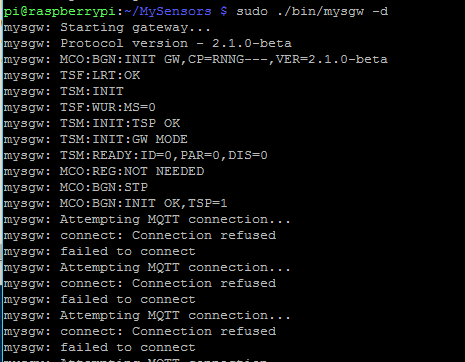
Then it seems to start normally onto the point where it refuses to connect to anything.
Does anyone have a clue what's going wrong?
I can't seem to figure it out. I've tried it several times over, and always go similar results.
I was using GertSanders's connector for the RPi Hub and I've tried it with normal wiring too.
As far as I can see it shouldn't be a wiring problem...EDIT:
!UPDATE!
I think I just fixed it. I reconfigured it to include the IRQ Pin and now it's just listening for throughputpi@raspberrypi:~/MySensors $ sudo ./bin/mysgw -d mysgw: Starting gateway... mysgw: Protocol version - 2.1.0-beta mysgw: MCO:BGN:INIT GW,CP=RNNG--Q,VER=2.1.0-beta mysgw: TSF:LRT:OK mysgw: TSM:INIT mysgw: TSF:WUR:MS=0 mysgw: TSM:INIT:TSP OK mysgw: TSM:INIT:GW MODE mysgw: TSM:READY:ID=0,PAR=0,DIS=0 mysgw: MCO:REG:NOT NEEDED mysgw: Listening for connections on 0.0.0.0:5003 mysgw: MCO:BGN:STP mysgw: MCO:BGN:INIT OK,TSP=1 -
I got the previous problem out of the way for now...
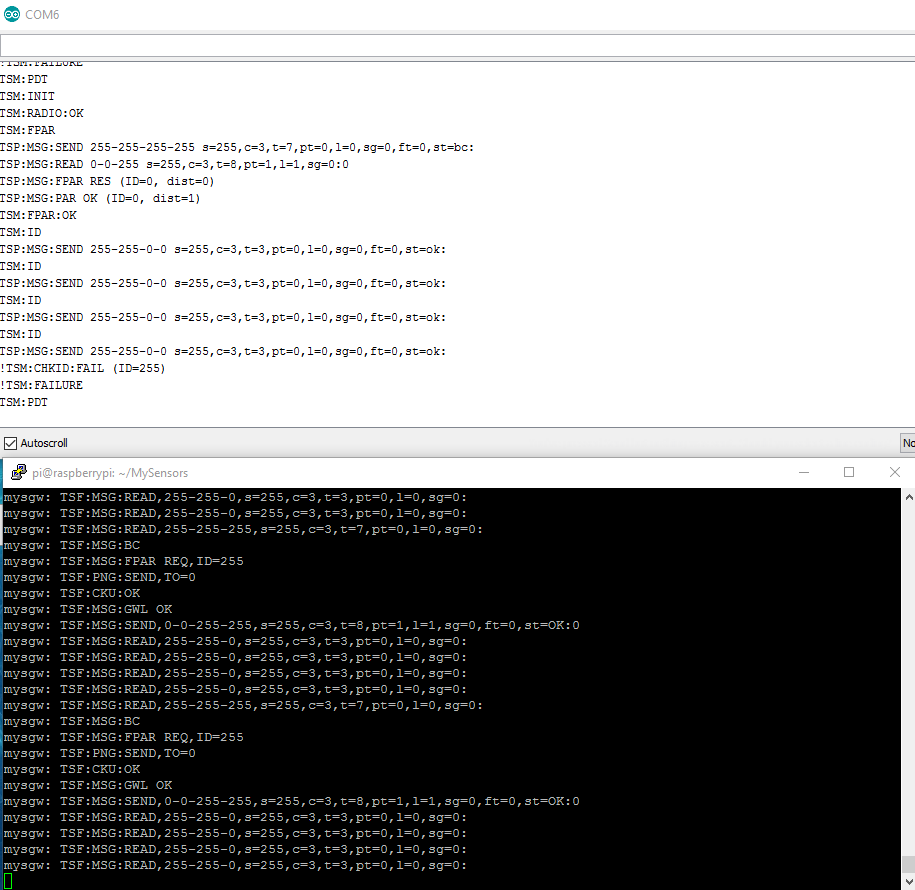
Now onto the next one.I started a node and now I can clearly see data being sent and received on my serial log and ssh. (See picture)
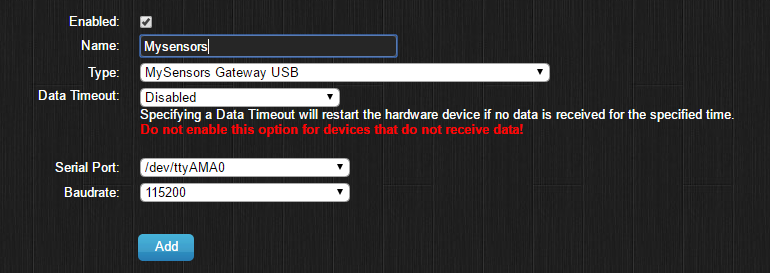
So I tried adding the gateway to domoticz using following settings:
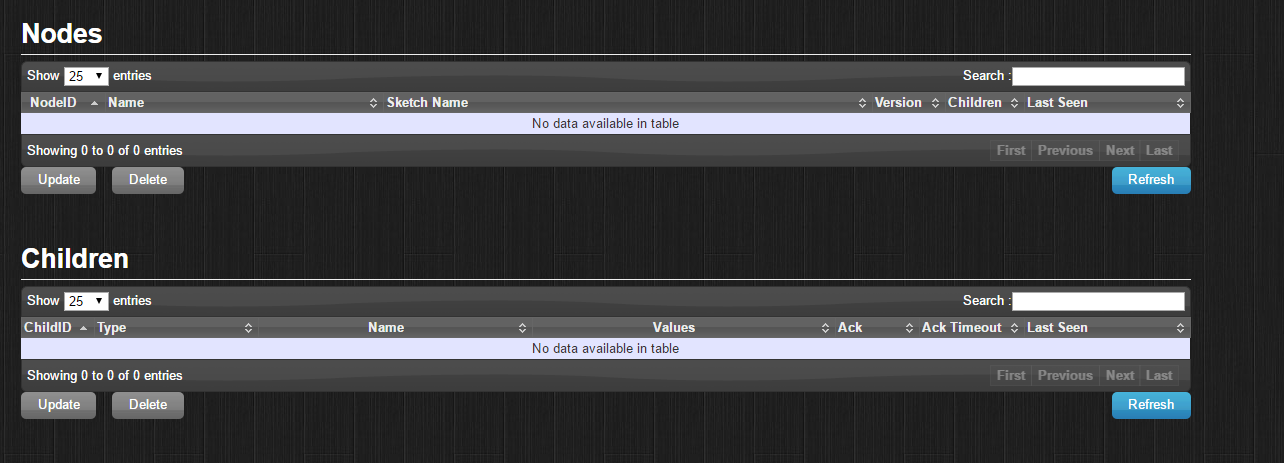
Yet if I check hardware setup I can see no nodes being presented.
Are there settings or steps I missed?
Greetings
Flor -
I got the previous problem out of the way for now...
Now onto the next one.I started a node and now I can clearly see data being sent and received on my serial log and ssh. (See picture)
So I tried adding the gateway to domoticz using following settings:
Yet if I check hardware setup I can see no nodes being presented.
Are there settings or steps I missed?
Greetings
Flor@Flor-Sanders I think you maybe should choose not USB but Ethernet gateway in domoticz.






Hello! It looks like you're interested in this conversation, but you don't have an account yet.
Getting fed up of having to scroll through the same posts each visit? When you register for an account, you'll always come back to exactly where you were before, and choose to be notified of new replies (either via email, or push notification). You'll also be able to save bookmarks and upvote posts to show your appreciation to other community members.
With your input, this post could be even better 💗
Register Login